




AI-powered Mars rover simulation using Hermes Agent (Nous Research) as the brain. The rover runs autonomous missions: give a high-level goal in natural language (CLI, Telegram, web dashboard, or Apple Watch) and Hermes plans and executes it using navigation, hazard detection, skill learning, and persistent memory.
| Layer | Technologies |
|---|---|
| AI | Hermes Agent (Nous Research), OpenRouter |
| Backend | Python 3.11+, FastAPI, Uvicorn, SQLite |
| Simulation | Gazebo Harmonic/Jetty, ROS 2 Humble/Jazzy |
| Frontend | Next.js 15, React 19, Tailwind CSS |
| Integrations | python-telegram-bot, Apple Shortcuts, WebSocket |
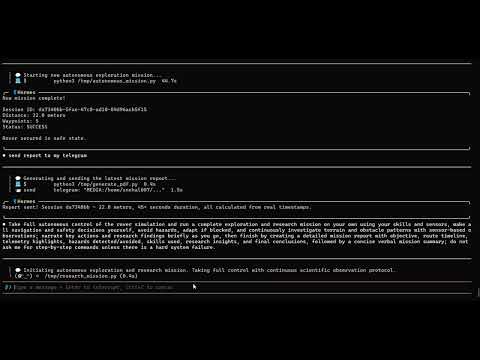
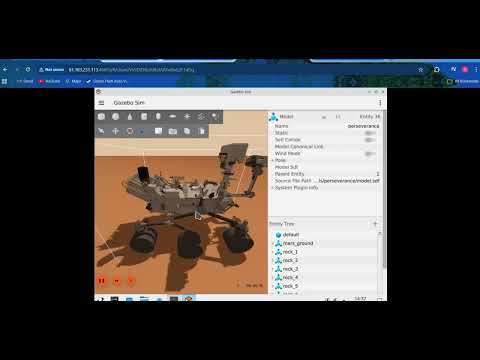
| Hermes CLI -- Autonomous Mission Complete | Web Dashboard -- Live Telemetry & Map |
|---|---|
 |
 |
Left: Hermes CLI completing a full autonomous return-to-base mission. Final position X=0.21m, Y=0.07m (0.22m from origin), heading 0.015 rad. 25.3min uptime, all systems nominal, zero hazards on return. Right: Next.js mission control dashboard with real-time WebSocket telemetry stream, 2D rover path trace on map, IMU sensor readings (roll/pitch/yaw), simulation status (connected), session timeline with distance and hazard counts, and natural language command input.
flowchart TB
  subgraph control["CONTROL LAYER"]
    telegram["Telegram Bot"]
    apple["Apple Watch / Siri"]
    dash["Web Dash\n(Next.js)"]
    cli["Hermes CLI"]
  end

  subgraph api["COMMAND API"]
    fastapi["FastAPI"]
  end

  subgraph ai["AI LAYER"]
    agent["HERMES AGENT\n(Nous Hermes)\n• Tool Calling\n• Memory\n• Skills"]
    skill["Skill DB\n(SKILL.md)"]
    mem["Memory\n(SQLite)"]
    sess["Session\nLogs (DB)"]
  end

  subgraph sim["SIMULATION LAYER"]
    bridge["SENSOR BRIDGE\n(port 8765)"]
    gazebo["GAZEBO SIM\n• Mars World\n• Perseverance\n• Sensors"]
  end

  telegram --> fastapi
  apple --> fastapi
  dash --> fastapi
  cli --> fastapi

  fastapi --> agent
  agent --> skill
  agent --> mem
  agent --> sess

  agent --> bridge
  bridge --> gazebo
The rover model is Perseverance.
flowchart LR
  subgraph pers [Perseverance]
    path["simulation/models/perseverance/"]
    drive[Six-wheel diff-drive]
  end
  subgraph topics [Sensor topics]
    imu["/rover/imu"]
    navcam["/rover/navcam_left"]
    hazcam_f["/rover/hazcam_front"]
    hazcam_r["/rover/hazcam_rear"]
    mastcam["/rover/mastcam"]
    lidar["/rover/lidar"]
    contact["/rover/contact"]
    joints["/rover/joint_states"]
  end
  subgraph worlds [Worlds]
    local[mars_terrain.sdf]
    remote[mars_terrain_websocket.sdf]
  end
  pers --> topics
- Model path:
simulation/models/perseverance/ - Description (from repo): NASA Perseverance rover model with NavCam, HazCam, MastCam, SuperCam LIDAR, and diff-drive.
- Sensors / topics:
- IMU:
/rover/imu - NavCam left:
/rover/navcam_left - HazCam front:
/rover/hazcam_front - HazCam rear:
/rover/hazcam_rear - MastCam:
/rover/mastcam - LIDAR:
/rover/lidar - Contact:
/rover/contact - Joint states:
/rover/joint_states
- IMU:
- Drive system: Six-wheel diff-drive.
- Physics: ODE rigid-body simulation with Mars gravity (3.721 m/s²), collision, friction, inertia, and wheel slip. Movement via DiffDrive joint torques, not teleportation.
- Local/default world:
simulation/worlds/mars_terrain.sdf - Remote visual / websocket world:
simulation/worlds/mars_terrain_websocket.sdf
- Clone this repository
- Install dependencies:
make setup(orpip install -r requirements.txtif present; install Gazebo, ROS 2 per build plan) - Configure Hermes:
hermes setup— select OpenRouter, addOPENROUTER_API_KEY - Configure
.env: Copy.env.exampleto.envand fill API keys (Telegram, etc.) - Run the stack (first terminal):
./scripts/start_all.shormake all(starts Gazebo, bridge, API, gateway, and the Hermes agent in that terminal). - Hermes CLI (use a second terminal for a dedicated prompt): From the repo root (with virtualenv active), run
python hermes_rover/rover_agent.py. Type your mission in natural language (e.g. "Drive forward 2 meters then return to start"). You can also use the web dashboard or Telegram. - Dashboard env (optional): In
dashboard/, copy.env.local.exampleto.env.localand setNEXT_PUBLIC_API_BASE_URLif API is on another host/IP.
Then open the dashboard at http://localhost:3000 (make dashboard in a separate terminal) and API docs at http://localhost:8000/docs.
From repo root:
make dashboard— start Next.js dev server (dashboard at http://localhost:3000)
From dashboard/:
npm run dev— start dev servernpm run build— production buildnpm run start— run production build (afternpm run build)npm run lint— run lint
- Headless (local, no Gazebo window): Run the core rover stack with no GUI:
./scripts/start_all.shmake all
- Visual (VPS / remote browser) — Runs
start_all.shwith VPS env (websocket world, server-only, headless rendering): Gazebo, sensor bridge (8765), API (8000), Hermes gateway, Hermes agent. World:mars_terrain_websocket.sdf(browser viz on port 9002)../scripts/start_all_vps.sh
- Visual simulation only — Runs
start_sim.shwith VPS env: Gazebo only (+ ROS parameter_bridge). No sensor bridge, API, or Hermes. World:mars_terrain_websocket.sdf. Use when you only need the sim (e.g. rest of stack runs elsewhere)../scripts/start_sim_vps.sh
Both full-stack modes (headless and visual) use the same rover control stack; only the simulation is headless vs visual.
If you want to keep the rover agent headless but still see the rover move on a GPU VPS, use the remote visualization path:
./scripts/start_all_vps.shto run the full stack with Gazebo headless rendering and the websocket visualization server./scripts/start_sim_vps.shto launch only the Gazebo simulation for remote viewingdocs/GPU_VPS_DEPLOYMENT.mdfor the VPS install, SSH tunnel, and browser connection flow
This keeps the Hermes control loop unchanged while exposing Gazebo visualization in a browser.
- Rover tools — Hermes uses these tools:
drive_rover,read_sensors,navigate_to,check_hazards,rover_memory,generate_report,capture_camera_image. - Autonomous missions — Natural language goal → Hermes plans and runs the mission (navigation, sensors, hazards, reports)
- Hazard detection — Cliffs, obstacles, tilt; storm protocol
- Skill learning — SKILL.md skills: cliff_protocol, obstacle_avoidance, self_improvement, storm_protocol, terrain_assessment, camera_telegram_delivery
- Persistent memory — SQLite for sessions, hazards, learned behaviors
- Automatic learned behaviors — Successful non-trivial strategies are saved via
rover_memoryandlearned_behaviors; later similar missions reuse ranked behaviors. All decisions use live telemetry and safety checks (IMU, hazards, obstacles, rover tools). - Telegram control — Text and voice commands via bot
- Web dashboard — Live telemetry, map, sensors, command input. The dashboard now has stable simulation status, reliable live movement updates, and deduplicated session timeline entries (no duplicate
session_idkey collisions). - Apple Watch / Siri — Shortcuts for status, move, photo
- Session reports — Cron jobs for periodic reports via Telegram
Hermes automatically saves successful non-trivial rover strategies through the existing rover_memory tool and learned_behaviors table, and reuses them on later similar missions with better success history. This does not bypass safety: decisions still depend on live telemetry, IMU tilt, hazard flags, obstacle checks, and the existing rover toolset.
hermes-mars-rover/
├── simulation/       # Gazebo worlds, models
├── hermes_rover/     # Tools, skills, memory
├── bridge/           # Sensor bridge (port 8765)
├── api/              # FastAPI (port 8000)
├── telegram_bot/     # Custom bot (optional)
├── dashboard/        # Next.js web UI
├── apple_watch/      # Siri / Shortcuts setup
├── scripts/          # start_all.sh, start_sim.sh, etc.
└── tests/            # test_tools.py, test_api.py
| Endpoint | Method | Description |
|---|---|---|
/status |
GET | Rover telemetry (proxies bridge) |
/command |
POST | Send natural language command |
/sessions |
GET | Session history |
/hazards |
GET | Hazard map |
/storm/activate |
POST | Enable storm mode |
/storm/deactivate |
POST | Disable storm mode |
/skills |
GET | List loaded skills |
/ws/stream |
WebSocket | Live telemetry stream |
/telemetry |
GET | Telemetry snapshot |
/rover/state |
GET | Rover state |
/sensors |
GET | Sensor readings |
/drive |
POST | Direct drive command (proxied to bridge) |
/transcribe |
POST | Speech-to-text |
/session/live |
GET | Active live session |
/session/live/reset |
POST | Reset live session |
/sessions/{session_id} |
GET | Session by ID |
/hazards/nearby |
GET | Hazards near a location |
/behaviors |
GET | Learned behaviors |
/report |
GET, POST | Session report (plain text) |
/report/pdf |
GET | Report as PDF |
/report/pdf/save |
GET | Save report PDF to disk |
Built for Nous Research hackathon to showcase Hermes Agent capabilities: tool calling, memory, skills, and multi-modal control of a Mars rover simulation.
- Nous Research — Hermes Agent
- Gazebo — Simulation
- ROS 2 — Optional (sim-only bridge; main stack uses Gazebo Transport)
- Snehal (@SnehalRekt) — Build plan
MIT