Pick or Capture an Image
Warnign: Please note that iOS Camera view does not support landscape orientation. So if your application/game is locked to the landscaper mode, your application may crash when attempting to present camera view:
Terminating app due to uncaught exception 'UIApplicationInvalidInterfaceOrientation', reason: 'Supported orientations has no common orientation with the application, and [CAMViewfinderViewController shouldAutorotate] is returning YES'
The workaround is to allow all the orientations (or at least add one portrait option).
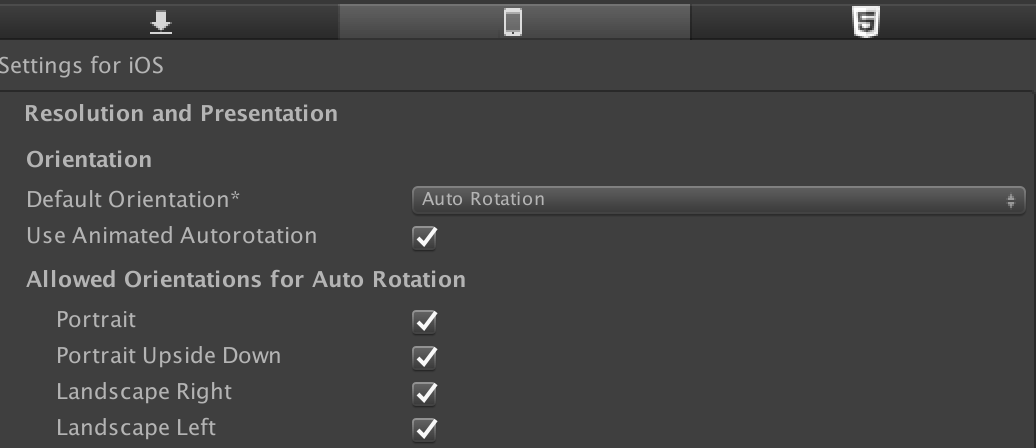
Then if you want your game to be locked in a landscape, you can lock orientation when the game starts:
using UnityEngine;
...

creen.orientation = ScreenOrientation.LandscapeLeft;
Then before you about to present camera view, make sure you allow portrait orientation before showing the camera view.
using UnityEngine;
...

Screen.orientation = ScreenOrientation.AutoRotation;
And once you are done with the camera, you can lock back to the landscape orientation.
The samples below show how to quickly configure ISN_UIImagePickerController for common operations with an image.
using SA.iOS.UIKit;
using SA.iOS.AVFoundation;
...

ISN_UIImagePickerController picker = new ISN_UIImagePickerController();
picker.SourceType = ISN_UIImagePickerControllerSourceType.Album;
picker.MediaTypes = new List<string>() { ISN_UIMediaType.IMAGE};
picker.MaxImageSize = 512;
picker.ImageCompressionFormat = ISN_UIImageCompressionFormat.JPEG;
picker.ImageCompressionRate = 0.8f;

picker.Present((result) => {
    if (result.IsSucceeded) {
        Debug.Log("IMAGE local path: " + result.ImageURL);
        //Example how to assing thumbnail to Image m_image
        m_image.sprite = result.Image.ToSprite();
        //Example how to assing thumbnail to GameObject m_go;
        m_go.GetComponent<Renderer>().material.mainTexture = result.Image;
    } else {
        Debug.Log("Madia picker failed with reason: " + result.Error.Message);
    }
});ISN_UIImagePickerController picker = new ISN_UIImagePickerController();
picker.SourceType = ISN_UIImagePickerControllerSourceType.Camera;
picker.CameraDevice = ISN_UIImagePickerControllerCameraDevice.Rear;
picker.MediaTypes = new List<string>() { ISN_UIMediaType.IMAGE};
picker.MaxImageSize = 512;
picker.ImageCompressionFormat = ISN_UIImageCompressionFormat.JPEG;
picker.ImageCompressionRate = 0.8f;
picker.Present((result) => {
if (result.IsSucceeded) {
Debug.Log("IMAGE local path: " + result.ImageURL);
//Example how to assing thumbnail to Image m_image
m_image.sprite = result.Image.ToSprite();
//Example how to assing thumbnail to GameObject m_go;
m_go.GetComponent<Renderer>().material.mainTexture = result.Image;
} else {
Debug.Log("Madia picker failed with reason: " + result.Error.Message);
}
});You can also define the ModalPresentationStyle if you like:
ISN_UIImagePickerController picker = new ISN_UIImagePickerController();
picker.ModalPresentationStyle = ISN_UIModalPresentationStyle.FullScreen;
You can check the available styles here