
Easily track when your Medicover doctor has open appointments.
- Automatically logs in to your Medicover account
- Checks for new available visits with selected doctors, clinics, or specialties
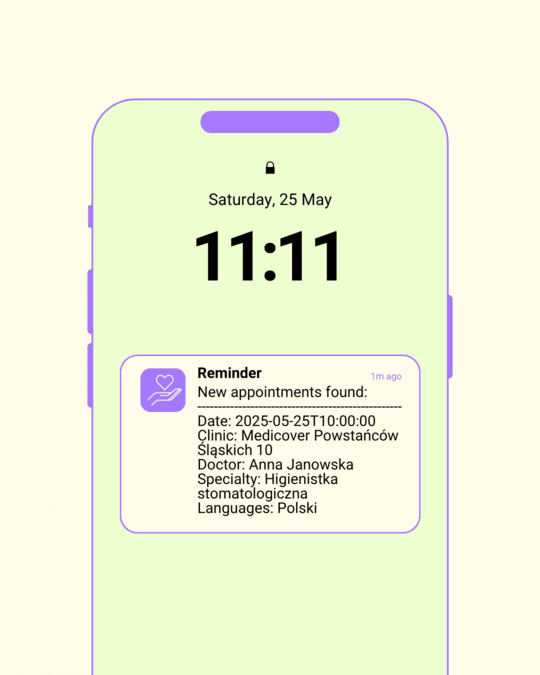
- Sends instant notifications (Gotify, Telegram, and more)
- Simple to set up and automate using Docker
- Copy the example environment file:
cp .env.example .env
- Fill in the
.envfile with your credentials. - Run the following command to build the Docker image:
docker build --rm -t mediczuwacz .
For a pediatrician (Pediatra) in Warsaw:
docker run --rm --env-file=.env mediczuwacz find-appointment -r 204 -s 132 -f "2024-12-11"To search and send notifications via Gotify:
docker run --rm --env-file=.env mediczuwacz find-appointment -r 204 -s 132 -f "2024-12-11" -n gotify -t "Pediatra"To search and send notifications via Gotify:
docker run --rm --env-file=.env mediczuwacz find-appointment -r 204 -s 132 -f "2024-12-11" -c 49284 -n gotify -t "Pediatra"Use -d param:
docker run --rm --env-file=.env mediczuwacz find-appointment -r 204 -s 132 -d 394 -f "2024-12-16" -e "2024-12-19"Use -l param:
docker run --rm --env-file=.env mediczuwacz find-appointment -r 204 -s 112 -l 60docker run --rm --env-file=.env mediczuwacz find-appointment -r 204 -s 112 -i 10Use --search-type param to search for appointments for a diagnostic procedure:
docker run --rm --env-file=.env mediczuwacz find-appointment -r 204 -s 521 --search-type DiagnosticProcedureNote that some examinations may be classified the same as regular doctor appointments (e.g. blood tests).
The known search types are (0 is used when --search-type is not specified):
Standard/0- consultations and dentistryDiagnosticProcedure/2- examinations
Search types have a numeric and text values. The current web UI uses the text values. When trying to use the numeric values instead, the UI wrongfully shows the visits as paid even when they're included in your medical care package. This seems to be the only difference between numeric and text value - they appear to return the same appointments.
In commands, you use different IDs (e.g., 204 for Warsaw). How do you find other values?
Run the following commands:
-
To list available regions:
docker run --rm --env-file=.env mediczuwacz list-filters regions
-
To list available specialties:
docker run --rm --env-file=.env mediczuwacz list-filters specialties
-
To list clinics for a specific region and specialty:
docker run --rm --env-file=.env mediczuwacz list-filters clinics -r 204 -s 132
-
To list doctors for a specific region and specialty:
docker run --rm --env-file=.env mediczuwacz list-filters doctors -r 204 -s 132
Use the Telegram app to send notifications to your channel by following these steps:
Follow this guide to create a Telegram Bot: Create Telegram Bot.
Add the following lines to your .env file:
NOTIFIERS_TELEGRAM_CHAT_ID=111222333
NOTIFIERS_TELEGRAM_TOKEN=mySecretTokenRun the following command to send Telegram notifications:
docker run --rm --env-file=.env mediczuwacz find-appointment -r 204 -s 132 -f "2024-12-11" -n telegram -t "Pediatra"Create a script named run_mediczuwacz.sh:
#!/bin/bash
cd /home/projects/
docker run --rm --env-file=.env mediczuwacz find-appointment -r 204 -s 132 -f "2024-12-11" -n gotify -t "Pediatra"
Make the script executable:
chmod +x run_mediczuwacz.shSet up a CRON job to check appointments every 10 minutes:
- Edit the crontab:
crontab -e
- Add the following line:
*/10 * * * * /home/projects/mediczuwacz/run_mediczuwacz.sh >> /home/projects/mediczuwacz/cron_log.txt 2>&1
Create a new file, e.g., check_appointments_windows.bat, to run the Docker command every 600 seconds (10 minutes). Example:
@echo off
:loop
docker run --rm --env-file=.env mediczuwacz find-appointment -r 204 -s 132
timeout 600
goto loop- Open Command Prompt (cmd).
- Run the script:
check_appointments_windows.bat
Press CTRL+C in the Command Prompt and confirm by typing y.
This command starts a container that checks for new appointments every 25 minutes. It will display either new appointment details or "No new appointments found."
Use the -i parameter to set the interval (in minutes):
docker run --rm --env-file=.env mediczuwacz find-appointment -r 204 -s 112 -i 25Leverage the -v Docker flag to mount local files, allowing you to modify the Python script without needing to rebuild the Docker container. You can make changes to the script, run it via Docker, and see the updates immediately!
Example:
Windows
docker run --rm -v %cd%/mediczuwacz.py:/app/mediczuwacz.py --env-file=.env mediczuwacz find-appointment -r 204 -s 132
Linux
docker run --rm -v $(pwd)/mediczuwacz.py:/app/mediczuwacz.py --env-file=.env mediczuwacz find-appointment -r 204 -s 132
- Repository initialized; created because the old Medihunter stopped working due to incompatibility with the new authentication system.
- Added the
list-filterscommand (by areqq).
- Fixed {epoch_time} auth bug (thanks pogarek & Odnoklubov).
- Added
intervalandenddateparameters, docker file optimization (by vitgorbunov).
- Added
list-filters clinicssupport.
- Added search type, start date validation, and examination examples (by Jackenmen).
- Handle MfaGate redirect during login when MFA prompt appears (works only if MFA is disabled) (by albertlis).
Special thanks to the following projects for their inspiration: