A lightweight browser extension for transferring bookmarks between Chromium-based browsers and Firefox on Android — export from one, import into another, with local storage as the bridge.




This extension is designed to transfer bookmarks between:
- 🟠 Chromium-based Android browsers that support extensions (e.g. Cromite, Kiwi)
- 🦊 Firefox for Android — including its forks that support browser extensions
💡 Why Firefox for Android? Firefox for Android and its forks do not have a built-in bookmark export feature. This extension fills that gap — letting you export your bookmarks as JSON or HTML directly from the browser.
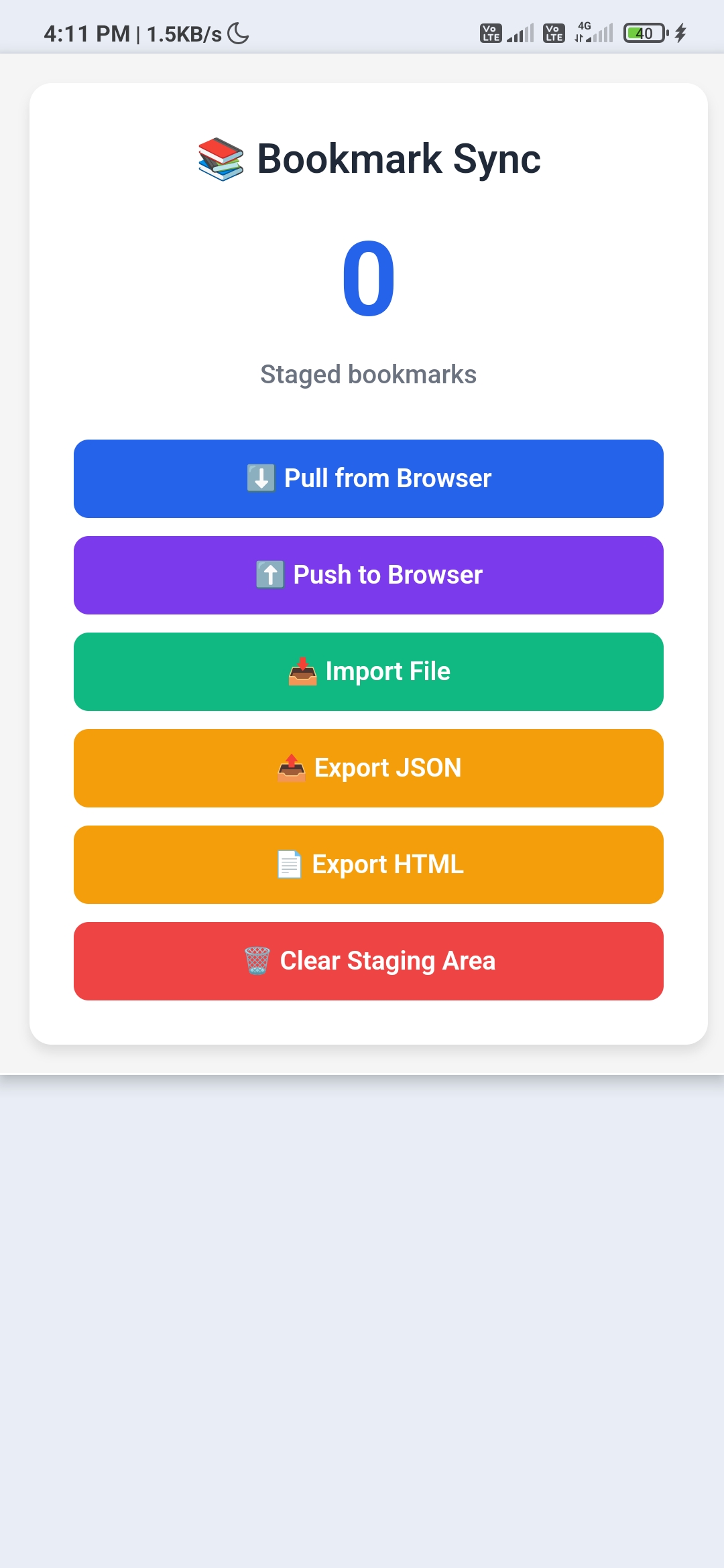
- 🔄 Cross-Browser Transfer - Move bookmarks between Chromium browsers and Firefox (including Android forks)
- 📡 Change Detection - Background listener detects bookmark changes and notifies the popup in real time
- 📊 Staging Area - Review and manage bookmarks before pushing them to the browser
- 🎯 Lightweight - Minimal resource usage with fast performance
- 🔒 Privacy Focused - All data stored locally, no server or account required
- 🎨 Modern UI - Clean and user-friendly interface
-
Clone the repository
git clone https://github.com/Sumon-Kayal/Bookmark-Sync-Offline.git cd Bookmark-Sync-Offline -
Load in Chrome/Edge
- Open
chrome://extensions/(oredge://extensions/) - Enable "Developer mode" (toggle in top-right corner)
- Click "Load unpacked"
- Select the
Bookmark-Sync-Offlinefolder
- Open
-
Load in Firefox
- Open
about:debugging#/runtime/this-firefox - Click "Load Temporary Add-on"
- Select any file from the
Bookmark-Sync-Offlinefolder (e.g.,manifest.json)
- Open
-
Initial Sync
- Click the extension icon in your browser toolbar
- Click "Pull from Browser" to save all your bookmarks to the staging area
- The count display will update to show how many bookmarks were staged
-
Import Bookmarks
- Click "Import File" to open the import page, then use the file picker to load bookmarks from a JSON or HTML file
- Once imported, click "Push to Browser" to add them to your browser
-
Automatic Sync
- The extension automatically syncs when you:
- Add new bookmarks
- Delete bookmarks
- Move bookmarks between folders
- Rename bookmarks or folders
- The extension automatically syncs when you:
- Popup Interface: Quick access to pull, push, export, and import bookmarks
- Import File Page: Full-page interface for importing bookmarks from JSON or HTML files
- Change Detection: Background listener that detects bookmark changes and notifies the popup
- Storage Statistics: View how many bookmarks are staged
- Modern web browser (Chrome 88+, Firefox 109+, or Edge 88+)
- Basic knowledge of JavaScript and browser extensions
- Text editor or IDE (VS Code recommended)
Bookmark-Sync-Offline/
├── manifest.json          # Extension manifest
├── background.js          # Background service worker
├── popup.html            # Extension popup interface
├── popup.js              # Popup functionality
├── manager.html          # Bookmark import page
├── styles.css            # Shared styles
├── README.md             # This file
├── CHANGELOG.md          # Version history
├── SETUP.md              # Setup and icon documentation
├── LICENSE               # GPL-3.0 License
└── .gitignore           # Git ignore rules
- manifest.json - Defines extension properties, permissions, and scripts
- background.js - Handles bookmark events and synchronization logic
- popup.js - Controls the popup interface and user interactions
- manager.html - Full-page bookmark import interface (file picker and drag-and-drop)
-
Make Changes
# Edit files in your preferred editor
code .
-
Reload Extension
- Chrome/Edge: Go to
chrome://extensions/and click the reload icon - Firefox: Click "Reload" on
about:debugging
- Chrome/Edge: Go to
-
Test Features
- Test bookmark creation, deletion, and modification
- Verify sync functionality
- Check manager interface
- Test error handling
-
Debug
- Right-click extension icon → "Inspect popup" (for popup debugging)
- Go to
chrome://extensions/→ "Inspect views: service worker" (for background script) - Check browser console for errors
- Extension installs without errors
- Popup opens and displays correctly
- Initial sync saves all bookmarks
- New bookmarks are automatically detected
- Bookmark manager opens correctly via Import File button
- JSON and HTML import works correctly
- Export JSON and Export HTML produce valid files
- Push to Browser adds bookmarks without duplicates
- Clear Staging Area wipes only extension storage
- Extension icon displays properly
| Browser | Version | Status |
|---|---|---|
| Chrome | 88+ | ✅ Supported |
| Edge | 88+ | ✅ Supported |
| Firefox | 109+ | ✅ Supported |
| Cromite | 142+ | ✅ Supported |
| Safari | - | ❌ Not tested |
| Opera | 74+ |
// Bookmarks are stored in chrome.storage.local
{
  "bookmarks_data": {
    "data": [
      {
        "title": "Example Site",
        "url": "https://example.com",
        "dateAdded": 1234567890000
      }
    ],
    "savedAt": 1234567890000,
    "count": 1
  }
}background.js
initializeExtension()— Sets default metadata on first installsetupAlarms()— Creates the 24h maintenance alarm (clears first to avoid duplicates)performMaintenance()— Runs periodic storage housekeepingdebounceNotifyPopup(message)— Alarm-based debounce for bookmark change notifications
popup.js
handlePull()— Reads the full bookmark tree and saves to local storagehandlePush()— Pushes staged bookmarks into the browser's bookmark barhandleExportJson()/handleExportHtml()— Exports stored bookmarks to filehandleImportFileData(file)— Imports bookmarks from a JSON or HTML filefindOrCreateFolder(title)— Finds or creates a folder on the bookmarks bar
Contributions are welcome! Here's how you can help:
- Fork the repository
- Create a feature branch
git checkout -b feature/amazing-feature
- Commit your changes
git commit -m 'Add some amazing feature' - Push to the branch
git push origin feature/amazing-feature
- Open a Pull Request
- Follow existing code style
- Add comments for complex logic
- Test thoroughly before submitting
- Update documentation as needed
- Keep commits focused and descriptive
- None currently reported
- Search functionality in manager
- Cloud sync integration
- Tag system for bookmarks
- Keyboard shortcuts
- Dark mode support
- Bookmark statistics and analytics
- Duplicate detection
- Backup scheduling
This project is licensed under the GNU General Public License v3.0 - see the LICENSE file for details.
Sumon Kayal
- GitHub: @Sumon-Kayal
- Thanks to all contributors
- Inspired by the need for better bookmark management
- Built with modern web extension APIs
If you encounter any issues or have questions:
- Open an Issue
- Check existing issues for solutions
- Star the repository if you find it useful!
- Chrome Web Store (Coming soon)
- Firefox Add-ons (Coming soon)
- Documentation (Coming soon)
Fixed
- Wrap file import in
try-finallyfor proper cleanup (8ca470c) - Improve import bookmarks instructions in README (
9fdf879) - Update SETUP.md with icon size documentation (
0cc5101)
Removed
- Deleted
COPYINGfile (replaced by LICENSE) (db05e5a) - Deleted
CREATE_ICONS.md(faa1876) - Deleted
DEPLOYMENT_COMPLETE.md(511c357) - Cleaned up stray
.gitignoreentries (86e1498)
Changed
- Multiple iterative file updates via PRs #20–#25
- Reverted a bad upload from PR #15 via PR #19 (
b76168e)
Fixed
- Removed
icons/Sample.txtplaceholder — added in5df1a66, then deleted in6cdb803
Added
- CodeRabbit auto-generated docstrings pass (
61de498) - Initial MV3 extension files uploaded (
37a7e09)
Changed
popup.jsupdated (35f9b08)manager.htmlupdated (f42c6a3)styles.cssupdated (9860286)- README formatting and content improvements (
695817e,15c2307,52b071c,b367e0d,f3f72f3,5501f41) DEPLOYMENT_COMPLETE.mdupdated (f922fbd)
Removed
- Deleted original
LICENSE(later re-added as GPL-3.0) (640d856) - Deleted original
.gitignore(0843f3e)
Added
- Initial commit — base extension scaffolding (
8fe9581)
Made with ❤️ by Sumon Kayal