Connect customers with qualified technicians through a streamlined booking system



Tech-Care is a comprehensive platform designed to bridge the gap between customers seeking technical services and qualified technicians in Rwanda. Our platform provides a stable, end-to-end experience where customers can easily find, view, and book technicians, while providing technicians with effective tools to manage their bookings and profiles.
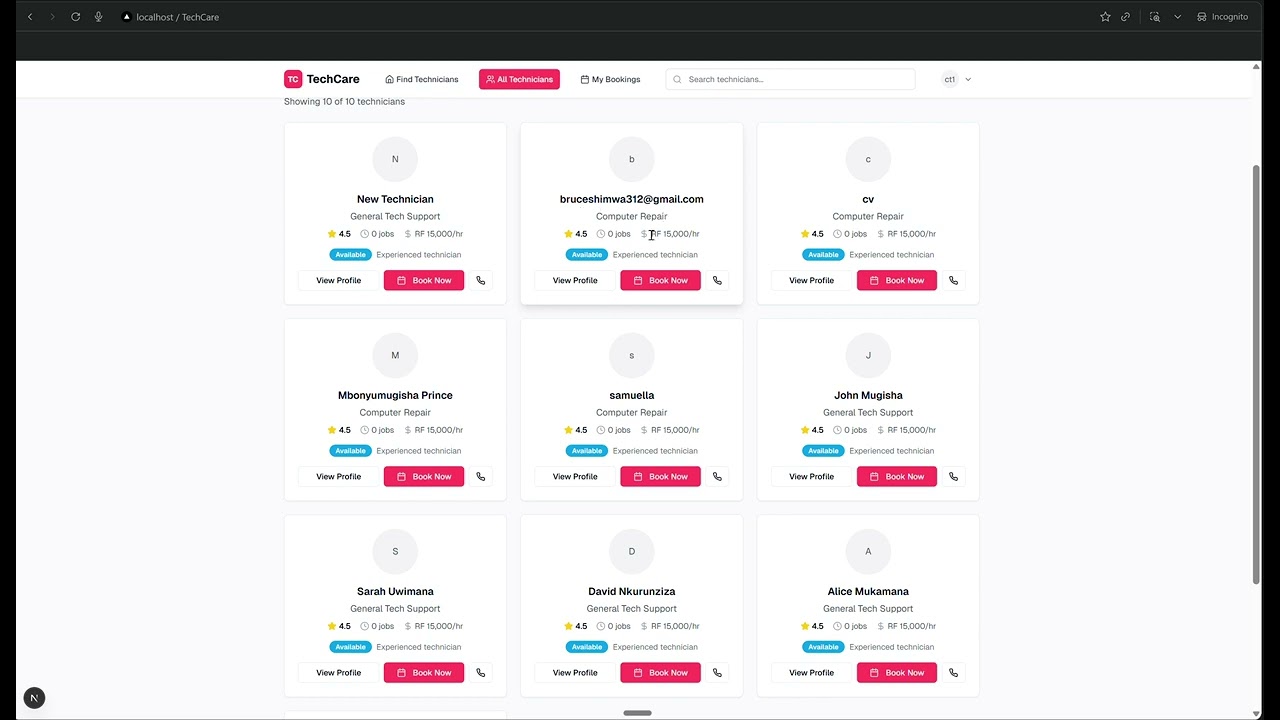
Click above to watch our platform demo video
- Node.js 18+
- npm or yarn
- Supabase account
- Google Maps API key
-
Clone the repository
git clone https://github.com/Tech-Care-Rwanda/tech-care.git cd tech-care -
Install dependencies
# Install root dependencies
npm install

# Install frontend dependencies
cd frontend
npm install

# Install backend dependencies
cd ../backend
npm install
cd ..
-
Environment Setup
Create
.env.localin the frontend directory:NEXT_PUBLIC_SUPABASE_URL=your_supabase_url NEXT_PUBLIC_SUPABASE_ANON_KEY=your_supabase_anon_key NEXT_PUBLIC_GOOGLE_MAPS_API_KEY=your_google_maps_api_key
Create
.envin the backend directory:SUPABASE_URL=your_supabase_url SUPABASE_SERVICE_KEY=your_supabase_service_key PORT=3001
-
Database Setup
Set up your Supabase database with the following tables:
users- Customer and technician profilestechnician_details- Extended technician informationbookings- Service bookings and requestsservices- Available service typescategories- Service categories
-
Start Development Servers
# Terminal 1: Start backend server
cd backend
npm run dev

# Terminal 2: Start frontend server
cd frontend
npm run dev
-
Access the Application
- Frontend: http://localhost:3000
- Backend: http://localhost:3001
Tech-Care utilizes a modern monorepo architecture with clear separation between frontend and backend services.
tech-care/
├── frontend/          # Next.js 15 + React 19 application
│   ├── src/
│   │   ├── app/       # Next.js App Router pages
│   │   ├── components/ # Reusable UI components
│   │   ├── lib/       # Utilities, services, and contexts
│   │   └── types/     # TypeScript type definitions
│   └── public/        # Static assets
├── backend/           # Express.js server
│   ├── services/      # Supabase integration services
│   ├── uploads/       # File upload storage
│   └── server.js      # Express server configuration
└── package.json       # Root package configuration
Frontend
- Framework: Next.js 15 with Turbopack
- UI Library: React 19 with TypeScript 5
- Styling: Tailwind CSS + Radix UI
- Mapping: Google Maps API + Leaflet
- State Management: React Context + Supabase client
- Authentication: Supabase Auth
Backend
- Server: Express.js (minimal)
- Database: Supabase (PostgreSQL)
- File Upload: Multer middleware
- Security: CORS + Helmet
Database
- Provider: Supabase
- Type: PostgreSQL with Row Level Security (RLS)
- Features: Real-time subscriptions, Auth integration
- 🗺️ Interactive Map - Find technicians on an interactive map with real-time locations
- 🔍 Smart Search - Filter technicians by specialization, rating, and availability
- 👤 Detailed Profiles - View comprehensive technician profiles with certifications
- 📅 Easy Booking - Streamlined booking process with status tracking
- 📱 Responsive Design - Works seamlessly on desktop and mobile devices
- 🔔 Real-time Updates - Get instant notifications on booking status changes
- 📊 Dashboard - Comprehensive dashboard showing earnings and booking statistics
- ✅ Booking Management - Accept or decline booking requests with one click
- 📝 Profile Management - Update profile information, upload certificates
- 💰 Earnings Tracking - Track monthly earnings and completed jobs
- 📸 Media Upload - Upload profile pictures and certification documents
- 📍 Location Services - Manage service areas and availability
- 🔐 Role-based Authentication - Separate customer and technician experiences
- 🛡️ Security - Row Level Security policies and secure file uploads
- ⚡ Performance - Optimized with Next.js 15 and Turbopack
- 📊 Analytics - Built-in analytics for tracking platform usage
- 🌐 API-First - RESTful API design for future mobile apps
- Browse Technicians - View available technicians on interactive map
- Filter & Search - Use filters to find the right technician
- View Profile - Check technician details, ratings, and certifications
- Book Service - Complete booking with service details
- Track Status - Monitor booking progress in real-time
- Registration - Sign up with professional details and certifications
- Profile Setup - Complete profile with specializations and rates
- Receive Requests - Get notified of new booking requests
- Manage Bookings - Accept, decline, or update booking status
- Track Earnings - Monitor income and performance metrics
frontend/src/
├── app/                    # Next.js App Router
│   ├── api/               # API routes
│   ├── book/              # Booking pages
│   ├── dashboard/         # User dashboards
│   ├── technician/        # Technician profiles
│   └── layout.tsx         # Root layout
├── components/            # UI Components
│   ├── auth/              # Authentication components
│   ├── booking/           # Booking-related components
│   ├── layout/            # Layout components
│   ├── maps/              # Map components
│   └── ui/                # Base UI components
├── lib/                   # Utilities & Services
│   ├── contexts/          # React contexts
│   ├── hooks/             # Custom React hooks
│   ├── services/          # API services
│   └── utils/             # Utility functions
└── types/                 # TypeScript definitions
Frontend
npm run dev          # Start development server
npm run build        # Build for production
npm run start        # Start production server
npm run lint         # Run ESLint
npm run format       # Format code with Prettier
Backend
npm run dev          # Start development server with nodemon
npm run start        # Start production server
npm run build # No-op build commandFrontend (.env.local)
NEXT_PUBLIC_SUPABASE_URL=your_supabase_project_url
NEXT_PUBLIC_SUPABASE_ANON_KEY=your_supabase_anon_key
NEXT_PUBLIC_GOOGLE_MAPS_API_KEY=your_google_maps_api_key
Backend (.env)
SUPABASE_URL=your_supabase_project_url
SUPABASE_SERVICE_KEY=your_supabase_service_role_key
PORT=3001users
- Stores both customers and technicians
- Includes authentication and basic profile info
- Role-based access control
technician_details
- Extended technician information
- Specializations, certifications, rates
- Availability and location data
bookings
- Service requests and bookings
- Status tracking and pricing
- Customer-technician relationships
services & categories
- Service type definitions
- Categorized service offerings
All tables implement RLS policies ensuring:
- Users can only access their own data
- Technicians can view relevant booking information
- Anonymous users can browse technicians and create bookings
- Create a new Supabase project
- Run the database migrations
- Configure RLS policies
- Set up file storage buckets
- Configure authentication providers
# Build and deploy to Vercel
npm run build
vercel --prod# Deploy backend to Railway or Render
railway up
# or
render deploy# Run frontend tests
cd frontend
npm test
# Run e2e tests (if configured)
npm run test:e2e- Unit Tests - Component and utility function tests
- Integration Tests - API endpoint and service tests
- E2E Tests - Full user workflow tests
- Next.js 15 - Latest optimizations and Turbopack
- Image Optimization - Automatic image optimization
- Code Splitting - Automatic route-based code splitting
- Bundle Analysis - Built-in bundle analyzer
- Caching - Supabase query caching and React Query
- Lighthouse Score - 90+ on all metrics
- Core Web Vitals - Excellent ratings
- Bundle Size - Optimized for fast loading
We welcome contributions! Please follow these steps:
- Fork the repository
- Create a feature branch (
git checkout -b feature/amazing-feature) - Commit your changes (
git commit -m 'Add amazing feature') - Push to the branch (
git push origin feature/amazing-feature) - Open a Pull Request
- Use TypeScript for all new code
- Follow existing code formatting (Prettier)
- Write meaningful commit messages
- Add tests for new features
This project is licensed under the MIT License - see the LICENSE file for details.
- ChristianTonny - Lead Developer & Architecture
- devark28 - Frontend Specialist
- Mbonyumugisha-Prince - Full-Stack Developer
- isamuella - Quality Assurance
If you have any questions or issues:
- Check the Issues page
- Create a new issue with detailed information
- Contact the development team
- ✅ User authentication and profiles
- ✅ Technician discovery and booking
- ✅ Interactive mapping
- ✅ Booking management
- 🔄 Real-time messaging
- 🔄 Payment integration
- 🔄 Push notifications
- 🔄 Mobile app (React Native)
- 🔮 AI-powered matching
- 🔮 Advanced analytics
- 🔮 Multi-language support
- 🔮 IoT device integration
The platform includes built-in analytics for:
- User engagement tracking
- Booking conversion rates
- Technician performance metrics
- Platform usage statistics
Built with ❤️ in Rwanda
For more information, visit our GitHub repository or watch our demo video.