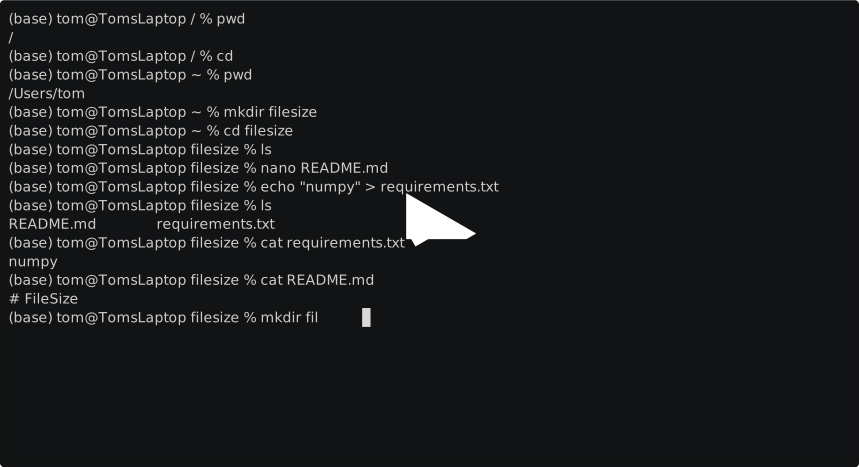
First navigate somewhere we can make a temporary project, I suggest either your home directory or a subdirectory of it:
cd ~
# or
cd ~/DocumentsWe're going to write a script to print the size of files, so let's call it filesize
pwd #check you're in the right place
mkdir filesize #make a folder here called filesizeThese files are a de facto standard to have in your python project. README.md describes your project as in written in MarkDown, which is also what this document is written in.
nano README.mdIn nano, # FileSize and then CTRL-O and then ENTER to save and CTRL-X to exit.
I'll show you a differnt trick to quickly make a one line file:
echo "numpy" > requirements.txtThis uses two things I haven't told you about, echo outputs whatever you give it and > saves the output of a command to file.
Check the files contain what you think:
cat requirements.txt
cat README.md
If not you can use nano to edit them. You can also use your own text editor to do this.
At this point pwd should print something like /home/user/filesize/ and ls should print requirements.txt and README.md
It's a convention for python project that the actual source code goes in project_name/project_name/source_code.py
So make a second folder called filesize inside the first.
Now make a python file called "filesize.py" inside it so that it ends up at filesize/filesize/filesize.py
Arrange that it contains:
import os, sys
arguments = sys.argv[1:] # The first argument is actually the name of the script
if len(arguments) == 1: print(os.path.getsize(arguments[0]))
else: print(f'filesize requires exactly one argument! Got {len(arguments)}')To run a python script as a command you can use
python filesize/filesize.pyTo give it an argument, let's try README.md, run:
python filesize/filesize.py README.md