
Give your AI the power of 400+ pentesting tools. Let it hack (legally).
Quick Start • Why AIDA • Installation • User Guide • Architecture




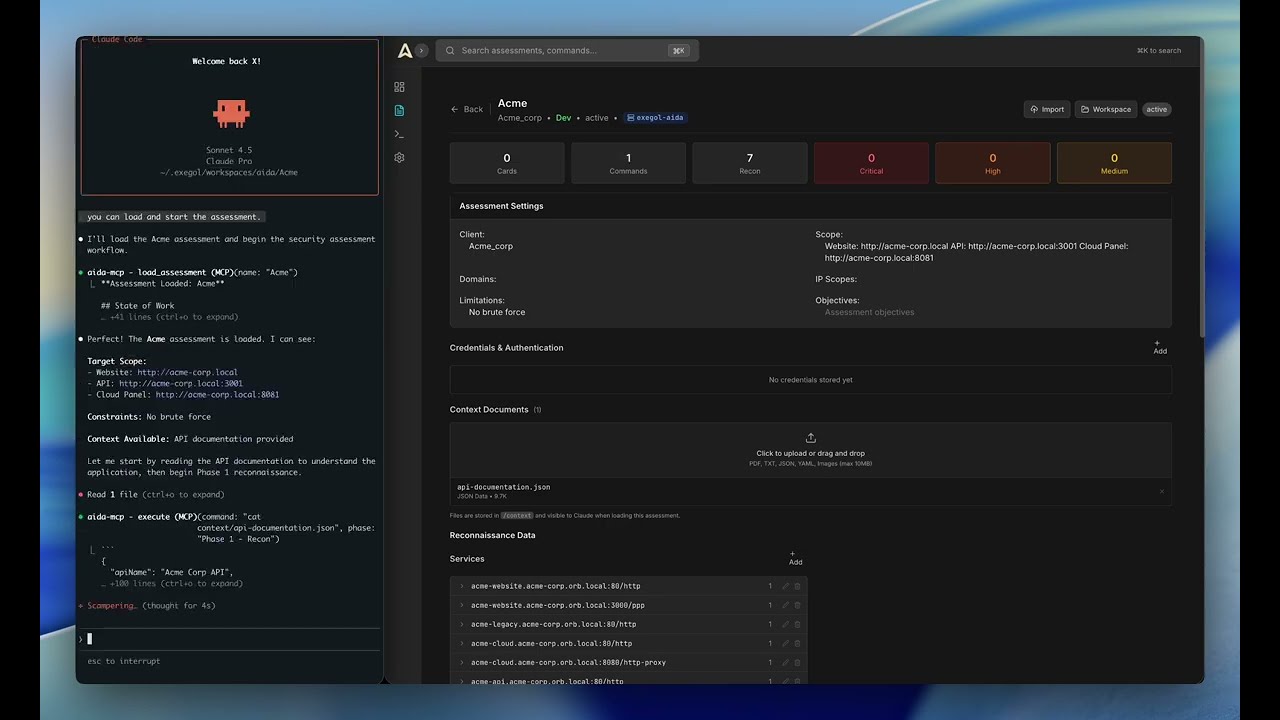
AIDA connects AI assistants to a real pentesting environment. Instead of just talking about security testing, your AI can actually do it.
Here's the deal:
- Exegol Docker container with 400+ security tools (nmap, sqlmap, ffuf, nuclei...)
- MCP integration that works with any AI client (Claude, Gemini, GPT, Antigravity...)
- Web dashboard to track findings, commands, and progress
- Structured workflow from recon to exploitation
Think of it as giving your AI a fully-equipped hacking lab and a notebook to document everything.

Modern AI assistants know pentesting tools, techniques, and vulnerability classes—but they can't execute them.
Without execution capabilities, security testing becomes a tedious back-and-forth: you ask the AI for a command, copy it to your terminal, wait for results, paste the output back, and repeat. Traditional scanners like Burp Suite run fixed patterns and can't adapt to specific tech stacks or chain multi-step exploits.
AIDA changes this by connecting AI directly to a professional pentesting environment:
- 🔧 Direct Execution - 400+ tools in Exegol (nmap, sqlmap, ffuf, nuclei...)
- 🧠 Persistent Memory - Full context maintained across sessions in structured database
- 📝 Auto Documentation - Findings tracked as cards with severity, proof, and technical analysis
- ⛓️ Attack Chains - AI connects dots between discoveries to build multi-step exploits
- 🎯 Adaptive Testing - Methodology adjusts based on findings, not fixed patterns
Result: Your AI becomes an autonomous security researcher, not just a consultant.
- macOS (Intel & Apple Silicon)
- Linux (Ubuntu, Debian, RHEL, Fedora, Arch, and derivatives)
- Windows (Untested)
- Docker Desktop - For running Exegol and the platform
- An AI Client - Claude Desktop, Claude Code, Gemini CLI, Antigravity... pick your favorite
# Clone
git clone https://github.com/Vasco0x4/AIDA.git
cd AIDA

# Start everything
./start.sh

# Open the dashboard
open http://localhost:5173
That's it. The platform is running.
Now hook up your AI client.
Recommended: AIDA CLI (Claude Code or Kimi)
The easiest way to get started is using the AIDA CLI wrapper, which supports both Claude Code and Kimi CLI:
# Auto-detect available CLI (Claude or Kimi)
python3 aida.py --assessment "test"

# Force a specific CLI
python3 aida.py --assessment "test" --cli claude
python3 aida.py --assessment "test" --cli kimi

# Auto-approve all actions
python3 aida.py --assessment "test" --yes
You can also use your own API keys (Claude only).
Alternative: Import MCP tools into your AI client
Here's Claude Desktop as an example:
Default config path (macOS):
~/Library/Application Support/Claude/claude_desktop_config.json
MCP config:
{
  "mcpServers": {
    "aida-mcp": {
      "command": "/bin/bash",
      "args": [
        "/absolute/path/to/AIDA/start_mcp.sh"
      ]
    }
  }
}
Full setup for all AI clients → INSTALLATION.md
- Create an assessment in the web UI
- Start your AI client
- Inject the pre prompt.
- Tell it: "Load assessment 'Acme' and start it"
- Watch it go
AIDA uses the Model Context Protocol (MCP) - an open standard. If your AI client supports MCP, it works with AIDA.
| AI Client | Status | Setup |
|---|---|---|
| Claude Code | Recommended | Via aida.py (automatic) |
| Kimi CLI | Recommended | Via aida.py (automatic) |
| External API | Recommended | Via aida.py --base-url |
| Claude Desktop | Works | Manual MCP import |
| ChatGPT Desktop | Works | Manual MCP import |
| Gemini CLI | Works | Manual MCP import |
| Antigravity | Works | Manual MCP import |
Full setup for all AI clients → INSTALLATION.md
The AI gets access to specialized tools:
ASSESSMENT
   load_assessment    - Load and start working
   update_phase       - Document progress

CARDS
   add_card          - Create findings/observations/info
   list_cards        - View all cards
   update_card       - Modify cards
   delete_card       - Remove cards

RECON
   add_recon_data    - Track discovered assets
   list_recon        - View recon data

EXECUTION
   execute           - Run any command in Exegol
   scan              - Quick scans (nmap, gobuster, ffuf...)
   subdomain_enum    - Find subdomains
   ssl_analysis      - Check SSL/TLS
   tech_detection    - Identify tech stack
   tool_help         - Get tool documentation

CREDENTIALS
   credentials_add   - Store credentials
   credentials_list  - List stored creds
Full tool documentation → MCP_TOOLS.md
AIDA/
├── backend/              # FastAPI + MCP Server
│   ├── api/             # REST endpoints
│   ├── mcp/             # MCP server + tools
│   ├── models/          # Database models
│   └── services/        # Business logic
├── frontend/            # React dashboard
│   ├── src/pages/       # Dashboard, Assessments, Settings...
│   └── src/components/  # Reusable UI components
├── Docs/                # AI prompts and methodology
├── aida.py              # CLI launcher
├── start.sh             # Start the platform
└── docker-compose.yml   # Infrastructure
| Document | Description |
|---|---|
| INSTALLATION.md | Complete setup guide - all AI clients |
| USER_GUIDE.md | How to use the platform |
| ARCHITECTURE.md | Technical deep dive + diagrams |
| MCP_TOOLS.md | All MCP tools explained |
AIDA is currently in alpha. This means:
- Local use only recommended - Do NOT expose the web interface publicly without additional security hardening
- No authentication system yet - Anyone with access to the UI can view/modify assessments
- Bugs and rough edges exist - Some error messages use browser alerts, WebSocket reconnections may require manual refresh
- Database credentials - Change defaults in
.envbefore any deployment
This is a working prototype for early adopters and security professionals who understand the risks.
Improvements coming in future releases:
- Proper authentication and user management system
- Refined UI/UX (replacing alerts with modals)
- Production-ready Docker configuration
- Enhanced error handling
For now: Run locally, don't expose to internet, use at your own risk.
Report bugs and request features: GitHub Issues
AIDA is actively developed. Want to contribute?
Planned Features:
- Build our docker image
- Frontend redesign with flat, professional UI
- OWASP testing guidelines integration
- Enhanced phase workflow system
- Advanced CLI wrapper capabilities
Need help? Contact vasco0x4 on Discord.
AGPL v3 - Free and open source.
You can use, modify, and distribute AIDA freely. If you modify and deploy it (including as a network service), you must open source your changes under AGPL v3.
Commercial licensing available for organizations that need proprietary modifications. Contact: Vasco0x4@proton.me
- Exegol - The pentesting Docker environment
- Anthropic MCP - The protocol that makes this possible
- The security community for all the amazing tools