
Reasoning-based RAG ◦ No Vector DB ◦ No Chunking ◦ Human-like Retrieval
🏠 Homepage • 🖥️ Chat Platform • 🔌 MCP • 📚 Docs • 💬 Discord • ✉️ Contact
🔥 Releases:
- PageIndex Chat: The first human-like document-analysis agent platform built for professional long documents. Can also be integrated via MCP or API (beta).
📝 Articles:
- PageIndex Framework: Introduces the PageIndex framework — an agentic, in-context tree index that enables LLMs to perform reasoning-based, human-like retrieval over long documents, without vector DB or chunking.
🧪 Cookbooks:
- Vectorless RAG: A minimal, hands-on example of reasoning-based RAG using PageIndex. No vectors, no chunking, and human-like retrieval.
- Vision-based Vectorless RAG: OCR-free, vision-only RAG with PageIndex's reasoning-native retrieval workflow that works directly over PDF page images.
Are you frustrated with vector database retrieval accuracy for long professional documents? Traditional vector-based RAG relies on semantic similarity rather than true relevance. But similarity ≠ relevance — what we truly need in retrieval is relevance, and that requires reasoning. When working with professional documents that demand domain expertise and multi-step reasoning, similarity search often falls short.
Inspired by AlphaGo, we propose PageIndex — a vectorless, reasoning-based RAG system that builds a hierarchical tree index from long documents and uses LLMs to reason over that index for agentic, context-aware retrieval. It simulates how human experts navigate and extract knowledge from complex documents through tree search, enabling LLMs to think and reason their way to the most relevant document sections. PageIndex performs retrieval in two steps:
- Generate a “Table-of-Contents” tree structure index of documents
- Perform reasoning-based retrieval through tree search
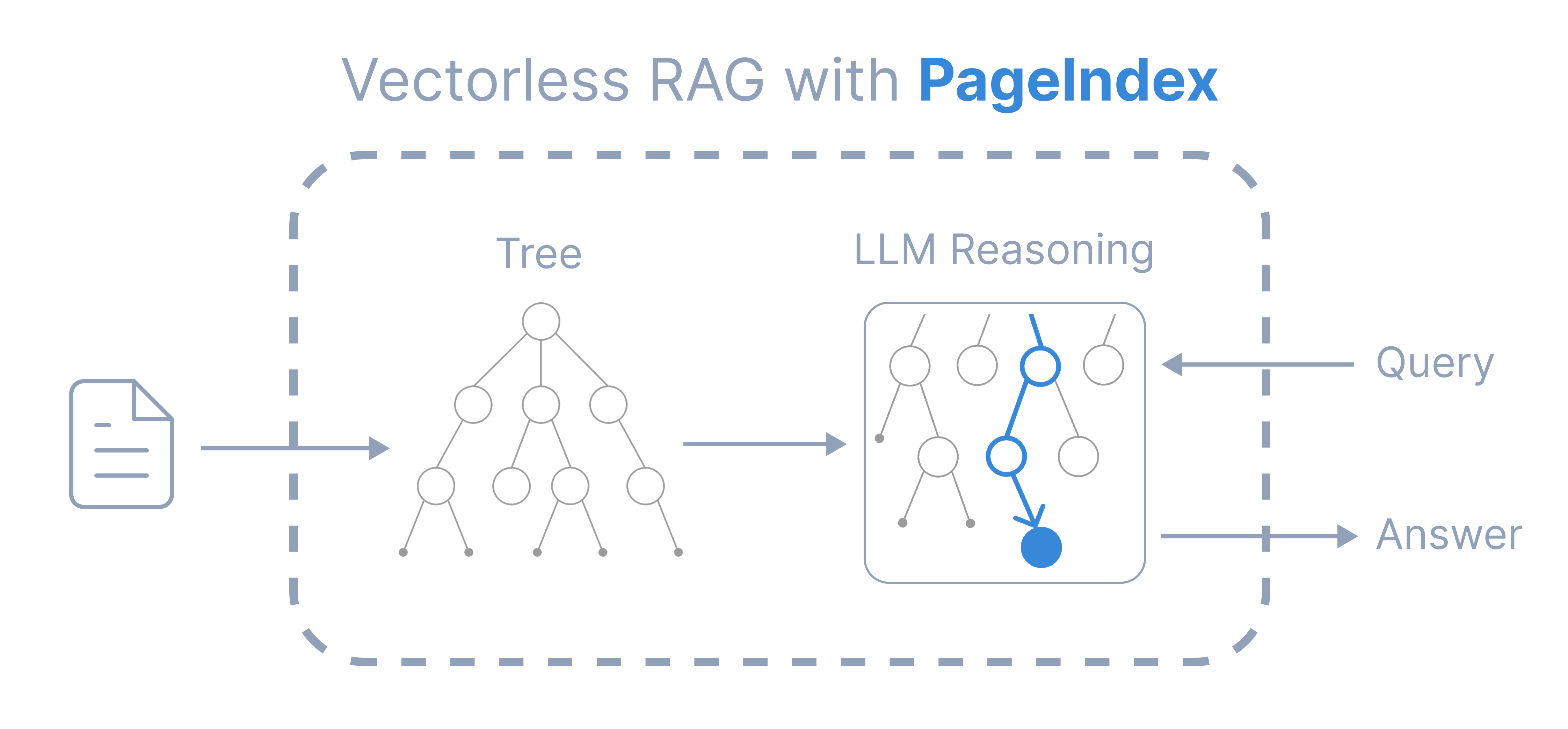
Compared to traditional vector-based RAG, PageIndex features:
- No Vector DB: Uses document structure and LLM reasoning for retrieval, instead of vector similarity search.
- No Chunking: Documents are organized into natural sections, not artificial chunks.
- Human-like Retrieval: Simulates how human experts navigate and extract knowledge from complex documents.
- Better Explainability and Traceability: Retrieval is based on reasoning — traceable and interpretable, with page and section references. No more opaque, approximate vector search (“vibe retrieval”).
PageIndex powers a reasoning-based RAG system that achieved state-of-the-art 98.7% accuracy on FinanceBench, demonstrating superior performance over vector-based RAG solutions in professional document analysis (see our blog post for details).
To learn more, please see a detailed introduction of the PageIndex framework. Check out this GitHub repo for open-source code, and the cookbooks, tutorials, and blog for additional usage guides and examples.
The PageIndex service is available as a ChatGPT-style chat platform, or can be integrated via MCP or API.
- Self-host — run locally with this open-source repo.
- Cloud Service — try instantly with our Chat Platform, or integrate with MCP or API.
- Enterprise — private or on-prem deployment. Contact us or book a demo for more details.
- Try the Vectorless RAG notebook — a minimal, hands-on example of reasoning-based RAG using PageIndex.
- Experiment with Vision-based Vectorless RAG — no OCR; a minimal, reasoning-native RAG pipeline that works directly over page images.


PageIndex can transform lengthy PDF documents into a semantic tree structure, similar to a "table of contents" but optimized for use with Large Language Models (LLMs). It's ideal for: financial reports, regulatory filings, academic textbooks, legal or technical manuals, and any document that exceeds LLM context limits.
Below is an example PageIndex tree structure. Also see more example documents and generated tree structures.
You can generate the PageIndex tree structure with this open-source repo, or use our API
You can follow these steps to generate a PageIndex tree from a PDF document.
pip3 install --upgrade -r requirements.txtCreate a .env file in the root directory and add your API key:
CHATGPT_API_KEY=your_openai_key_herepython3 run_pageindex.py --pdf_path /path/to/your/document.pdfOptional parameters
You can customize the processing with additional optional arguments:
--model OpenAI model to use (default: gpt-4o-2024-11-20)
--toc-check-pages Pages to check for table of contents (default: 20)
--max-pages-per-node Max pages per node (default: 10)
--max-tokens-per-node Max tokens per node (default: 20000)
--if-add-node-id Add node ID (yes/no, default: yes)
--if-add-node-summary Add node summary (yes/no, default: yes)
--if-add-doc-description Add doc description (yes/no, default: yes)
Markdown support
We also provide markdown support for PageIndex. You can use the `-md_path` flag to generate a tree structure for a markdown file.
python3 run_pageindex.py --md_path /path/to/your/document.mdNote: in this function, we use "#" to determine node heading and their levels. For example, "##" is level 2, "###" is level 3, etc. Make sure your markdown file is formatted correctly. If your Markdown file was converted from a PDF or HTML, we don't recommend using this function, since most existing conversion tools cannot preserve the original hierarchy. Instead, use our PageIndex OCR, which is designed to preserve the original hierarchy, to convert the PDF to a markdown file and then use this function.
Mafin 2.5 is a reasoning-based RAG system for financial document analysis, powered by PageIndex. It achieved a state-of-the-art 98.7% accuracy on the FinanceBench benchmark, significantly outperforming traditional vector-based RAG systems.
PageIndex's hierarchical indexing and reasoning-driven retrieval enable precise navigation and extraction of relevant context from complex financial reports, such as SEC filings and earnings disclosures.
Explore the full benchmark results and our blog post for detailed comparisons and performance metrics.

- 🧪 Cookbooks: hands-on, runnable examples and advanced use cases.
- 📖 Tutorials: practical guides and strategies, including Document Search and Tree Search.
- 📝 Blog: technical articles, research insights, and product updates.
- 🔌 MCP setup & API docs: integration details and configuration options.
Leave us a star 🌟 if you like our project. Thank you!





© 2025 Vectify AI
...
{
  "title": "Financial Stability",
  "node_id": "0006",
  "start_index": 21,
  "end_index": 22,
  "summary": "The Federal Reserve ...",
  "nodes": [
    {
      "title": "Monitoring Financial Vulnerabilities",
      "node_id": "0007",
      "start_index": 22,
      "end_index": 28,
      "summary": "The Federal Reserve's monitoring ..."
    },
    {
      "title": "Domestic and International Cooperation and Coordination",
      "node_id": "0008",
      "start_index": 28,
      "end_index": 31,
      "summary": "In 2023, the Federal Reserve collaborated ..."
    }
  ]
}
...