Releases: X-Plane/XPlane2Blender
XPlane2Blender v4.4.0-rc-1

This update adds Blender 4.5 LTS support, support for wheel empties in X-Plane 12.2.0 and fixes a bug with decals on transparent objects.
XPlane2Blender v4.3.3-rc-1
This update renames decals into detail textures and contains UX improvements proposed by Tom Kyler.
XPlane2Blender v4.3.3-beta-3
This update adds support for X-Plane 12.1.0 features including decals, avionics devices and updated thermal textures.
This release is compatible with Blender 2.8-4.2.
XPlane2Blender v4.2.0-rc-3

This release updates the lights file that ships with the exporter to match X-Plane 12 and fixes bugs where lights are incorrectly written due to bugs in the lights.txt file.
This release is compatible with Blender 2.8 - 3.3.
XPlane2Blender v4.2.0-rc.2
XPlane2Blender 4.2.0-rc.2 fixes bugs in the 4.2.0 exporter series:
XPlane2Blender v4.1.0-rc.1
X-Plane 4.1.0 improves the set of supported X-Plane 11 OBJ features, including:
- OBJ materials (e.g. textures) can be set up directly on an export root, for efficient PBR modeling using a painting program like SP2.
- ATTR_light_level animations can be set per-mesh; no need to create a material per animated annunciator in cockpits.
- Custom spill lights are natively supported.
- ATTR_cockpit_device support - this lets you map the image of a GPS device directly onto your meshes.
- Complete panel/region mode support.
- Bug fixes.
4.1.0 fixes python compatibility and should work on a wide range of systems.
4.1.0 will be the last version of the XPlane2Blender exporter to target X-Plane 11; the in-development 4.2.0 patch will focus on X-Plane 12.
XPlane2Blender v4.1.0-beta.2

XPlane2Blender v4.1.0-beta.2
What's Changed
Remember to make backups! This beta is a small release with 1 new feature - Mesh Level Light Level Overrides!
Mesh Level Light Level Override
#663 - Light Level can now be controlled via the Object's properties instead of using an existing or new material per Object. If enabled, this Light Level is used instead of the Material's Property.

Minor Bug Fixes
-
#660 - To decrease the confusion of "Specular" vs "Specular (Principled BSDF Shader)" a warning label label was added if you use the wrong one

-
#648 - TEXTURE paths now resolve more cleanly and have some validations for file types and bad relative paths. In the beta this is the only one I'm concerned with breaking someone's project.
-
#629 - Datarefs.txt and Commands.txt are now refreshed on load
-
#613 -
ATTR_manip_noopno longer hasDatarefandTooltipproperties to remove -
#528 - A long useless checkbox "Composite Normal Textures" has been removed from XPlane2Blender. With PBR this feature is never going to make a come back.
-
#474 - For a few places (Axis Detent Ranges) perfect WYSIWYG behavior precision is needed. We now have this and got the rounding correct.
XPlane2Blender v4.2.0-alpha.1
XPlane2Blender v4.2.0-alpha.1
This informal alpha-alpha-alpha(!) features a mostly tested official importer!
Features which import
- TEXTURE (Use Z > Look Dev to see it)
- Animations, including Show/Hide, and Keyframe Loop
- Meshes

Features which don't
- Optimized animations which make less of a hierarchy
- Lights
- Material attributes
- Everything else
Basically I'm uploading this because I want someone else to say "I imported a cube that dances, and also some stuff from AC3D!"
I present a partially imported KingAir C90 B cockpit!

XPlane2Blender v4.1.0-beta.1
XPlane2Blender v4.1.0-beta.1
This is a beta so make backups of your work before using!
New features!
Custom Spill Lights
Custom Spill Lights are now implemented (#312)! To use, make a light datablock with the XPlane2Blender light type as Custom Spill. Relevant properties are:
| Property | Function |
|---|---|
| Light Color | RGB color for the light |
| Light Rotation | Spot light direction |
| Light Spot Size | The width of spot light |
| Size | Size parameter (in meters)? |
| Dataref | Dataref that controls the light |
Custom Spill lights can make dataref driven custom omni-directional billboards and directional spot lights.
As with Automatic Lights, the goal is What You See Is What You Get.

In this photo the green light is a Custom Spill, where sim/graphics/animation/lights/traffic_light changes the color between green, yellow, and red! The white lights have different widths, all made without doing any math by hand.
Cockpit Device
X-Plane has pre-made high quality GPS devices that are easily accessible to the artist. Thanks to (#481) using one is as simple as making a mesh, and giving it a material with a Cockpit Device set. Pick the device, at least 1 electrical bus (matching Plane Maker), the lighting channel, and if the screen's brightness should auto-adjust. You'll get a fully functional GPS device just like that! You can have multiple devices in the same OBJ, as well as use of the panel texture.


The Cessna's cockpit provides 2 great examples of using cockpit devices.
Cockpit Features UI
Given the changes and additions to our Cockpit Features, the UI has been changed slightly. On the material Properties tab use the "Cockpit Features" to find "Cockpit Regions" and "Cockpit Device". The updater should adjust the setting for you if you were using regions.
Minor features
(#426) Shadow Blend's Blend Ratio can finally be set. Thanks @kbrandwijk!
(#548) Non-Exporting Lights are back in. They're intended as "work lights" and will never ever show up in the OBJ! Simply set the X-Plane Light Type to "Non-Exporting" and use freely.
Important fixes
- Light Level can now be used multiple times in the same .obj without tricks or getting lucky!
Thanks to everyone who downloaded alpha.1! I'm glad that this series has been so successful and I can wait to see what you make with the new light features! As always make backups!
XPlane2Blender v4.1.0-alpha.1
XPlane2Blender v4.1.0-alpha.1
This alpha contains changes to the updater. Make backups before using!
Global Material Settings -> OBJ Settings
This new version contains one of the most requested fixes (#357, #599) for XPlane2Blender: Normal Metalness, Blend Glass, and Global Tint have been moved out of the Material Properties Tab and into OBJ Settings! The annoying "All Materials in an obj must have the same Normal Metalness/Blend Glass Value" error is gone!
The updater tries its best to guess if you wanted Normal Metalness, Blend Glass, or Global Tint, however it isn't perfect. If you have to manually correct more than 3 of your OBJ settings, please tell me.
These new settings can be found under the Textures section of the OBJ Settings.

Emissive Panel Texture Only and Panel Mode Selector
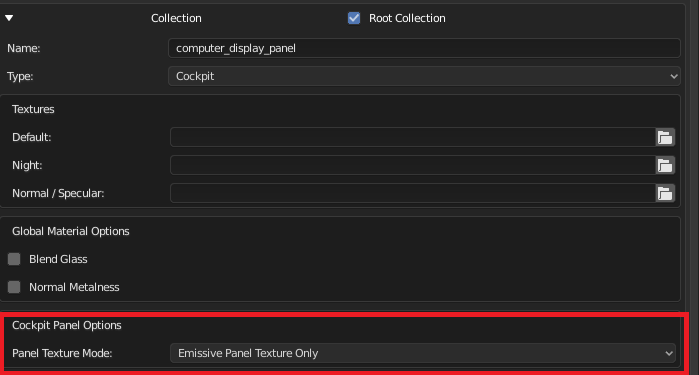
#595 Also known as ATTR_cockpit_lit_only, this directive has actually been in X-Plane since 11.10, but now is accessible in XPlane2Blender! It makes a panel only use the emissive "Lit" texture - a great speed boost if that is all you need. This is the perfect feature for computer displays.
For Aircraft or Cockpit export types, look in the Cockpit section for "Panel Mode". This changes the meaning of "Part of Cockpit Panel" for the whole OBJ. Setting it to "Emissive Panel Texture Only" mode activates the feature. You cannot mix panel modes.
Cockpit Regions
People who use Cockpit Regions will have to manually change "Panel Mode" from Default to Regions to see the UI and have regions export again. A one time fix. A future updater will do it for you. Until then I hope it isn't too many OBJs to change.
Updater Version History Synchronization
#471 The updater now synchronizes its last version across every scene and new updater functions will not use data cleaning to protect against accidental or purposeful updater re-runs. Simply put this means a safer to use XPlane2Blender (but still make backups). Since this is new updater code, however, it had to be put in an alpha. People with multiple scenes should be especially on the look out for problems. I feel very confident about it however.
With testers and users like the ones XPlane2Blender has we'll be getting to v4.1.0-rc.1 much much much much faster this time! For the users who requested moving Normal Metalness and Blend Glass, thank you for your patience. I know now just how annoying that error message was! I'll certainly keep this experience in mind for future decisions and don't worry, "make it the same across every material" is not going to be chosen again without an extremely important reason!