




This Python library provides functionalities to get cryptoCurrency prices and perform conversions between Iranian Toman (IRT) and USD, for all supported cryptocurrencies.
- Real-time cryptoCurrency price data retrieval .
- Support for multiple exchanges .
- Perform conversions between USD, IRT, and supported cryptocurrencies.
- Get the current price of metals ( Gold , Copper , Silver and ... ) .
- Get the current price of natural resources ( oil , gas and ... ) .
- Generate cryptoCurrency tables (requires
kaleidolibrary for table rendering). - Asynchronous data fetching .
- Customizable data formats .
- Save data to cache .
- Smart calculator
- Install the library using pip:
pip install YnExchangePY- Required:
kaleidolibrary for generating crypto tables ( Images )
pip install kaleido- Get Crypto Price :
# Import to your project :
from YN_Exchange import Exchange

# "Cache" Argument It is set to "False" by default
# "Cache_Duration" it is set to per second
ExchangeOBJ = Exchange.CryptoManager(Cache = True , Cache_Duration = 300) # Make object of CryptoManager

# "Currency" Argument supported Currency is : USD , IRT ( Default : USD )
# "Grouping" It is set to "False" by default
# Grouping ( False ) Output : 96000
# Grouping ( True ) Output : 96,000
BTC_Price = ExchangeOBJ.GetCryptoPrice(CryptoName = "BTC",Currency = "USD",Grouping = True) # Get crypto price
If the Cache is active, the information is received and displayed from the Cache until the Cache_Duration expires, and after the Cache expires, the information is received from the server again and stored in the Cache.
- Generate Crypto Charts :
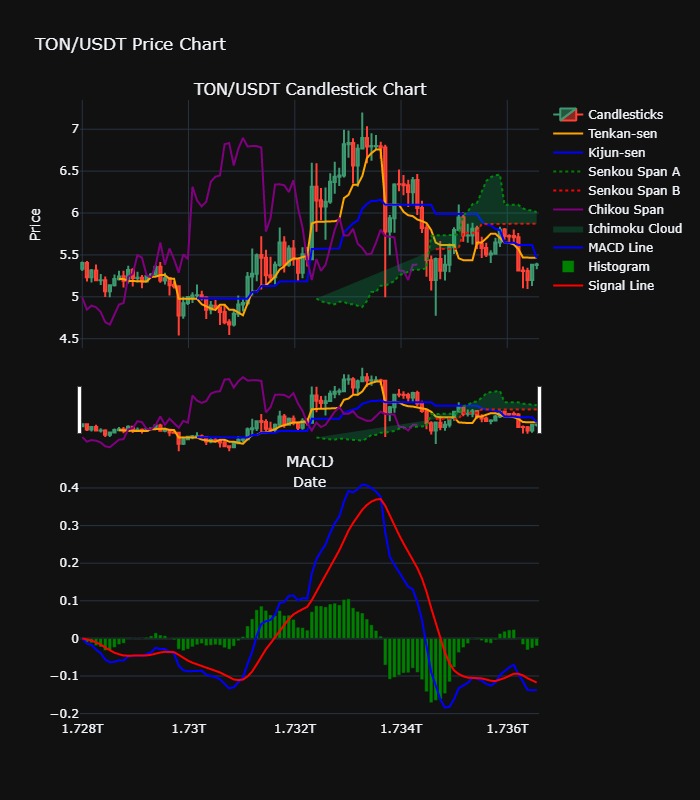
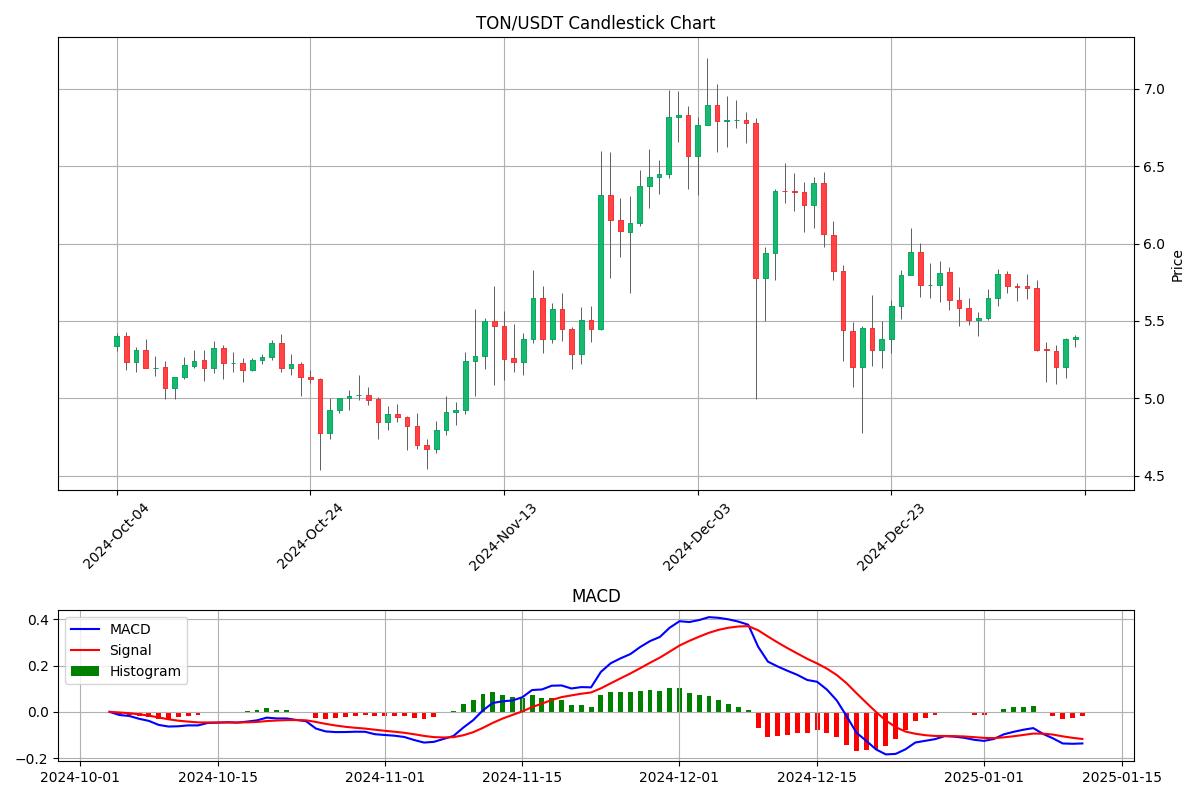
# Import to your project :
from YN_Exchange import Exchange

# "Cache" Argument It is set to "False" by default
# "Cache_Duration" it is set to per second
# Cache not active for charts
ExchangeOBJ = Exchange.CryptoManager(Cache = True , Cache_Duration = 300) # Make object of CryptoManager

# Generate chart
# For save chart as image definitely install kaleido
# You can edit argument for edit your chart for example, if you set the histogram argument to "False", the histograms will be removed from the chart.
ExchangeOBJ.GenerateCryptoChart(CryptoSymbol = "TON/USDT)
You can edit argument for edit your chart for example, if you set the histogram argument to "False", the histograms will be removed from the chart.
For save chart as image definitely install kaleido ( Click )
ImageSave : bool = TrueHTML_Save : bool = FalseJson_Save : bool = FalseChartTemplate : str = "Professional"Exchange : str = "binance"CryptoSymbol : str = "BTC/USDT"Limit : int = 100Timeframe = '1d'IchimokuLine : bool = TrueIchimokuCloud : bool = TrueCandlesticks : bool = TrueChikou : bool = TrueTenkan : bool = TrueKijun : bool = TrueMACD_Line : bool = TrueSignalLine : bool = TrueHistogram : bool = True
You can customize your charts with arguments
- Get Price :
# Import to your project :
from YN_Exchange import Exchange

# "Cache" Argument It is set to "False" by default
# "Cache_Duration" it is set to per second
MetalsOBJ = Exchange.MetalManager(Cache = True , Cache_Duration = 300) # Make object of MetalManager

GoldPrice = MetalsOBJ.GetGoldPrice(Carat=24,Grouping=True)
You will see the rest of the functions of this class
GetPlatinumPrice(Grouping : bool = "False")Ounce per USDGetSilverPrice(Grouping : bool = "False")Ounce per USDGetPalladiumPrice(Grouping : bool = "False")Ounce per USDGetTinPrice(Grouping : bool = "False")Tonne per USDGetZincPrice(Grouping : bool = "False")Tonne per USDGetNickelPrice(Grouping : bool = "False")Tonne per USDGetLeadPrice(Grouping : bool = "False")Tonne per USDGetCopperPrice(Grouping : bool = "False")Pound per USDGetAluminiumPrice(Grouping : bool = "False")Tonne per USDGetGoldPrice(Grouping : bool = "False",carat : int = 18,weight : str = "gram")Weight : [kilo,gram,ounce] and Only IRT Price
- Get Price :
# Import to your project :
from YN_Exchange import Exchange

# "Cache" Argument It is set to "False" by default
# "Cache_Duration" it is set to per second
NaturalOBJ = Exchange.NaturalResourcesManager(Cache = True , Cache_Duration = 300) # Make object of NaturalResourcesManager

BrentOil = NaturalOBJ.GetBrentOil(Grouping = True)
OilWTI = NaturalOBJ.GetCrudeOilWTI(Grouping = True)
NaturalGas = NaturalOBJ.GetNaturalGas(Grouping = True)GetCrudeOilWTIBarrel per USDGetBrentOilBarrel per USDGetNaturalGasMmbtu per USD
You can use this functions in Calculator() class
- Example usage code :
# Import to your project :
from YN_Exchange import Exchange

CalculatorOBJ = Exchange.Calculator() # Make object of Calculator

Result = CalculatorOBJ.CryptoValue2Currency(CryptoName="BTC",Currency="USD",Grouping = True)CryptoValue2Currency(Value: int, CryptoName: str = "BTC", Currency: str = "USD", Grouping: bool = False)Currency2CryptoValue(Value: int, CryptoName: str = "BTC", Currency: str = "USD", Grouping: bool = False)CryptoValue2CryptoValue(CryptoValue: int, CryptoName1: str = "BTC", CryptoName2: str = "ETH", Grouping: bool = False)CryptoValue2GoldWeight(GoldCarat: int = 18, GoldWeight: str = "gram", CryptoName: str = "BTC")GoldWeight2CryptoValue(GoldCarat: int = 18, GoldWeight: str = "gram", GoldValue: int = 1, CryptoName: str = "BTC")GoldWeight2Currency(GoldCarat: int = 18, GoldWeight: str = "gram", GoldValue: int = 1, Currency: str = "USD")Currency2GoldWeight(GoldCarat: int = 18, GoldWeight: str = "gram", CurrencyValue : int = 5000000)
A class to receive digital currency information from APIs of world's most prestigious exchanges
- Example usage code :
# Import to your project :
from YN_Exchange import Exchange

ExchangeOBJ = Exchange.ExchangeAPI(Exchange = "binance") # Make object of ExchangeAPI

BTC = ExchangeOBJ.GetCryptoData(CryptoSymbol = "BTC/USDT")- Output
{'symbol': 'BTC/USDT', 'timestamp': 1736598300337, 'datetime': '2025-01-11T12:25:00.337Z', 'high': 95836.0, 'low': 92206.02, 'bid': 94613.99, 'bidVolume': 5.67459, 'ask': 94614.0, 'askVolume': 0.35323, 'vwap': 94125.84165815, 'open': 94805.6, 'close': 94614.0, 'last': 94614.0, 'previousClose': 94805.6, 'change': -191.6, 'percentage': -0.202, 'average': 94709.8, 'baseVolume': 25125.20063, 'quoteVolume': 2364930656.128506, 'markPrice': None, 'indexPrice': None, 'info': {'symbol': 'BTCUSDT', 'priceChange': '-191.60000000', 'priceChangePercent': '-0.202', 'weightedAvgPrice': '94125.84165815', 'prevClosePrice': '94805.60000000', 'lastPrice': '94614.00000000', 'lastQty': '0.03192000', 'bidPrice': '94613.99000000', 'bidQty': '5.67459000', 'askPrice': '94614.00000000', 'askQty': '0.35323000', 'openPrice': '94805.60000000', 'highPrice': '95836.00000000', 'lowPrice': '92206.02000000', 'volume': '25125.20063000', 'quoteVolume': '2364930656.12850630', 'openTime': '1736511900337', 'closeTime': '1736598300337', 'firstId': '4392795366', 'lastId': '4396948127', 'count': '4152762'}}All the classes in the library have the "clear_cache" function, which you can use to clear the cache of that class.
Caches are saved as json files on your computer
For usage Async version you must import AsyncExchange module
And for usage you can use asyncio.run() function
- Example Usage :
# Import to your project :
from YN_Exchange import AsyncExchange
import asyncio

# The use of all async functions is the same as the main functions :
ExchangeOBJ = AsyncExchange.AsyncCryptoManager(Cache = True , Cache_Duration = 300)

CryptoPrice = asyncio.run(ExchangeOBJ.GetCryptoPrice(CryptoName = "BTC",Currency = "USD",Grouping = True))
To use functions, you can easily use them by adding the word "async" to the first of the main functions.
- TON , USDT Wallet ( Tonkeeper ) :
UQCZgyJ4XB7c1GMnLgefqcc-zOA98hyOlMLZpO0EsCNxBq-e - BTC Wallet :
bc1qpgzy8hpklpp0zwan5ha4lfzavvtjf286w0tlzc - ETH Wallet :
0xE95FAEc8B847F18B3bC5dc1bB8256fb376d2e459 - TRX Wallet :
TG8MpYtysGngjK7tPdCATLqLJKwm5vbfYi