This project implements a foundational backend template using Django REST Framework, integrating Google OAuth 2.0 API Authentication and a secure Data Entry & Retrieval API, suitable for an Order Management System framework.
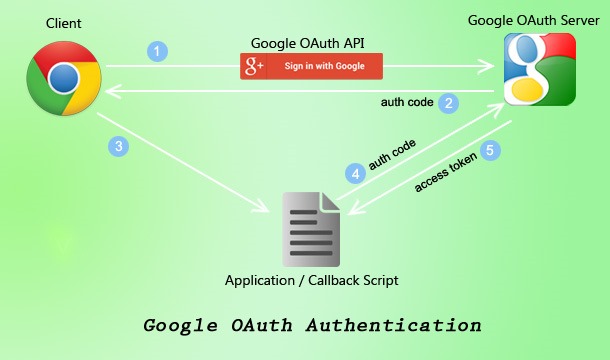
- Google OAuth 2.0 API Authentication: Secure user authentication using Google's OAuth 2.0. Users can log in and Access the data using the obtain token
- Access and Refresh Tokens: The authentication process handles obtaining these tokens.
djangorestframework.authtokenis integrated to provide unique API tokens for authenticated users. - Data Entry API: Provides a
POSTendpoint to add structured data (e.g.,title,description) to the database, automatically associating the data with the authenticated user. - Data Retrieval API: Offers a
GETendpoint to fetch data. This endpoint is protected and automatically filters results to show only data relevant to the authenticated user. It also supports filtering bytitleusing a query parameter. - Robust Database: defaults to SQLite for local development or use PostgreSQL for production environments
- Secure Handling of Sensitive Keys: All sensitive credentials are managed via environment variables using
python-dotenv.
- Python 3.8+
- Python package installer
- Git
-
Clone the repository:
git clone https://github.com/Yuvraj-1107-ML/Ywork_Assignment.git
-
Create a Python virtual environment (highly recommended):
python -m venv venv
venv/Scripts/activate or venv/Scripts/activate.bat
-
Install project dependencies:
pip install -r requirements.txt
-
Set up Environment Variables:
- Create a
.envfile in the root directory of the project . - Add the following variables, replacing the placeholders with your actual credentials:
GOOGLE_OAUTH_CLIENT_ID=your_google_cloud_client_id_here GOOGLE_OAUTH_CLIENT_SECRET=your_google_cloud_client_secret_here - Google OAuth Credentials:
-
Go to Google Cloud Console.
-
Navigate to "APIs & Services" > "Credentials".
-
Click "Create Credentials" > "OAuth client ID" > "Web application".
-
Add your local development redirect URI under "Authorized redirect URIs":
https://oauth.pstmn.io/v1/callback -
Your Client ID and Client Secret will be displayed; use these for
GOOGLE_OAUTH_CLIENT_IDandGOOGLE_OAUTH_CLIENT_SECRET.
-
- Create a
-
Run Database Migrations:
python manage.py makemigrations
python manage.py migrate
-
Create a Django Superuser (for Django Admin access):
python manage.py createsuperuser
(Note: ADD SOME DATA INTO THE DB)
python manage.py runserver-
HOW TO RUN THE API :
-
Get Access token using Authorization in postman choose Auth 2.0 and fill the required fields hit the post request for the Authentication
-
Required fields URL :
- Auth URL :
https://accounts.google.com/o/oauth2/auth - Token URL :
https://accounts.google.com/o/oauth2/token
- Auth URL :
-
After getting the access token hit GET and POST request:
- POST :
http://localhost:8000/api/items/ - GET :
http://localhost:8000/api/items/list - filter :
http://localhost:8000/api/items/list/?title=titlefilter
- POST :
-
Ensure that you are Using Access token in the header to Fetch and Post the data otherwise it will respond Unathorized Access
-