A Node.js-based tool for generating individual sprite sheets for Aavegotchi NFTs by compositing multiple trait layers based on their attributes. This project includes both the generation engine and a web-based viewer for browsing the generated sprites.
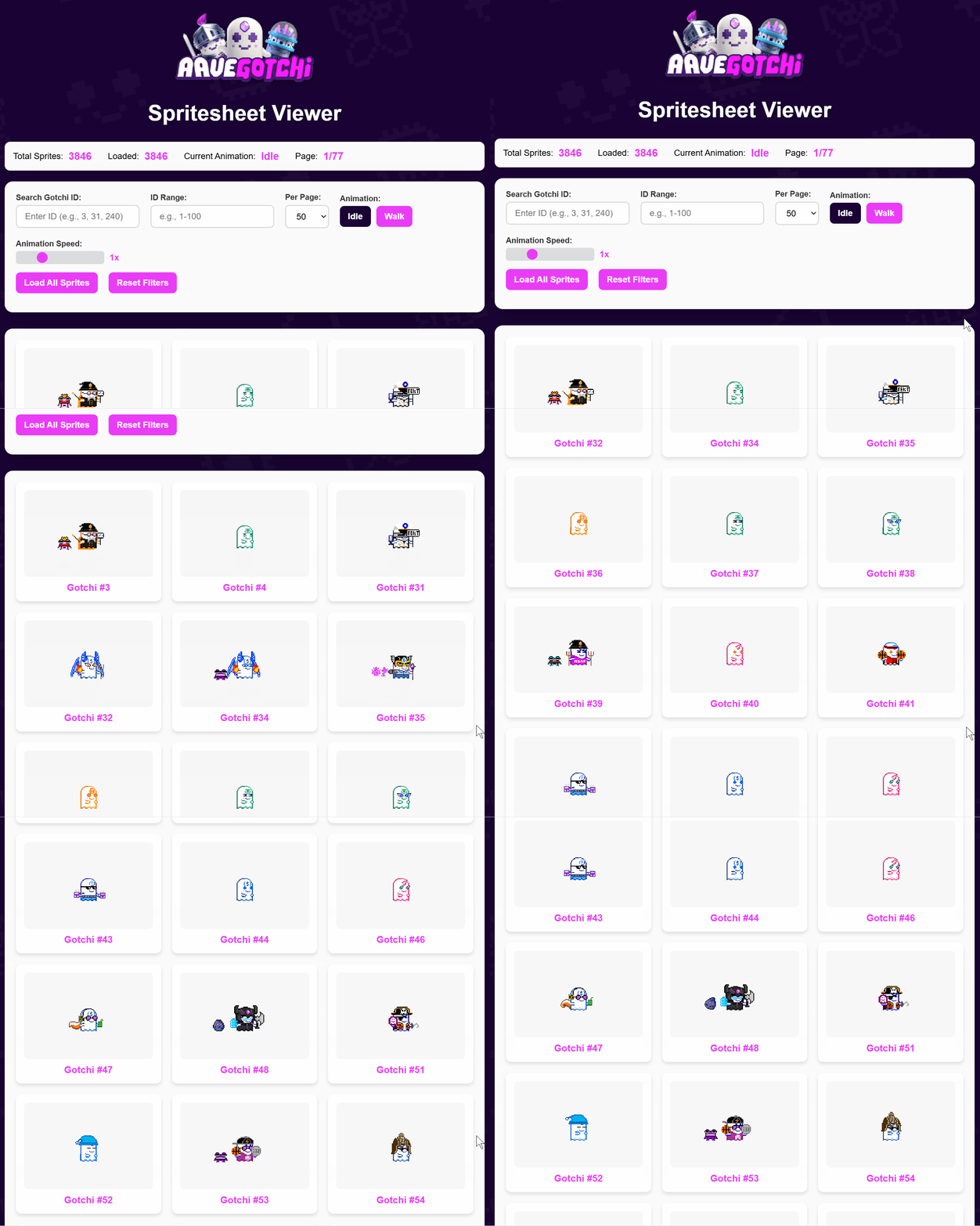

- Automated Sprite Generation: Creates composite sprites by layering individual trait images
- Batch Processing: Process thousands of Aavegotchis efficiently with parallel processing
- Configuration-Driven: Uses JSON configuration to map traits to sprite folders and layers
- Web Viewer: Interactive HTML viewer with animation controls and filtering
- Error Handling: Comprehensive logging of missing layers and failed generations
- Flexible Input: Support for processing specific IDs, ranges, or entire collections
gotchi-generator/
├── generate_spritesheets.js    # Main generation script
├── config.json                 # Trait-to-folder mapping configuration
├── package.json               # Node.js dependencies and scripts
├── processedAavegotchis.json  # Input data files with Aavegotchi attributes
├── Trait Files/               # Source sprite assets organized by trait
│   └── Sprites/
│       ├── meleebody/         # Melee body type sprites
│       ├── meleegunbody/      # Melee gun body type sprites
│       ├── punchbody/         # Punch body type sprites
│       ├── punchgunbody/      # Punch gun body type sprites
│       └── wandbody/          # Wand body type sprites
├── website/                   # Web viewer
│   ├── viewer.html           # Main viewer interface
│   ├── viewer.js             # Viewer functionality
│   ├── viewer.css            # Styling
│   └── spritesheets/         # Generated sprite output directory
└── unneeded/                 # Development utilities and archived files
- Node.js (v18 or higher)
- npm
- Clone or download this repository
- Install dependencies:
npm install
npm install gotchi-generatorIf your repository uses pnpm or a pnpm workspace layout (presence of pnpm-lock.yaml and node_modules/.pnpm):
# At the workspace root
corepack enable
pnpm add -w gotchi-generator

# Or add to a specific package only
pnpm -F <package-name> add gotchi-generator
Using npm inside a pnpm-managed workspace can cause npm to crash with an internal Arborist error like:
TypeError: Cannot read properties of null (reading 'matches')
If you must use npm in such a workspace, either install from a leaf package directory (not the workspace root) or use the nested strategy:
# from the package directory
npm install gotchi-generator --install-strategy=nested
Package details: gotchi-generator on npm
When installed from npm, the package includes the sprite assets under Trait Files/ and the default config.json.
To resolve the package base path programmatically:
import { getPackageBasePath } from "gotchi-generator";

const basePath = getPackageBasePath();
// basePath points to the package root where `Trait Files/` and `config.json` live
You can then pass basePath to generateSpritesheet:
const result = await generateSpritesheet(gotchi, config, basePath, "./output");Use these steps when writing code that imports the package:
- Import APIs and resolve the package base path
import fs from "node:fs";
import path from "node:path";
import {
  generateSpritesheet,
  getPackageBasePath,
  type Gotchi,
  type Config,
} from "gotchi-generator";

const basePath = getPackageBasePath(); // has "Trait Files/" and "config.json"- Load the default config shipped with the package
const configPath = path.join(basePath, "config.json");
const config: Config = JSON.parse(fs.readFileSync(configPath, "utf8"));- Provide a gotchi object and generate a single spritesheet
const gotchi: Gotchi = {
  id: 3,
  collateral: "aDAI",
  attributes: [
    { trait_type: "Base Body", value: "aDAI" },
    { trait_type: "Eye Shape", value: "uncommon_high_3" },
    { trait_type: "Eye Color", value: "rare_high" },
    { trait_type: "Wearable (Body)", value: "Witchy Cloak" },
  ],
};

const { success, error, details } = await generateSpritesheet(
  gotchi,
  config,
  basePath,
  "./output",
  false
);- Batch generation with basic concurrency
async function generateBatch(
  gotchis: Gotchi[],
  config: Config,
  outDir: string
) {
  const concurrency = 10;
  for (let i = 0; i < gotchis.length; i += concurrency) {
    const slice = gotchis.slice(i, i + concurrency);
    const results = await Promise.all(
      slice.map((g) => generateSpritesheet(g, config, basePath, outDir))
    );
    // optional: inspect results for missing layers via result.details?.missingImages
  }
}
Notes for AI:
- Always pass
basePathfromgetPackageBasePath()so the generator can findTrait Files/. - Do not run in the browser.
sharpand filesystem access require Node.js (server-side only). - When using Next.js, call the generator in server code (API route, route handler, or server action), not in a Client Component.
- Avoid importing JSON via ESM assertions for portability; prefer
fs.readFileSync(path.join(basePath, "config.json"))as shown.
ESM:
import {
  generateSpritesheet,
  type Gotchi,
  type Config,
} from "gotchi-generator";

// example usage inside your Node project
async function run(gotchi: Gotchi, config: Config) {
  const result = await generateSpritesheet(
    gotchi,
    config,
    ".", // base path where `Trait Files/` lives
    "./output", // output folder for generated PNGs
    false // verbose
  );
  console.log(result);
}
CommonJS:
const { generateSpritesheet } = require("gotchi-generator");Generate sprites for all Aavegotchis in a JSON file:
npm run generate "processedAavegotchis.json"Quick test (process 5 gotchis to validate your setup):
npm run generate -- "processedAavegotchis.json" --limit 5 --batch 5 --verbose# Process only the first 100 Aavegotchis
npm run generate -- "processedAavegotchis.json" --limit 100
# Process specific IDs
npm run generate -- "processedAavegotchis.json" --ids 1,2,3,100
# Start from a specific index (useful for resuming)
npm run generate -- "processedAavegotchis.json" --start 500
# Adjust batch size for performance (default: 10)
npm run generate -- "processedAavegotchis.json" --batch 20
# Enable verbose logging to see layer details
npm run generate -- "processedAavegotchis.json" --verboseThe generator now runs via TypeScript using tsx:
# Generate sprites
npm run generate -- "processedAavegotchis.json"The generator expects JSON files containing Aavegotchi data in the following format:
[
  {
    "id": 3,
    "collateral": "aDAI",
    "attributes": [
      {
        "trait_type": "Base Body",
        "value": "aDAI"
      },
      {
        "trait_type": "Eye Shape",
        "value": "uncommon_high_3"
      },
      {
        "trait_type": "Eye Color",
        "value": "rare_high"
      },
      {
        "trait_type": "Wearable (Body)",
        "value": "Witchy Cloak"
      }
    ]
  }
]The config.json file maps Aavegotchi traits to sprite folders and defines rendering rules. It includes:
- Conditional Logic: Different sprite configurations based on trait combinations
- Layer Mapping: Associates trait types with sprite folder paths
- Rendering Order: Defines the layering sequence for proper sprite composition
Sprites are composited in this fixed order (critical for proper rendering):
- Base Body
- Eye Shape
- Eye Color
- Wearable (Body)
- Wearable (Face)
- Wearable (Eyes)
- Wearable (Head)
- Wearable (Hands) L (Left hand)
- Wearable (Hands) R (Right hand)
- Wearable (Pet)
Generated sprites are saved as PNG files in website/spritesheets/ with filenames matching the Aavegotchi ID (e.g., 1234.png).
The generator creates detailed logs:
- failed_gotchis.json: Aavegotchis that couldn't be processed
- missing_layers.json: Summary of missing sprite assets
- Console output with progress and statistics
The included web viewer (website/viewer.html) provides:
- Grid Display: Browse generated sprites in a paginated grid
- Animation Controls: Switch between idle and walk animations
- Search & Filter: Find specific Aavegotchis by ID or range
- Performance Options: Adjust items per page and animation speed
- Modal View: Click sprites for detailed view
To use the viewer:
- Generate sprites using the main script
- Open
website/viewer.htmlin a web browser - The viewer will automatically load sprites from the
spritesheets/folder
Optional (recommended): serve the website/ folder locally for best results:
# Using Node
npx serve website

# Or using Python 3
python3 -m http.server 8080 -d website- Phaser: see
examples/phaser.md - React + Phaser: see
examples/react.md
- sharp: High-performance image processing for PNG composition
- fs/path: Node.js built-in modules for file system operations
- Parallel processing with configurable batch sizes
- Efficient image buffering and composition
- Progress tracking for large collections
- Memory-optimized for processing thousands of sprites
- Graceful handling of missing sprite files
- Detailed error logging and recovery
- Validation of input data and configuration
- Comprehensive progress reporting
- Missing Dependencies: Run
npm installto install required packages - Missing Sprite Files: Check the
missing_layers.jsonoutput for details - Memory Issues: Reduce batch size with
--batchparameter - Configuration Errors: Verify
config.jsonformat and trait mappings
- Use
--batchparameter to optimize for your system's memory - Process in chunks using
--startand--limitfor very large collections - Monitor the
missing_layers.jsonto identify incomplete sprite sets
elitebr33d
MIT License
Copyright (c) 2025 elitebr33d
Permission is hereby granted, free of charge, to any person obtaining a copy of this software and associated documentation files (the "Software"), to deal in the Software without restriction, including without limitation the rights to use, copy, modify, merge, publish, distribute, sublicense, and/or sell copies of the Software, and to permit persons to whom the Software is furnished to do so, subject to the following conditions:
The above copyright notice and this permission notice shall be included in all copies or substantial portions of the Software.
THE SOFTWARE IS PROVIDED "AS IS", WITHOUT WARRANTY OF ANY KIND, EXPRESS OR IMPLIED, INCLUDING BUT NOT LIMITED TO THE WARRANTIES OF MERCHANTABILITY, FITNESS FOR A PARTICULAR PURPOSE AND NONINFRINGEMENT. IN NO EVENT SHALL THE AUTHORS OR COPYRIGHT HOLDERS BE LIABLE FOR ANY CLAIM, DAMAGES OR OTHER LIABILITY, WHETHER IN AN ACTION OF CONTRACT, TORT OR OTHERWISE, ARISING FROM, OUT OF OR IN CONNECTION WITH THE SOFTWARE OR THE USE OR OTHER DEALINGS IN THE SOFTWARE.
Note: Aavegotchi assets and trademarks belong to their respective owners.
When modifying the generator:
- Test with a small subset using
--limitfirst - Verify layer order changes don't break sprite composition
- Update configuration mappings when adding new traits
- Test the web viewer after generation changes
Generated sprites are composite images created from individual trait layers. The quality and completeness depend on the availability of source sprite assets in the Trait Files/ directory.