Video
The Pocket is very particular about how you provide video information. As such, this is likely to be your first stumbling block.
-
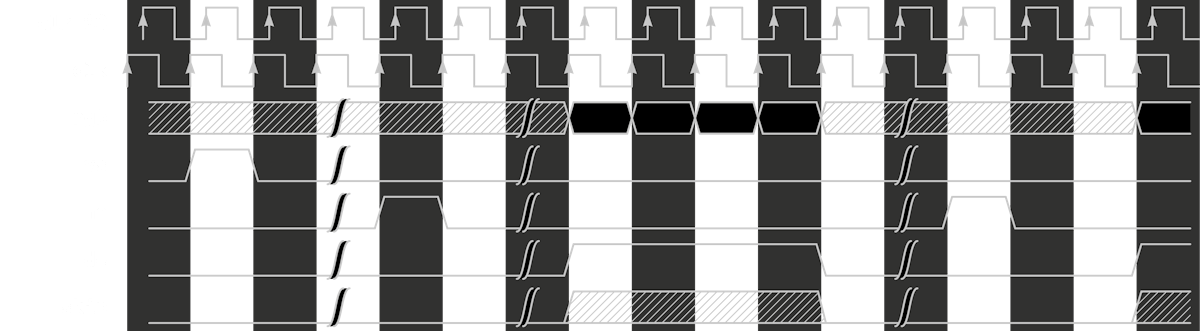
vsyncandhsyncmust take exactly one cycle -
hsyncmust come at least 3 cycles aftervsync -
video_deshould be high only for the pixels you have specified invideo.json(unless you're usingvideo_skipas well). Any extra pixels may produce garbled video (though not always) -
vidout_rgbshould be set to 0 whenvideo_deis not asserted. The 24-bit value preceeding the first clock in the frame withvideo_deasserted and the value following the last clock withvideo_deasserted are both used to configure the scaler. Not zeroing outvideout_rgbcan have unexpected results
| Spec | Value |
|---|---|
| Resolution | 16 x 16 up to 800 x 720 pixels |
| Refresh Rate | 47 Hz up to ~62 Hz |
| Internal Color Format | 24-bit RGB8881 |
| Pixel Clock | 1MHz to ~50MHz |
1: Neither the Pocket internal display nor the Dock displays full 24-bit color. The internal display outputs RGB565 color, and the Dock outputs 21-bit color
Visit https://tomverbeure.github.io/video_timings_calculator and enter your desired horizontal and vertical pixel counts. These numbers should help you determine what clock speed you want to use.
The APF scaler requires two clocks, your main video clock, and an additional clock of the same frequency but 90 degrees out of phase with the main clock (most likely you will not use this clock yourself). However you determine your pixel clock, make sure:
- the resulting time for each frame is between 47 and 61hz
- your image size is between 16x16 and 800x720 pixels
Note that smaller resolutions (in my case 128x64) may produce some unusual scaling results that drop pixels to provide a nice scaling. If this is not desirable, try integer scaling the video yourself and positioning it on the screen (see my Arduboy port).
- The video clock of the original hardware is not necessarily what you want for APF
- APF wants exactly one clock per pixel
- Given you are likely not clocking your core off of the APF video clock, regardless of what clock you provide to APF, the
vsyncandhsynctiming will remain constant- Specifically, there is a fixed number of
hsyncfor every frame (eachvsync), this is the number of rows of lines, and is your vertical resolution that you should set invideo.json
- Specifically, there is a fixed number of
- Therefore, your pixel clock should be chosen to provide exactly the right number of clocks per pixel in the horizontal, while providing ~60Hz per
vsync
APF does not require accurate blanking times, and in fact should be able to consume pixels immediately after hsync goes low. However, for clarity of how video works in general, CRT (and therefore standard video signal) blanking works as follows:

Image from Stack Exchange
-
vblankperiod- Front porch - We've stopped drawing lines, about to move to the top of the screen
-
vsync- We're about to start drawing this frame - Back porch - Period the electron beam is moving back to the top of the screen. Additionally, the electron beam may begin to draw lines, but these are likely to be black (or garbage) and off of the top of the screen
- Frame content:
hblankto follow
-
hblankperiod- Front porch - We've stopped drawing this scanline, and we're about to move to the next one
-
hsync- We're about to start drawing this scanline - Back porch - Period the electron beam is moving back to the left of the screen after drawing a scanline
- Scanline begins:
hblankto follow - After all scanlines, we once again enter
vblank

Image from Designing Video Game Hardware in Verilog by Hugg
Make sure you have first verified that you followed Important Checks above.
- You do not need accurate porch alignment. Once the requirements of
vsyncandhsyncare met, you can throw pixels up whenever. In fact, you don't need a porch at all, and can output pixels immediately afterhsync- This doesn't mean you won't get "glitchy" video (pixels don't fit on the screen, pixels overrun the screen and cause the columns to be messed up, no video at all), but you will get a green Sync indicator with Statistics turned on in Tools
- You do not need accurate
video.json. As above, this will just mean misaligned pixels - If you have the appropriate hardware, inspect the sync signals coming out of the core with SignalTap
- Some older arcade cores actually have
vsynccome in the middle of anhsyncsignal. As of writing (firmware 1.1-beta-3) this can hard crash the scaler, to the point that no core will produce video. If you suspect this occurs, you must fully restart your Pocket before video will work again
- Some older arcade cores actually have