


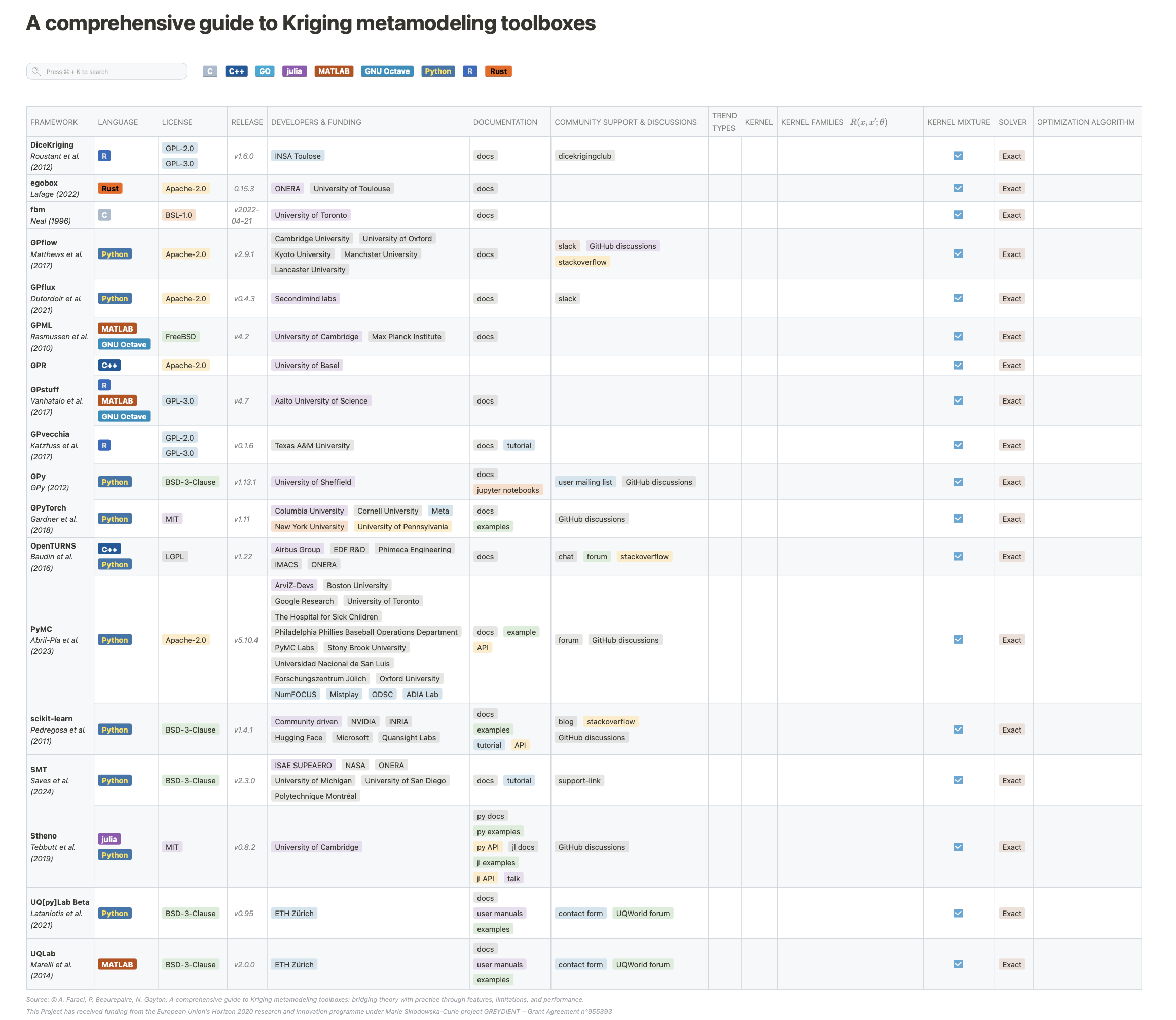
GPhub offers an interactive guide to Gaussian Process (GP) libraries. This project is built using Hugo Framework, GO Template, HTML, CSS, and JS. The guide features a comprehensive dynamic table to provide an easy-to-use and intuitive reference for exploring the GP libraries available to the data science community. Whether new to GP or experienced in the field, the table simplifies the process of selecting the ideal GP tool that best suits one's needs.
The table is available by opening the Table.html file on a web browser of your choice.
Contributions to GPhub are warmly welcomed. There are several ways you can contribute:
- Improving the Guide: Help us enhance the content and accuracy of our guide. This includes updating library information, adding new GP tools, and refining our descriptions to make them more helpful.
- Technical Enhancements: Contribute to the development of the site by improving its design, enhancing the functionality of the dynamic table, or fixing bugs.
- Feedback and Suggestions: Share your insights on how we can improve GPhub. We're always looking for feedback on the usability of the guide, new features that could be added, or any other suggestions you might have.
- Fork the Repository: Start by forking the GPhub repository on GitHub. This allows you to make changes without affecting the main project.
- Create a Pull Request: Once you've made your changes, submit a pull request. Be sure to provide a detailed description of your contributions and why they are beneficial to the project.
- Code Review: After submission, your pull request will be reviewed by the project maintainers. This process ensures that contributions align with the project's standards and goals.
- Integration: Once approved, your contributions will be merged into the project, becoming a part of the GPhub guide.
To add a new library to the table, you need to create a new PackageName.yaml entry in the gphub/data/libraries directory by running:
cd gphub
make -f new_library name=PackageName
This will gerate a new file using this base YAML template:
PackageID: PackageName
Library:
  - Name: PackageName
    URL: null
    Reference:
      - Author: null
        URL: null
Language:
  - null
License:
  - Name: null
    URL: null
Repository:
  - Name: null
    URL: null
Version:
  - Name: null
    URL: null
Developer:
  - Tag: null
    Name: null
    URL: null
Docs:
  - Name: null
    URL: null
Support:
  - Name: null
    URL: null
Framework:
  - null
GPU: false
Models:
  - Types:
      - Tag: null
        Name: null
    URL: null
Complexity:
  - null
Trend:
  - Types:
      - Tag: null
        Name: null
    URL: null
LengthScale:
  - null
Correlation:
  - Types:
      - Tag: null
        Name: null
    URL: null
Mixture: false
MixtureModels:
  - Types:
      - Tag: null
        Name: null
    URL: null
Likelihood:
  - Types:
      - Tag: null
        Name: null
    URL: null
    Nugget:
      - Tag: null
        Name: null
    Noise:
      - Tag: null
        Name: null
EstimationMethods:
  - Types:
      - Tag: null
        Name: null
    URL: null
OptimizationMethods:
  - Types:
      - Tag: null
        Name: null
URL: nullModify the ./gphub/data/libraries/PackageName.yaml file.
Refer to Hugo website for details on how to install Hugo.
brew install hugopip install requests beautifulsoup4 lxml pyyaml richbrew install prettierYou can start your local server via hugo by executing:
cd gphub
hugo serve -D
The table is served at http://localhost:1313
You can fetch the version data of the libraries by running:
cd gphub
make -f fetch_versionsYou can generate a static file Table.html by running:
make -f table_htmlThis project has received funding from the European Union’s Horizon 2020 research and innovation programme under the Marie Sklodowska-Curie grant agreement No. 955393.
Licensed under the MIT license.