
OpenFaaS provider for containerd - single node / edge workloads
What's the use-case?
OpenFaaS providers can be built for any backend, even for an in-memory datastore. Some users could benefit from a lightweight, single-node execution environment. Using containerd and bypassing Kubernetes or Docker should reduce the start-time for functions and allow for running in resource-constrained environments.
Pros:
- Fast cold-start
- containerd features available such as pause/snapshot
- Super lightweight
- Basic service-discovery and inter-service communication through /etc/hosts and bridge
Cons:
- No clustering (yet)
Proof of concept.
This project implements the faas-provider SDK.

faas-provider conceptual architecture
See other examples:
Goals:
- Deploy container specified via
PUTto/system/functions - Serve HTTP traffic from deployed container via
/function/NAME - List running containers via GET on
/system/functions - Clean-up containers on exit
- Give configuration for running faas-containerd / OpenFaaS gateway and Prometheus via systemd unit files or similar
faas-containerd is now part of the faasd project, which adds additional orchestration to bring the whole OpenFaaS experience and ecosystem to containerd.
See my tutorial on how to get started with faasd. It is written for RPi users, but faasd is designed to be portable and also runs on x86_64 and ARM64:
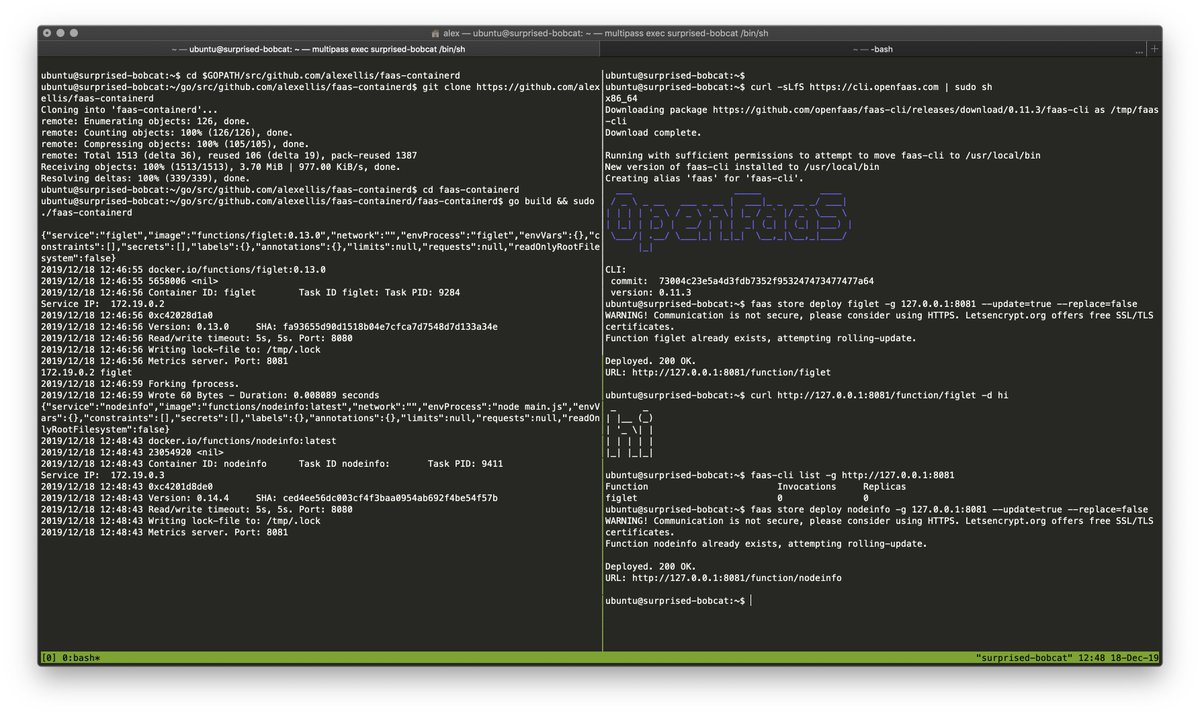
You need a Linux computer, VM, or bare-metal cloud host.
I used Ubuntu 18.04 LTS on Packet.com using the c1.small.x86 host. You can use multipass.run to get an Ubuntu host on any OS - Windows, MacOS, or Linux.
sudo apt update && \
  sudo apt install -qy runc \
  	bridge-utils \
	tmux git \
  	build-essential \
libbtrfs-dev libseccomp-devcurl -SLsf https://dl.google.com/go/go1.12.14.linux-amd64.tar.gz > go.tgz
sudo rm -rf /usr/local/go/
sudo mkdir -p /usr/local/go/
sudo tar -xvf go.tgz -C /usr/local/go/ --strip-components=1
export GOPATH=$HOME/go/
export PATH=$PATH:/usr/local/go/bin/
go versioncurl -SLsf https://dl.google.com/go/go1.12.14.linux-armv6l.tar.gz > go.tgz
sudo rm -rf /usr/local/go/
sudo mkdir -p /usr/local/go/
sudo tar -xvf go.tgz -C /usr/local/go/ --strip-components=1
export GOPATH=$HOME/go/
export PATH=$PATH:/usr/local/go/bin/
go version- Install containerd (or build from source)
Note: This can only be run on x86_64
export VER=1.3.2
curl -sLSf https://github.com/containerd/containerd/releases/download/v$VER/containerd-$VER.linux-amd64.tar.gz > /tmp/containerd.tar.gz \
  && sudo tar -xvf /tmp/containerd.tar.gz -C /usr/local/bin/ --strip-components=1

containerd -version- Or clone / build / install containerd from source:
export GOPATH=$HOME/go/
mkdir -p $GOPATH/src/github.com/containerd
cd $GOPATH/src/github.com/containerd
git clone https://github.com/containerd/containerd
cd containerd
git fetch origin --tags
git checkout v1.3.2

make
sudo make install

containerd --version
Kill any old containerd version:
# Kill any old version
sudo killall containerd
sudo systemctl disable containerd
Start containerd in a new terminal:
sudo containerd &Install the CNI plugins like this:
export CNI_VERSION=v0.8.2
- For PC run
export ARCH=amd64 - For RPi/armhf run
export ARCH=arm - For arm64 run
export ARCH=arm64
Then run:
mkdir -p /opt/cni/bin
curl -sSL https://github.com/containernetworking/plugins/releases/download/${CNI_VERSION}/cni-plugins-linux-${ARCH}-${CNI_VERSION}.tgz | tar -xz -C /opt/cni/bin
Check it worked:
/opt/cni/bin/bridge --help

CNI bridge plugin v0.8.2
This is required to allow containers in containerd to access the Internet via your computer's primary network interface.
sudo /sbin/sysctl -w net.ipv4.conf.all.forwarding=1Make the setting permanent:
echo "net.ipv4.conf.all.forwarding=1" | sudo tee -a /etc/sysctl.conf-
Get a binary
 # For x86_64
 sudo curl -fSLs "https://github.com/alexellis/faas-containerd/releases/download/0.4.0/faas-containerd" \
   -o "/usr/local/bin/faas-containerd" \
   && sudo chmod a+x "/usr/local/bin/faas-containerd"

 # armhf
 sudo curl -fSLs "https://github.com/alexellis/faas-containerd/releases/download/0.4.0/faas-containerd-armhf" \
   -o "/usr/local/bin/faas-containerd" \
   && sudo chmod a+x "/usr/local/bin/faas-containerd"

 # arm64
 sudo curl -fSLs "https://github.com/alexellis/faas-containerd/releases/download/0.4.0/faas-containerd-arm64" \
   -o "/usr/local/bin/faas-containerd" \
   && sudo chmod a+x "/usr/local/bin/faas-containerd"

 # run faas-containerd
 sudo service_timeout=1m ./faas-containerd
-
Or build from source
 export GOPATH=$HOME/go/

 mkdir -p $GOPATH/src/github.com/alexellis/faas-containerd
 cd $GOPATH/src/github.com/alexellis/faas-containerd
 git clone https://github.com/alexellis/faas-containerd
 cd faas-containerd

 go build && sudo service_timeout=1m ./faas-containerd
Listens on port TCP/8081
Get the OpenFaaS CLI:
curl -sLfS https://cli.openfaas.com | sudo shDeploy a function with a server
faas store deploy figlet -g 127.0.0.1:8081 --update=true --replace=falseDeploy a ping function with a server
faas-cli deploy --image alexellis2/ping:0.1 \
  -g 127.0.0.1:8081 --update=true --replace=false --name ping
Deploy nodeinfo function with a server
faas-cli store deploy nodeinfo \
  -g 127.0.0.1:8081 --update=true --replace=false
Try to list functions:
faas-cli list -g 127.0.0.1:8081Get a function's status:
faas-cli describe nodeinfo -g 127.0.0.1:8081Try to invoke a function:
echo "-c 1 8.8.8.8" | faas-cli invoke ping -g 127.0.0.1:8081

echo "verbose" | faas-cli invoke nodeinfo -g 127.0.0.1:8081
List containers with ctr:
sudo ctr --namespace openfaas-fn container listDelete container, snapshot and task:
sudo ctr --namespace openfaas-fn task kill figlet
sudo ctr --namespace openfaas-fn task delete figlet
sudo ctr --namespace openfaas-fn container delete figlet
sudo ctr --namespace openfaas-fn snapshot remove figlet-snapshotBasic auth requires three things: a username file, a password file, and an env variable.
First, create the username and password, make sure to pick a secure password for production deployments:
echo admin >> basic-auth-user
echo localdev >> basic-auth-password
Then set the basic_auth and secret_mount_path env variables when starting faas-containerd:
service_timeout=1m basic_auth=true secret_mount_path=`pwd` sudo ./bin/faas-containerdThe default value for secret_mount_path is /run/secrets/.
Once it is running, you can quickly verify that auth is being enforced by using the CLI:
$ faas-cli list -g 127.0.0.1:8081
Unauthorized access, run "faas-cli login" to setup authentication for this server
Now login:
cat basic-auth-password | faas-cli login -g 127.0.0.1:8081 --tls-no-verify -u admin --password-stdinYou can now deploy and invoke a function as before:
faas-cli deploy --image alexellis2/ping:0.1 \
  -g 127.0.0.1:8081 --update=true --replace=false --name ping
echo "-c 1 8.8.8.8" | faas-cli invoke ping -g 127.0.0.1:8081
The auth is saved in ~/.openfaas/config.yml.
MIT