
This is an Android Library for showing AlertDialog with little customization with title, colors, custom loading, icon. Example is available in app module.
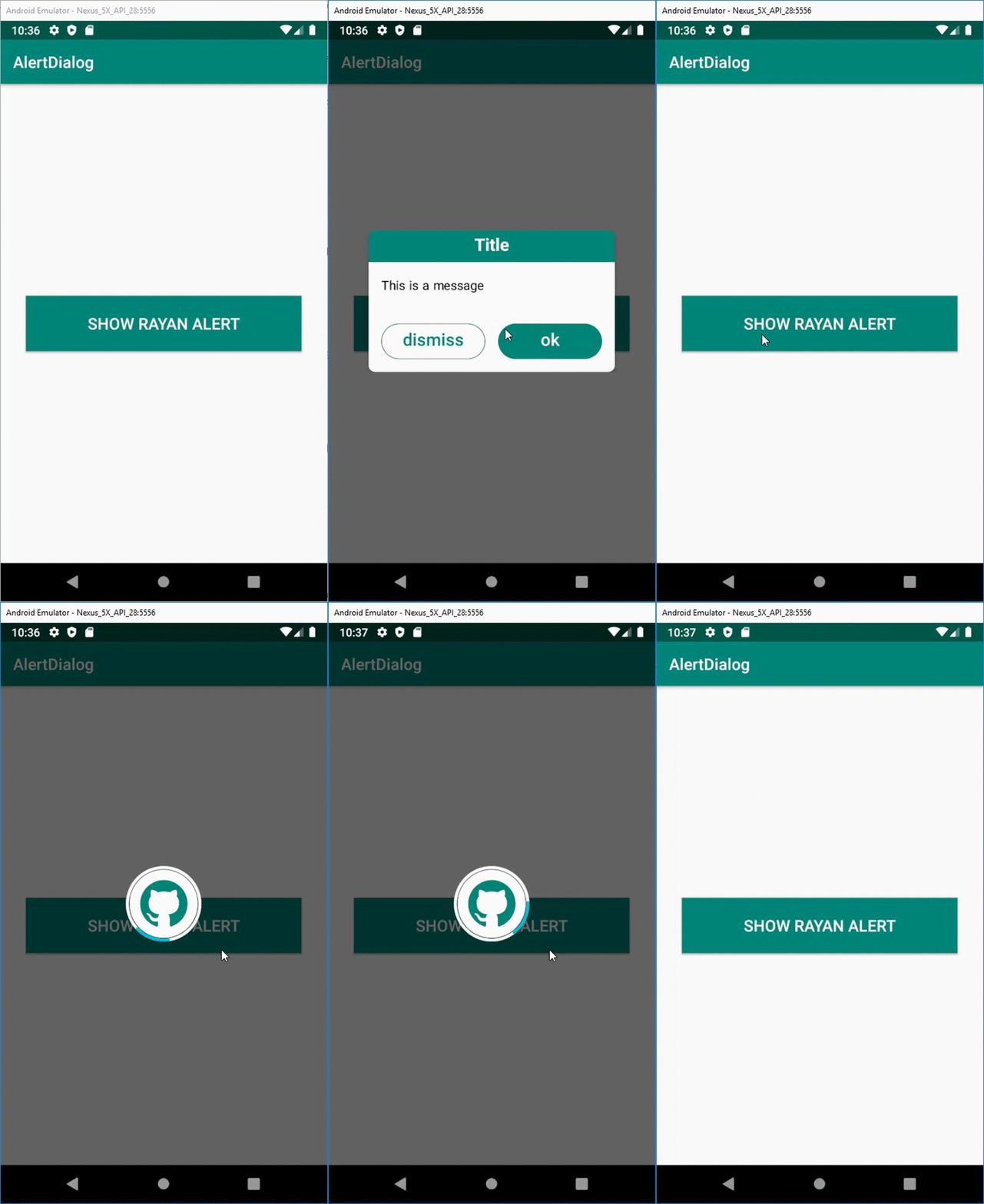

- Add the following to your project level build.gradle:
allprojects {
	repositories {
		...
		maven { url "https://jitpack.io" }
	}
}- Add this to your app build.gradle:
dependencies {

	implementation 'com.github.amirrajabzadeh:Rayan-AlertDialog:1.0.0'

}Create Builder Pattern for default Dialog.
- Default Dialog has "Title" as dialog title, "Content Description" as content, "Yes" & "No" buttons.
RayanAlert alert = new RayanAlert(this);

alert
	.show(new RayanAlert.OnClickListener() {
	     @Override
	     public void onPositiveButtonClick() {

	     }
});- Add Title
.setTitle(String title)
RayanAlert alert = new RayanAlert(this);

alert
	.setTitle("Title")
	.show(new RayanAlert.OnClickListener() {
	     @Override
	     public void onPositiveButtonClick() {

	     }
});- Set Color Title
.setColorTitle(int color)
RayanAlert alert = new RayanAlert(this);

alert
	.setTitle("Title")
	.setColorTitle(Color.WHITE)
	.show(new RayanAlert.OnClickListener() {
	     @Override
	     public void onPositiveButtonClick() {

	     }
});- Set Title Background Color
.setTitleBackground(int color)
RayanAlert alert = new RayanAlert(this);

alert
	.setTitle("Title")
	.setColorTitle(Color.WHITE)
	.setTitleBackground(Color.GREEN)
	.show(new RayanAlert.OnClickListener() {
	     @Override
	     public void onPositiveButtonClick() {

	     }
});- Add Message
.setMessage(String title)
RayanAlert alert = new RayanAlert(this);

alert
	.setTitle("Title")
	.setColorTitle(Color.WHITE)
	.setTitleBackground(Color.GREEN)
	.setMessage("Message")
	.show(new RayanAlert.OnClickListener() {
	     @Override
	     public void onPositiveButtonClick() {

	     }
});- Set Message Color
.setColorMessage(int color)
RayanAlert alert = new RayanAlert(this);

alert
	.setTitle("Title")
	.setColorTitle(Color.WHITE)
	.setTitleBackground(Color.GREEN)
	.setMessage("Message")
	.setColorMessage(Color.BLUE)
	.show(new RayanAlert.OnClickListener() {
	     @Override
	     public void onPositiveButtonClick() {

	     }
});- Show Loading
.showLoading(boolean isShow)
RayanAlert alert = new RayanAlert(this);

alert
	.setTitle("Title")
	.setMessage("Message")
	.showLoading(true)
	.show(new RayanAlert.OnClickListener() {
	     @Override
	     public void onPositiveButtonClick() {

	     }
});- Set Image Loading
.setImageLoading(Drawable image)
RayanAlert alert = new RayanAlert(this);

alert
	.setTitle("Title")
	.setMessage("Message")
	.showLoading(true)
	.setImageLoading(getResources().getDrawable(R.drawable.ic_github))
	.show(new RayanAlert.OnClickListener() {
	     @Override
	     public void onPositiveButtonClick() {

	     }
});- Set Layout Direction
.setLayoutDirection(int layoutDirection)
RayanAlert alert = new RayanAlert(this);

alert
	.setTitle("Title")
	.setColorTitle(Color.WHITE)
	.setTitleBackground(Color.GREEN)
	.setMessage("Message")
	.setColorMessage(Color.BLUE)
	.setImageLoading(getResources().getDrawable(R.drawable.ic_github))
	.setLayoutDirection(LayoutDirection.LTR)
	.show(new RayanAlert.OnClickListener() {
	     @Override
	     public void onPositiveButtonClick() {

	     }
});- Positive Button
.setTextPositiveButton(String s).setBackgroundPositiveButton(int color).setFocusBackgroundColorPositiveButton(int color).setBorderColorPositiveButton(int color).setBorderWidthPositiveButton(int width).setTextColorPositiveButton(int color)
RayanAlert alert = new RayanAlert(this);

alert
	.setTitle("Title")
	.setMessage("Message")
	.setTextPositiveButton("Yes")
	.setBackgroundPositiveButton(Color.BLUE)
	.setFocusBackgroundColorPositiveButton(Color.GREEN)
	.setBorderColorPositiveButton(Color.YELLOW)
	.setBorderWidthPositiveButton(10)
	.setTextColorPositiveButton(Color.WHITE)
	.show(new RayanAlert.OnClickListener() {
	     @Override
	     public void onPositiveButtonClick() {

	     }
});- Negative Button
.setTextNegativeButton(String s).setBackgroundNegativeButton(int color).setFocusBackgroundColorNegativeButton(int color).setBorderColorNegativeButton(int color).setBorderWidthNegativeButton(int width).setTextColorNegativeButton(int color)
RayanAlert alert = new RayanAlert(this);

alert
	.setTitle("Title")
	.setMessage("Message")
	.setTextNegativeButton("Yes")
	.setBackgroundNegativeButton(Color.BLUE)
	.setFocusBackgroundColorNegativeButton(Color.GREEN)
	.setBorderColorNegativeButton(Color.YELLOW)
	.setBorderWidthNegativeButton(10)
	.setTextColorNegativeButton(Color.WHITE)
	.show(new RayanAlert.OnClickListener() {
	     @Override
	     public void onPositiveButtonClick() {

	     }
});- Dialog Dismiss
RayanAlert alert = new RayanAlert(this);

alert.dismiss();