











kwx is a toolkit for multilingual keyword extraction based on Google's BERT, Latent Dirichlet Allocation and Term Frequency Inverse Document Frequency. The package provides a suite of methods to process texts of any language to varying degrees and then extract and analyze keywords from the created corpus (see kwx.languages for the various degrees of language support). A unique focus is allowing users to decide which words to not include in outputs, thereby guaranteeing sensible results that are in line with user intuitions.
For a thorough overview of the process and techniques see the Google slides, and reference the documentation for explanations of the models and visualization methods.
kwx is available for installation via uv (recommended) or pip.
# Using uv (recommended - fast, Rust-based installer):
uv pip install kwx

# Or using pip:
pip install kwxgit clone https://github.com/andrewtavis/kwx.git
cd kwx
# With uv (recommended):
uv sync --all-extras # install all dependencies
source .venv/bin/activate # activate venv (macOS/Linux)
# .venv\Scripts\activate # activate venv (Windows)
# Or with pip:
python -m venv .venv # create virtual environment
source .venv/bin/activate # activate venv (macOS/Linux)
# .venv\Scripts\activate # activate venv (Windows)
pip install -e .import kwxImplemented NLP modeling methods within kwx.model include:
Bidirectional Encoder Representations from Transformers derives representations of words based on nlp models ran over open-source Wikipedia data. These representations are then leveraged to derive corpus topics.
kwx uses sentence-transformers pretrained models. See their GitHub and documentation for the available models.
Latent Dirichlet Allocation is a generative statistical model that allows sets of observations to be explained by unobserved groups that explain why some parts of the data are similar. In the case of kwx, documents or text entries are posited to be a mixture of a given number of topics, and the presence of each word in a text body comes from its relation to these derived topics.
Although not as computationally robust as some machine learning models, LDA provides quick results that are suitable for many applications. Specifically for keyword extraction, in most settings the results are similar to those of BERT in a fraction of the time.
The user can also compute Term Frequency Inverse Document Frequency keywords - those that are unique in a text body in comparison to another that's compared. This is a useful baseline when a user has another text or text body to compare the target corpus against.
Finally a user can simply query the most common words from a text corpus. This method is used in kwx as a baseline to check model efficacy.
Keyword extraction can be useful to analyze surveys, tweets and other kinds of social media posts, research papers, and further classes of texts. examples/kw_extraction provides an example of how to use kwx by deriving keywords from tweets in the Kaggle Twitter US Airline Sentiment dataset.
The following outlines using kwx to derive keywords from a text corpus with prompt_remove_words as True (the user will be asked if some of the extracted words need to be replaced):
from kwx.utils import prepare_data

input_language = "english" # see kwx.languages for options

# kwx.utils.clean() can be used on a list of lists.
text_corpus = prepare_data(
    data="df_or_csv_xlsx_path",
    target_cols="cols_where_texts_are",
    input_language=input_language,
    min_token_freq=0,  # for BERT
    min_token_len=0,  # for BERT
    remove_stopwords=False,  # for BERT
    verbose=True,
)from kwx.model import extract_kws
num_keywords = 15
num_topics = 10
ignore_words = ["words", "user", "knows", "they", "don't", "want"]
# Remove n-grams for BERT training.
corpus_no_ngrams = [
" ".join([t for t in text.split(" ") if "_" not in t]) for text in text_corpus
]
# We can pass keywords for sentence_transformers.SentenceTransformer.encode,
# gensim.models.ldamulticore.LdaMulticore, or sklearn.feature_extraction.text.TfidfVectorizer
bert_kws = extract_kws(
method="BERT", # "BERT", "LDA", "TFIDF", "frequency"
bert_st_model="xlm-r-bert-base-nli-stsb-mean-tokens",
text_corpus=corpus_no_ngrams, # automatically tokenized if using LDA
input_language=input_language,
output_language=None, # allows the output to be translated
num_keywords=num_keywords,
num_topics=num_topics,
corpuses_to_compare=None, # for TFIDF
ignore_words=ignore_words,
prompt_remove_words=True, # check words with user
show_progress_bar=True,
batch_size=32,
)The BERT keywords are:
['time', 'flight', 'plane', 'southwestair', 'ticket', 'cancel', 'united', 'baggage',
'love', 'virginamerica', 'service', 'customer', 'delay', 'late', 'hour']
Should words be removed [y/n]? y
Type or copy word(s) to be removed: southwestair, united, virginamerica
The new BERT keywords are:
['late', 'baggage', 'service', 'flight', 'time', 'love', 'book', 'customer',
'response', 'hold', 'hour', 'cancel', 'cancelled_flighted', 'delay', 'plane']
Should words be removed [y/n]? n
The model will be rerun until all words known to be unreasonable are removed for a suitable output. kwx.model.gen_files could also be used as a run-all function that produces a directory with a keyword text file and visuals (for experienced users wanting quick results).
kwx.visuals includes the following functions for presenting and analyzing the results of keyword extraction:
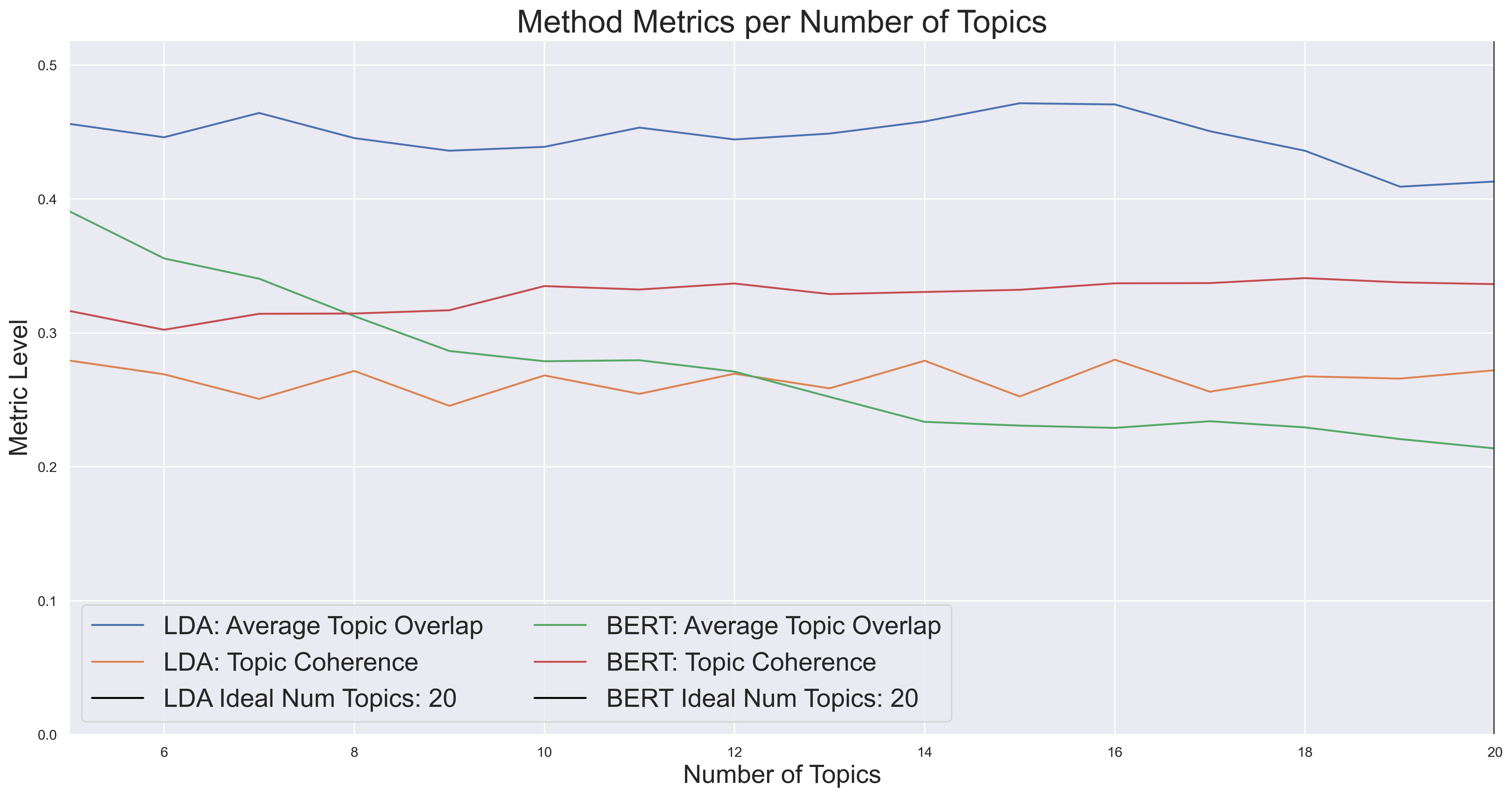
A graph of topic coherence and overlap given a variable number of topics to derive keywords from.
from kwx.visuals import graph_topic_num_evals
import matplotlib.pyplot as plt

graph_topic_num_evals(
    method=["lda", "bert"],
    text_corpus=text_corpus,
    num_keywords=num_keywords,
    topic_nums_to_compare=list(range(5, 15)),
    metrics=True, #  stability and coherence
)
plt.show()
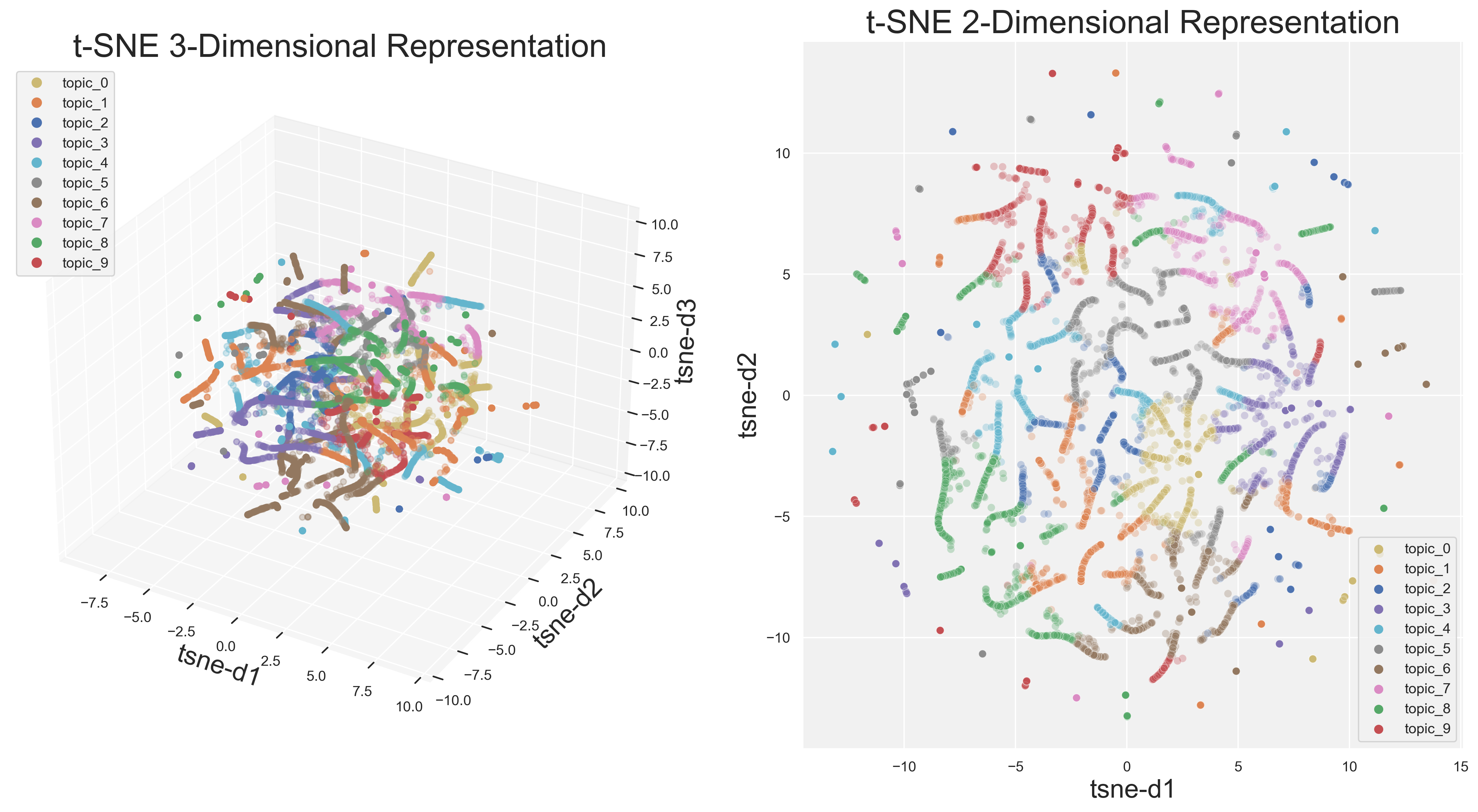
t-SNE allows the user to visualize their topic distribution in both two and three dimensions. Currently available just for LDA, this technique provides another check for model suitability.
from kwx.visuals import t_sne
import matplotlib.pyplot as plt

t_sne(
    dimension="both",  # 2d and 3d are options
    text_corpus=text_corpus,
    num_topics=10,
    remove_3d_outliers=True,
)
plt.show()
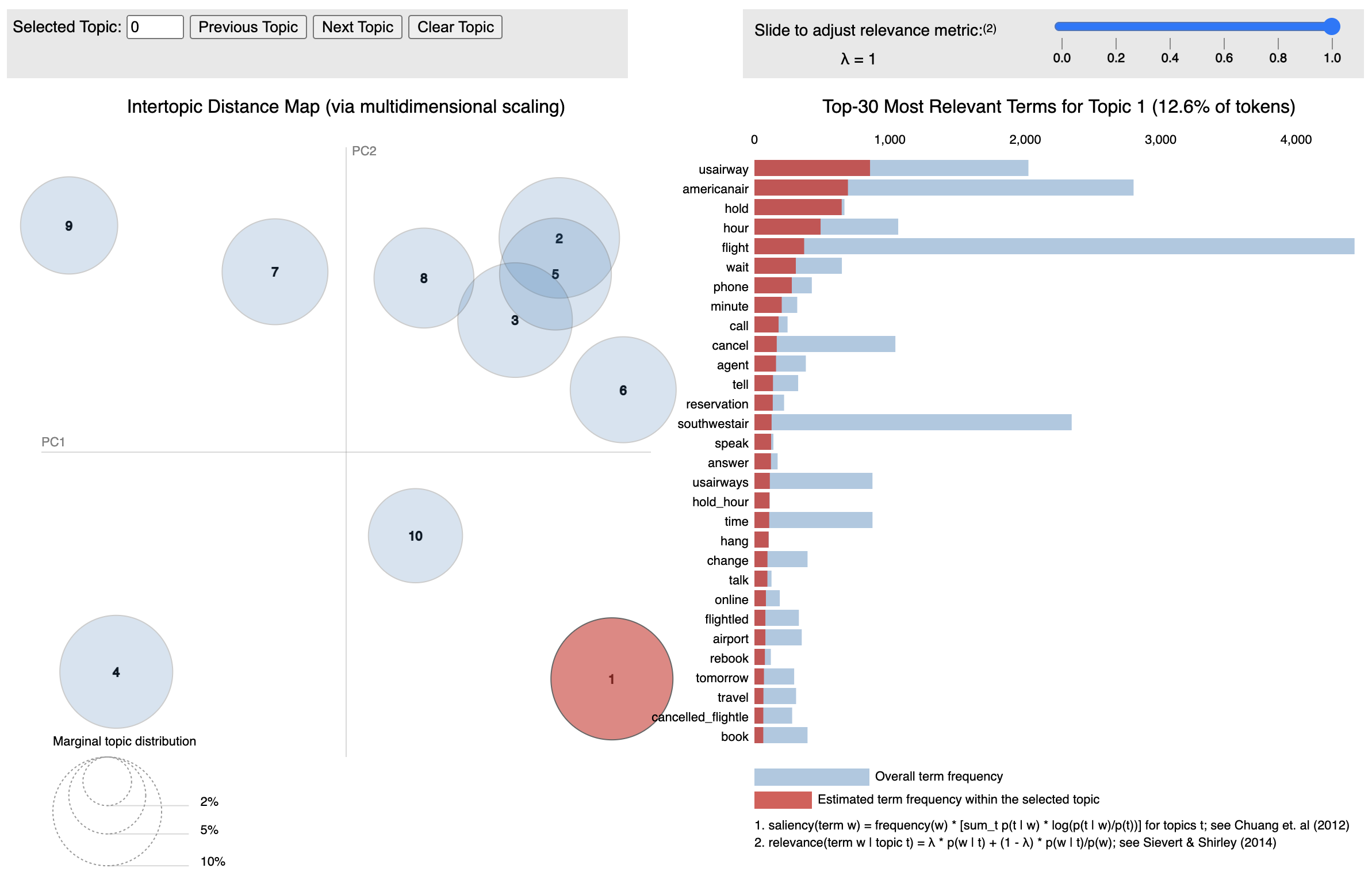
pyLDAvis is included so that users can inspect LDA extracted topics, and further so that it can easily be generated for output files.
from kwx.visuals import pyLDAvis_topics

pyLDAvis_topics(
    method="lda",
    text_corpus=text_corpus,
    num_topics=10,
    display_ipython=False,  # for Jupyter integration
)
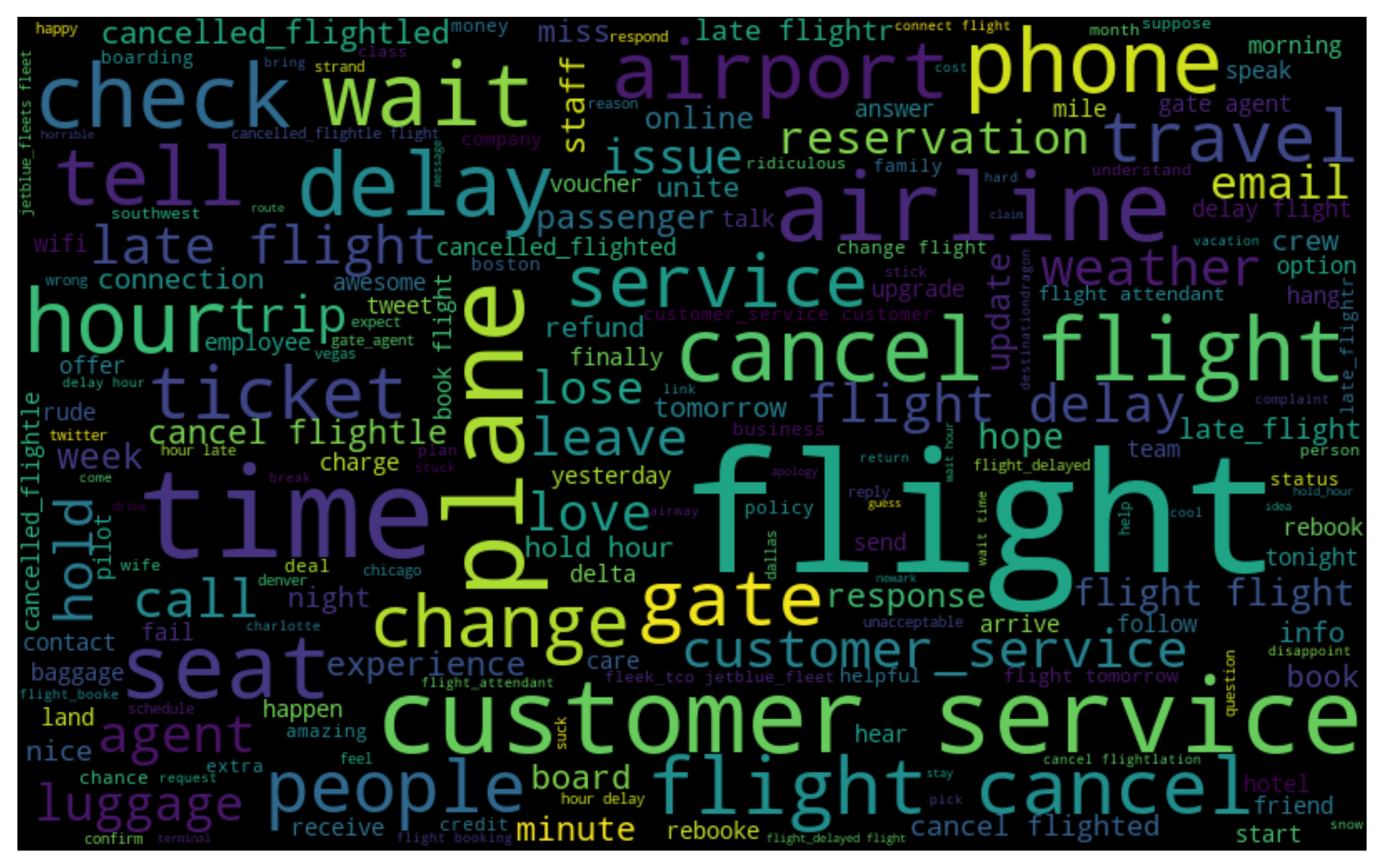
Word clouds via wordcloud are included for a basic representation of the text corpus - specifically being a way to convey basic visual information to potential stakeholders. The following figure from examples/kw_extraction shows a word cloud generated from tweets of US air carrier passengers:
from kwx.visuals import gen_word_cloud

ignore_words = ["words", "user", "knows", "they", "don't", "want"]

gen_word_cloud(
    text_corpus=text_corpus,
    ignore_words=None,
    height=500,
)
Please follow the steps below to set up your development environment for kwx contributions.
# Clone your fork of the repo into the current directory.
git clone https://github.com/<your-username>/kwx.git
# Navigate to the newly cloned directory.
cd kwx
# Assign the original repo to a remote called "upstream".
git remote add upstream https://github.com/andrewtavis/kwx.git- Now, if you run
git remote -vyou should see two remote repositories named:origin(forked repository)upstream(kwx repository)
Create a virtual environment for kwx (Python >=3.12), activate it and install dependencies.
Note
First, install uv if you don't already have it by following the official installation guide.
uv sync --all-extras  # create .venv and install all dependencies from uv.lock

# Unix or macOS:
source .venv/bin/activate

# Windows:
.venv\Scripts\activate.bat # .venv\Scripts\activate.ps1 (PowerShell)Download Anaconda if you don't have it installed already.
conda env create --file environment.yaml
conda activate kwx-dev
uv pip install -r <(uv export --format requirements-txt)  # install all dependencies from uv.lock
Note
If you change dependencies in pyproject.toml, regenerate the lock file with the following command:
uv lock # refresh uv.lock for reproducible installsAfter activating the virtual environment, set up prek for pre-commit hooks by running:
# In the project root:
prek install

# Then test the pre-commit hooks to see how it works:
uv run prek run --all-files
Note
If you are having issues with prek and want to send along your changes regardless, you can ignore the pre-commit hooks via the following:
git commit --no-verify -m "COMMIT_MESSAGE"Please see the contribution guidelines if you are interested in contributing to this project. Work that is in progress or could be implemented includes:
-
Including more methods to extract keywords (see issue)
-
Adding key phrase extraction as an option for kwx.model.extract_kws (see issues)
-
Adding t-SNE and pyLDAvis style visualizations for BERT models (see issues)
-
Converting the translation feature over to use another translation api rather than py-googletrans (see issue)
-
Updates to kwx.languages as lemmatization and other linguistic package dependencies evolve
-
Creating, improving and sharing examples
-
Improving tests for greater code coverage
-
Updating and refining the documentation