
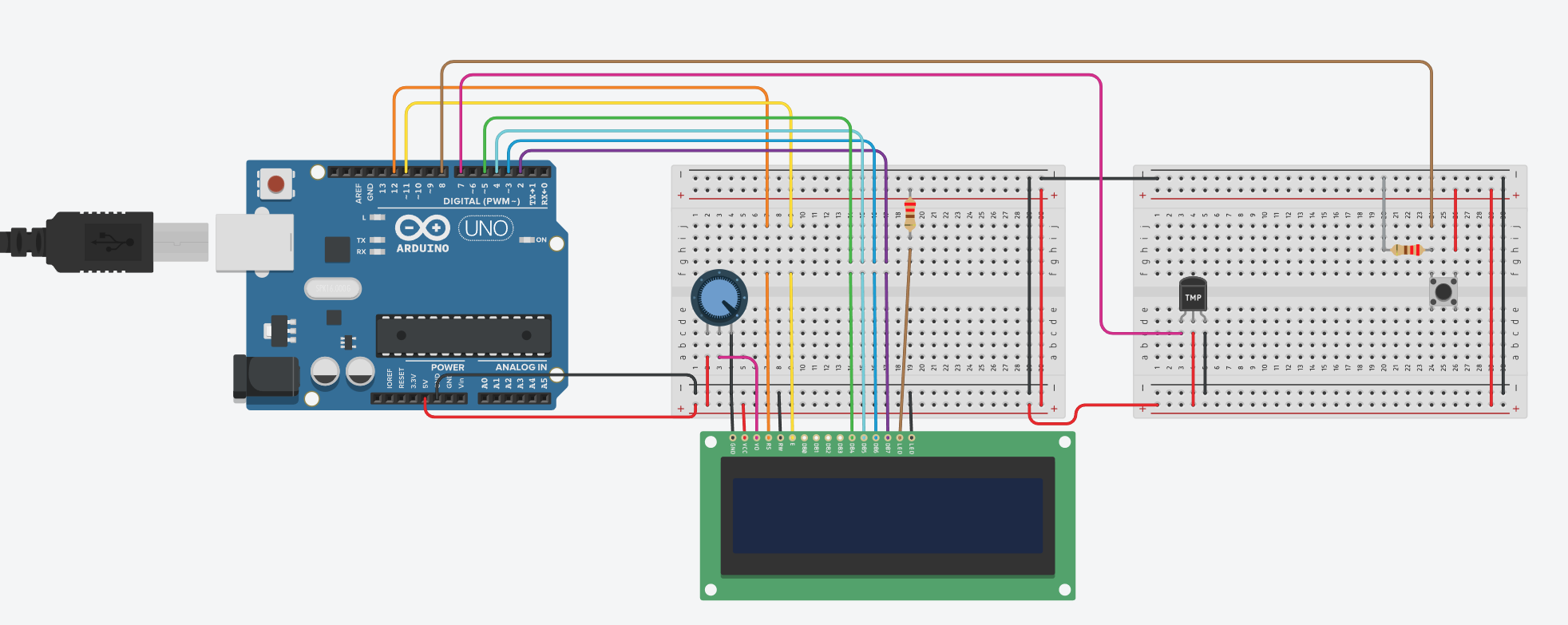
The goal of this project is to create a device that reads the current temperature of the room and saves it if a button is pressed. If the room temperature rises or falls by one degree, the device will output "Hotter" or "Colder," respectively.
First, make sure you have the required hardware components and have software dependencies downloaded.
- Download and install the Arduino IDE from here https://www.arduino.cc/en/software
- Clone this repository
- Open 530proj.ino in Arduino IDE
- Include the DHT library
- If already downloaded, go to Include Library > Add .ZIP Libary and select DHTlib.zip
- Alternatively, go to Include Library > Libary Manager and search for DHTLib (WARNING: not recommended
- Plug in Arduino and confirm that it communicates with the Serial
- Verify and Upload
- DHT Library (for temperature sensor)
- Arduino (battery or usb powered)
- Breadboard
- Wires
- 220 Ohm Resistor
- Button
- 16x2 LCD Screen
- DHT-11 Temperature/Humidity Sensor
- (optional, for lcd) Potentiometer
- Chase Knowland (Leader)
- Zi Wang
- Renan Hiramatsu