Cheat Sheet
Neodigm 55 Easy JavaScript Popups
Neodigm 55 is an eclectic JavaScript UX micro-library. The lightweight components come together in a unique way that will make your website playful, fun, and bounceproof.
This CheatSheet is like a cook-book of solutions to commonly asked questions. We try to keep this document up-to-date.
Neodigm 55 Popups are “declarative” and HTML first. That means that you simply add a tag to your existing HTML. No JavaScript required. You can use JavaScript if you want however it's not necessary.
Improve performance by overloading the setTimeout and setInterval with a multi-threaded implementation. This improves tasks that rely on the JS timer even while the tab no longer has the focus.
<script>
// Turn on Feature Flag
// Turn  on debugger to verify | neodigmOpt.N55_DEBUG_lOG = true
let neodigmOptCustom = {  neodigmWWInterval:true }
// Verify by neodigmToast.q("If this Toast goes away, it is working", "brand")
</script>
The ActIcon component (Action Icon) is a simple round icon that may be themed, disabled, and supports light / dark mode. They are useful for quick actions such as CRUD (Create, Read, Update, Delete) or page navigation (First, Next, Previous, Last). The experience is made discoverable when used in conjunction with tooltips (tulips).
<neodigm-acticon data-n55-theme="brand" data-n55-size="xsmall" data-n55-tulip="Search"><neodigm-icon class="material-symbols-outlined">search</neodigm-icon></neodigm-acticon>
Displays a temporal floating text tip in the proximity of an element when hovered (not on mobile) or when actuated via JavaScript (works on mobile). This behavior is triggered by the existence of the data-n55-tulip attribute. This attribute can contain simple text, like "hello world", or for advanced configuration a JSON string. Up to two lines of text are allowed, delimited by the pipe character "|". When opened declaratively the tulip is dismissed upon click, mouse exit, scroll, resize, or reorientate.
data-n55-tulip='{"msg":"Advanced Config","mrq":false,"tmpt":"","theme":"brand","size":"small","position":"top|right|bottom|left","icon":""}'
onclick="neodigmTulip.autoOpen('#js-tulip__auto--target')"
// Lifecycle Callback (optional ID specification)
neodigmTulip.setOnBeforeOpen( function(sMsg){ console.log(" | " + sMsg); }, "js-tulip__auto--target" )
<neodigm-juicebar role="progressbar" data-n55-theme="brand" data-n55-size="small"><div></div></neodigm-juicebar>
  _________          .___     __________
 /   _____/ ____   __| _/____ \______   \____ ______
 \_____  \ /  _ \ / __ |\__  \ |     ___/  _ \\____ \
 /        (  <_> ) /_/ | / __ \|    |  (  <_> )  |_> >
/_______  /\____/\____ |(____  /____|   \____/|   __/
        \/            \/     \/               |__|

! The Neodigm SodaPop Component (Popup) stays fixed when the page scrolls. It stays focused because the background is blurred. It sizes automatically to fit your content.| Attribute | Options | JavaScript | Comment |
|---|---|---|---|
| data-n55-sodapop-modal | true | false | NA | A modal dialog popup cannot be closed until the neodigmSodaPop.close() function is called. |
| data-n55-sodapop-size | xsmall | small | medium | large | NA | |
| data-n55-sodapop-fullscreen | true | false | NA | When this popup is opened the browser will become full-screen. |
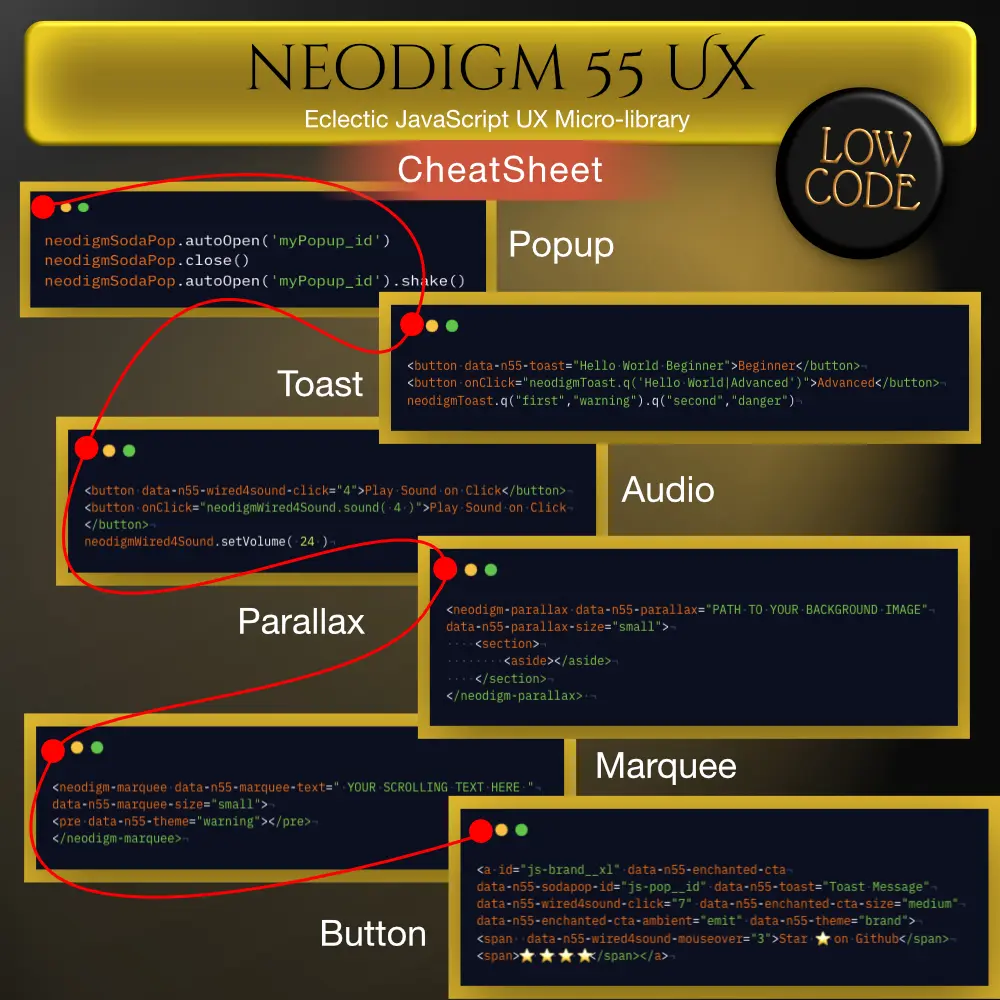
neodigmSodaPop.autoOpen('myPopup_id')
neodigmSodaPop.close()
  if (typeof neodigmSodaPop !== 'undefined') {
    // Small delay to ensure DOM is ready
    setTimeout(() => {
      neodigmSodaPop.setOnBeforeOpen(() => {
        console.log('SodaPop opening...')
        return true
      }, 'my-pop-id')
      .setOnAfterOpen(() => {
        console.log('SodaPop opened')
        return true
      }, 'my-pop-id')
      .setOnClose(() => {
        console.log('SodaPop closed')
        return true
      }, 'my-pop-id')

      // Open the popup
      console.log('Calling neodigmSodaPop.autoOpen...')
      neodigmSodaPop.autoOpen('my-pop-id')
    }, 50)
  } else {
    console.error('❌ neodigmSodaPop not available')
  }
neodigmSodaPop.shake()
neodigmSodaPop.autoOpen('myPopup_id').shake()
window.addEventListener('DOMContentLoaded', ( ev ) => {
    setTimeout(function(){
        if( neodigmSodaPop && neodigmMarquee ) neodigmSodaPop.setOnAfterOpen( function(){
            neodigmMetronome.init()
            neodigmMarquee.init()
        })
    }, 3200)
});
window.addEventListener('DOMContentLoaded', ( ev ) => {
    setTimeout(function(){
        if( neodigmSodaPop && neodigmMarquee ) neodigmSodaPop.setOnAfterOpen( function(){
            neodigmMetronome.init()
            neodigmMarquee.init()
        }, "myPopupId")
    }, 3200)
});  // Note the DEFAULT function will also fire (after this function)
window.addEventListener('DOMContentLoaded', (ev) => {
    setTimeout(function(){
        if( neodigmSodaPop && neodigmMarquee && neodigmEnchantedCTA ){
            neodigmSodaPop.setOnAfterOpen( function(){
                NeodigmClaire.showCanv('neodigm-sodapop').setTheme( ['brand','danger','info'] ).initCanvOn('neodigm-sodapop').waxOn('neodigm-sodapop')
            });
            neodigmSodaPop.setOnClose( function(){
                NeodigmClaire.showCanv('neodigm-sodapop').initCanvOff('neodigm-sodapop').waxOff('neodigm-sodapop')
            });
            neodigmSodaPop.setOnBeforeUserExit( function(){
                neodigmToast.q("Thanks for Vistiting|Bookmark, Star, and Install as PWA!", "info")
            } )
        }
    }, 3e3)
});
setTimeout(()=>{  //  autoOpen if in query string
    let autoOpenParm = new URLSearchParams( document.location.search )
    autoOpenParm = autoOpenParm.get("autoOpen")
    if( autoOpenParm && neodigmSodaPop ) {
        neodigmSodaPop.autoOpen( autoOpenParm )
        autoOpenParm = autoOpenParm + "_cb"  // Callback by append naming convention
        if(typeof window[ autoOpenParm ] === "function") neodigmSodaPop.setOnAfterOpen( window[ autoOpenParm ] )
    } // Note: Cannot open in fullscreen mode when opened via URL param
},876)
neodigmSodaPop.setOnAfterOpen( function(){
    neodigmSodaPop.tsOpen = Date.now()
    setInterval(function(){
        let nSecs = (Date.now() - neodigmSodaPop.tsOpen) / 1000
        let nMins = Math.floor( nSecs / 60 )
        let nMinSecs = Math.floor( nSecs - (nMins * 60) )
        let elFB = document.querySelector("#js-precache-h3-fb")
        neodigmSodaPop.tsOpenText = nMins + " min " + nMinSecs + " sec "
        if( elFB ) elFB.textContent = neodigmSodaPop.tsOpenText
    }, 1000)
})
   _____
  /     \ _____ _______  ________ __   ____   ____
 /  \ /  \\__  \\_  __ \/ ____/  |  \_/ __ \_/ __ \
/    Y    \/ __ \|  | \< <_|  |  |  /\  ___/\  ___/
\____|__  (____  /__|   \__   |____/  \___  >\___  >
        \/     \/          |__|           \/     \/

! The Marquee display is a powerful and distinct way to draw attention to important text.The Neodigm 55 Marquee component now supports inline text coloring using invisible Unicode markers, allowing portions of scrolling text to be dynamically styled with any of the 12 Neodigm theme colors.
Multi-color text in marquees is achieved through:
- Invisible Unicode character pairs that act as color delimiters
- CSS Highlight API for performant, real-time text styling
- Dynamic color application that persists as text scrolls in any direction
- Zero visual artifacts - markers are completely invisible to users
All 12 Neodigm theme colors are available:
-
brandprimarysecondarysuccessdangerwarning -
infonightmarcompartyghostdisabled
Use HTML entity codes to insert invisible marker pairs around text you want to color:
<neodigm-marquee
data-n55-marquee-text="Normal text ​brand colored‌ more ‍primary text‎ continues"
data-n55-marquee-colors='["brand","primary"]'>
<pre></pre>
</neodigm-marquee>
| Color | Start Entity | End Entity | Start (JS) | End (JS) |
|---|---|---|---|---|
| brand | ​ |
‌ |
\u200B |
\u200C |
| primary | ‍ |
‎ |
\u200D |
\u200E |
| danger |  |
⁠ |
\uFEFF |
\u2060 |
| secondary | ⁡ |
⁢ |
\u2061 |
\u2062 |
| success | ⁣ |
⁤ |
\u2063 |
\u2064 |
| warning |  |
 |
\u206A |
\u206B |
| info |  |
 |
\u206C |
\u206D |
| night |  |
 |
\u206E |
\u206F |
| marcom | ᠎ |
឴ |
\u180E |
\u17B4 |
| party | ឵ |

 |
\u17B5 |
\u2028 |
| ghost | 
 |
‪ |
\u2029 |
\u202A |
| disabled | ‫ |
‬ |
\u202B |
\u202C |
When generating marquee text dynamically in JavaScript, use escape sequences:
const marquee = document.querySelector('neodigm-marquee');
marquee.dataset.n55MarqueeText = `Normal text \u200Bbrand styled\u200C more \u200Dprimary\u200E text`;
marquee.dataset.n55MarqueeColors = '["brand","primary"]';
Apply different colors to different text portions simultaneously:
data-n55-marquee-text="Text ​brand‌ and ‍primary‎ and danger⁠"
data-n55-marquee-colors='["brand","primary","danger"]'
The system intelligently handles:
- Start marker visible, end marker not yet scrolled in → highlights to end of visible text
- End marker visible, start marker scrolled off → highlights from beginning of visible text
- Direction reversal on hover → colors persist correctly in both directions
- Markers completely off-screen → no highlighting applied
- Uses native CSS Highlight API (Chrome 105+, Safari 17.2+, Edge 105+)
- Highlights update smoothly at 60fps during scroll
- No DOM manipulation or element injection
- Minimal performance overhead
Colors are automatically applied using the primary color value from N55_THEME_COLORS with font-weight: 600. Custom styling can be overridden via CSS:
::highlight(marquee-mq-0-brand) {
  color: #FF6600 !important;
  font-weight: 700 !important;
  text-shadow: 0 0 5px rgba(255,102,0,0.5);
}
Requires CSS Highlight API support:
- ✅ Chrome/Edge 105+
- ✅ Safari 17.2+
- ❌ Firefox (not yet supported)
Marquees without color markers continue to function normally in all browsers.
- Always close markers - Each start marker must have a corresponding end marker
-
Declare colors - Include all colors used in
data-n55-marquee-colorsarray - Keep text readable - Use high-contrast theme colors for accessibility
- Test scrolling - Verify colors persist correctly as text scrolls in both directions
- Fallback content - Ensure text remains meaningful without colors in unsupported browsers
<neodigm-marquee
data-n55-marquee-text="Regular ​emphasized‌ and urgent⁠ text"
data-n55-marquee-colors='["brand","danger"]'>
<pre></pre>
</neodigm-marquee>
<neodigm-marquee
data-n55-marquee-text="Save up to 50% OFF⁠ on ​premium features‌ today only!"
data-n55-marquee-colors='["danger","brand"]'>
<pre></pre>
</neodigm-marquee>
<neodigm-marquee
data-n55-marquee-text="System status: ⁣All services operational⁤ | Last updated: 2 mins ago"
data-n55-marquee-colors='["success"]'>
<pre></pre>
</neodigm-marquee>
Note: Invisible Unicode markers remain in the text when copied. This is by design to preserve formatting when content is shared.
__________ ____ _________________________________    _______    _________
\______   \    |   \__    ___/\__    ___/\_____  \   \      \  /   _____/
 |    |  _/    |   / |    |     |    |    /   |   \  /   |   \ \_____  \
 |    |   \    |  /  |    |     |    |   /    |    \/    |    \/        \
 |______  /______/   |____|     |____|   \_______  /\____|__  /_______  /
        \/                                       \/         \/        \/

! The Neodigm Enhanced Call To Action Buttons command attention and have a mind of their own. They drive conversions with ambient and interactive animation.https://www.webtooltoys.com/web-traffic-widgets/n55-roller-enchanted-cta/
- It will appear gray
- It will not display a mouse pointer
- It will not fire hover animation
- It will not fire ambient animation
- It will not be touchable (exclude ambient animation)
- It will not fire hover or click audio / vibrate
- It will not fire a declarative Soda Pop (Popup)
- It will not fire a declarative Toast
- It will not fire a Tulip (Tooltip)
- It will not Flash a theme
- It will not fire a Poptart (Popover)
However, it will participate in the roundRobin theme change.
The Long Tap function allows for an Enchanted CTA button to execute logic when it has been clicked or tapped for a longer period of time (about 3.4 seconds). This allows a single button to perform two actions, one when clicked, and another, more advanced function when long tapped.
if( neodigmEnchantedCTA ) neodigmEnchantedCTA.setOnLongTap( function(){ alert("Advanced Feature"); }, "js-open-pup--cta")
___________                    __
\__    ___/________    _______/  |_
  |    | /  _ \__  \  /  ___/\   __\
  |    |(  <_> ) __ \_\___ \  |  |
  |____| \____(____  /____  > |__|
                   \/     \/

! The Neodigm Toast component is a super convenient way to show a quick message without disrupting the user’s flow. It just pops from the bottom of the screen, displays a message, and then animates off screen.setTimeout(function(){
if( neodigmSodaPop ){
neodigmSodaPop.setOnBeforeUserExit( function(){ neodigmToast.q("Thanks for Vistiting|Bookmark, Star, and Install as PWA!", "info") } )
}
}, 3e3)
if( neodigmToast.getQ().length == 0 ) neodigmToast.q("empty")
Change the duration that Toast message are displayed. This change effects every Toast in the current session. The Progress Bar is not effected. Allow a Q call to change the session level duration (default 5200) to any numeric value (in microseconds).
neodigmToast.q("This message will stay on the screen for 16 seconds", "brand", 16000)
neodigmToast.q("This message will also stay on the screen for 16 seconds", "brand")
neodigmToast.q("This message will stay on the screen for 5.2 seconds (default)", "brand", 5200)
_________     _____ __________ ________   ____ ___  ____________________.____
\_   ___ \   /  _  \\______   \\_____  \ |    |   \/   _____/\_   _____/|    |
/    \  \/  /  /_\  \|       _/ /   |   \|    |   /\_____  \  |    __)_ |    |
\     \____/    |    \    |   \/    |    \    |  / /        \ |        \|    |___
 \______  /\____|__  /____|_  /\_______  /______/ /_______  //_______  /|_______ \
        \/         \/       \/         \/                 \/         \/         \/

! Neodigm Carousel is a smooth horizontal content discovery experience. Animated content pages slide into view from the left or right. <neodigm-carousel id="js-carousel-inpup">
<section>
<section data-n55-carousel-page-name="PageOne">
<h6>Page Tab Region 1</h6>
<a data-n55-carousel-nav='{"id": "js-carousel-inpup", "nav": "next"}'>next</a>
<a data-n55-carousel-nav='{"id": "js-carousel-inpup", "nav": 2.4}'>2.4</a>
<a data-n55-carousel-nav='{"id": "js-carousel-inpup", "nav": "prev"}'>prev</a>
</section>
<section data-n55-carousel-page-name="PageTwo">
<h6>Page Tab Region 2</h6>
<a data-n55-carousel-nav='{"id": "js-carousel-inpup", "nav": "next"}'>next</a>
<a data-n55-carousel-nav='{"id": "js-carousel-inpup", "nav": "prev"}'>prev</a>
</section>
<section data-n55-carousel-page-name="PageThree">
<h6>Page Tab Region 3</h6>
<a data-n55-carousel-nav='{"id": "js-carousel-inpup", "nav": "next"}'>next</a>
<a data-n55-carousel-nav='{"id": "js-carousel-inpup", "nav": 1}'>2</a>
<a data-n55-carousel-nav='{"id": "js-carousel-inpup", "nav": "prev"}'>prev</a>
</section>
</section>
</neodigm-carousel>
Neodigm Carousel lifecycle event(s) On After Nav: This event will fire your callback function when ANY Carousel instance navigates to a new page, and/or when a PARTICULAR Carousel instance navigates to a new page, and/or when a PARTICULAR Carousel instance navigates to a PARTICULAR page.
/*
More than one function can fire when a page is presented (3 max), in this case they will fire in the order of specificity, meaning the function assigned a page number will first, then the function assigned at the Carousel level, then the function assigned to all Carousel instances.
*/
// This function will execute whenever Page 2 named 'PageTwo' of the Carousel with the id of "js-carousel-inpup" is presented.
neodigmCarousel.setOnAfterNav( function( sId, sPg, sNm ){neodigmToast.q('n55 Caro OnAfterNav Named Page 2', 'warning');},'js-carousel-inpup', 'PageTwo' )

// This function will execute whenever Page 2 of the Carousel with the id of "js-carousel-inpup" is presented.
neodigmCarousel.setOnAfterNav( function( sId, sPg, sNm ){neodigmToast.q('n55 Caro OnAfterNav Page 2', 'warning');},'js-carousel-inpup', 2 )

// This function will execute whenever ANY PAGE of the Carousel with the id of "js-carousel-inpup" is presented.
neodigmCarousel.setOnAfterNav( function( sId, sPg, sNm ){neodigmToast.q('n55 Caro OnAfterNav Any Page', 'warning');},'js-carousel-inpup' )

// This function will execute whenever ANY PAGE of ANY Carousel is presented.
neodigmCarousel.setOnAfterNav( function( sId, sPg, sNm ){neodigmToast.q('n55 Caro OnAfterNav All Pages', 'warning');} )
Neodigm Carousel - Create a page level keyboard trap that prevents the user from tabbing outside the page (carousel panel).
/*
Implement lifecycle events to execute the `doKeyFocusTrap` function.
*/
neodigmCarousel.setOnAfterNav( ( sId, nPg )=>{
    switch( nPg ){
        case 1:  //  email
           doKeyFocusTrap("[data-n55-carousel-page-name='email']")
        break;
    }
} )

function doKeyFocusTrap( sQry ) {
    let elPanel = document.querySelector( sQry )
    if( elPanel ){
        if( elPanel.hasN55Trap ) return
        elPanel.hasN55Trap = true
        let aFocus =  elPanel.querySelectorAll('a[href]:not([disabled]), button:not([disabled]), textarea:not([disabled]), input[type="text"]:not([disabled]), input[type="radio"]:not([disabled]), input[type="checkbox"]:not([disabled]), select:not([disabled])')
        let elFocusFirst = aFocus[0], elFocusLast = aFocus[aFocus.length - 1]

        elPanel.addEventListener('keydown', ( ev )=>{
            if( ev.key != "Tab" ) return

            if( ev.shiftKey ){
                if(document.activeElement === elFocusFirst) {
                    elFocusLast.focus()
                    ev.preventDefault()
                }
            }else{
                if(document.activeElement === elFocusLast) {
                    elFocusFirst.focus()
                    ev.preventDefault()
                }
            }
        } )
    }
}
window.addEventListener( "resize", ( ev ) =>{
    const NUNIQUE = 301
    window.requestAnimationFrame(() => {
        neodigmMetronome.subscribe( ()=>{  //  Debounce Carousels
            neodigmMetronome.unsubscribe( NUNIQUE )
            if( neodigmCarousel ){
                [ ... document.querySelectorAll( "neodigm-carousel" )].forEach( ( elC )=>{
                    neodigmCarousel.init().nav({'id': elC.id , 'nav': 'resize'}, false )  //  reset caro (no callbacks)
                } )
            }
        }, NUNIQUE )
    })
});
__________           ___________              __
\______   \____ _____\__    ___/____ ________/  |_
 |     ___/  _ \\____ \|    |  \__  \\_  __ \   __\
 |    |  (  <_> )  |_> >    |   / __ \|  | \/|  |
 |____|   \____/|   __/|____|  (____  /__|   |__|
                |__|                \/

! The Neodigm Poptart component (Popover) is a transient view that overlays on top of the page when a user clicks or hovers a button or within any defined region of interaction.- A Poptart is fired via a hover ( not on mobile ) or click attribute (
data-n55-poptart-hover="id" data-n55-poptart-click="id") - A Poptart maintains its state even when not visible (reopened)
- A Poptart is never modal
- A Poptart can be actuated declaratively or by API (
autoOpen) within ANY viewport 👁️ - A Poptart closes upon click/tap outside, escape key, or explicit
neodigmPoptart.close( id ) - A Poptart has lifecycle events (
setOnBeforeOpen setOnAfterOpen setOnClose). The On Before Open event must returntrueto perform the open, however returningundefinedwill not stop the event. The On Close event must also returntruefor the Poptart instance to be closed. - A Poptart can exist inside a Soda Pop and/or Carousel
- A Carousel, Tulip, and Parallax can exist inside a Poptart
- A Poptart is X Y Z H (auto Y scroll) W fixed
- A Poptart's width and coordinates may be inherited from it's bound actuator component
- A Poptart's theme can be explicitly defined or inherited from it's actuating (bound) component (flash theme may take precedence)
- A Poptart animates on / off /w event audio 👁️
- All Poptart functionality may be paused indefinitely or for a finite amount of time (
neodigmPoptart.pause( 1000 )) - A Poptart supports custom Adobe analytics / Google analytics dataLayer (
N55_GTM_DL_POPTRT) - A Poptart supports Dark / Light mode (ampm) background & border
- A Poptart cannot be disabled but will not be opened if its bound component is disabled
- A Poptart will not be visible when printing
- A Poptart may render an arrow pointing at its bound component (
"arrow":true)👁️ - A Poptart z-index is soft coded and configurable (
N55_ZIND) - A Poptart supports advanced dismiss logic, such as
"dismiss": "hover-out"and Cascade (more than one poptart) 👁️ - A Poptart can be shaken (
neodigmPoptart.shake( bSound )). This will shake all open poptarts, if enabled it will make a sound and vibrate.
   _____   ____ ___________  .___________
  /  _  \ |    |   \______ \ |   \_____  \
 /  /_\  \|    |   /|    |  \|   |/   |   \
/    |    \    |  / |    `   \   /    |    \
\____|__  /______/ /_______  /___\_______  /
        \/                 \/            \/

! Generative Audio: A subtle sound can be the unique sensual differentiator that sets your website apart.if( neodigmWired4Sound ) neodigmWired4Sound.setVolume( .1 ).sound( 7 ).setVolume( .018 )
if( neodigmWired4Sound ) neodigmWired4Sound.sound( [4, 5][ neodigmUtils.f02x(2) ] )
 ____ ______________.___.____    .______________.______________ _________
|    |   \__    ___/|   |    |   |   \__    ___/|   \_   _____//   _____/
|    |   / |    |   |   |    |   |   | |    |   |   ||    __)_ \_____  \
|    |  /  |    |   |   |    |___|   | |    |   |   ||        \/        \
|______/   |____|   |___|_______ \___| |____|   |___/_______  /_______  /
                                \/                          \/        \/

! The Neodigm Utilities are powerfull tools to augment the UX and make your life easier.[ ... document.querySelectorAll("summary") ].forEach( ( eD )=>{ // Summary Detail open close sounds
eD.addEventListener("click", function( ev ){
neodigmWired4Sound.sound( ev.currentTarget.parentElement.hasAttribute( "open" ) ? 9 : 7 )
})
})
Animate Global theme change in a Round Robin fashion with JavaScript (emphasis visual effect). Note: Does not fire on GHOST or DISABLED themed components.
neodigmUtils.robinTheme("party"); //. Defaults to Brand theme
<a id="js-nav-roic-3" href="#"
onclick='neodigmCarousel.nav({"id": "js-caro-roic", "nav": "prev"})'
data-n55-enchanted-cta data-n55-enchanted-cta-dont-touch="true"
data-n55-enchanted-cta-shape-off="true" data-n55-enchanted-cta-hover-an="true"
data-n55-enchanted-cta-size="medium" data-n55-theme="night"
><span><neodigm-icon class="material-symbols-outlined">navigate_before</neodigm-icon> Back</span><span><neodigm-icon class="material-symbols-outlined">navigate_before</neodigm-icon> Previous Page</span>
</a>
/*  N55 overrides  */
/* brand */
.l-snackbar .snackbar__cont[data-n55-theme='brand'] { box-shadow: inset #0082ba 0 0 6px 2px !important; background: linear-gradient(45deg, #0082ba 0%, #0082ba 100%) !important; }
.l-snackbar .snackbar__cont[data-n55-theme='brand'] .snackbar__progbar { background-color: #005f88 !important }
.l-snackbar .snackbar__cont[data-n55-theme='brand'] .snackbar__progbar { background: #005f88 !important }
[data-n55-enchanted-cta][data-n55-theme='brand'] { background: linear-gradient(#0082ba, #00629a) !important; }
neodigm-kpi[data-n55-theme='brand'] { background: radial-gradient(circle, #005f88 0%, #00629a 100%) !important; }
[data-n55-select][data-n55-theme='brand']     { border-color: #005f88 !important; color: #005f88 !important; }

/* secondary */
.l-snackbar .snackbar__cont[data-n55-theme='secondary'] { box-shadow: inset #CFD92Cff 0 0 6px 2px !important; background: linear-gradient(45deg, #CFD92Cff 0%, #CFD92Cff 100%) !important; }
.l-snackbar .snackbar__cont[data-n55-theme='secondary'] .snackbar__progbar { background-color: #91C540ff !important }
.l-snackbar .snackbar__cont[data-n55-theme='secondary'] .snackbar__progbar { background: #91C540ff !important }
[data-n55-enchanted-cta][data-n55-theme='secondary'] { background: linear-gradient(#91C540ff, #81B530ff) !important; }
neodigm-kpi[data-n55-theme='secondary'] { background: radial-gradient(circle, #91C540ff 0%, #91C540ff 100%) !important; }
[data-n55-select][data-n55-theme='secondary']     { border-color: #91C540ff !important; color: #005f88 !important; }

/* Soda Pop X vector fill */
neodigm-sodapop-scrim-close > svg { fill: var( --neodigm-theme-brand-alt ); }
<script> // Turn off console version logging and turn down volume
let neodigmOptCustom = { CONSOLE_LOG_VER:false, W4S_VOLUME: .016 }
</script>
<script> // Shake a single element with audio / haptic feedback
neodigmUtils.shake( "#MyElement_id" )
// Note: neodigmOpt.EVENT_SOUNDS must be true for audio / vibration.
</script>
<script> // Shake a single element WITHOUT audio / haptic feedback
neodigmUtils.shake( "#MyElement_id", false )
</script>
Animate numbers. The countTo utility will increment or decrement numbers in any HTML element. This is good for count downs or KPI values. It creates the effect that the numbers are changing in real-time.
<a id="js-open-pup--countOn__1000"
onclick="neodigmUtils.countTo( '.countToTarget', 1000, MY_UNIQUE_INTERVAL )"
</a>
<h1 class="countToTarget">0</h1>
Type On Progressive Text Effect - Appears as if the text is being typed onto the webpage letter by letter.
neodigmUtils.typeOn({"q1st":"#MyH2", "msg":"Hi|How are you?|Well, I hope.", "mode":"RANDOM|LOOP|OFF","uniqueDelay":176})
// Note: The `RANDOM` mode will choose one phrase out of the pipe delimited array (updating the `data-n55-typeon` attribrute). The `LOOP` mode will display each phrase in order then recycle when complete. The `OFF` mode will progressively remove whatever text is currently displayed.

Supports buth Click and Hover attributes: data-n55-typeon-click and data-n55-typeon-hover
Pulse Effect - Create a text effect wherein the background is an infinite animated gradient. The background colors are those available in the themes collection. This effect participates in the Round Robin temporal color change.
<p data-n55-theme-pulse="brand" style="font-size: 56px;"
onClick="neodigmUtils.robinTheme('party')">This is text</p>
.___ _____________________________ __________________    ________________.___________    _______
|   |\      \__    ___/\_   _____//  _____/\______   \  /  _  \__    ___/|   \_____  \   \      \
|   |/   |   \|    |    |    __)_/   \  ___ |       _/ /  /_\  \|    |   |   |/   |   \  /   |   \
|   /    |    \    |    |        \    \_\  \|    |   \/    |    \    |   |   /    |    \/    |    \
|___\____|__  /____|   /_______  /\______  /|____|_  /\____|__  /____|   |___\_______  /\____|__  /
            \/                 \/        \/        \/         \/                     \/         \/

! The Neodigm Integration - Add Neodigm 55 to your favorite web platform.Pro-tip: You can add Soda Pop templates to the Elementor HTML component.
function my_neodigm55_assets() {
    wp_enqueue_style( 'style-name', 'https://cdn.jsdelivr.net/gh/arcanus55/neodigm55@gh-pages/dist/neodigm55_v3_0.min.css' );
    wp_enqueue_script( 'script-name', 'https://cdn.jsdelivr.net/gh/arcanus55/neodigm55@gh-pages/dist/neodigm55_v3_0.min.js', array(), '3.0.0', true );
}
add_action( 'wp_enqueue_scripts', 'my_neodigm55_assets' );
Navigate to: Online Store > Themes > [ ... ] > Edit Code
Left Nav: theme.liquid
Paste the following lines in the document head:

<link rel="stylesheet" href="https://cdn.jsdelivr.net/gh/arcanus55/neodigm55@gh-pages/dist/neodigm55_v2_5.min.css"></link>
<script src="https://cdn.jsdelivr.net/gh/arcanus55/neodigm55@gh-pages/dist/neodigm55_v2_5.min.js"></script>
<!-- (c) 2023 🗝️ www.theScottKrause.com -->

Click Save
Fire a Adobe Analytics or Google Analytics event when a Popup is opened or a Call to Action button is engaged
Configure Google Tag Manager events / variables for the following dataLayer tags:
- N55_GTM_DL_CARSL: "n55_gtm_dl_carsl"
- N55_GTM_DL_CTA: "n55_gtm_dl_cta"
- N55_GTM_DL_KPI: "n55_gtm_dl_kpi"
- N55_GTM_DL_POP_CLOSE: "n55_gtm_dl_pop_close"
- N55_GTM_DL_POP_OPEN: "n55_gtm_dl_pop_open"
- N55_GTM_DL_POPTRT: "n55_gtm_dl_poptrt"
- N55_GTM_DL_TOAST: "n55_gtm_dl_toast"
<nav style="text-align: center;">
    <a id="js-powered-by--sm" href="https://www.theScottKrause.com/emerging_tech/neodigm55_ux_library/?poweredby=Neodigm55"
    target="_blank" rel="noopener" tabindex="0" aria-haspopup="true"
    data-n55-enchanted-cta-hover-an="true"
    data-n55-enchanted-cta
    data-n55-enchanted-cta-ambient="emit"
    data-n55-enchanted-cta-dont-touch="false"
    data-n55-enchanted-cta-shape-off="false"
    data-n55-enchanted-cta-size="medium"
    data-n55-flash-theme="marcom"
    data-n55-theme="night"
    data-n55-toast="Powered by ✨ Neodigm 55"
    data-n55-wired4sound-click="7"
    data-n55-poptart-hover="js-poptrt__poweredBy"
    ><span data-n55-wired4sound-mouseover="3">Powered by ✨ Neodigm 55</span>
    <span>
        <neodigm-marquee data-n55-marquee-text=" Neodigm 55 is different.  It's an eclectic UX micro-library.  The lightweight components come together in a unique way that makes your website playful, fun, and bounce-proof.  Because it’s so easy to get started it is the perfect solution for quick landing pages, business accelerators, and event sites.  Enhanced CTA Buttons command attention and have a mind of their own.  They drive conversions with ambient and interactive animation.  Neodigm Toast is a super convenient way to show a quick message without disrupting the user’s flow.  It just pops from the bottom of the screen, displays a message, and then animates off.  Parallax scrolling is a web design technique in which the website background remains fixed while the foreground moves.  This results in a 3D effect as visitors scroll down the site, adding a sense of depth and creating a more immersive browsing experience.  Neodigm 55 is a small, fast, batteries included, HTML first, low code, responsive, analytics friendly, opinionated, accessible, tweaked to oblivion, future-proof, business accelerating, UX solution.  "
        data-n55-flash-theme="party"
        data-n55-wired4sound-click="5" data-n55-wired4sound-mouseover="3"
        data-n55-marquee-size="small" data-n55-marquee-direction="false"><pre data-n55-theme="white"></pre></neodigm-marquee>
    </span>
    </a>
</nav>
<neodigm-template id="js-poptrt__poweredBy" data-n55-poptart='{"w": 256, "position":"bottom", "arrow": true, "offset":{"x":0,"y":0,"w":0}}'
style="background-color: #2f5240; overflow: hidden;height: 104px;">
    <video preload="auto" autoplay="" loop="" muted="" poster=""
    style="background-color: transparent; width: 100%;outline: none;"
    onClick="neodigmUtils.shake( document.getElementById('js-poptrt__poweredBy'))">
        <source src="https://www.thescottkrause.com/video/neodigm55_palm.mp4" type="video/mp4">
    </video>
</neodigm-template>
User Export to JSON filtered contents of a data table (Neodigm Picnic). The timestamped JSON file will be downloaded into the end user's download folder.
const downloadPicnic = ( sId )=>{  //  Gen and download as Blob, a filter-aware JSON of Picnic data source
    //  Because we capture hidden row cols, the header may not contain all cols.
    let nRetTotal = 0
    let elPicn = document.getElementById( sId )
    if( elPicn ){
        let aOut = [], aRow = [], aCell = []
        aOut[0] = []
        elPicn.querySelectorAll( "header > div" ).forEach( ( elDiv )=>{
            aOut[0].push( elDiv.textContent )
        })
        elPicn.querySelectorAll( "output > article > section" ).forEach( ( elSctn )=>{
            if( !elSctn.classList.contains("h-filter-not-found") ){
                aCell = []
                elSctn.querySelectorAll( "div, aside" ).forEach( ( elCell )=>{
                    aCell.push( elCell.textContent )
                })
                aOut.push( aCell )
                nRetTotal++
            }
        })
        let blOut = new Blob([ JSON.stringify( aOut ) ], { type: "text/csv;charset=utf-8;" });
        elDLoad = document.createElement("a");
        elDLoad.setAttribute("href", URL.createObjectURL( blOut ));
        elDLoad.setAttribute("download", "data_table_" + new Date().getTime() + ".json" );
        elDLoad.style.visibility = 'hidden';
        document.body.appendChild( elDLoad );
        elDLoad.click();
        document.body.removeChild( elDLoad );
    }
    return nRetTotal
}
Usage:
onClick="neodigmToast.q('Exported to JSON|' + downloadPicnic( 'js-picn__MyTable--id' ), 'brand')"
<!-- The Neodigm55 library is assumed to be installed.
Paste the neodigm-widget element wherever you want the widget located.
It will appear once the page is loaded. Replace the id data attribute value
with the id of widget that you want to embed.
-->

<link rel="stylesheet" href="https://arcanus55.github.io/neodigm55/dist/neodigm55_v1_0_launchComplete.css"></link>
<script src="https://arcanus55.github.io/neodigm55/dist/neodigm55_v1_0_launchComplete.js"></script>

<neodigm-widget data-n55-widget-id="compress_json"></neodigm-widget>
export default defineConfig({
  plugins: [
    vue({
      template: {
        compilerOptions: {
          isCustomElement: (tag) => ['neodigm-template', 'neodigm-acticon','neodigm-icon'].includes(tag),
        }
      }
    }),
    vueJsx(),
  ],
  resolve: {
    alias: {
      '@': fileURLToPath(new URL('./src', import.meta.url))
    }
  }
})