
Stylish weather application, powered by Open-Meteo, OpenStreetMap and ipapi.
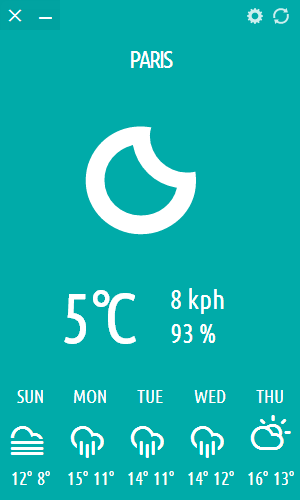


Typhoon is a beautiful weather application that provides real-time weather updates and forecasts in a highly configurable and colorful widget inspired by the Metro interface in Windows 8.
Originally based on Stormcloud 1.1 by Jono Cooper, Typhoon is powered by Open-Meteo, OpenStreetMap and ipapi.
- Real-time weather updates and forecasts for up to four days
- Customizable units of measurement
- Displays current temperature as launcher count
- Displays precipitation warning within app
- Displays system notifications for rain, snow or thunderstorm
- Configurable widget opacity and color
- Chameleonic background color based on wallpaper or accent color
- Temperature-based background color
- Supports customizable background color
- Powered by Open-Meteo, OpenStreetMap and ipapi
- Supports IP address-based location detection
- Supports multiple locations
Thanks to Adam Whitcroft for Climacons.
On Ubuntu you can use the official PPA.

sudo add-apt-repository ppa:apandada1/typhoon
sudo apt update
sudo apt install typhoon
On Debian, you can install the prebuild .deb package on GitHub releases.
For Arch based distros Typhoon is available on the AUR,
yay -S typhoon
On Fedora, you can install the prebuild .rpm package on GitHub releases.
Distro agnostic packages: Typhoon is available on Flathub and the Snap Store (thanks to @soumyaDghosh).

Note that the wallpaper based chameleonic background does not work in the flatpak and snap packages due to confinement. They fall back to the accent color instead. To use wallpaper based chameleonic background feature, use the native packages instead.
On Windows, download the prebuilt installers from GitHub releases.
Linux-specific integrations (dbus-python, python-gobject, libportal) are optional on Windows.

By default, Typhoon supports transparency in nearly all desktop environments. However, thanks to Qt, you can also make the background blur with the following methods:
- GNOME: Use Blur my Shell extension.
- KDE Plasma: Install KVantum and enable blur option for transparent windows in KVantum settings. Alternatively use kde-blur effect for KWin if you don't want to install KVantum.
- Cinnamon: Install the Blur Cinnamon extension.
This project uses the Meson build system for configuration and installation.
- Ensure you have Meson and Ninja installed on your system.
- Install the dependencies:
- Common:
PyQt6,PyQt6-WebEngine - Linux extras:
dbus-python,python-gobject,libportal
- Common:
- Navigate to the project directory.
- Run the following commands to build and install the application:
meson setup builddir --prefix=/usr
sudo ninja -C builddir install
To uninstall, run
sudo ninja -C builddir uninstallAfter installation, you can run the application using:
typhoonThis project is licensed under the GPL-3. See the LICENSE file for more details.