


Kiro Assistant is a general purpose agent with 500+ capabilities & vast array of skills.The idea behind Kiro Assistant is that it will help every member of the society and not just software developers. It can work along side you as your coworker and help with your work across your business domains: Sales, Marketing, HR, Legal, FSI, Telco etc. All you have to add it is tools (MCPs) and skills. The system can load skills based on context. It can invoke appropriate tools based on context. That is what makes the system truly general purpose.
To summarize:
- 🚀 Native Electron desktop app Can help with tasks that you didn't know Kiro could help you with: make Audio, Video, Presentations, help you file expenses, cancel subscriptions and so on.
- 🧠 Powered entirely by
kiro-cli - 🧩 500 MCPs through Composio. Additional MCPs for Excel, Pencil Desktop etc surfaced inside Settings
- 📂 Auto-provisioned workspaces per session under
~/Documents/workspace-kiro-assistant/<task-id> - 💾 SQLite-backed history so conversations stream in real time and persist across launches
We show that Kiro is not only for software developers, but every member of the society, for every member in your family (accessabilty features like voice coming soon..)

With Kiro Powers, Kiro is useful to vast array of professionals. Just define skills and tools. Skills are plane .md files that are loaded depending on context. They describe how to do specific things (e.g. creating powerpoint as per your style, building spreadsheets as per your preferrence). Tools give access to Kiro to various softwares and SaaS products on your behalf.

Soon you will be able to get Kiro Powers for professional scenarios from Kiro Hub. Organizations can define Kiro Powers and share between teams.

Kiro Assistant has 500+ tools through Composio (ElevanLab for audio, HeyGen for video, Gmail, X tools etc.).
It can also use local MCPs for Excel and other development environments like Blender, Pencil Desktop etc. As long as you have an MCP, it will figure out how to use it opportunistically. We have added playwright MCP to allow it ability to handle browsers. We have added ZAI MCPs to give it ability to deal with PDFs, Images etc. when the model being used is not multimodal.
It also has a skill repository, e.g. to make 3D animation with threejs and professional video with Remotion. You can add more skills. Skills are loaded dynamically. That is how skills work.
Even we don't know what it is fully capable of. Please give it a shot!

Task: Make me an audio podcast of 3 minutes on Moltbot controversy. I want to upload it to youtube, so create a display image and combine it with mp3 to give me an MP4.

Task: Can you please review architectures of WAN and SeeDance video models and compare them in a ppt. Add diagrams, screenshots etc. to make your points. we added a small animation of Kiro mascot working while the tasks are ongoing to keep you entertained!

If a model works in kiro-cli, it works in Kiro Assistant. So for example, if MiniMax M2 can be selected in Kiro CLI, it will work with Kiro Assistant.
Kiro Assistant always uses the model stored in ~/Library/Application Support/kiro-assistant/assistant-settings.json (managed through the Settings → Default Model dropdown). If you haven’t picked one yet, it falls back to claude-opus-4.5. Every prompt launches a fresh kiro-cli process using whatever model is currently selected, so changing the dropdown takes effect on the very next run. Current limitation: because the conversation metadata is cached by kiro-cli, mid-task changes are only picked up after starting a new task (which creates a new working directory). If you switch models midway through an existing task, that session will continue using the originally selected model until you spin up another task.
Available models today:
claude-opus-4.6– experimental Claude Opus 4.6claude-opus-4.6-1m– experimental Opus 4.6 with 1M contextclaude-opus-4.5claude-sonnet-4.5(current default)claude-sonnet-4.5-1mclaude-sonnet-4claude-haiku-4.5
Soon to be available more models from Amazon Bedrock (stay tuned)
deepseek-3.2kimi-k2.5minimax-m2.1glm-4.7glm-4.7-flashqwen3-coder-next
We highly encourage you to start contributing to the project. Kiro-CLI (which wraps Kiro Agents) is awesome. Let us have fun with it.
With new OSS models that will become available soon, you will be able to use Kiro-Assistant as a general AI agent for vast number of tasks every month with your Kiro subscription.
The architecture is simple. It trusts models to be resourceful and figure out a way. We use powerful models and give them necessary tools. In a way it is inspired by the "bitter lesson".

Agent Cowork - which inspired this project - uses Claude Code CLI which has a SDK called Claude Agents SDK. We can launch Kiro-cli directly from code and receive responses (tool_use requests, responses) through real time SQLite database it maintains.

This is a technical diagram of various components involved.
| Layer | Responsibilities | Key Files |
|---|---|---|
| Electron Main | Boots the BrowserWindow, exposes IPC APIs (read-file, run-kiro-command, MCP helpers), spawns kiro-cli chat, and copies uploads into per-session workspaces. |
src/electron/main.ts, src/electron/libs/runner.ts, src/electron/libs/mcp-config.ts, src/electron/libs/workspace.ts |
| React Renderer | Zustand store + UI components (sessions, prompt bar, MCP settings, file sidebar, file upload). | src/ui/* |
| Kiro CLI runtime | Talks to models on Amazon Bedrock securely using your Kiro Subscription, executes tools, runs MCP servers, and writes conversation history to its SQLite store. | /Applications/Kiro CLI.app or kiro-cli on PATH |
| Persistence | Assistant metadata/history via sessions.db; conversation bodies live in Kiro’s own ~/Library/Application Support/kiro-cli/data.sqlite3. |
src/electron/libs/session-store.ts |
More details (mermaid diagrams, SQLite polling strategy, security notes) live in docs/ARCHITECTURE.md and docs/INTEGRATION.md.
- Kiro CLI installed and authenticated.
- Bun (preferred) or Node.js 18+ for building.
- macOS 13+ (the current build targets macOS; Windows/Linux scripts are stubbed but untested).
# Clone from AWS Samples Github
git clone https://github.com/aws-samples/sample-kiro-assistant.git
cd sample-kiro-assistant

# Install dependencies
bun install

# Development mode (Vite + Electron with hot reload)
bun run dev

# Production build (macOS arm64)
bun run dist:mac
The macOS bundle is emitted to dist/mac-arm64/Kiro Assistant.app. Copy it into /Applications (back up any previous version first).
You can also build and run it for Windows machines. Users report it works fine.
Kiro Assistant instantiates a custom agent named kiro-assistant. Its configuration lives in ~/.kiro/agents/agent_config.json:
You may use these configurations as they are, just remember to place your keys for Composio (that provides search over 500 MCP tools) and ZAI MCP in respective
Replace_with_your_key field.
{
  "name": "kiro-assistant",
  "description": "A custom agent for my workflow",
  "mcpServers": {
    "pencil": {
      "command": "/Applications/Pencil.app/Contents/Resources/app.asar.unpacked/out/mcp-server-darwin-arm64",
      "args": ["--ws-port", "53881"],
      "env": {},
      "type": "stdio",
      "disabled": false
    },
    "playwright": {
      "type": "stdio",
      "command": "npx",
      "args": ["@playwright/mcp@latest"],
      "env": {},
      "disabled": false
    },
    "composio": {
      "type": "http",
      "url": "https://backend.composio.dev/tool_router/trs_8YCbLt0jkO8_/mcp",
      "headers": {
        "x-api-key": "Replace_with_your_key"
      },
      "disabled": false
    },
    "zai-mcp-server": {
      "type": "stdio",
      "command": "npx",
      "args": ["-y", "@z_ai/mcp-server"],
      "env": {
        "Z_AI_API_KEY": "Replace_with_your_key",
        "Z_AI_MODE": "ZAI"
      },
      "disabled": false
    },
    "excel": {
      "command": "npx",
      "args": ["--yes", "@negokaz/excel-mcp-server"],
      "env": {
        "EXCEL_MCP_PAGING_CELLS_LIMIT": "4000"
      },
      "disabled": false
    }
  },
  "tools": [
    "@pencil","@composio","@playwright","@zai-mcp-server","@excel",
    "read","glob","grep","write","shell","aws","web_search","web_fetch",
    "introspect","report","knowledge","thinking","todo","use_subagent"
  ],
  "allowedTools": [
    "@pencil","@composio","@playwright","@zai-mcp-server","@excel",
    "read","glob","grep","write","shell","aws","web_search","web_fetch",
    "introspect","report","knowledge","thinking","todo","use_subagent"
  ],
  "resources": ["skill:///Users/you/.kiro/skills/**/SKILL.md"],
  "prompt": "You are a general purpose agent you will try your best to complete a tasks with available tools and skills. You will look for files in your workspace also known as working directory. You will create all the files in the same",
  "model": "claude-opus-4.5"
}- During the first launch of the packaged DMG, Kiro Assistant automatically copies a credential-free template to
~/.kiro/agents/agent_config.jsonso you start with the same MCP/server definitions shown above. You still need to fill in your own API keys for services like Composio or ZAI by editing that file later. - If you don't want the installer to touch an existing config (e.g., on a dev machine where you copy the app straight into
/Applications), runlaunchctl setenv KIRO_SKIP_AGENT_TEMPLATE 1before opening the app (clear it withlaunchctl unsetenv KIRO_SKIP_AGENT_TEMPLATE). Only configure the file manually if the automatic setup doesn't occur. - Edit this file to add/remove MCPs. The Settings dialog simply toggles the
disabledflag and shows summaries. - Skills are directories under
~/.kiro/skills. Each folder is a skill and appears in the UI. - Adding skills is easy. You can add them by copying folders to the above mentioned path, or you can add them using npx command and selecting Kiro option. They will show up in Settings dialogue.
npx skills add remotion-dev/skills

- Uploads: The paperclip copies files into the current workspace (with collision-safe renaming).
- FileBar: Separates created vs accessed files; clicking opens them inline (text/images/PDF/Excel) or via the OS.
- Kiro CLI missing: Ensure
kiro-cliis installed or setKIRO_CLI_PATH. - MCP server not showing: Edit
~/.kiro/agents/agent_config.jsonand refresh Settings. - Long-running
execute_bash: Some commands (e.g., interactivenpx) block until they finish. You can ask Kiro Assistant to run them without user input. better-sqlite3ABI mismatch: If you see...better_sqlite3.node was compiled against NODE_MODULE_VERSION 137... requires NODE_MODULE_VERSION 140, runnpx electron-rebuild -f -w better-sqlite3to rebuild the native module against the Electron ABI you have installed.
- Audio creation
- Video creation
- Excel modelling
- Helping cancel unwanted subscriptions
- Social media management
- Daily tasks (emails, scheduling)
Converting articles to audio and video podcasts, great for making training videos (click on the image)
You can give it article that you don't have time to read. It can convert them to audio podcasts.
You can even ask it do research for you and make the output into podcasts so you can listen while doing mundane activities. For example, here it is making a podcast for me on Moltbot controversy. It 1/ did the research, 2/ wrote a script, 3/ produced audio using ElevenLabs (MP3), 4/ produced a poster, 5/ stitched together the poster and MP3 to produce MP4 using FFMPEG.
Just listen and remember this is all being orchestrated autonomously by Kiro-CLI. I did not have to do anything.
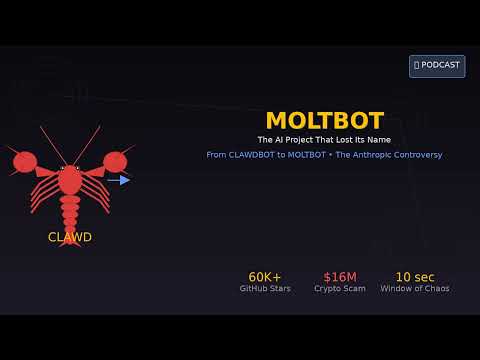
If you want to record a training video, you can give it text and it will make a perfectly edited video for you. It will figure out services to use and deliver the final outcome. You may need to give feedback sometimes (off-coures).

If you want a beautiful poster, creative etc. it can use Pencil MCP and create well thought out creatives for you.

Here we asked Kiro-Assistant to study impact of AI boom on stocks on MAG7 companies and prominent SaaS stocks. It got this data from reputable sources.

It didn't just build great tables, it also built great meaningful visualizations.

We asked Kiro-Assitant to study architecture of WAN and SeeDance 1 video models and create a presentation to compare and contrast them.
It got this data from reputable sources.

It has many skills for PPTs, Excel, Videos etc. Here is a simple promotional video it made using Remotion-Best-Practices skill.

- Fork or clone
https://github.com/aws-samples/sample-kiro-assistant.git. - Run
bun run devfor iterative changes. - Update docs when touching architecture or UX.
- Open a pull request with a clear summary and testing notes.
- Add voice interface
- Add support for MCP for Apps for interactive applications with this desktop interface.
- Integrate Kiro CLI with help of Kiro SDK once it is released (due soon), replacing current arrangement of getting Kiro-CLI responses through SQLite database.
- Social connections - slack, Whatsapp, Telegram, iMessage
- 24*7 running agents in the cloud - designed for cost effectiveness and security.
The project started with this base Agent Cowork which is under MIT license. This project is also released under MIT. Kiro-CLI that provides Kiro Agent for this project is an Amazon Web Services product (all right reserved).
It runs on local machine, and accesses files from working directories. It access models on Bedrock through Kiro-CLI. It is no different from using Kiro-CLI. It calls external APIs with users’ own account (OAuth). These are the services that users already trust. There is a proper login flow that helps user log in into services like ElevanLabs, HeyGen, Gmail etc. Use Composio Search tool and SaaS services it avails, if you trust them. We DO NOT assume responsibility for any loss arising out of use of this prototype.
Local MCPs like excel, playwright don’t need credentials. We also use ZAI MCPs for dealing with PDFs, Images etc. It gets automatically used if the model being used is not multimodal. User can remove any of the MCPs they don’t prefer.
Typical advisory applicable for any GenAI service applies to this one.