The Notes API is a versatile application programming interface for managing and organizing notes, allowing users to categorize and tag their notes efficiently. It provides CRUD (Create, Read, Update, Delete) operations for handling notes, along with the flexibility to organize them using categories and tags.
- Create, Read, Update, Delete (CRUD) Operations: Efficiently manage notes with standard CRUD functionality.
- Categorization: Organize notes into categories for streamlined organization and retrieval.
- Tagging System: Associate tags with notes to enhance categorization and search capabilities.
- Create and Manage Categories: Easily create and manage categories to group related notes.
- Create and Manage Tags: Establish a tagging system for improved note classification.
- Node.js: JavaScript runtime for server-side development
- Express: Web application framework for Node.js
- TypeScript: Strongly typed programming language that builds on JavaScript.
- Prisma: Node.js and TypeScript ORM.
- Vitest: Testing framework.
- PactumJS: REST API Testing Tool.
-
Clone the repository:
git clone https://github.com/baabouj/notes-api.git
-
Install dependencies:
pnpm install
-
Set the environment variables:
cp .env.example .env # make sure to open `.env` file and modify the environment variables (if needed) -
Run Migrations:
pnpm prisma migrate dev
-
Generate Prisma Client:
pnpm prisma generate
-
Running locally:
pnpm dev
-
Running in production:
pnpm build # we need to build the application first pnpm start -
Testing:
# run all tests
pnpm test

# run all tests in watch mode
pnpm test:watch
To view the list of available APIs and their specifications, run the server and go to http://localhost:4000/api/v1/docs in your browser. This documentation page is automatically generated using the swagger definitions written as comments in the route files.
List of available routes:
Auth routes:
POST /v1/auth/signup - signup
POST /v1/auth/login - login
POST /v1/auth/refresh - refresh auth token
POST /v1/auth/logout - logout
POST /v1/auth/change-password - change password
POST /v1/auth/forgot-password - send reset password email
POST /v1/auth/reset-password - reset password
POST /v1/auth/send-verification-email - send verification email
POST /v1/auth/verify-email - verify email
Notes routes:
POST /v1/notes - create a note
GET /v1/notes - get all notes
GET /v1/notes/:noteId - get note
PATCH /v1/notes/:noteId - update note
DELETE /v1/notes/:noteId - delete note
GET /v1/notes/:noteId/category - get note category
GET /v1/notes/:noteId/tags - get note tags
Categories routes:
POST /v1/categories - create a category
GET /v1/categories - get all categories
GET /v1/categories/:categoryId - get category
PATCH /v1/categories/:categoryId - update category
DELETE /v1/categories/:categoryId - delete category
GET /v1/categories/:categoryId/notes - get all notes in category
Tags routes:
POST /v1/tags - create a tag
GET /v1/tags - get all tags
GET /v1/tags/:tagId - get tag
PATCH /v1/tags/:tagId - update tag
DELETE /v1/tags/:tagId - delete tag
GET /v1/tags/:tagId/notes - get all notes in category
Certain routes require authentication, these routes require a valid access token in the Authorization request header using the Bearer schema. If the request does not contain a valid access token, an Unauthorized (401) error is thrown.
Generating Access Tokens:
An access token can be generated by making a successful call to the login (POST /api/v1/auth/login) endpoint. The response of this endpoint also contains a refresh token in an httpOnly and secure cookie. (explained below). The access token is sent for each API call that requires authentication and is used to verify the session.
An access token is valid for the amount of time specified in the JWT_MAX_AGE environment variable in the .env file.
Refreshing Access Tokens:
After the access token expires, a new access token can be generated, by making a successful call to the refresh endpoint (GET /api/v1/auth/refresh) and sending along a valid refresh token in the request cookies. This call returns a new access token in the response body and a new refresh token in an httpOnly and secure cookie.
A refresh token is valid for the amount of time specified in the REFRESH_TOKEN_MAX_AGE environment variable in the .env file.
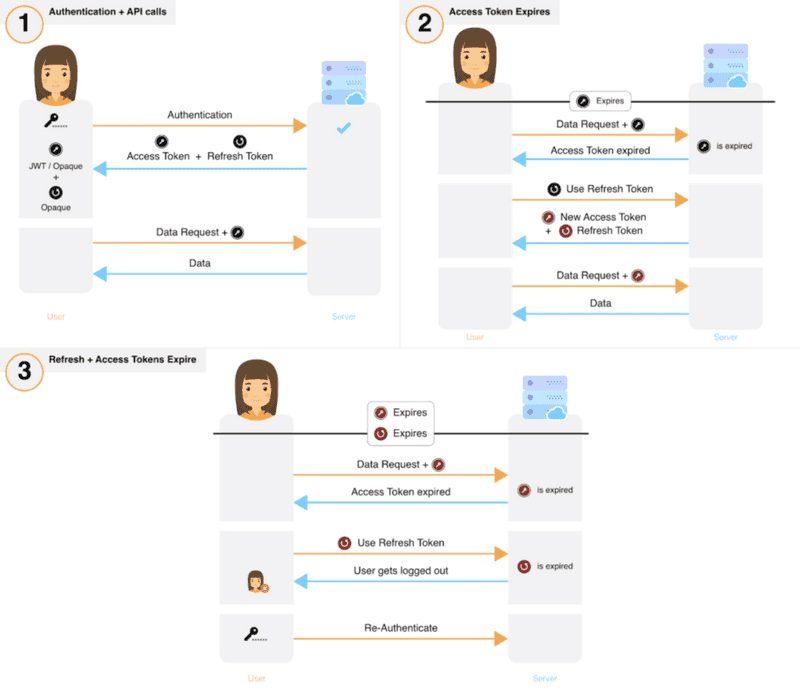
This is known as rotating refresh tokens. The new access token is used to make subsequent API calls and the session continues normally. This flow is illustrated in the diagram below:
 |
|---|
| image from supertokens |
Contributions are welcome! If you find any issues or have suggestions for improvements, please open an issue or create a pull request.