Home
This extension is hosted on https://addons.mozilla.org/de/firefox/addon/10653.
CommandRun is a firefox extension which allows to run operating system commands from within javascript.
It allows javascript code like this:
CommandRun.run("/usr/bin/touch",["/tmp/commandruntest"]);
which will create the file /tmp/commandruntest or update its timestamp.
Allowed commands must be defined in the preferences. You can either define allowed commands for all hosts in the preference extensions.commandrun.allowedcommands which expects a JSON array containing the allowed commands, e.g.
["/usr/bin/touch","/usr/bin/ls"]
Or you define allowed commands per host. To be more precise: per url prefix. For this you have to define the preference extensions.commandrun.allowedcommandsperhost which expects a JSON object. The properties of the object are prefixes which are checked against the url of the page the CommandRun is used in. The property values are again JSON arrays as before.
Other commands are rejected.
So why did I develop this extension at all? For an intranet web application I searched for a possibility to raise the firefox window from within javascript. The web application is a GWT application, that means it is a javascript client running in a browser. The nature of the application is that it may idle for a long time until it gets an event pushed by a server. The user of the application may do other things while she is waiting for an event to arrive, she may even work with other applications, reading mails, etc. The focus of the web application may be lost, firefox may be hidden by other windows. When an event arrives firefox should immediately raise to the front such that the user can react on the event. I did not find a simple javascript solution to raise firefox to the front. If anybody knows, please tell me. http://www.sweb.cz/tripie/utils/wmctrl/ is a linux tool which allows to raise windows (and do other things to the window manager). The next step is then to find a possibility to call wmctrl from within javascript. And there comes the CommandRun extension. (puh, long speech)
The extension is based on code snippets from two other extensions: https://addons.mozilla.org/de/firefox/addon/7458 contains code which adds an object to a document's window with which new operations can be called. In my extension's case the CommandRun object is added which allows to invoke 'run'. https://addons.mozilla.org/de/firefox/addon/9738 allows to execute selected text in a terminal. It contains code to create an operating system process.
How to try it out:
after installation of the extension browse to chrome://commandrun/content/test.html. This is a test page shipped with the extension and you should get something like this:
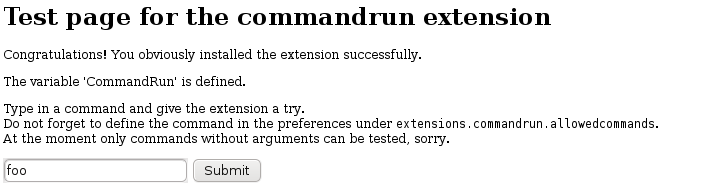
First type something like foo and submit. You should get an alert saying
Command 'foo' is not allowed for page chrome://commandrun/content/test.html.
Then either open the preferences dialog of the extension or edit the config value extensions.commandrun.allowedcommands in [about:config] and define an allowed command. I tested with a shell script named commandrun.sh containing
#!/bin/bash

echo `date` >/tmp/date.txt
Set extensions.commandrun.allowedcommands to
["/home/aabeling/commandrun.sh"]
(or wherever the script lies) and try again. The file /tmp/date.txt should have been updated.
Or you use the allowed commands per host preference like this by setting the preference extensions.commandrun.allowedcommandsperhost to
{"chrome://commandrun/content":["/home/aabeling/commandrun3.sh"]}
This allows to run the command /home/aabeling/commandrun3.sh on any page with an url beginning with chrome://commandrun/content.
- since I found no way to get the output of a command back into the extension a workaround could be used: the extension could allow to return the contents of a local file after the command has finished its work. The command should then be defined such that some output is piped into the file.