
Mᴏʀᴇ ᴛʜᴀɴ ᴊᴜsᴛ ᴀ Mᴀʀᴋᴇᴛᴘʟᴀᴄᴇ. Aᴄᴄᴇss Dᴀᴛᴀᴄᴏʀᴇ ᴄᴏᴍᴘᴏɴᴇɴᴛs, ᴍᴀɴᴀɢᴇ ʏᴏᴜʀ ᴀᴄᴄᴏᴜɴᴛ, ᴀɴᴅ ᴜɴʟᴏᴄᴋ ᴇxᴄʟᴜsɪᴠᴇ ʀᴇᴡᴀʀᴅs.


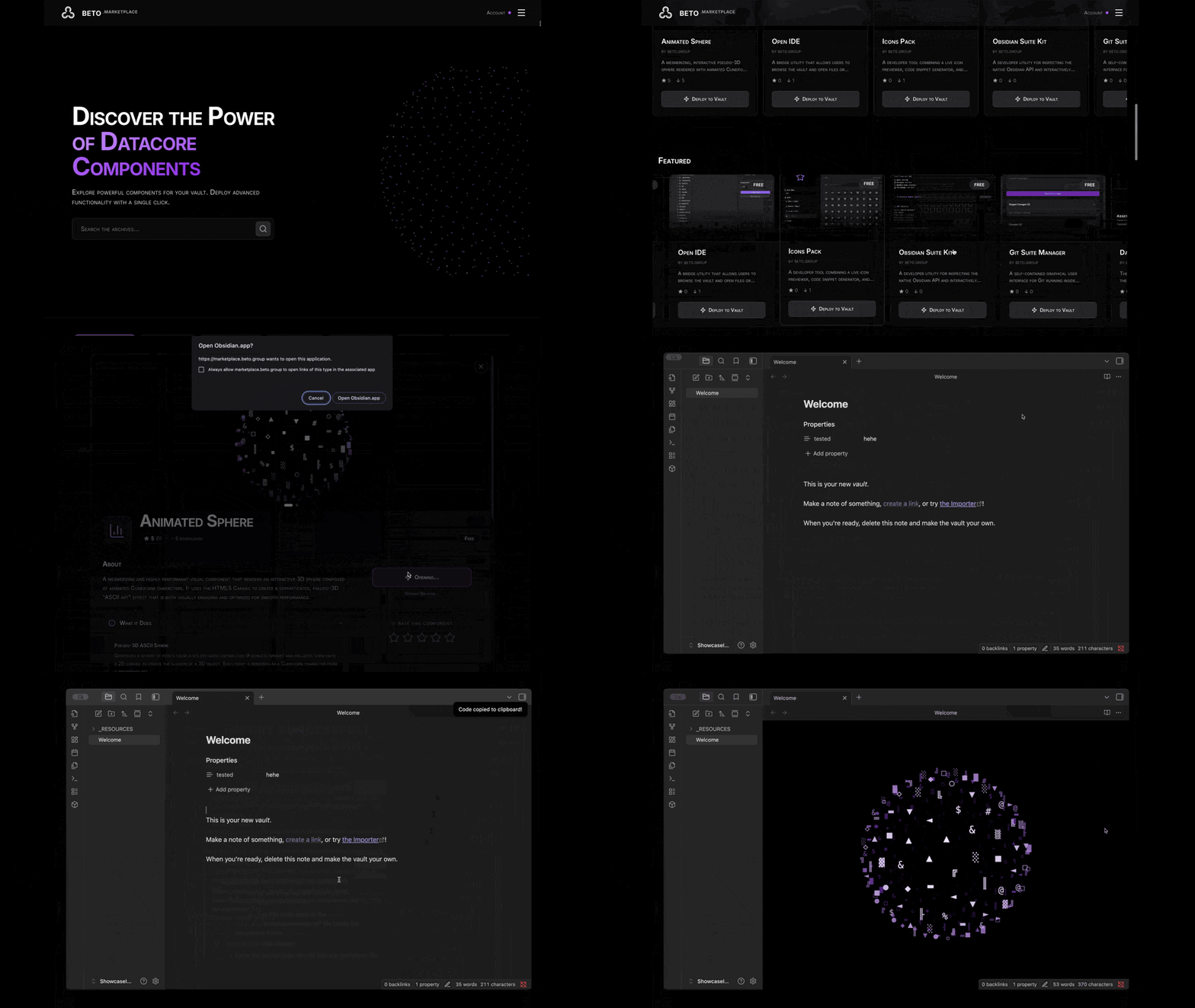
(Demo: Browsing the marketplace via Beto Nexus)
Beto Nexus is the central hub for everything in the Beto Ecosystem. While it powers the Beto Marketplace for one-click Datacore component installation, it is designed to be much more.
Nexus serves as your personal gateway, connecting your Obsidian vault to a world of utilities, rewards, and account-based features. Whether you are looking for the latest views or managing your Beto profile, Nexus is the key.
- One-Click Installation: Deploy complex Datacore components instantly.
- Secure & Verified: All components are reviewed to ensure safety and performance.
- Seamless Integration: Components are installed directly into your vault's configuration.
- Auto-Updates: Keep your components up to date with the latest features and fixes.
- Beto Account Integration: Log in to sync your preferences and access personalized settings.
- Rewards & Perks: Unlock exclusive content and benefits based on your account tier and activity.
- Fine-Grained Controls: Advanced management options for power users logged into the ecosystem.
- Creator API: Utilize the Beto Nexus API to integrate your own components into the ecosystem.
- Enhanced Functionality: Unlock advanced features and interactions for your custom views and utilities.
- Ecosystem Integration: Seamlessly connect your creations with Beto accounts and rewards.
Since Beto Nexus is currently in beta, the easiest way to install it is using BRAT (Beta Reviewers Auto-update Tool).
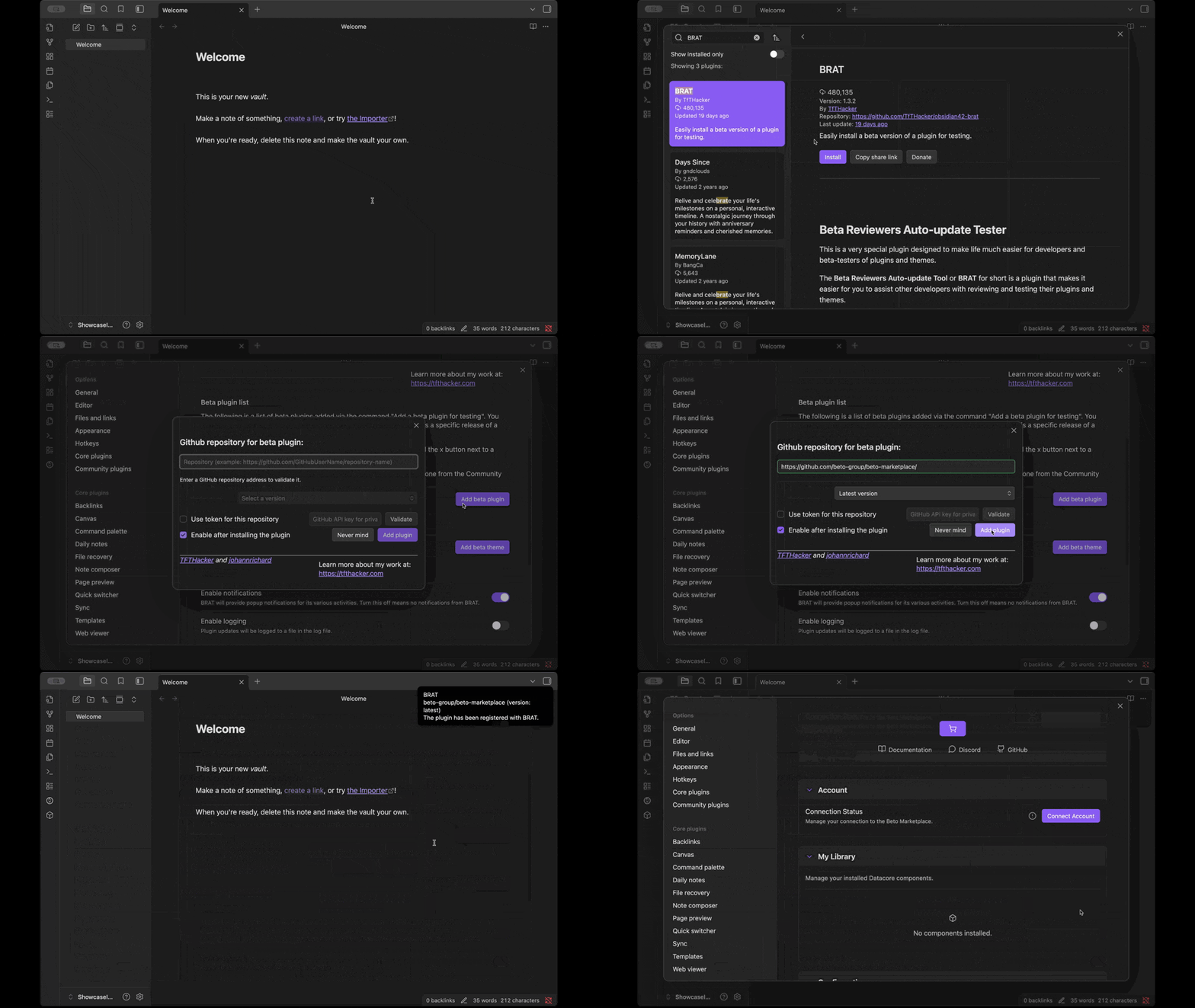
- Install the BRAT plugin from the Obsidian Community Plugins list.
- Open the command palette (
Cmd/Ctrl + P) and search forBRAT: Add a beta plugin for testing. - Enter the repository URL:
https://github.com/beto-group/beto-nexus. - Click Add Plugin.
- Once installed, go to Settings > Community Plugins and enable Beto Nexus.
- Download the latest release from the Releases Page.
- Extract the
beto-nexusfolder. - Move the folder to your vault's plugin directory:
.obsidian/plugins/. - Reload Obsidian.
- Enable the plugin in Settings > Community Plugins.
- Open Nexus: Click the Beto Nexus icon in the ribbon or use the command palette.
- Browse Marketplace: Visit marketplace.beto.group or browse directly within the plugin.
- Connect Account: (Coming Soon) Log in to access your dashboard and rewards.
If you encounter any issues or have suggestions, please open an issue on GitHub.
Note: This plugin requires the Datacore plugin to be installed and enabled.