
TheBIGbam is a genome browser and alignment viewer designed for massive metagenomic and metatranscriptomic datasets.
It enables compression and visualization of large genomic annotation (GenBank) and alignment files (BAM). It supports the generation of alignments with explicit circular-genome mapping.
Built with Rust for fast BAM processing and Python + Bokeh for interactive visualization.
- Installation
- Main usage
- Additional utilities
- Additional in-depth documentation pages
You will need conda installed on your computer.
We create a fresh environment with python 3.10 and the required dependencies (samtools, minimap2, and bwa-mem2 for the mapping commands, BLAST+ for repeat detection):
conda create -n thebigbam -c conda-forge -c bioconda python=3.10 samtools=1.23 minimap2=2.30 bwa-mem2=2.3 blast=2.17
conda activate thebigbam
We then install thebigbam via pip in this environment:
python3.10 -m pip install thebigbamCheck main command works:
thebigbam -hYou can download the tests directory from the git repository to assess your installation:
git clone --filter=blob:none --sparse https://github.com/bhagavadgitadu22/theBIGbam
cd theBIGbam
git sparse-checkout set tests
Then check the calculate command works:
thebigbam calculate \
 -g tests/HK97/HK97_GCF_000848825.1_pharokka.gbk \
 -b tests/HK97/ \
 -o tests/HK97/test.db
Finally visualize interactively the test data:
thebigbam serve --db tests/HK97/test.db --port 5006Open browser to http://localhost:5006 to see the visualization. If working from a remote server, see the Visualisation section.
TheBIGbam consists of 3 main steps:
- (optional) Generation of alignment files for your samples with circular-genome support
- Generation of a DuckDB database summarizing your genomic and mapping files with Rust
- Interactive visualization of the DuckDB database content using Python and Bokeh
# only available if you downloaded the mapping dependencies
thebigbam mapping-per-sample \
  -r1 tests/HK97/HK97_R1_illumina.fastq.gz \
  -r2 tests/HK97/HK97_R2_illumina.fastq.gz \
  -a tests/HK97/HK97_GCF_000848825.1.fasta \
  --circular -o tests/HK97/HK97_illumina_circular.bam

thebigbam calculate \
  -b tests/HK97 \
  -g tests/HK97/HK97_GCF_000848825.1_pharokka.gbk \
  -m coverage,misalignment \
  -o tests/HK97/HK97.db \
  -t 4

thebigbam serve --db tests/HK97/HK97.db --port 5006
For more complex examples see the usage page.
thebigbam calculate command converts large BAM files and associated annotated assemblies into a compact, queryable DuckDB database.
Example command to compute the database for a single sample containing paired-end short reads mapped to the reference genome of phage HK97:
thebigbam calculate
-b tests/HK97
-g tests/HK97/HK97_GCF_000848825.1_pharokka.gbk
-m coverage,misalignment
-o tests/HK97/HK97.db
-t 4
For more complex examples see the usage page.
You need to provide at least one of the following:
-
BAM mapping files (
-b) -
A GenBank annotation file (
-g)
If only an annotation file is provided, contig-level data (annotations, GC content, repeats) is calculated without any sample-level mapping features.
If only BAM files are provided, an assembly file of contigs (FASTA format) can be supplied with -a to allow the computation of sequence-dependent, mapping-derived features.
Parameter: --bam_files DIRECTORY, short-version -b
Your mapping files need to be sorted BAM files with MD tags. If you have mapping files but not in the right format, SAMtools is your friend!
# to convert a SAM/BAM file in a sorted BAM file
samtools view -bS example.sam | samtools sort -o example.sorted.bam

# to add an index file to your BAM file
samtools index example.sorted.bam

# to add MD tags to your BAM file
# you also need the fasta file used during the mapping step
samtools calmd -b example.sorted.bam ref.fasta > example.sorted.md.bam
Alternatively, you can produce your alignment files directly in theBIGbam as specified in the Mapping section.
Parameter: --genbank FILE, short-version -g
Annotation file should be in GenBank (.gbk, .gbff, .gb) or GFF3 (.gff, .gff3) format, made with the tool of your choice: bakta for bacteria, pharokka or phold for phages, eggnog-mapper for eukaryotes, etc.
Examples of commands to generate such annotations are available in the usage page.
Parameter (optional): --modules COMMA-SEPARATED LIST, short version -m
When BAM files are provided, theBIGbam performs fast Rust-based computations on them to extract relevant values. Individual read information is discarded in favor of lightweight per-position averages for each contig in each sample.
All mapping-derived modules are computed and stored in the database unless you provide a specific subset of modules. 5 mapping-derived modules exist at the moment:
- Coverage: computes per-position coverage for primary, secondary, and supplementary reads, as well as the mapping quality (MAPQ)
- Misalignment: computes per-position number of clippings, insertions, deletions and mismatches
- Long-reads: computes per-position average length of reads
- Paired-reads: computes per-position average insert size of reads along with the number of incorrect pair orientations (non-inward pairs, mates unmapped or mapping or another contig)
- Phage termini: compute per-position coverage for primary-reads starting with an exact match (a short clipping < 5 bp is tolerated). Among those reads, the number of mapped reads starting and ending is computed. This module requires sequences to be provided
When contig sequences are provided, the Genome module is computed. It calculates GC content, GC skew and the repeats contained within each contig using an autoblast. If annotations are available (GenBank file provided), contig annotations (e.g. positions of the coding sequences and their functions) are also saved.
A more detailed explanation of the modules and the features it contains is available in the features section.
Parameters (optional): --min_aligned_fraction, --min_coverage_depth, --variation_percentage, --contig_variation_percentage, --coverage_percentage,
Discarding the reads to only keep the main features of the mappings (like the coverage per position) already allows the DuckDB database to be way lighter than the original BAM file. The database itself is also structured to be as light as possible.
First, the database is organised per contig per sample (qualified as a contig/sample pair thereafter). Only pairs relative to a contig present in a sample are stored in the database. The definition of a presence can be tweaked via two parameters:
-
--min_aligned_fraction controls the minimum percentage of positions that received reads (default 50%, meaning a contig is considered present only if more than half of it received reads)
-
--min_coverage_depth sets the minimum mean coverage depth required for contig inclusion (default 0, i.e. disabled — set to e.g. 5 to filter out contigs with very low depth that produce noisy signals).
To further reduce the size of the database, values per feature are compressed rather than saving all positions. The type of compression depends on the type of plots:
-
A Run-Length Encoding approach (RLE) is applied to the continuous plots (features from Coverage, Paired-reads and Long-reads module, "Coverage reduced" feature in Phage termini module). RLE stores consecutive genomic positions with similar values as a single entry, preserving the overall signal while substantially reducing storage size. The allowed percentage of variation can be adjusted using the --variation_percentage parameter (default 50% ie 0.5) for mapping-related features, and the --contig_variation_percentage parameter (default: 10% ie 0.1) for contig-related features
-
Only positions with values above a defined percentage of the local coverage are retained for Bar plots (Misalignment and Phage termini module except for "Coverage reduced" feature). For each position, values are compared to the local coverage and discarded if they fall below the --coverage_percentage threshold (default 10%), ensuring that only meaningful peaks are preserved
The output is a DuckDB database that is typically 10–100 times smaller than the original BAM files while retaining the essential characteristics of the mapping data. When using theBIGbam only for a GenBank file, the main objective is visualization, as the output database is typically similar in size to the original file.
For more information see the compression section.
In addition to per-position information, summary metrics are computed and stored in the database per contig, per sample and per contig–sample pair. These metrics combine the per-position values into average values like the coverage mean to help identify informative contig–sample pairs without requiring specific hypotheses.
Metrics belong to 4 categories:
- Presence detection
- Misassembly
- Microdiversity
- Topology
A description of all metrics is available in the filters section.
Once the database has been computed, it can be visualized interactively using thebigbam serve command. This starts a local web server that hosts the interactive plots.
Example command:
thebigbam serve --db tests/HK97/HK97.db --port 5006If calculating and serving the database from remote machine without graphical interface, you can use SSH port forwarding to access the visualization on your local machine. For example, if your remote server is remote.server.com and you want to forward port 5006, you can run the following command on your local machine:
ssh -N -L 5006:localhost:5006 user@remote.server.comIf running the job on a compute node, you first need to find which node your job is running on (e.g. node042) using squeue -u $USER, then tunnel through the login node to the compute node:
ssh -L 5006:node042:5006 user@cluster.addressWhen accessing the web server (http://localhost:5006), you will be presented with a web interface:
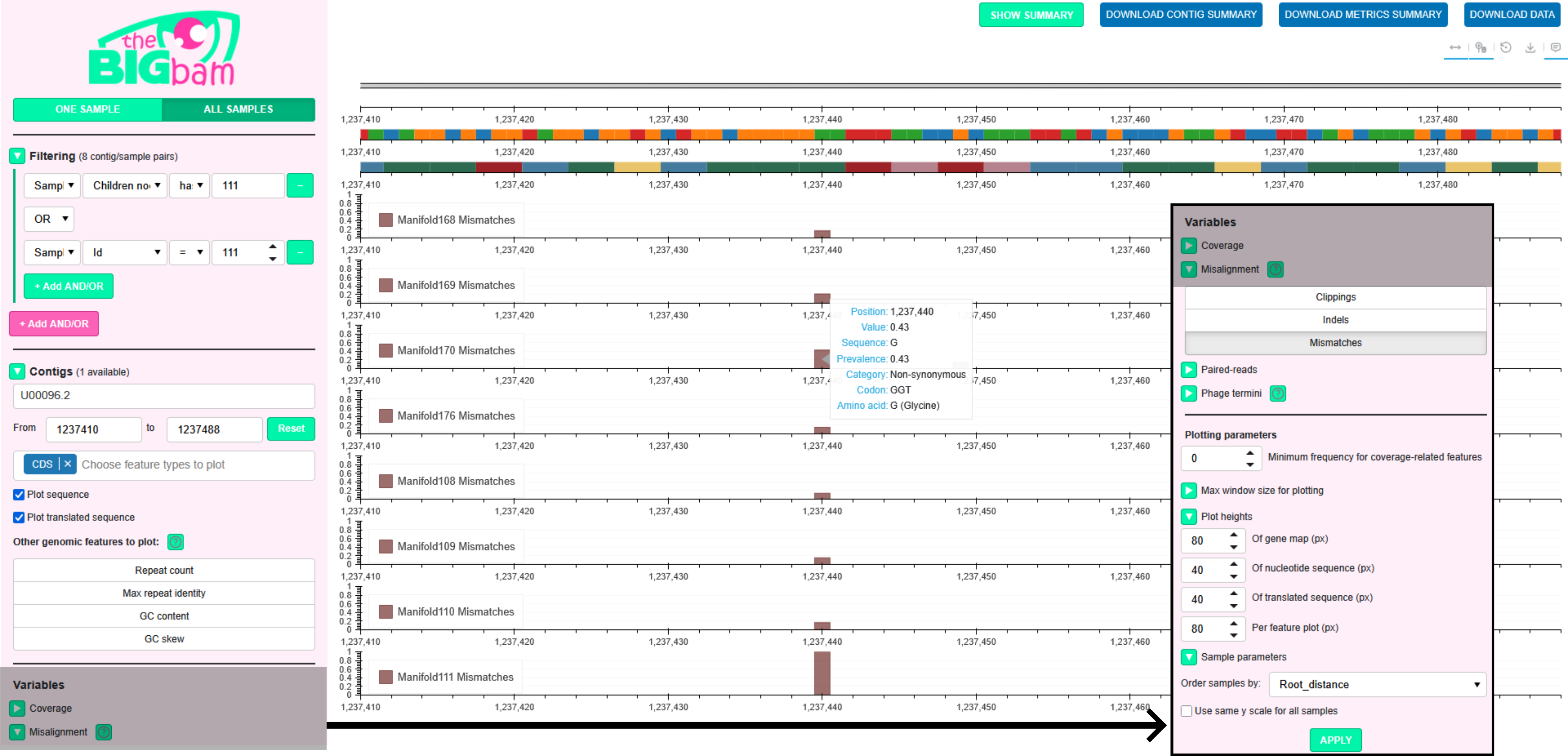
You are initially in the One Sample mode, which allows exploration of all computed features for a single sample. Several sections on the left panel control what is plotted:
-
Filtering: Only pairs of contig/samples matching the selected filters are available in the Contigs and Samples sections. For instance, if the contig length filter is set to >10 kbp, only contigs longer than this threshold will appear in the Contigs section, and only samples containing at least one such contig will appear in the Samples section. To consult the list of filters available have a look at the filtering page
-
Contigs: Select the contig you want to explore. If sequences and/or annotations were provided when creating the database, genomic features (gene maps, repeats, GC content, GC skew) can be selected for plotting by clicking on the contig features
-
Samples: Select the sample you want to explore
-
Variables: Select the features to plot. You can either use the checkboxes to select all features from a module or click individual features within a module
-
Plotting parameters: You can customize several aesthetic aspects of the plots (e.g. the heights of the genomic feature tracks and mapping-derived plots)
Finally, click Apply to visualize the requested features for the selected contig and sample. Alternatively, click Peruse Data to display tables containing the metrics and feature values.
All Samples mode enables comparison of a specific feature across multiple samples. Compared to the One Sample mode, the Samples section is omitted, and only a single feature can be selected in the Variables section (e.g. mismatches on the figure above).
Genomic tracks are plotted at the top and mapping-derived features below. On the figure for instance, you can see the gene map, the sequence track and the codon track. Below are displayed the mismatch track for the samples in display (All Samples mode).
All plots leverage the full capabilities of Bokeh: you can pan, zoom, and hover over specific points to inspect local values. For misalignment tracks, the dominant alternative sequences among the misaligned reads is displayed, in addition with the potential replacement codon for mismatches (for example a Glycine on the figure above).
Buttons in the top-right section allow you to disable pan, zoom, or hover interactions, reset the plots to their original state, and export the current view as a PNG image. In addition, the green button SHOW SUMMARY opens a new html page showing the metrics computed per contig per sample for the contig and samples in display. The blue buttons allow you to download:
-
The metrics relative to the contig (DOWNLOAD CONTIG SUMMARY)
-
The metrics relative to the contig per sample for all samples in display (DOWNLOAD METRICS SUMMARY)
-
All data plotted at the moment (considering all points without adaptive resolution rendering) (DOWNLOAD DATA)
Sequences and contig annotations only make sense when looking at a small window: by default sequences are plotted for ≤ 1 kbp window and gene maps are plotted for ≤ 100 kbp window.
The level of detail of the other plots is adapted to the viewing window size to ensure responsive plotting:
-
Full resolution (≤ 100 kbp window): All data points are plotted
-
Downsampled view (> 100 kbp window): SQL-side binning reduces the number of points sent to the browser: the visible window is divided into 1000 fixed-width bins and the maximum value per bin is kept to preserve spikes and outliers
The binning thresholds are configurable in the Plotting parameters via 3 spinners:
-
Feature plots without binning (default: 100 kbp)
-
Gene map (bp) (default: 100 kbp)
-
Sequence plots (bp) (default: 1000 bp)
When zooming or panning, you need to re-click APPLY to refresh the plots with the current window size. For more information consult the visualization section.
TheBIGbam is not a read aligner: it relies on minimap2 or bwa-mem2 for alignment, applying minimal modifications to generate output compatible with thebigbam calculate command. thebigbam mapping-per-sample command produces sorted, indexed BAM files with MD tags.
Default mapping uses minimap2 for short reads while keeping secondary and supplementary reads. The mapper preset of settings can be changed with the --mapper option:
-
minimap2-sr: minimap2 with short-reads preset
-
minimap2-sr-secondary: minimap2 short-read preset, but retains secondary alignments (default)
-
bwa-mem2: BWA-MEM2 for short reads
-
minimap2-ont: minimap2 with Oxford Nanopore preset
-
minimap2-pb: minimap2 with PacBio CLR preset
-
minimap2-hifi: minimap2 with PacBio HiFi preset
-
minimap2-no-preset: minimap2 with no preset (advanced users, parameters can be provided using
--minimap2-paramsinstead)
Additional parameters can be provided to minimap2 and bwa-mem2 using the --minimap2-params and --bwa-params options. Those paramaters takes precedence over the presets parameters if different values for the same parameter are provided.
The --circular flag is a specificity of theBIGbam mapping allowing explicit circular genome support. To do that, each contig is duplicated prior to alignment, enabling seamless mapping across the junction. Artificial secondary and supplementary alignments arising from the duplication are removed, and reads are reassigned to their correct positions before output. This approach preserves consistent coverage at contig ends of circular genomes.
Example command:
thebigbam mapping-per-sample
-r1 tests/HK97/HK97_R1_illumina.fastq.gz
-r2 tests/HK97/HK97_R2_illumina.fastq.gz
-a tests/HK97/HK97_GCF_000848825.1.fasta
--circular -o tests/HK97/HK97_illumina_circular.bam
For more details on theBIGbam circular genome support, you can consult the circular mapping page.
Export any metric as a TSV matrix (with contigs as rows and samples as columns):
thebigbam export -d tests/HK97/HK97.db --metric Coverage_mean -o tests/HK97/coverage.tsvRun thebigbam export -h to see the full list of available metrics.
Consult DATABASE.md for instructions on reading and modifying the database after it has been created. The documentation explains how to add, remove, or list samples, contigs, and variables. It also describes how to query the database directly using SQL.
- How to run theBIGbam on big projects?
- On mapping with circular genome support
- Features TO-DO
- Compression TO-DO
- Filters TO-DO
- Misalignment TO-DO
- Phage packaging TO-DO
- Assembly check TO-DO, to merge with FILTERS.md
- Database TO-DO
- Visualization TO-DO
- Plot interpretation TO-DO, discard?
- Developers note TO-DO, to merge with contributing?
- Contributing TO-DO
- Installation guide to remove?
TO-DO: check the list! Specify that links only work on main github page not pypi page