Generate customizable PDF daily planners optimized for the reMarkable Paper Pro Move. Import events from Google Calendar, Outlook, or any iCal feed to create simple daily schedules.
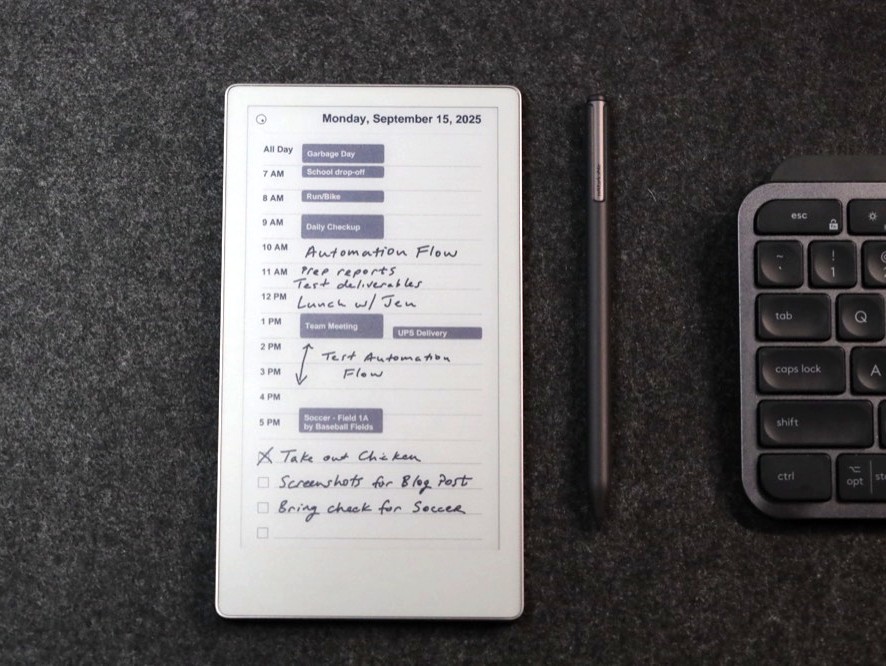
Full blog post with more details here.
After getting some amazing feedback from users of this little web app, I made a desktop app for Mac and Windows that has a ton of features, including auto sync, preserved handwritten notes, lots of custom options, minimize to system tray, and more!
Planneriffic - Calendar Sync for Remarkable Move
Your data stays private:
- No calendar data is stored or logged
- No URLs are saved or tracked
- PDFs are automatically deleted immediately after download
- Zero data persistence - everything is processed in memory
- Multiple Calendar Support: Google Calendar, Outlook, Apple Calendar, or any iCal feed
- Smart Layout: Automatic event positioning with overflow handling
- All-Day Events: If an all day event exists, show it, otherwise hide
- Customizable Time Range: Choose your daily schedule hours (8-12 hour range)
- Optional To-Do Section: Add checkboxes and lines for daily tasks
- Optimized for reMarkable: Perfect dimensions (954 x 1696 pixels, 264 PPI)
Visit the hosted app at https://remarkable.pythonanywhere.com/ - no setup required!
If you prefer to run the app on your own machine, follow these steps:
-
Clone the repository:
git clone https://github.com/vikboyechko/remarkable-daily-planner.git cd remarkable-daily-planner -
Install dependencies:
pip install -r requirements.txt
-
Run the app:
python app.py
-
Open your browser: Navigate to
http://localhost:5000
- Open Google Calendar
- On the left sidebar, find your calendar and click the three dots (⋮)
- Select "Settings and sharing"
- Scroll down to "Integrate calendar"
- Copy the "Secret address in iCal format" link
⚠️ Important: Use the secret link, not the public one, for private events
- Open Outlook Calendar
- Click "Settings" (gear icon) → "View all Outlook settings"
- Go to "Calendar" → "Shared calendars"
- Under "Publish a calendar", select your calendar
- Choose "Can view all details" for private events
- Click "Publish" and copy the ICS link
- Open iCloud Calendar
- Click the share icon next to your calendar name
- Check "Public Calendar"
- Copy the provided link and change
webcal://tohttps://
Most calendar applications support iCal export. Look for:
- "Export calendar" or "Share calendar"
- "iCal feed" or "ICS link"
- "Calendar URL" or "Subscription link"
- Multiple Calendars: Separate multiple iCal URLs with commas
- Time Range: Choose 8-12 hour ranges (e.g., 6 AM - 5 PM)
- Date Range: Generate single days or multi-day planners
- To-Do Section: Toggle on/off based on your preference
Optimized for reMarkable Paper Pro Move, but it can easily be adapted for other Remarkable devices or eink tablets by adjusting the PDF dimensions in app.py.