
A lightweight, self-hosted, all-in-one monitoring tool for Monad Node Operators.
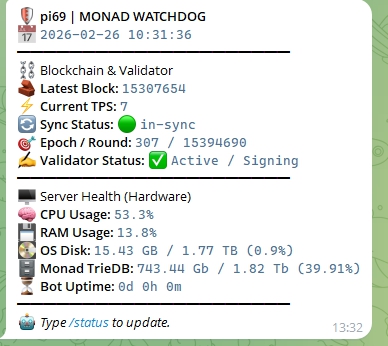
📖 Overview As a node operator, relying solely on third-party explorers for monitoring is risky. Monad Node Watchdog is a Python script designed to run locally alongside your node. It communicates directly with the RPC endpoint, monitors system logs, checks hardware resources, and sends instant Telegram Alerts if critical issues are detected.
- Real-time Blockchain Monitoring: Checks block height, Sync Status (🟢 in-sync or 🟡 lagging), Epoch, and Round continuously directly from the local
monad-statusCLI and RPC. - 🖥️ Server Health & Storage Tracking: Monitors CPU, RAM, and OS Disk usage in real-time. [NEW] Includes specialized tracking for Monad TrieDB capacity and usage! Sends alerts if usage exceeds safe thresholds.
- 🥷 Validator Log Reader: Monitors
monad-bftjournal logs in the background. Detects missed blocks, failed proposals, and consensus timeouts immediately! - 🚀 TPS Tracking & Hype Alerts: Monitors current Transactions Per Second (TPS) in real-time and triggers automatic hype alerts when network activity spikes (e.g., TPS > 500).
- ⏰ Automated & On-Demand Reports: Receive automatic status summaries, or fetch instant detailed data anytime using the
/statuscommand in Telegram. - 🛑 Stall Detection: Alerts you immediately if block production halts or the node gets stuck for more than 3 minutes.
- Privacy Focused: No external data leaks; connects only to your local node and the official Telegram API.
- Dead-Man's Switch (Heartbeat Server): Includes an optional secondary lightweight Flask server to detect complete node outages or network disconnections.
Download the script to your server:
git clone [https://github.com/bozdemir52/monad-node-watchdog.git](https://github.com/bozdemir52/monad-node-watchdog.git)
cd monad-node-watchdog- Install Requirements Install the necessary Python libraries (requests for API calls, psutil for hardware monitoring):
pip3 install requests psutil- Configuration Rename the example config file and enter your details (or edit directly inside monitor.py depending on your setup):
mv config.py.example config.py
nano config.py
Settings to edit:
TELEGRAM_BOT_TOKEN: Get this from @BotFather.
TELEGRAM_CHAT_ID: Get this from @userinfobot.
NODE_RPC_URL: Usually http://localhost:8080
VALIDATOR_MONIKER: Your node's name for the dashboard.
ALERT_CPU_THRESHOLD, ALERT_RAM_THRESHOLD, ALERT_DISK_THRESHOLD: Customize your hardware alert limits (default is 90%).
🛠️ Running in Background (Persistent) To keep the bot running even after you disconnect from the server, use screen.
Create a New Session:
screen -S watchdogStart the Script:
python3 monitor.py(You should see: "🚀 [INFO] Monad Ultimate Validator Watchdog started...")
Detach (Leave it running): To exit the screen without stopping the bot: Press Ctrl + A, then release and press D. (You will be returned to your main terminal, but the bot continues running in the background.)
🔄 Management View Logs (Re-attach): To check if the bot is still running or to see logs:
screen -r watchdogStop the Bot:
Re-attach to the screen: screen -r watchdog
Relying on a local script is great, but what if your entire node server crashes or loses internet connection? Who alerts you then?
To solve this DevOps paradox, monad-node-watchdog includes a secondary Heartbeat Server architecture. By running heartbeat_server.py on a separate, cheap VPS (or any other server), it will constantly listen for "I am alive" pings from your main node. If the main node goes offline for more than 3 minutes, the Heartbeat Server will trigger a critical alert!
1. On your Secondary Server (The Watcher): Create the heartbeat file and install the required web framework (Flask):
# Download the heartbeat script
wget https://raw.githubusercontent.com/bozdemir52/monad-node-watchdog/main/heartbeat_server.py

# Install dependencies
pip3 install flask requests- Configure the Heartbeat Server: Edit the heartbeat_server.py file and add your Telegram/Discord credentials so it knows where to send the critical alert:
nano heartbeat_server.py(Make sure to open port 5000 on your secondary server's firewall).
- Run the Heartbeat Server in the background:
screen -S heartbeat
python3 heartbeat_server.py
(Press Ctrl + A then D to detach and leave it running).
- Link your Main Node to the Heartbeat Server: Go back to your Main Node Server, open monitor.py, and enter the IP address of your secondary server:
WATCHDOG_SERVER_IP = "http://<YOUR_SECONDARY_SERVER_IP>:5000"
Restart your monitor.py on the main node. It will now send a ping to the Heartbeat server every few seconds. If somebody pulls the plug on your node, you will know within 3 minutes!
Press Ctrl + C to stop the script.