Passmark is an open-source AI framework for regression testing. Most AI testing tools focus on testing a single PR. Passmark is designed for continuous regression testing of applications, where the goal is to catch regressions as soon as they occur, without needing to update AI prompts or retrain models.
Passmark uses AI models to execute natural language steps via Playwright, with intelligent caching, auto-healing, and multi-model assertion verification.
npm init playwright@latest passmark-project # select the default options and set language to TypeScript
cd passmark-project
npm install passmark
We need at least one model from Anthropic and one from Google to use Passmark's multi-model consensus features. Set the required environment variables in .env:
ANTHROPIC_API_KEY=sk-ant-...
GOOGLE_GENERATIVE_AI_API_KEY=AIza...
Alternatively, you can use an AI gateway like Vercel AI Gateway to route requests to multiple providers without managing individual API keys. If you choose this option, set AI_GATEWAY_API_KEY instead. Note: we support only Vercel AI Gateway at the moment, but we're planning to add support for other gateways in the future.
Set your Playwright project to read .env by adding the following to playwright.config.ts (after import { defineConfig, devices } from '@playwright/test';):
import dotenv from 'dotenv';
import path from 'path';

dotenv.config({ path: path.resolve(__dirname, '.env') });
Make sure you install dotenv by running npm install dotenv.
Now, paste the following code into tests/example.spec.ts:
import { test, expect } from "@playwright/test";
import { runSteps } from "passmark";

test.use({
  headless: !!process.env.CI,
});

test("Shopping cart tests", async ({ page }) => {
  test.setTimeout(60_000); // increase timeout for AI execution
  await runSteps({
    page,
    userFlow: "Add product to cart",
    steps: [
      { description: "Navigate to https://demo.vercel.store" },
      { description: "Click Acme Circles T-Shirt" },
      { description: "Select color", data: { value: "White" } },
      { description: "Select size", data: { value: "S" } },
      { description: "Add to cart", waitUntil: "My Cart is visible" },
    ],
    assertions: [{ assertion: "You can see My Cart with Acme Circles T-Shirt" }],
    test,
    expect
  });
});
If you are using Vercel AI Gateway, you can add the following to the above code:
import { runSteps, configure } from "passmark";

configure({
  ai: {
    gateway: "vercel" // Make sure to set AI_GATEWAY_API_KEY in your .env file
  }
});
To run the test, use:
npx playwright test example.spec.ts --project chromiumAfter the test completes, you can run npx playwright show-report to see a detailed report of the test execution, including an AI summary at the top, provided by Passmark.
- Core Execution —
runSteps()andrunUserFlow()for flexible test orchestration in natural language, with smart caching and auto-healing - Multi-Model Assertion Engine — Consensus-based validation using Claude and Gemini, with an arbiter model to resolve disagreements
- Redis-Based Step Caching — Cache-first execution with AI fallback and automatic self-healing when cached steps fail
- Configurable AI Models — 8 dedicated model slots for step execution, assertions, extraction, and more
- AI Gateway Support — Route requests through Vercel AI Gateway or connect directly to provider SDKs
- Dynamic Placeholders — Inject values at runtime with
{{run.*}},{{global.*}},{{data.*}}, and{{email.*}}expressions for repeatable and data-driven tests - Email Extraction — Pluggable email provider interface with a built-in emailsink provider
- AI-Powered Data Extraction — Extract structured values from page snapshots and URLs using AI
- Smart Wait Conditions — AI-evaluated wait conditions with exponential backoff. No rigid selectors or time-based waits needed.
- Secure Script Runner — AST-validated Playwright script execution with an allowlisted API surface
- Telemetry — Optional Axiom and OpenTelemetry tracing via environment variables
- Structured Logging — Pino-based logger with configurable log levels
- Global Configuration — Single
configure()entry point for models, gateway, email provider, and upload path
Executes a sequence of steps using AI with caching. Each step is described in natural language and executed via Playwright.
await runSteps({
  page,
  userFlow: "Checkout Flow",
  steps: [
    { description: "Add item to cart" },
    { description: "Go to checkout" },
    { description: "Fill in shipping details", data: { value: "123 Main St" } },
  ],
  assertions: [{ assertion: "Order confirmation is displayed" }],
  test,
  expect,
});Runs a complete user flow as a single AI agent call. Best for exploratory testing where exact steps are flexible.
const result = await runUserFlow({
  page,
  userFlow: "Complete a purchase",
  steps: "Navigate to store, add an item, checkout with test card",
  effort: "high", // by default "low" uses gemini-3-flash for faster execution; "high" uses gemini-3.1-pro-preview for deeper thinking
});Multi-model consensus assertion. Runs Claude and Gemini in parallel; if they disagree, a third model arbitrates.
const result = await assert({
  page,
  assertion: "The dashboard shows 3 active projects",
  expect,
});Call configure() once before using any functions:
import { configure } from "passmark";

configure({
  ai: {
    gateway: "none", // "none" (default) or "vercel"
    models: {
      stepExecution: "google/gemini-3-flash",
      utility: "google/gemini-2.5-flash",
    },
  },
  uploadBasePath: "./uploads",
});| Variable | Required | Default | Description |
|---|---|---|---|
REDIS_URL |
No | - | Redis connection URL for step caching and global state |
ANTHROPIC_API_KEY |
Yes | - | Anthropic API key for Claude models |
GOOGLE_GENERATIVE_AI_API_KEY |
Yes | - | Google API key for Gemini models |
AI_GATEWAY_API_KEY |
If gateway=vercel | - | Vercel AI Gateway API key |
AXIOM_TOKEN |
No | - | Axiom token for OpenTelemetry tracing |
AXIOM_DATASET |
No | - | Axiom dataset for trace storage |
PASSMARK_LOG_LEVEL |
No | info |
Log level: debug, info, warn, error, silent |
All models are configurable via configure({ ai: { models: { ... } } }):
| Key | Default | Used For |
|---|---|---|
stepExecution |
google/gemini-3-flash |
Executing individual steps |
userFlowLow |
google/gemini-3-flash-preview |
User flow execution (low effort) |
userFlowHigh |
google/gemini-3.1-pro-preview |
User flow execution (high effort) |
assertionPrimary |
anthropic/claude-4.5-haiku |
Primary assertion model (Claude) |
assertionSecondary |
google/gemini-3-flash |
Secondary assertion model (Gemini) |
assertionArbiter |
google/gemini-3.1-pro-preview |
Arbiter for assertion disagreements |
utility |
google/gemini-2.5-flash |
Data extraction, wait conditions |
Passmark caches successful step actions in Redis. On subsequent runs, cached steps execute directly without AI calls, dramatically reducing latency and cost.
- Steps are cached by
userFlow+step.description - Set
bypassCache: trueon individual steps or the entire run to force AI execution - Cache is automatically bypassed on Playwright retries
- Caching only applies to
runSteps. As of now, only those AI executions that are single-step are cached as multi-step actions can vary widely and are less likely to be identical on subsequent runs. We're exploring ways to safely cache multi-step flows.
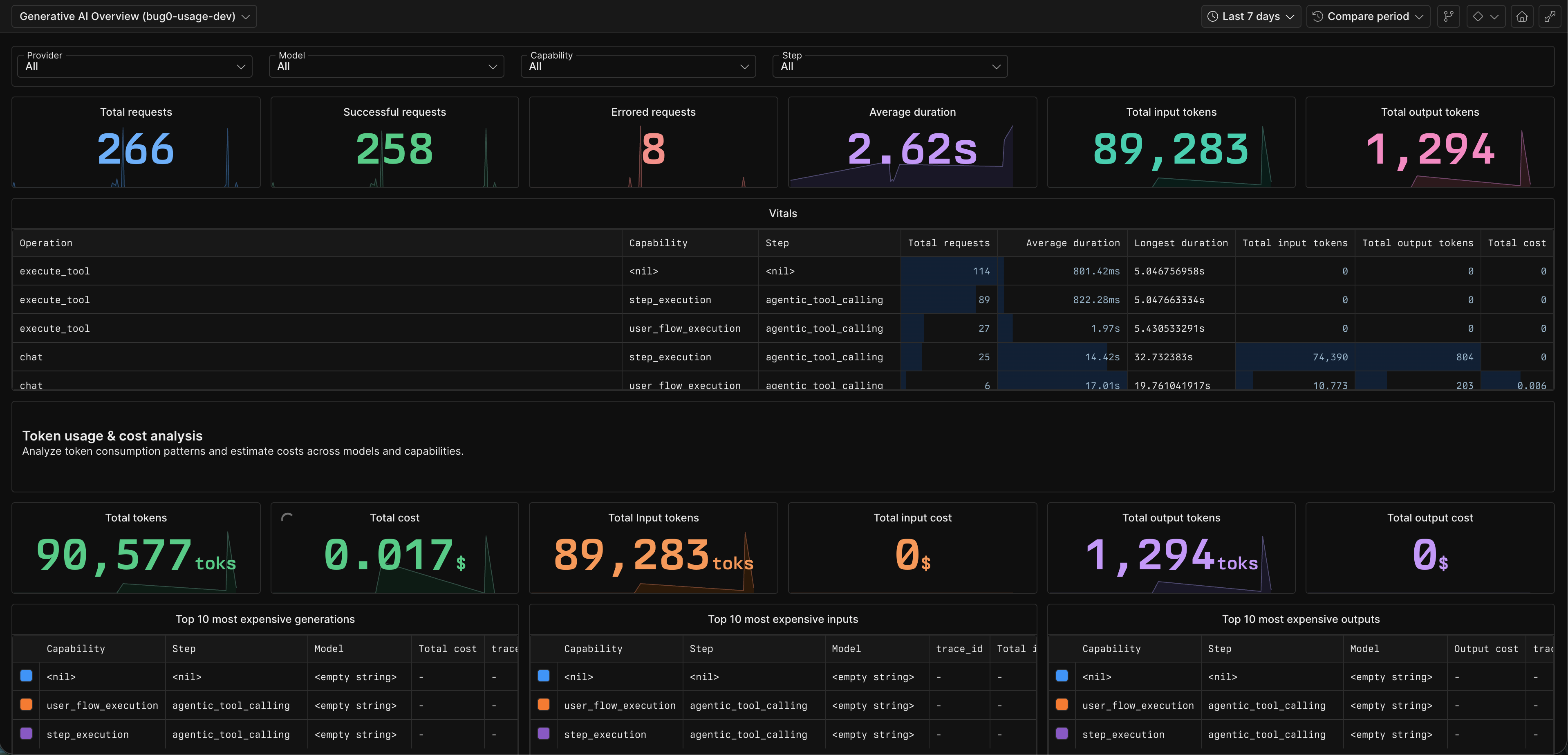
Telemetry is opt-in. Set AXIOM_TOKEN and AXIOM_DATASET to enable OpenTelemetry tracing via Axiom. All AI calls are wrapped with withSpan for observability.
Without these env vars, telemetry is a no-op.
Configure Axiom to get a rich dashboard like this:
Configure an email provider for testing flows that involve email verification. By default, you can use the emailsink provider, which provides disposable email addresses and an API to fetch received emails. The free tier doesn't need any credentials, but for more reliability and flexible rate limits, you can sign up for an account and use your EMAILSINK_API_KEY. Reach out to us if you want to get an API key.
import { configure } from "passmark";
import { emailsinkProvider } from "passmark/providers/emailsink";

configure({
  email: emailsinkProvider({ apiKey: process.env.EMAILSINK_API_KEY }),
});
Or implement a custom provider:
configure({
  email: {
    domain: "my-test-mail.com",
    extractContent: async ({ email, prompt }) => {
      // Fetch and extract content from your email service
      return extractedValue;
    },
  },
});
Use in steps with the {{email.*}} placeholder pattern:
{
  description: "Enter the verification code",
  data: { value: "{{email.otp:get the 6 digit verification code:{{run.dynamicEmail}}}}" }
}Dynamic values can be injected into step data using placeholders:
| Pattern | Scope | Description |
|---|---|---|
{{run.email}} |
Single test | Random email (faker) |
{{run.dynamicEmail}} |
Single test | Email using configured domain |
{{run.fullName}} |
Single test | Random full name |
{{run.shortid}} |
Single test | Short unique ID |
{{run.phoneNumber}} |
Single test | Random phone number |
{{global.email}} |
All tests in an execution | Shared across runSteps calls with same executionId |
{{global.dynamicEmail}} |
All tests in an execution | Shared dynamic email |
{{data.key}} |
Per project | Stored in Redis, managed via project settings |
{{email.type:prompt}} |
Resolved lazily | Extract content from received email |
Step Request
    |
    v
[Cache Check] --hit--> [Execute Cached Action] --success--> Done
    |                          |
    miss                     fail (auto-heal)
    |                          |
    v                          v
[AI Execution] ---------> [Cache Result]
    |
    v
[Assertions] (Claude + Gemini consensus)
- Tests are not comprehensive at the moment. We welcome contributions to expand test coverage, especially around edge cases and failure modes.
See CONTRIBUTING.md for development setup, code style, and PR workflow.
FSL-1.1-Apache-2.0 - Functional Source License, Version 1.1, with Apache 2.0 future license.