Adding a RTC to Raspberry Pi
A RTC, or "Real Time Clock", will be used to keep track of time for our datalogger.
##Overview When a Raspberry Pi turns on, it asks the internet what the local time is. If there is no internet connection, it will fall back to a default time.
Because we wish to start up the datalogger out in the field, it is necessary to keep a module responsible for tracking time. We will use Adafruit's breakout board for the DS1307. It works just as the clock in your watch does.
This chip will communicate with our Raspberry Pi via a communication protocol called I2C ("i squared c").
##Background on I2C I2C, or inter-integrated chip communication, is a protocol to allow communication between different chips. Falls under the master-slave model, where one chip is the centralized hub and there are several slaves providing information. Our Raspberry Pi with various helper chips follows this models.
I2C is often visualized as
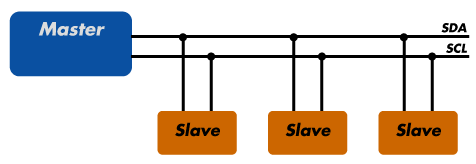
The SCL, or clock signal, keeps chips synchronized. The SDA, or data signal, will pass information.
Each chip attached to these lines will be given an address, and as many as 128 different chips can be attached.
Though beyond the scope of this project, please see Quick2wire's I2C explanation for a further introduction to the protocol.
##Setting up I2C
Please follow these instructions to set up I2C on the Pi.
##Connecting the RTC
With I2C configured for our Pi, we connect the RTC. Refer to Adafruit's wiring instructions.
As of August 2016, DO NOT follow Adafruit instructions to "Set RTC Time". Instead, please refer to AB Electronics' RTC Pi on a Raspberry Pi Raspbian Jessie.
##Testing the RTC
Next, we need to test that your RTC works correctly.
Simply disconnect from the internet, reboot the pi, and then see if the time was set.
####If your Pi connects to the internet automatically
sudo nano /etc/wpa_supplicant/wpa_supplicant.conf
Temporarily change the name of your wifi so it does not automatically connect.
If the time shows up correctly without the internet, you have successfully added the RTC!