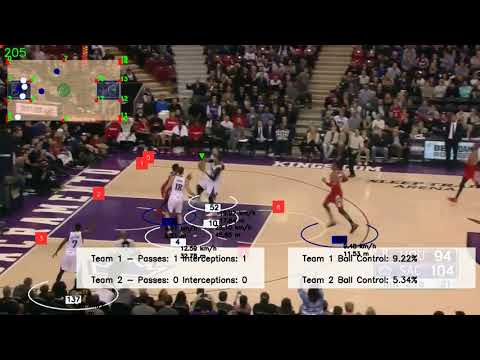
Analyze basketball footage with automated detection of players, ball, team assignment, and more. This repository integrates object tracking, zero-shot classification, and custom keypoint detection for a fully annotated basketball game experience.
Leveraging the convenience of Roboflow for dataset management and Ultralytics' YOLO models for both training and inference, this project provides a robust framework for basketball video analysis.
Training notebooks are included to help you customize and fine-tune models to suit your specific needs, ensuring a seamless and efficient workflow.
- Features
- Prerequisites
- Demo Video
- Installation
- Training the Models
- Usage
- Project Structure
- Future Work
- Contributing
- License
- Player and ball detection/tracking using pretrained models.
- Court keypoint detection for visualizing important zones.
- Team assignment with jersey color classification.
- Ball possession detection, pass detection, and interception detection.
- Easy stubbing to skip repeated computation for fast iteration.
- Various “drawers” to overlay detected elements onto frames.
Below is the final annotated output video.
- Python 3.8+
- (Optional) Docker
Setup your environment locally or via Docker.
- Create a virtual environment (e.g., venv/conda).
- Install the required packages:
pip install -r requirements.txtdocker build -t basketball-analysis .docker imagesHarnessing the powerful tools offered by Roboflow and Ultralytics makes it straightforward to manage datasets, handle annotations, and train advanced object detection models. Roboflow provides an intuitive platform for dataset preprocessing and augmentation, while Ultralytics’ YOLO architectures (v5, v8, and beyond) deliver state-of-the-art detection performance.
This repository relies on trained models for detecting basketballs, players, and court keypoints. You have two options to get these models:
-
Download the Pretrained Weights
- ball_detector_model.pt
(https://drive.google.com/file/d/1KejdrcEnto2AKjdgdo1U1syr5gODp6EL/view?usp=sharing) - court_keypoint_detector.pt
(https://drive.google.com/file/d/1nGoG-pUkSg4bWAUIeQ8aN6n7O1fOkXU0/view?usp=sharing) - player_detector.pt
(https://drive.google.com/file/d/1fVBLZtPy9Yu6Tf186oS4siotkioHBLHy/view?usp=sharing)
Simply download these files and place them into the
models/folder in your project. This allows you to run the pipelines without manually retraining. - ball_detector_model.pt
-
Train Your Own Models
The training scripts are provided in thetraining_notebooks/folder. These Jupyter notebooks use Roboflow datasets and the Ultralytics YOLO frameworks to train various detection tasks:basketball_ball_training.ipynb: Trains a basketball ball detector (using YOLOv5). Incorporates motion blur augmentations to improve ball detection accuracy on fast-moving game footage.basketball_court_keypoint_training.ipynb: Uses YOLOv8 to detect keypoints on the court (e.g., lines, corners, key zones).basketball_player_detection_training.ipynb: Trains a player detection model (using YOLO v11) to identify players in each frame.
You can easily run these notebooks in Google Colab or another environment with GPU access. After training, download the newly generated
.ptfiles and place them in themodels/folder.
Once you have your models in place, you may proceed with the usage steps described above. If you want to retrain or fine-tune for your specific dataset, remember to adjust the paths in the notebooks and in main.py to point to the newly generated models.
You can run this repository’s core functionality (analysis pipeline) with Python or Docker.
Run the main entry point with your chosen video file:
python main.py path_to_input_video.mp4 --output_video output_videos/output_result.avi- By default, intermediate “stubs” (pickled detection results) are used if found, allowing you to skip repeated detection/tracking.
- Use the
--stub_pathflag to specify a custom stub folder, or disable stubs if you want to run everything fresh.
docker build -t basketball-analysis .docker run \
-v $(pwd)/videos:/app/videos \
-v $(pwd)/output_videos:/app/output_videos \
basketball-analysis \
python main.py videos/input_video.mp4 --output_video output_videos/output_result.avi-
main.py
– Orchestrates the entire pipeline: reading video frames, running detection/tracking, team assignment, drawing results, and saving the output video. -
trackers/
– HousesPlayerTrackerandBallTracker, which use detection models to generate bounding boxes and track objects across frames. -
utils/
– Contains helper functions likebbox_utils.pyfor geometric calculations,stubs_utils.pyfor reading and saving intermediate results, andvideo_utils.pyfor reading/saving videos. -
drawers/
– Contains classes that overlay bounding boxes, court lines, passes, etc., onto frames. -
ball_aquisition/
– Logic for identifying which player is in possession of the ball. -
pass_and_interception_detector/
– Identifies passing events and interceptions. -
court_keypoint_detector/
– Detects lines and keypoints on the court using the specified model. -
team_assigner/
– Uses zero-shot classification (Hugging Face or similar) to assign players to teams based on jersey color. -
configs/
– Holds default paths for models, stubs, and output video.
As we continue to enhance the capabilities of this basketball video analysis tool, several areas for future development have been identified:
- Integrating a Pose Model for Advanced Rule Detection
Incorporating a pose detection model could enable the identification of complex basketball rules such as double dribbling and traveling. By analyzing player movements and positions, the system could automatically flag these infractions, adding another layer of analysis to the video footage.
These enhancements will further refine the analysis capabilities and provide users with more comprehensive insights into basketball games.
Contributions are welcome!
- Fork the repository.
- Create a new branch for your feature or bug fix.
- Submit a pull request with a clear explanation of your changes.
This project is licensed under the MIT License.
See LICENSE for details.
Feel free to open an issue or reach out via email if you have questions about the project, suggestions for improvements, or just want to say hi!
Enjoy analyzing basketball footage with automatic detection and tracking!