What's New in this Release
Here is a list of Updates by Commit. Not every single one is listed, only relevant and major changes are listed below.
- 🩹 Fix string buffer warning
- 🩹 Fix MARKFORGED_INVERSE typos
- 🩹 Fix some serial chars
- 🧑💻 DWIN icon updates, etc.
- 🐛 Creality Free Runs fixups
- 🔨 Remove signature.py debug
- ✨ Orca 3D Modular Controller
- 🎨 Whitespace in the rightplace
- 🩹 Jerk correction for LIN_ADVANCE + CLASSIC_JERK
- 📝 Clean up variant labels
- 🚸 Update ProUI Plot graph
- 🔨 Build flag tweaks
- 🎨 Planner indent
- 🔧 Optional FAN_INVERTING
- 🔧 Up to 12 PWM fans
- 🔧 config.ini / JSON dump by @section
- 🚸 Just "warn" on SD fail
- 🐛⚡️ FT_MOTION improvements
- Update - PID Plot graph
- 🔧 Fix Creality E3 "Free-runs"
- ✨ Creality E3 Free-runs Silent Motherboard
- 🐛 Fix planner jerk limits
- ✨ EDITABLE_DISPLAY_TIMEOUT
- ✨ SERIAL_DMA (for some STM32Fx)
- 🚸 Adjust Progress / Completion
- ⚡️ Use strlcpy with buffer size
- ✨ Voxelab Aquila N32 (via Maple)
- 🐛 Fix tool-change E prime
- 🐛 Fix thermistor 14 & 60 constexprness
- 🚸 UI refresh for some events
- ✨ DOUBLE_LCD_FRAMERATE
- 🩹 Fix some minor issues
- 🚸 Fix BLTouch HSMode deploy
- 🔨 Update config/schema scripts
- ✨ XY_AFTER_HOMING, EVENT_GCODE_AFTER_HOMING
- 🚸 Fix ProUI hostui.notify('finished')
- 🔨Update MinSerial.cpp
- 🔧 Configurable FR/Flow edit ranges
- ✨ MAX Thermocouples for Heated Bed
- 🧑💻 Use ftpl for item strings
- ✨ BD_SENSOR_PROBE_NO_STOP
- 🔧 Configurable FR/Flow edit ranges
- 🐛 Fix expand_u8str_P string substitution
- ⚡️ Tiny string optimization
- 🩹 Fix JyersUI/ProUI narrowing
- 🚸 Fixes for ProUI popup, abort
- 🌐 Regenerate Russian font data
- 🚸 Fix, clean up ProUI Color values changed to 'rgb_t' struct
- 🧑💻 Update pins formatter script
- 🔨 Fix Ender-5 S1 env
- 🚸 Fix more MarlinUI title centering
- 🚸 Fix MarlinUI axis move / UBL strings
- 🚸 Minor touch calibration improvement
- 🐛 Fix rotational AxisFlags
- 🔨 Rotational move items
- 🔧 Define MarlinUI axis moves with lists
- 🔨 Creality STM32F401RC w/out bootloader
- 🐛 Fix BTT SKR Mini E3 pins
- 🔨 Fix legacy auto_build.py
- 🔨 Fix updated build script (#)
- 🎨 Python ; cleanup
- ✨ BED_ANNEALING_GCODE
- 🔨 Specific package versions
- 🧑💻 Fix M808 debug (#)
- 🩹 Probe XY Offset followup
- ✨ G27 P3 / P4 Use G27 P3 - Move up Z (no X/Y), P4 - Park X/Y only (no Z)
- Change Runout Sensor Endstop Diag. to show "PRESENT" instead of "TRIGGERED"
- Fixes #64 [BUG] Crash and reboot after second time gcode preview
- 🧑💻 Use FLT_MAX for HUGE_VALF
- 🔨 Fix test of env['PROGNAME']
- ✨ Probe XY Offset value limits
- 🐛 Fix Backlash Compensation layer shift
- 🔨 Minor schema.py updates
- 🧑💻 Improve POSTMORTEM_DEBUGGING
- 🌐 Fix long Italian string
- 🩹 Fix MarlinUI UTF-8 chars
- 🚸 Move Debug menu down
- 🧑💻 Update .editorconfig settings
- 🌐 Update Italian language
- ⚡️ Faster COMPACT_MARLIN_BOOT_LOGO (rle16)
- 🔥 Automatic minimum planner junction speed
- 🩹 Fix Input Shaping max_isr_rate with Distinct E factors
- Added Support for BTT SKR Mini E3 V2.0 / V3.0 / V3.0.1
- Misc. probe opts
- GCode => G-Code
- FxdTiCtrl => FTMotion
- Macro comments
- Nonlinear Extrusion Control (M592)
- Fix LCD Backlight Timeout and Encoder Tick menu interfere with each other
- Fix tool-change E prime
- More angles for 2x Servo Switching Nozzle
- Patches for MSC SD
- Update dev scripts
- Serial warning followup
- Specify LPC toolchain 1.100301.220327
- CI test for STM32G0
- Fix G33 output
- Move some config options
- No TMC_HOME_PHASE on tandem steppers
- misc. formatting, grid condition
- Tweak an 'if' block
- Fix Endstop Test debug menu
-
Remove extraneous 'inline'Reverted - Warning alerts for non-fatal errors
- Update config sections
- Some settings units
- Fix SanityCheck typo
- Temp report precision option
- More precision in G30 output
- Use SERIAL_FLOAT_PRECISION for SERIAL_ECHO(float)
- Added support for the Aquila X3 (inductive proximity sensor bed probe)
- Rearranged ICON's, added new ones, remastered old ones.
- Allow arbitrary BLOCK_BUFFER_SIZE
- Avoid LCD messages starting with "Error:"
- Fixes for G2/G3 arcs
- Fixes for ProUI, build rename
- Reversible file alpha sorting
- Linear Advance enabled and shows in menu
- Add option to reset single mesh point to Zero
- Fix Mesh viewer, shows Green for Negative, Red for Positive
- Configurable SD card retry/timeout
- UI Sound off/on with M300 E<0|1> T<0|1> Use M300 E 0/1 - toggle sound, T 0/1 - for encoder tick/beep
- Fix UBL probe_entire_mesh skips points
- Option to report temperature on error
- More endstops refactoring
- STM32 support 9 UARTs
- Fix hotend idle timeout checks
- Fix runout extra length
- Revert M206 Home Offset behavior
- Always use ISR for BABYSTEPPING
- Ensure BLTouch deploy in HS Mode
- MString helper class
- Tramming Wizard starts a bit better, fixed mesh viewer values (were limited to 0.20)
- Mesh insets now save after restarting
- Runout icon indicator over the Extruder flow dashboard icon
- Dashboard Speed percentage also flashes speed in mm/s intermittently
- Enhanced Gcode preview --- Preview QR code removed
- Improved 3D/BL/CR-Touch auto leveling
- Multiple Probing is now Extra Probing
- Improved UBL Mesh viewer
- Bed Tramming Wizard --- Find average or absolute values
- New C35 custom g-code to launch Bed Tramming Wizard
- Added toolbar option for parking head.
- Force axes home to allow parking at pause
- Raise Z when printing is aborted
- Fix a possible bug with filename drawing in printing page
- Fix Crash after removing SD card
- Added Creality Cloud Support
- Adjust encoder knob speed rates
- Fix stepper motor noise
- Several minor bug fixes and Misc. optimizations
- and many more fixes from latest Marlin's bugfix 2.1.x
Modifications in Source Code (for custom builds):
- TJC support to enable preview and grid mesh viewer
- Added Creality CV laser module support with automatic file type detection
Note
The follow may apply to you if the mainboard chip supports 256KB max and firmware is -ProUI
This may NOT apply to -NoPro
Note 1: Due to lack of flash memory space in the Aquila's GD32/N32|F103RCT6, some features had to be disabled in the ProUI of UBL and BLT versions, including, but not limited to:
- Configuration.h
-----------------------------PREHEAT_2_LABEL 'ABS' PREHEAT_3_LABEL 'Warmup' G26_MESH_VALIDATION G26 NOZZLE_CLEAN_FEATURE G12 P<#> S<#> T<#> HAS_LOCKSCREEN Simple lockscreen ACTIVATE_MESH_ITEM Active Mesh Leveling menu option
- Configuration_adv.h
-----------------------------POWER_LOSS_RECOVERY Continue Print after Power-Loss M114_DETAIL Use 'M114' for details to check planner calculations CANCEL_OBJECTS Use 'M486' to allow Marlin to skip objects AUTO_REPORT_POSITION M154 S<seconds> EXTENDED_CAPABILITIES_REPORT > M115_GEOMETRY_REPORTM115 output REALTIME_REPORTING_COMMANDS Report position and state of the machine
Note 2: The latest releases are promoting UBL versions over ABL (BLT - BL Touch), but ABL/BLT versions will be available. MPC autotune is available for the hot-end as a replacement to PID autotune.
- [ _Default-NP ]: Use if you have a near stock machine Default No Probe
- [ _MM ]: Create a bed mesh without an auto bed probe Manual Mesh Bed Leveling
- [ _BLT ]: Use if you have a CR/3D/BL-Touch level sensor installed. Bilinear Auto Bed Leveling
- [ _UBL ]: Similar to both MM and BLT - with more options. Recommended over BLT Unified Bed Leveling
You can download the firmware's latest files from the Assets at the bottom of
the release page.
Binaries with UBL in their filename are similar to the bilinear leveling of BLT, but with extra features to provide users with more control and information. There are multiple guides about UBL, it's recommend reading about it before using this type of leveling system.
- https://all3dp.com/2/marlin-ubl-unified-bed-levelin-simply-explained/
- https://www.3dmakerengineering.com/blogs/3d-printing/unified-bed-leveling-marlin
- https://hackaday.com/2022/01/14/3d-printering-getting-started-with-universal-bed-leveling/
- [ -ProUI ]
| ProUI | (ProUI ENABLED)- Toolbar, Gcode model preview, and other special features and options
- [ -NoPro ]
| No ProUI | (ProUI DISABLED)- Does not have some features listed, but may include others not enabled in ProUI - see NOTE above
- [ -IS ]
| Input Shaping | Only if you mean to do the initial calibration- (May require a special breakout board, more information below)
- [ -MPC ]
| MPC Autotune | (replaces PID for hotend)
- All firmware version types have Linear Advance enabled
- Linear Advance - M900
- Input Shaping is enabled with files ending with "-IS"
- Input Shaping - M593
- MPC is enabled in firmware files containing "-MPC"
- Model Predictive Temperature Control
- MPC has proven to be a better algorithm for keeping the nozzle temperature stable, and is also very useful for high power heaters. It does take some getting used to how it works if you are unfamiliar with it. It's recommended for advanced users, so stick to the default PID versions, especially if your printer is relatively stock
Teaching Tech - Input Shaping: Step by Step guide
Chris' Basement - Marlin Input Shaper
- Universal Marlin Support
- - Support for Model predictive temperature control "MPC"
- - Support for Linear Advance
- - Support for Input Shaping
- DWIN / DACAI / TJC / SYNWIT display support
- Up to 300°c Hotend
- Improved support for Manual Mesh and CR/3D/BL-Touch
- Manual and Probe Assisted bed tramming
- Tramming Wizard for Auto Bed Leveling versions
- Calculate corner values of the bed, for easier bed tramming
- Set Bed Screw Inset to easily find each corner
- Editable physical dimensions (X/Y bed size and Z height)
- Selectable mesh point grid from 3x3 to 9x9
- Mesh editor for fine tuning Mesh Points
- Improved Mesh viewer (two types of viewers)
- Customizable Color theme
- Long filename support with scroll
- Baby Z-Stepping
- Probe Stow/Deploy/Reset menu items
- M48 Probe Test to Probe Settings menu
- Firmware Retract: adjust retraction settings while printing
- Filament management - Advanced pause features
- - change filament mid-print (park head/unload/load)
- Configurable park-head position (default x=0 y=220 z=40)
- Home axes after disabling motors
- Configurable Z feed rate
- Live move for all motors
- Support for S-curve Acceleration
- Restart printer menu item
- Allow invert direction of the extruder
- Support for filament runout sensor
- - Selectable runout filament sensor active state (LOW/HIGH/MOTION)
- - Editable runout distance
- Support for SD card extension (Auto-mount menu item)
- PID settings menus with viewable temperature plot graph
- - Able to view Bed or Nozzle temp on a graph during printing
- Lock screen
- Customizable pre-heat functions
- Enable/disable encoder beep/tick sound
- Preview g-code thumbnail (use this guide)
- New print done screen
- Two decimal positions for axis coordinates value
- Z-Offset wizard
- Editable minimum extrude temperature
- Turn off the LCD and Adjustable Brightness
- - LCD Timeout - Automatic turn off (Screen Saver)
- Individual axis homing
- Enable 250000 or 115200 bauds
- Power failure / power-loss recovery
- Enable/Disable Adaptive Step Smoothing
- Z-Offset icon blinks to indicate active mesh leveling
- Live End-stop diagnostics
- Printcounter and Statistics
- Toolbar with 11 configurable shortcut actions.
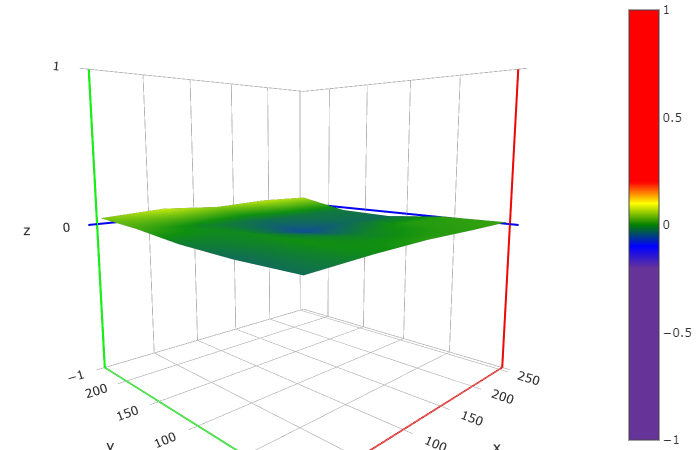
This shows the two types of meshviewer as an example
The newer colorful one has a more rainbow like characteristic
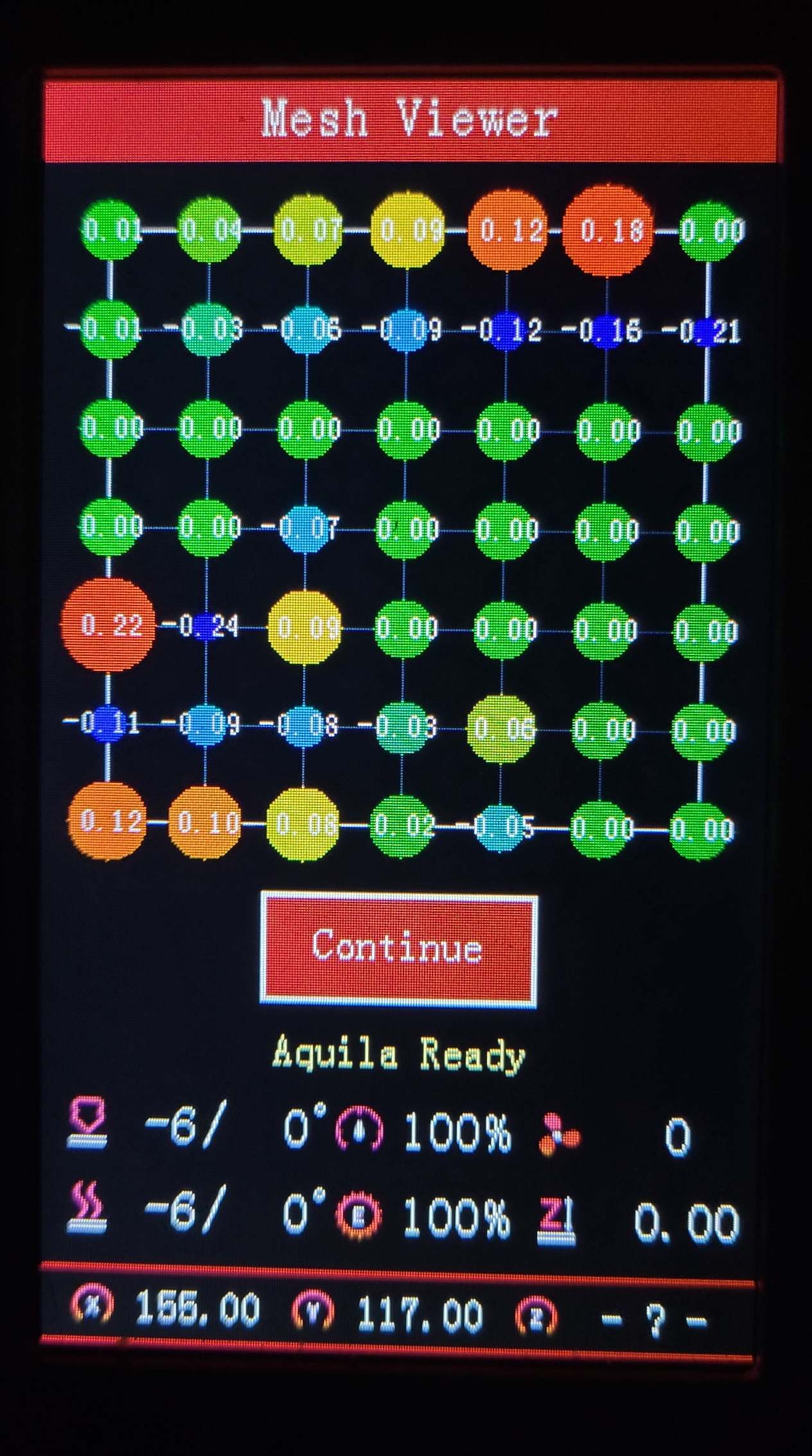
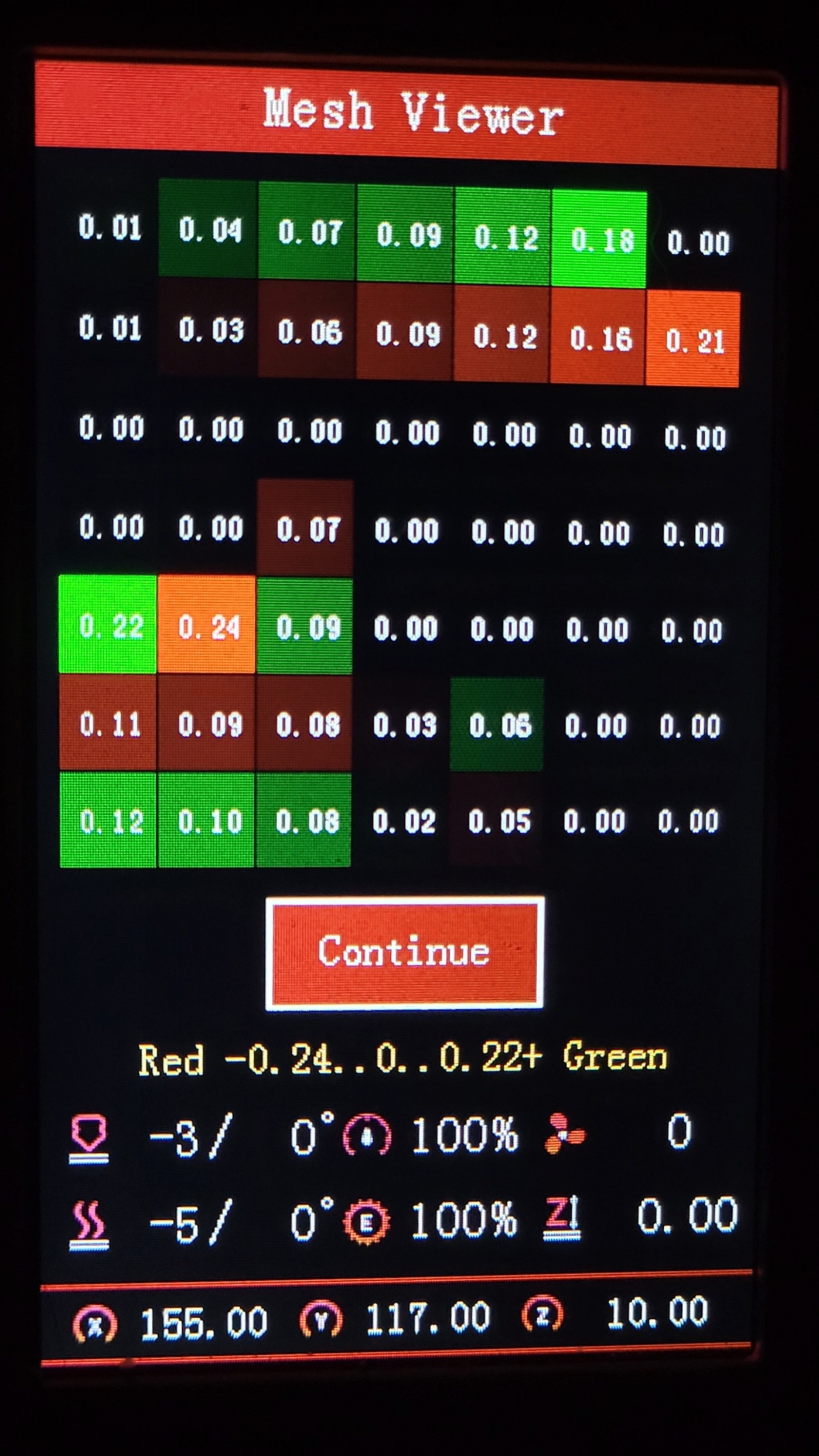
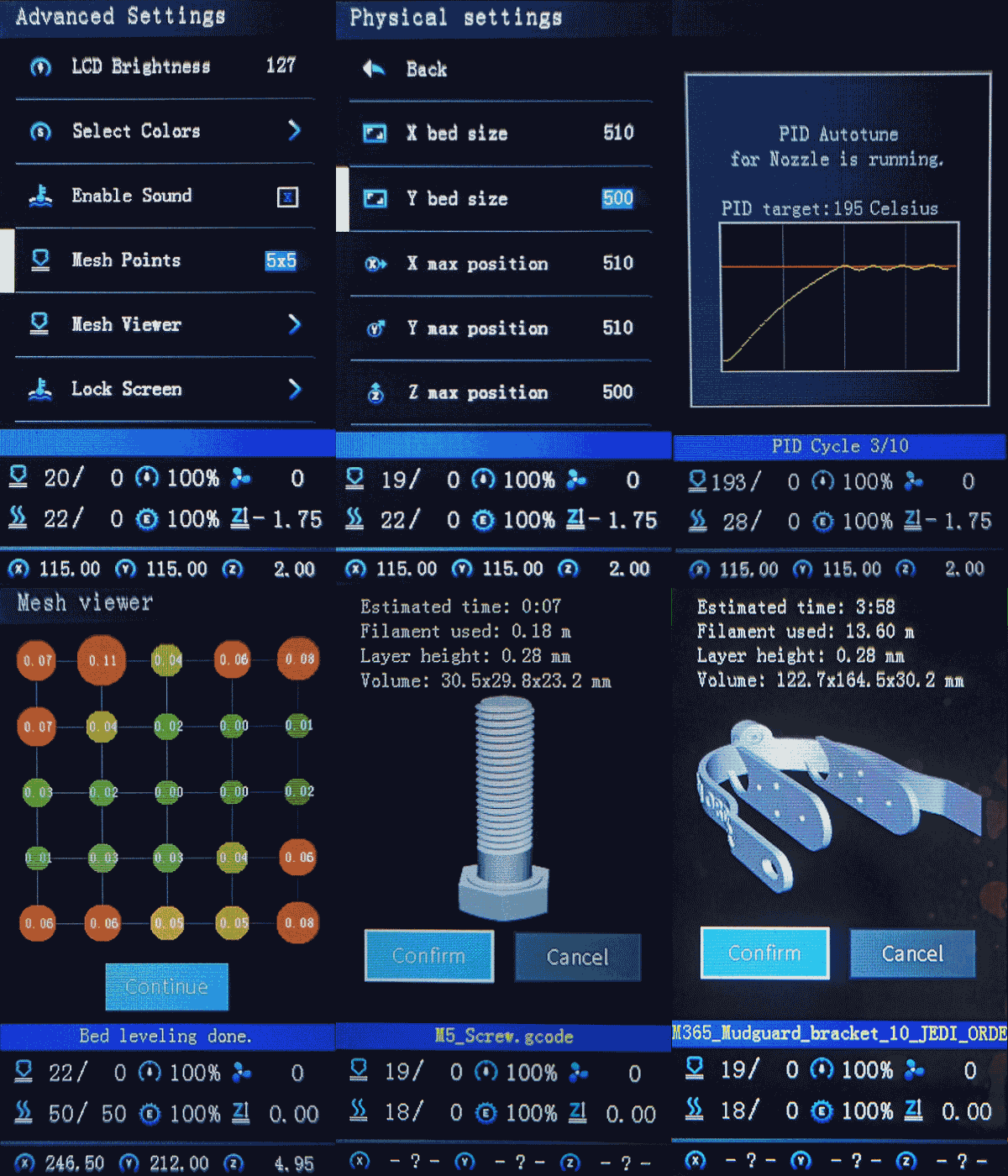
Select Color Menu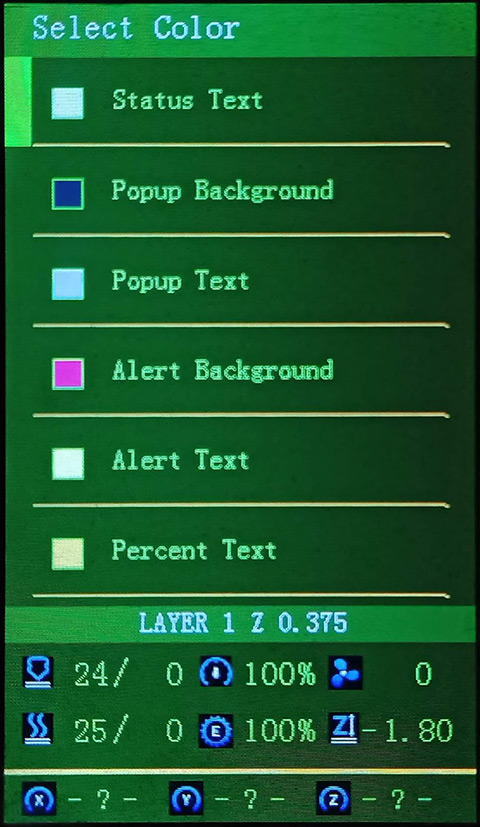
Octoprint bed visualizer support
Compatible main boards with the following chips:
- GD32F103RCT6
- N32F103RCT6 / N32G455REL7
- Creality V4.2.2
- Creality V4.2.7
- STM32F103RET6 *some versions may not fit into RCT6
- BTT SKR Mini E3 V3 / V2 / V3.0.1
- STM32G0B1RE / STM32F103RC / STM32F401RC
Compatible LCD screens:
- A DWIN color display with encoder knob
- For using ProUIONLY DACAI, TJC, or SYNWIT displays may be used if enabled
- The following Touch or legacy monochrome screens are not supported by ProUI:
- Aquila Pro / D1 / C2
- Ender-3 / Pro
Firmware files not yet posted under Assets may be available at a later time.
Feel free to make a request for anything specific.
You can still use this source code to compile firmware for other printers, but they will not be able to use the Professional User Interface without the specific LCD screen. In that case, you rather use the most current Marlin source code. You may also modify your printer to meet these requirements.
Get the latest firmware 
Use the Firmware Selector
-
Generate a G-code image preview
- Slicer post processing scripts -
Update LCD Display ICON's
- How to install the DWIN_SET - How to install the firmware
- https://teachingtechyt.github.io/calibration.html - Great for all around calibrations
- https://ellis3dp.com/Print-Tuning-Guide/ - Secondary guide for extra references
- https://youtu.be/xzQjtWhg9VE - Video guide for E-steps and Flow calibration
Some the pages and images in this Wiki were copied from https://github.com/mriscoc/Ender3V2S1/wiki