Web based tool to interact with data in the ATT&CK Framework as well as build and facilitate Cyber Security tabletops.
If you'd like to install it yourself documentation is below. If you want to just give it a try feel free to visit: (https://adeptus.vigilocyber.com)
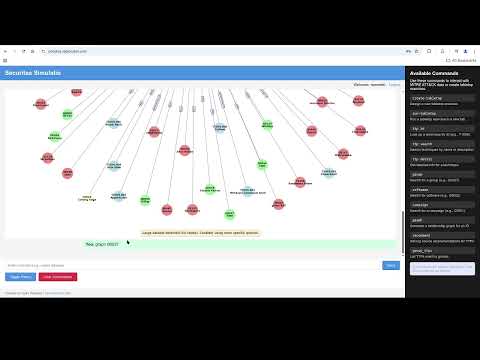
The MITRE ATT&CK chatbot supports the following commands to interact with MITRE ATT&CK data and manage tabletop exercises. Commands are case-insensitive and entered in the chat interface.
- create-tabletop: Designs a new tabletop exercise, guiding users to define a scenario with technologies, techniques (TTPs), injects, and a narrative. The exercise is saved as a JSON definition in the
tabletopsdatabase table for later use. - run-tabletop: Opens a selected tabletop exercise in a new browser tab, displaying the narrative, injects, facilitation tips, and a notes panel for real-time findings. Notes are saved to the
completed_tabletopstable as they are entered. - ttp id : Retrieves details for a specific MITRE ATT&CK technique by its ID (e.g.,
T1059). Returns the technique’s name, description, tactics, platforms, detection, and mitigation from thetechniquestable. - ttp search : Searches MITRE ATT&CK techniques by name or description matching the query term. Returns a list of relevant techniques from the
techniquestable. - ttp detail : Provides in-depth information for a specific technique by ID, including external references and relationships (e.g., campaigns, groups) from the
external_referencesandrelationshipstables. - group : Searches for a MITRE ATT&CK group by name or ID (e.g.,
G0027). Returns group details, such as description and associated campaigns, from thegroupstable. - software : Searches for software or tools by name or ID (e.g.,
S0002). Returns details like description and associated techniques from thesoftwareandsoftware_technique_relationshipstables. - campaign : Searches for a MITRE ATT&CK campaign by name or ID (e.g.,
C0001). Returns campaign details and related techniques from thecampaignsandcampaign_technique_relationshipstables. - graph : Generates a visual relationship graph for a given ID (e.g., technique, group, or software), showing connections like associated groups or techniques, using data from the
relationshipstable. - recommend : Provides log source recommendations for detecting a specific TTP, leveraging data from the
dettect_data_sourcestable to suggest relevant data sources and platforms. - group_ttps : Lists all TTPs associated with a specific group (e.g.,
G0027), retrieved from thegroup_technique_relationshipstable.
Information in this section assumes at least Ubuntu 24.04.
Infrastructure
- Python (My version was 3.13.2)
- MySQL or MariaDB
- Ollama (Model in use for demo was phi3:latest)
Requirements Install requirements by hand or using requirements.txt
- pyyaml
- requests
- mysql-connector-python
- networkx
- matplotlib
- discord.py
- python-dotenv
- flask
- Flask-Session
- Flask-Login
- aiohttp
- bcrypt
Schema & Data File Creation
- Create database & user
- Import schema.sql file
mysql -h {host} -u {username} -p {database name} < schema.sql
- Get enterprise-attack.json:
https://github.com/mitre/cti/blob/master/enterprise-attack/enterprise-attack.json
- Examine generateGenDET.py, specifically lines 17-86 this is a generic way to generate our monitoring/DETTECT controls.
- Run generateGenDET.py to create data-sources.yaml
python generateGenDET.py
- Run detect2sql.py to read the data-source.yaml and create the sql to import into the database:
python detect2sql.py
- Run mitre2sql.py to read enterprise-attack.json and generate the main sql import:
python mitre2sql.py
- Import the sql files:
mysql -h {host} -u {username} -p {database name} < mitre_full.sql
mysql -h {host} -u {username} -p {database name} < dettect_import.sql
Configure .env File
- Copy .env-sample to .env and update (samples below): OLLAMA_URL="http://localhost:11434" DB_HOST="localhost" DB_USER="user" DB_PASS="password" DB="mitre" ENABLE_TABLETOP=true
Tweaking LLM
- If you want to try a different model you can modify line 239 (yes eventually it will be an env variable):
"model": "{ollama model name}"
Running
- Run app.py, this will listen on port 5000. I'd recommend a reverse proxy
python app.py
If you run into issues feel free to open an issue here or ask quesitons.
The MITRE ATT&CK dataset is licensed under the Apache 2.0 License. Copyright (c) MITRE Corporation See https://www.apache.org/licenses/LICENSE-2.0 for details.
This project uses the following libraries:
- Flask: MIT License (https://github.com/pallets/flask)
- discord.py: MIT License (https://github.com/Rapptz/discord.py)
- mysql-connector-python: Apache 2.0 License (https://github.com/mysql/mysql-connector-python) See requirements.txt for the full list.