Mnemic
Mnemic is about tracing and profiling applications. The current version is focused on python but other any other language supporting asynchronous programming can be used.
The service can be installed from docker and the client (meaning the application to be profiled) can access it using the host name the the port where it is installed and listening.
The following picture shows the components that are involved in mnemic:
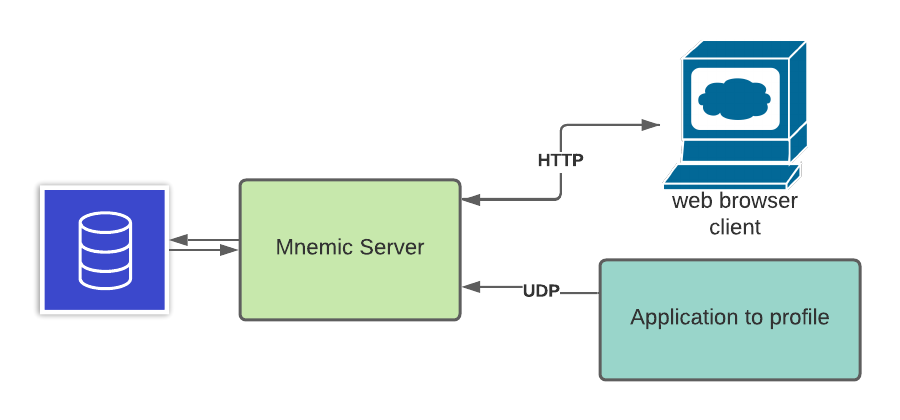
The backend consists of a service that runs as a docker container. It receives messages from the application to profile and stores then in the database. It also exposes a UI client making the profiling data discoverable and visible by a browser session.
In this example we will install the mnemic service on a desktop that has docker installed. Running the following commands:
docker run --name mnemic-db -e POSTGRES_PASSWORD=postgres123 -p 15432:5432 -d jpazarzis/mnemic-db
docker run  --name mnemic-back-end --add-host host.docker.internal:host-gateway -p 12013:12013/udp  -e POSTGRES_CONN_STR='postgresql://postgres:[email protected]:15432/mnemic' -e BACK_END_PORT='12013'  -d jpazarzis/mnemic-backend
docker run --name mnemic-front-end -e POSTGRES_CONN_STR='postgresql://postgres:[email protected]:15432/mnemic'  -e FRONT_END_PORT='12111' -p 12111:12111  -d jpazarzis/mnemic-front-end
will make mnemic available to the environment.
The application to be profiled will be able to communitate with it using port 12013 while the browser front end will use port 12111.
At this point if you access mnemic from the browser (using localhost:12111) the output will look as follows:
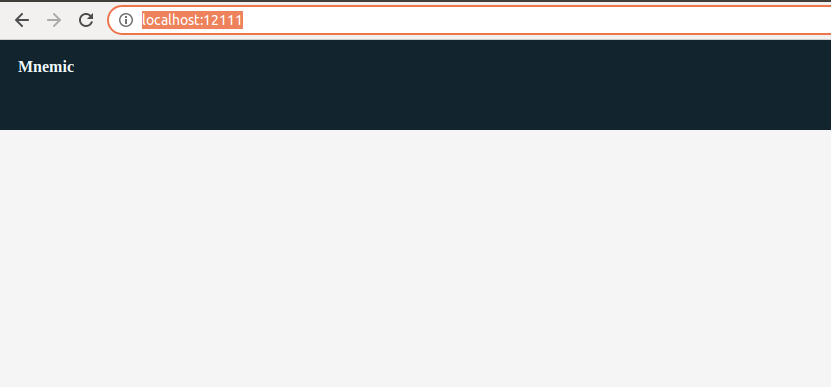
Since we stil do not have any tracing runs the screen is empty.
From your client machine you will need to installt the dolon which exposes the client functionality:
pip3 install dolon
The following program uses the tracer monitoring its memory allocation, the active async tasks and the utilization of CPU in a percent basis:
"""Mnemic hello_word program."""

import asyncio
import random

import tracemalloc

tracemalloc.start()

import dolon.trace_client as tc


async def tracer():
    """Plain vanilla tracer."""
    tracer_name = "hello-world"
    host = "localhost"
    port = 12013
    frequency = 1
    await tc.start_tracer(
        tracer_name,
        frequency,
        host,
        port,
        tc.mem_allocation,
        tc.active_tasks,
        tc.cpu_percent
    )


async def time_and_memory_consuming_func():
    """Allocates some memory for some time!"""
    _ = [i for i in range(10000)]
    await asyncio.sleep(random.uniform(0.1, 3))


async def main():
    """The main function to profile."""
    while 1:
        asyncio.ensure_future(time_and_memory_consuming_func())
        await asyncio.sleep(0.4)


if __name__ == '__main__':
    loop = asyncio.get_event_loop()
    asyncio.ensure_future(tracer())
    loop.run_until_complete(main())
After running the above program for several minutes the screen that we will see when accessing the UI from the browser will be similar to the following:

If we stop and restart the program then as we can see in the following picture we will see another key in the tree control under the same trace run name (hello-world in our example) which will acculate the new tracing info:

Any async corotoutine which does not expect any arguments in its signature can be used as a profiler.
The term global metric applies to any generic metric like for example memory allocation or CPU usage and the trace_client library exposes several of them that can be of common use.
Take a look in the following function call from the program above:
await tc.start_tracer(
        tracer_name,
        frequency,
        host,
        port,
        tc.mem_allocation,
        tc.active_tasks,
        tc.cpu_percent
    )
All the parameters following the port are profiler functions complying to the following signature:
async def profiling_function_name() {
    return some_real_value
}
The current example is using the following predifined profiler functions:
        tc.mem_allocation,
        tc.active_tasks,
        tc.cpu_percent
which are implemented as part of the dolon.trace_client library; we can always pass our own custom profilers to fit the specific needs of the application we are profiling.
The is no limatation in the number of profiling functions to use and each run can have a different set of them; the name of the profiling function will become the title of the corresponding plot that will be shown from the UI.
Some times we might need to profile a specific callable (sync or async) that is part of the application we are profiling. This can be done by importing the import dolon.profiler as profiler library and decorating the callable with the @profiler.profiler decorator.
In the example above if we replace:
async def time_and_memory_consuming_func():
    """Allocates some memory for some time!"""
    _ = [i for i in range(10000)]
    await asyncio.sleep(random.uniform(0.1, 3))
with
@profiler.profiler
async def time_and_memory_consuming_func():
    """Allocates some memory for some time!"""
    _ = [i for i in range(10000)]
    await asyncio.sleep(random.uniform(0.1, 3))
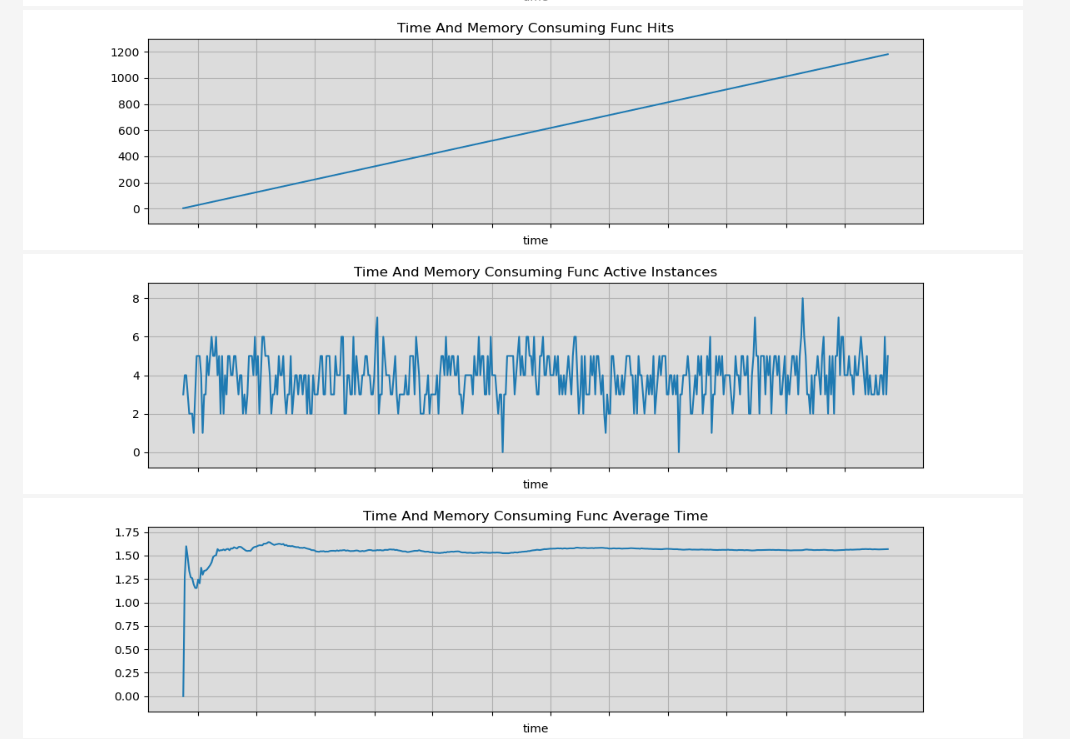
We will see that ther following new plots are showing up in the UI measuring the total number that the function was called, the number of active instances per time (assuming an async callable) and the average time for each call of the function.