This repository was archived by the owner on Mar 31, 2019. It is now read-only.
Create PatientDescription
-
Use
DescriptionFactoryItem to excecuteCreateNewDescriptionActivity
- Select
/desc/dev/DescriptionFactoryin the tree browser - Right-click on the icon and select Activity
CreateNewDescription - Type
PatientDescriptioninto input fieldObjectName - Type
tutorialinto input fieldSubFolder - Push
Donebutton
- Select
-
Use
PatientDescriptionItem to executeSetPropertyDescriptionActivity
- Select
/tutorial/PatientDescriptionin the tree browser - Right-click on the icon and select Activity
SetPropertyDescription - Push
+button to have two rows in the PropertyDescription table - Set the
Namecolumn for the 2 rows to Name and Type respectively - Set the
IsClassIdentifiercheckbox of Type row - Type
Patientto theDefaultValuecolumn of Type row - Set the
IsMutablecheckbox of Name row - Push
Donebutton
- Select
-
Use
PatientDescriptionItem to executeSetInstanceWorkflowActivity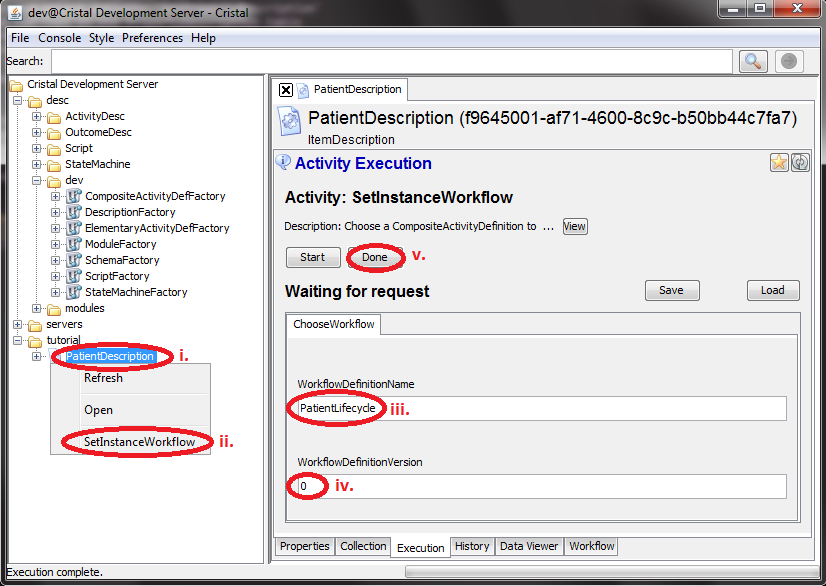
- Select
/tutorial/PatientDescriptionin the tree browser - Right-click on the icon and select Activity
SetInstanceWorkflow - Type
PatientLifecycleinto input fieldWorkflowDefinition - Type
0into input fieldWorkflowDefinitionVersion - Push
Donebutton
- Select