Releases: crocodilestick/Calibre-Web-Automated
Version 4.0.6 - Smart Automatic Duplicate Handling & Resolution 🔍, a Gorgeous & Powerful New Stats Centre 📊, Magic Shelves ✨, Robust OAuth, Auto-Send & Auto-Fetch ✈️ Huge Performance Uplifts and more!

Release Notes: v4.0.6
Changelog
✨ New Features
- Magic Shelf Ordering:
- Per-User Sorting: You can now customize the order of your Magic Shelves via the user profile (
/me). - Sorting Modes: Choose between Manual (drag & drop), Book Count, Name, Date Created, or Date Modified. (Fixes #1027)
- Per-User Sorting: You can now customize the order of your Magic Shelves via the user profile (
- KOReader Sync Control:
- Performance Toggle: Added a global setting to enable/disable KOReader sync (default is now Off).
- Optimization: Disabling this feature prevents background checksum calculations and database table creation, significantly reducing startup overhead and database locks.
- Backfill Improvements: Reworked the checksum backfill process to use shorter batches and fewer locks to prevent UI stalling.
🚀 Improvements
- Theme Unification:
- Dark Mode Standard: The application now enforces the "caliBlur" (dark) theme for all users to ensure consistent UI styling. Light theme options have been removed.
- Styling Fixes: Fixed broken styling on the Login page (OAuth buttons) and improved Flash alerts to wrap long text properly.
- Logging: Defaulted all application logs to
/dev/stdoutand hid the logfile path setting in the UI, adhering to container best practices.
🐛 Bug Fixes
Kobo & Readers
- Kobo Cover Cache: Fixed an issue where Kobo devices displayed stale covers even after metadata updates. The system now appends a cache-busting suffix to cover requests. (Fixes #1050)
- Kindle Language Tags: Fixed a bug where imported books would default to the UI language. The Kindle EPUB fixer now preserves valid ISO language tags and supports a wider range of language codes. (Fixes #1047)
- KOReader Safety: Added safeguards to prevent crashes when KOReader document settings are missing. (Fixes #1039)
System & Uploads
- Safari Uploads: Fixed a bug where book uploads would fail on Safari browsers due to incompatibility with the progress bar handler. Safari now falls back to a standard form submission. (Fixes #1049)
- Network Share Mode: Refined permissions logic to be path-aware. It now only skips permission checks for actual network mounts (
/config,/calibre-library), while correctly applying necessary permissions to internal application paths. (Fixes #1030) - Quoted Defaults: Fixed a regression where settings (like "epub" or "new_record") were saved with extra quotes, causing
ebook-convertandcalibredbto fail. (Fixes #1032, #1038)
Data & Display
- Date Shift: Fixed a timezone serialization issue where custom Date columns in the book list were displaying one day ahead of the actual Calibre date. (Fixes #1036)
- EPUB Fixer: Corrected an overly permissive regex that was incorrectly flagging
<img>tags with empty sources. (PR #1029)
📦 Dependencies
- Calibre: Bumped the included Calibre version.
Version 4.0.5 - Smart Automatic Duplicate Handling & Resolution 🔍, a Gorgeous & Powerful New Stats Centre 📊, Magic Shelves ✨, Robust OAuth, Auto-Send & Auto-Fetch ✈️ Huge Performance Uplifts and more!
Release Notes: v4.0.5
✨ New Features
- KOReader Sync & Progress:
- KOReader Progress: The web reader and book details page now display reading progress from KOReader (if available).
- Resume Playback: If you have progress in KOReader but no web-reader progress, the web reader will now intelligently resume from your KOReader position.
- Send-to-eReader Controls:
- Per-User Customization: Added a new setting in user profiles (
/me) to toggle the "Send to eReader" modal. - Direct Send: Users can now disable the modal to trigger an immediate "direct send" to all configured device addresses.
- Admin Control: Admins can manage this setting for other users via the user edit page.
- Per-User Customization: Added a new setting in user profiles (
- EPUB Fixer UI:
- Single-Book Fixer: You can now run the EPUB fixer on a specific book directly from the UI.
- Live Progress: The page now reloads to show progress immediately, and you can cancel stuck runs.
🚀 Improvements
- Cover Handling & Stability:
- Download Limits: Added a configurable size limit (default 15MB) for cover downloads to prevent the server from hanging on massive images (Fixes #1018).
- Optimized Processing: The system now skips ImageMagick conversion if the cover is already a valid JPEG, saving CPU resources.
- Metadata Management:
- Bulk Edit Enforcement: Editing books via the "List View" (bulk edit) now correctly marks metadata as "dirty," forcing the system to write changes (Series, Tags, etc.) into the actual EPUB files (Fixes #998).
- Startup Robustness:
- Network Shares: Improved startup logic for libraries on network shares (NFS/SMB). The system now gracefully handles "disk I/O errors" by disabling WAL mode and redirecting to the DB config page instead of crashing with a 500 error.
- Ingest Directory: Added a preflight check to ensure the
/cwa-book-ingestdirectory is writable. If permissions are wrong, the upload now fails fast with a clear error message instead of failing silently (Fixes #995).
🐛 Bug Fixes
- Kobo & Sync:
- Sync Crash: Fixed a crash caused by books missing
date_addedortimestampfields during Kobo sync (Fixes #1011). - KOReader Malformed Responses: Hardened the sync plugin against malformed responses from the server to prevent KOReader crashes (Fixes #1003).
- Header Auth: Allowed header-based authentication for the
kosyncendpoint.
- Sync Crash: Fixed a crash caused by books missing
- UI & Styling:
- Delete Button: Fixed the delete button in the book details toolbar (Fixes #1000).
- Mobile View: Fixed styling issues on the new book details page for mobile devices.
- Login Page: Polished the login page styling.
- Duplicates Sidebar: Fixed a bug where the "Duplicates" sidebar link would re-appear after every restart. The migration now runs only once (Fixes #1010).
- Kindle EPUB Fixer: Fixed an issue where the fixer would duplicate XML declarations in files that lacked encoding information.
🌍 Translations
- Japanese: Major update with 198 new translations and 155 corrections.
- German: Updated translations for 4.x features.
- Spanish: Improved phrasing and fixed variable names.
- Slovenian & Dutch: General translation updates.
🔧 Technical & CI
- CI Permissions: Fixed permissions issues in the test pipeline by dynamically setting UID/GID for test containers.
- Python Babel: Switched translation scripts to use
python -m babelto avoid issues with broken virtual environment shebangs. - Directory Ownership: Improved how the initialization script parses
dirs.jsonto ensure all required folders (including/cwa-book-ingest) have correct ownership.
Version 4.0.4 - Smart Automatic Duplicate Handling & Resolution 🔍, a Gorgeous & Powerful New Stats Centre 📊, Magic Shelves ✨, Robust OAuth, Auto-Send & Auto-Fetch ✈️ Huge Performance Uplifts and more!
Release Notes: v4.0.4
✨ New Features
- Disaster Recovery: Restore Calibre Database:
- Added a "Restore Calibre Database" workflow in the Admin DB Configuration.
- This tool rebuilds a corrupted
metadata.dbfrom your book files (OPFs). - Safety First: It automatically backs up your current database and configuration before running. It also smartly cleans up the application database (
app.db) to remove broken references (like reading progress) caused by book ID changes, ensuring the app remains stable after restoration. (Fixes #898, #984)
- Book Details Improvements:
- Dynamic Tags: You can now add and remove tags directly from the Book Details page without entering the full edit mode.
- Direct Downloads: Clicking the file size "pills" on the details page now directly downloads that specific file.
🐛 Critical Bug Fixes
- Admin User Management: Fixed a 500 error that occurred when trying to add or edit users. This was caused by missing OPDS context in the admin views. Admins can now also manage OPDS settings for other users directly from the edit screen. (Fixes #986)
- Kobo Sync Stability: Resolved a crash during Kobo sync caused by books missing a
date_addedvalue. (Fixes #983) - Corrupt Download Handling: Fixed a server crash (500 error) that occurred when attempting to download malformed or "dodgy" kepub files.
- Shelf Actions: Fixed the "Add to Shelf" and "Remove from Shelf" buttons which were broken in the previous version.
🚀 Enhancements
- Robust Metadata Search: Hardened the metadata provider system against crashes. Google, Scholar, ComicVine, and others are now better at handling missing fields or connection errors without failing the entire search. (Fixes #981)
- Reliable Identifier Editing: Completely overhauled how book identifiers (ISBN, etc.) are saved. This fixes issues with special characters, duplicates, and empty values, ensuring that what you type is exactly what gets saved.
- UI/UX Tweaks:
- Reorganized the settings menu buttons for a more logical flow.
- Improved the styling of flash messages and shelf action buttons.
- Removed the redundant "About" link from the side navigation.
Version 4.0.3 - Smart Automatic Duplicate Handling & Resolution 🔍, a Gorgeous & Powerful New Stats Centre 📊, Magic Shelves ✨, Robust OAuth, Auto-Send & Auto-Fetch ✈️ Huge Performance Uplifts and more!
Release Notes: v4.0.3
✨ New Features
- Redesigned Book Details Page:
- Completely rebuilt the view to be modern, responsive, and data-rich.
- Added the ability to delete books directly from the details screen (no longer requires entering "Edit" mode).
- Displays more useful metadata at a glance.

- OPDS & Magic Shelves Overhaul:
- Magic Shelves Support: Added
/opds/magicshelfroutes. Magic Shelves now appear in the OPDS catalog. - Customizable OPDS Root: Replaced the static root with a dynamic, per-user list.
- Drag & Drop Ordering: Users can now reorder OPDS entries and toggle their visibility via a new UI in User Settings (
/me), similar to the Duplicate Format Priority ranking.
- Magic Shelves Support: Added
- Manual Search Improvements:
- Persistence: The UI now remembers your selected metadata fields for manual searches (#891).
- File Sizes: Added file size badges to search results.
- Feedback: Added toast notifications for better user feedback.

🚀 Improvements
- Hardcover Integration:
- Metadata Enforcement: Inline edits and book-list updates now correctly trigger the metadata enforcer. This ensures changes (like Series info) are written into the EPUB files. The system also now coalesces duplicate logs to prevent redundant processing (#726).
🐛 Bug Fixes
Kobo & Syncing
- Unregistered Device Support: Added placeholder OAuth endpoints to fix connectivity for Kobo devices that cannot use the store proxy (#879).
- Download Fix: Fixed EPUB OPF parsing (stripping BOM/whitespace) to resolve download failures on Kobo devices (e.g., Clara BW) (#975).
- Magic Shelf Sync: Fixed an issue where books existing only in Magic Shelves were not syncing to Kobo. Reading states now also respect the Magic Shelf allow-list (#976).
Authentication & Permissions
- OAuth Admin Roles: Fixed a bug where enabling OAuth could revoke admin rights if the provider returned an empty groups claim. The system now preserves existing roles if group data is missing (#978).
- OAuth Email Collision: Fixed "UNIQUE constraint failed" errors. If an OAuth provider's email matches an existing user, the system now binds the login to that user instead of attempting to create a duplicate (#973).
Database & Stability
- Calibre 9 Schema Fallback: Refined the database compatibility layer. Added a safe fallback for
books.isbnby detecting the schema version at startup. This resolves lingering 500 errors for users on both Calibre 9 and older versions (#979).
🌍 Translations
- French: Major updates and corrections (merged PR #977).
- Dutch: Updated server restart messages (merged PR #969).
👷 CI/CD
- ARM Runner: Added cleanup for zombie digests on the persistent ARM runner to improve build reliability.
Version 4.0.2 - Smart Automatic Duplicate Handling & Resolution 🔍, a Gorgeous & Powerful New Stats Centre 📊, Magic Shelves ✨, Robust OAuth, Auto-Send & Auto-Fetch ✈️ Huge Performance Uplifts and more!
Release Notes: v4.0.2
🚨 Critical Updates
These changes are essential for database stability and compatibility with Calibre 9.
- Calibre 9 Metadata Compatibility: Fixed critical UI crashes (500 errors) caused by Calibre 9's removal of
books.isbn,books.flags, andbooks.lccn.- The system now dynamically detects schema versions at startup.
- For Calibre 9+, ISBNs are now correctly pulled from the
identifierstable. - Maintained full backward compatibility for users on older Calibre versions.
- SQLAlchemy 2.x Migration Fix: Resolved
InvalidRequestErrorduring database migrations by utilizingengine.begin(). This prevents nested transaction failures when PRAGMA triggers autobegin. - Initialization Fix: Fixed a regression causing
AttributeErrorduring login. The system now ensures minimal config fields (likeconfig_books_per_page) are loaded even during background initialization.
🛠 Features & Improvements
- Route Reorganization: * Renamed the versioning page to
/package-versionsto reduce ambiguity.- Redirected legacy
/statspath to/cwa-stats-show.
- Redirected legacy
- Docker Updates:
- Updated Dockerfile to Calibre 9.0.0.
- Unified Calibre/Kepubify build arguments to ensure the UI accurately reports installed versions.
- Fork Modernization: Removed "Stock Calibre-Web" version display from admin stats as it is no longer applicable to this fork.
🐞 Bug Fixes
- OAuth Link Loop: Fixed a "UNIQUE constraint failed" error when linking an OAuth provider to an existing account.
- Hardcover Auto-Fetch: Fixed a bug where auto-fetching would ignore cancel commands and block the task queue.
- ARM Builds: Fixed network configuration issues in the ARM build workflows.
🌍 Translations & CI/CD
- Automation: Updated translation workflows to automatically commit
.poand.potfiles. - Build Flow: Translation updates now trigger dev builds automatically to keep the
mainbranch images up to date with the latest localization. - Issue #960 Resolution: Addressed a major translation regression introduced in 4.0.0/4.0.1 that caused broken UI strings across multiple languages.
- Babel Execution Fix: Switched translation scripts to use
python -m babelinvocation. This bypasses issues with broken virtual environment shebangs that were previously causing automation failures in the CI/CD pipeline.
🏗️ Build System Technicals
- Image Optimization: Updated the dev workflow to skip redundant "main push" builds when a translation build is already triggered, preventing duplicate Docker images and saving runner resources.
- Docker Cleanup: Dropped the unused
CWbase label and arguments from the Dockerfile to streamline the multi-stage build process. - Migration Testing: Added a specific "smoke test" for the database transaction pattern to ensure future schema changes don't re-introduce the SQLAlchemy
InvalidRequestError.
Version 4.0.1 - Smart Automatic Duplicate Handling & Resolution 🔍, a Gorgeous & Powerful New Stats Centre 📊, Magic Shelves ✨, Robust OAuth, Auto-Send & Auto-Fetch ✈️ Huge Performance Uplifts and more!
Release Notes: v4.0.1
This release is a hotfix that mainly focuses on database stability, EPUB compatibility, and automated maintenance while fixing numerous other bugs. I’ve also addressed critical race conditions during migrations and improved how the application handles metadata synchronization and ingest workflows (mainly for those running the new NETWORK_SHARE_MODE.
🚀 New Features & Enhancements
- Scheduled Maintenance: Added a new background task (
TaskCleanArchivedBooks) to purge stale archived references. Configure maintenance schedules via the CWA Settings UI (default 03:00 local). - Harden Ingest Flow: Sidecar manifest files are now ignored to prevent premature deletion.
- Improved "skip-delete" handling for temporary artifacts during readiness timeouts.
- Implemented robust stale temp cleanup with configurable age and interval settings.
- UI & UX Improvements: Renamed "Categories" to "Tags / Categories" in the bulk edit modal with updated multi-value instructions.
- Unified the homepage filter header styling with the standard shelf-actions wrapper.
- Updated all copyright years to 2026 for Calibre-Web and CWA contributors.
EPUB Reader & File Handling
- Enhanced Fixer Safety: The default EPUB fixer has been completely overhauled to be "safe by default." It now uses advanced encoding detection to preserve original file integrity and performs targeted repairs (like removing stray
<img>tags) without risky full-file reserialization. - New "Aggressive" Mode: Introduced a
kindle_epub_fixer_aggressivetoggle in the settings UI. This allows users to opt-in to more intensive transforms and duplicate XML declaration repairs for severely malformed files that fail Send-to-Kindle (E999) or crash the internal reader. - Reader Stability: The Web UI reader now includes guards against invalid
container.xmlstates and provides clear error messaging instead of an endless loading spinner when encountering corrupted EPUB structures.
🛠 Bug Fixes
Database & Stability
- Migration Lockups: Fixed
sqlite3.OperationalErrorwhere migrations locked the DB during startup. Added safe rollbacks and retry wrappers forALTER TABLEstatements. - Session Management: Resolved "transaction is closed" errors during metadata saves and fixed an
AttributeErrorwhere the Calibre session wasNoneduring startup/upgrade races. (Fixes #947, #943) - Startup Healthchecks: Introduced an
app.dbhealthcheck at startup to flag missing, non-writable, or locked DBs early. - DB Path Resolution: Hardened
app.dbresolution logic to prevent mismatched DB usage across services (e.g., accidentally usingcwa.db). - Archived Book Sync: Deleting an archived book now correctly removes its entry from the
archived_booktable. (Fixes #8243)
Metadata & Web UI
- Save Flakiness: Fixed an issue where "Save" appeared to work but didn't persist if TinyMCE/Rating widgets weren't ready. Added a sync trigger on form submit. (Fixes #948)
- Pagination & Sorting: * Fixed "inflated" book counts on the homepage caused by duplicate rows in database joins. (Fixes #766)
- Fixed "duplicate scan" crashes caused by comparing timezone-aware vs naive timestamps. (Fixes #945)
- Date Display: Fixed a bug where the published date rendered as the prior day due to timezone offsets. (Fixes #789)
- Stats Dashboard: Resolved "Unknown User" entries in dropdowns by properly mapping activity logs to current user IDs. (Fixes #942)
Reader & File Handling
- EPUB Repair: * The reader now auto-repairs and validates invalid
container.xmlfiles (e.g., duplicate XML declarations) that causedepub.jsto crash.- Improved EPUB fixer safety by preserving original file encodings and adding better UTF-8/UTF-16 detection.
- Auto-Zip Backups: Switched to
shutil.copyto resetmtimeso that daily auto-zips correctly include new backups. (Fixes #260) - Magic Shelves: Fixed negated tag filters (e.g., "does not contain tag") which were failing to exclude books correctly.
Integrations & Config
- Hardcover.app: Fixed layout issues (0px height), Isotope initialization errors, and button failures on the review matching page. Allowed
https:images in CSP for reviews. - Cover Enforcer: Fixed an infinite loop where failed logs were re-processed indefinitely; failures are now logged to CWA stats. (Fixes #829)
- DB Config: Fixed styling issues on the Config page and prevented crashes when the Calibre directory path was missing or empty. (Fixes #870, #779)
Version 4.0.0 - Smart Automatic Duplicate Handling & Resolution 🔍, a Gorgeous & Powerful New Stats Centre 📊, Magic Shelves ✨, Robust OAuth, Auto-Send & Auto-Fetch ✈️ Huge Performance Uplifts and more!
Note
"I'm honestly so excited to finally share this update with you all. We've tackled the duplicate book problem once and for all, built a sick stats system that actually shows you how your library is being used, added dynamic/Magic Shelves, and a powerful & robust new OAuth system. The amount of new features and fixes in this release is incredible. This is the biggest, most community-driven update CWA has ever had and I'm very grateful to everyone that helped work on it." - CrocodileStick
Supporting the Project ❤️
CWA is and always will be free and open source. If it makes your library life easier and you're able to support development, contributions go directly to:
- Testing hardware (ereader devices & tablets ect.)
- Development tools and infrastructure
- Coffee ☕ (lots of coffee)

Major Changes 🚀
NEW: Smart Duplicate Detection & Management 🔍🔗
Say goodbye to duplicate book headaches! The completely rebuilt duplicate system is smarter, faster, and actually catches duplicates you didn't even know you had.
-
Automatic Detection:
- Hybrid SQL + Python Detection - Combines performant SQL queries with intelligent fuzzy matching to find 95% of duplicates other systems miss
- Post-Ingest Scanning - Automatically checks for duplicates after importing new books
- Scheduled Scans - Background task runs periodic checks with configurable cron scheduling
- Incremental Scanning - Only scans books added/modified since last check instead of your whole library
- Smart Title Normalization - Strips articles (A, The, etc.), special characters, and whitespace for accurate matching
- Language-Aware - No more accidental flagging of translations as duplicates
-
Powerful Management:
- Auto-Resolution - Optionally auto-merge duplicates based on your preferences (keep newest, keep oldest, or manual)
- One-Click Merging - Merge duplicates directly from the Duplicates Manager with format consolidation
- Batch Operations - Select and merge multiple duplicate groups at once
-
You're In Control:
- Configure What Counts as a Duplicate - Decide exactly what matching criteria to use
- Adjustable Thresholds - Set how strict or lenient the fuzzy matching should be
- Format Awareness - Choose whether different formats of the same book count as duplicates
-
Beautiful, Useful Notifications:
- Optional Alerts - Real-time feedback when duplicates are found or resolved, keeping you on top of your library whether you want to go full-auto or curate your library by hand (toggleable in CWA Settings)
- Task Progress - Monitor duplicate scans & related jobs in the Tasks panel

Finally, a duplicate system that actually works! ✨
NEW: Magic Shelves 🪄📚
Magic Shelves are dynamic, rules-based collections that automatically populate based on criteria you define. Think of them as smart playlists for your books!
-
Universal Filtering System:
- Filter by Title, Author, Series, Publisher, Language, Tags, Read Status, Rating, Publication Date, Identifiers (ISBN, Hardcover ID, etc.)
- Multiple filter types: Exact match, contains, starts with, ends with, regex patterns
- Combine multiple rules with AND/OR logic for incredibly specific collections
- Date range filtering with validation for publication years and addition dates
-
Pre-Built Templates:
- Recently Added - Your newest acquisitions at a glance
- Highly Rated - Books you've rated 4+ stars
- No Cover - Quickly identify books missing cover art
- Recent Publications - Books published in the last year
- Incomplete Series - Series where you're missing entries
- Yet to Read - Books you haven't started
- All templates automatically created for new users and backfilled for existing users
-
Advanced Features:
- Kobo Sync Integration - Magic Shelves can sync to your Kobo device just like regular shelves!
- Tag-Based Syncing - Automatically sync books to Kobo when they match Magic Shelf criteria
- Real-Time Updates - Shelves update automatically as your library changes
- Custom Icons - Choose from hundreds of emojis to personalize your shelves
- Book Counts & Caching - Lightning-fast performance with smart caching and tooltips showing item counts in sidebar
- Stats Tracking - Magic Shelf usage is also tracked in the new stats dashboard system
-
Beautiful UI:
- Modern, intuitive interface for creating and managing Magic Shelves
- Visual rule builder with drag-and-drop priority
- Live preview of matching books
- Mobile-optimized with conditional formatting
Your library can organize itself now! 🎉

NEW: Auto-Send to eReader 📧⚡
Set it and forget it! Books can now be automatically emailed to your eReader as soon as they're ingested.
- Fully Automated Delivery:
- Hands-Free Reading - New books automatically appear on your Kindle, Kobo, or other eReader
- Smart Scheduling - Configurable delay (1-60 minutes) allows time for metadata fetching and EPUB fixes before sending
- Format Selection - Automatically sends in your preferred format (EPUB, MOBI, AZW3, etc.)
- Multiple Recipients - Send to multiple email addresses/devices at once

-
Integration with CWA Pipeline:
- Works with EPUB Fixer - Books are automatically fixed before sending to prevent Amazon rejections
- Works with Auto-Metadata - Fetch metadata first, then send fully-tagged books
- Task Tracking - Monitor auto-send jobs in the Tasks panel
- Toast Notifications - Get notified when books are successfully sent
-
Flexible Configuration:
- Per-User Settings - Each user can configure their own auto-send preferences
- Conditional Sending - Only send books that match certain criteria (format, author, etc.)
- Email Customization - Custom subject lines for Amazon's "convert" feature
Wake up to new books on your eReader every morning! 🌅📚
NEW: Automatic Metadata Fetching on Ingest! 🏷️🤖
No more manually searching for metadata after importing books! CWA can now automatically fetch and apply metadata during the ingest process.
-
Seamless Integration:
- Fetch on Import - Optionally fetch metadata automatically when books are ingested
- Pre-Send Enrichment - Fetch metadata before auto-sending to eReader so your books arrive fully tagged
- Provider Selection - Uses your preferred metadata providers (Google Books, Kobo, Hardcover, etc.)
- Smart Fallback - If one provider fails, automatically tries the next configured provider and you control the hierarchy. Your library, your choice.
-
Configurable Behavior:
- Toggle On/Off - Enable or disable auto-fetch in CWA Settings
- Timing Control - Set when metadata fetch happens in the ingest workflow
- Quality Control - Choose whether to overwrite existing metadata or only fill in missing fields
- Choose Which Fields Get Updated - Only ever want certain fields to be automatically updated and others to be left alone? No problem! You can choose what gets updated when.
- Smart Metadata Application System - When enabled, fetched metadata will only replace existing data if it appears to be better quality (e.g., longer descriptions, higher resolution covers). When disabled, fetched metadata will replace existing data as-is from the preferred provider.
Your books arrive perfectly tagged, automatically! 📖✨
NEW: Deep Stats & Analytics 📊✨
Ever wondered who's using your library the most, what devices people prefer, or when peak reading hours are? The CWA Stats page has been completely rebuilt from scratch with 4 major sections packed with insights!
User Activity Statistics 👥
- Top Users by Downloads - See who's using your library the most
- Reading Velocity - Track pages read and reading speed per user
- Device Breakdown - Understand what devices your users prefer (Kobo, Kindle, web, etc.)
- Format Preferences - Which formats are most popular?
- Peak Usage Hours - Heat map showing when your library is busiest
- Average Session Duration - How long users spend browsing
- Search Success Rate - Percentage of searches that result in book views/downloads
- Failed Auth Attempts - Security monitoring for unauthorized access attempts
Library Statistics 📚
- Publication Year Distribution - Visualize your collection's age range
- Largest Series - See which series dominate your library
- Rating Statistics - Average ratings, most highly-rated books
- Most Fixed Books - Books that required the most EPUB fixes
- Top Enforced Books - Books with the most metadata enforcement runs
- Import Source Flows - Track where your books are coming from
- Format Distribution - Breakdown of all formats in your library
- Language Distribution - See the linguistic diversity of your collection
API Usage Statistics 🔌
- OPDS Feed Activity - Monitor OPDS usage and popular feeds
- Kobo Sync Stats - Track Kobo device syncs and downloads
- KOReader Sync Stats - KOReader progress sync activity
- REST API Calls - External ...
Contributors


Assets 2
Version 3.1.4 – Critical Security Fix, New Metadata Provider, ACSM Support and more! 🔐📚✨
Caution
Critical Security Fix 🔒
Fixed a critical vulnerability inherited from CW that could expose sensitive configuration data. Please update as soon as possible to ensure your instance remains secure.
New Features / Changes ✨
- Added Deutsche Nationalbibliothek (German National Library) as a Metadata Provider — thank you to UsamaFoad & GelbPhoenix for the original work! Fixes Feature Request #376
- Added ACSM format support (PR #498) — better compatibility for workflows involving Adobe DRM acquisition files
- Documented
customize.py.jsonusage (PR #498) to make plugin customization easier and clearer - Added
USER_AGENTconstant - Added improved error handling to
hardcover.py(originally provided by UsamaFoad to AutoCaliWeb) - Startup sequence cleanup: folded
init-calibre-web-configintocwa-initand adjusted order socwa-initruns first, followed bysvc-calibre-web-automated, improving reliability on boot - Made it possible to test
hardcover.pythrough the CLI without CPS to vastly aid further development & future testing
Now available via the GitHub Container Registry! 🚢💚
- Images will now also be published to the GitHub Container Registry (GHCR) in addition to Docker Hub, making pulls faster and more reliable for some users
- To do so, simply change the image tag in your docker-compose to
ghcr.io/crocodilestick/calibre-web-automated:latest
Heads‑up 📝
- We discovered that stripping the ABI tags from Qt6 during image creation (to extend compatibility with older kernels) can break parts of Calibre functionality (e.g., working with PDFs). We’re evaluating the best approach here to maximize stability and compatibility — more updates to follow.
Bugfixes 🐛
- Fixed 500 Internal Server Error — closes #504
- Fixed “Unable to refresh library” — closes #499
- Minor refactors and general stability improvements
- Fixed Health Check (endpoint
/health) - Changed STABLE_VERSION & INSTALLED_VERSION constants so that they're set once at init by the cwa-init service to avoid potential rate-limiting issues and potential slight performance impacts of previous solution
Translations 🌍
- Updated Slovenian translations — hvala! 💙
Thanks 🙏
- Huge thanks to everyone who reported issues, tested, and contributed code this cycle — in particular UsamaFoad and GelbPhoenix for their work on the DNB provider, and all reviewers on PR #498.
Supporting the Project ❤️
If CWA makes your library life easier and you’re in a position to support development, tips are appreciated and go straight back into testing hardware and tooling:
Version 3.1.3 - Theming is now unique to each user, new Translations System, Major Improvements to Dark Mode on Mobile and more! 🎨🌍🦚
New Features / Changes
Theming is now unique to users, no longer server-wide! ☀️/🌑 🎉
-
In CW & pervious versions of CWA, the theming of the Web UI has always been Global, which has often been inconvenient for those with servers with lots of users as it could result in the theming of the Web UI frequently and unexpectedly changing for everyone
-
Well no more! 🎉
-
As of V3.1.3, the theming of the Web UI is no longer global and is set per User Settings!
-
Users can of course still change Theme using the button in the Navbar butcan now also do so on their profile page
-
Using the Switch Theme element in the Navbar now also keeps you on the page you're on instead of redirecting you to the index every time
-
The old option for Admins to set themes in the UI Config page of the Admin panel has been changed to "Set Default Theme", giving admins the ability to set which theme will be enabled by default for new users and Guest users (if enabled)
-
COMING SOON: Ability for users to select their preferred accent colour for the UI 🎨
New Translations System 🌐 🫶
-
As of V3.1.3, users using CWA in a language other than English will be, by default, notified if the translations for their chosen language are currently incomplete, with a link to the CWA Wiki Translations Page where they can quickly and easily contribute the missing translations if desired (notifications can be disabled in the CWA Settings)
-
I've tried to catch as many CWA specific strings that were previously untranslatable as possible but if you spot any I've missed, please let me know / submit a PR / Issue!
-
Added workflow to automatically update the translations status of each language on the translations page of the CWA Wiki
-
Hopefully with these changes, we can make CWA accessible to as many different people in as many different languages as possible! 🌍❤️

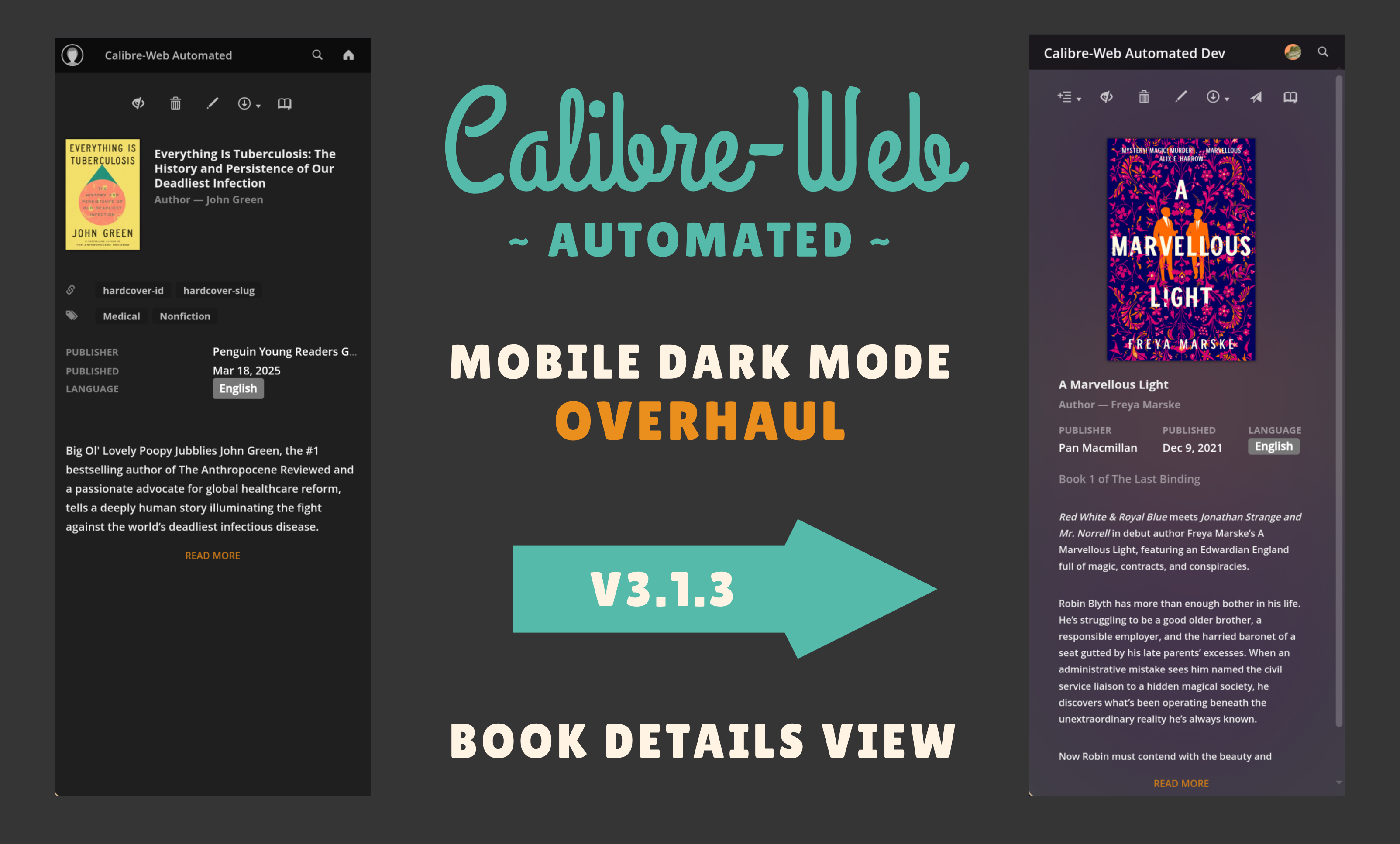
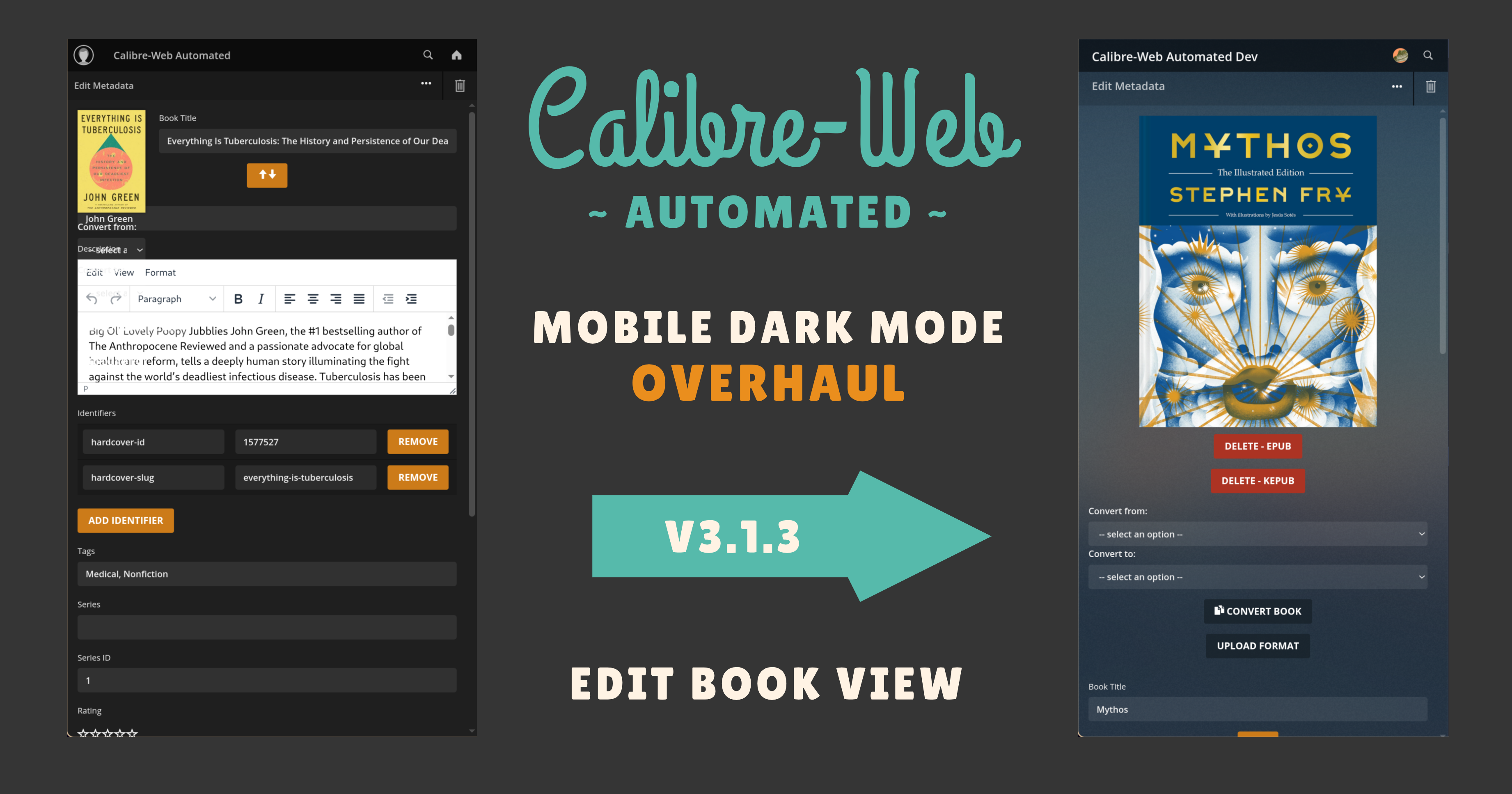
Major Mobile Dark Mode Overhaul 🦚
-
Lets be honest, the Mobile Dark Mode Experience we inherited from stock Calibre-Web was ROUGH
-
With V3.1.3 I've done my best to overhaul the experience to be much more enjoyable and visually pleasurable on mobile
-
Part of this overhaul includes the addition of an option to CWA Settings page to disable the Dynamic Background Blur Backgrounds. When enabled (default), mobile dark mode users have the same cover incorporated background blur effect they have on desktop view however this can be computationally expensive depending on any given devices performance, hence the option to disable in the settings.
-
See a few examples of the many improvements made below:


Bugfixes 🐛
- Fixed Issue #496 - book date not updated when overwriting book
- Fixed Issue #463 - KoSync webpage shows URL as http:///kosync but plugin is only expecting http://
- Fixed #470 - Incorrect link to KOReader sync server
- Fixed #473 - Error when updating metadata
- Fixed #475, #466 - No option for other languages
- Fixed edit users table in dark mode
- Fix dark mobile book view & dark login screen css
- Fixed profile picture positioning mobile
- Fix Kobo auth window being rendered off screen in dark mode
- Fix custom profile picture not being shown in mobile view
Misc ✨
- Created scripts to automatically manage the SPDX headers of project files and ensure contributors to both CW & CWA are properly recognized for their work
- REFACTOR - Moved root scripts to scripts dir
- Updated to latest Calibre Version V8.8.0
- Upload permissions are no longer required to upload/change book covers, only edit permissions
- Removed iOS reference kosync_plugin.html as unfortunately, no good KoReader solutions exist on iOS
- Added CWA version to About page
- Disabled ability to reset
calibre-librarylocation in DB Config settings to prevent user confusion and added an explanation about how CWA handles libraries - Fixed spacing in admin page headings
Version 3.1.2 - The Community Update 👬 Hardcover Integration 💜, Calibre Plugins 🔌, Split Library Support 💞, KoReader Sync 🗘 and much more! 📚
Minor Update - Version 3.1.2
Huge Refactor of the CWA Repo! 🎉
- Before today, CWA would grab the files from the latest releases of janeczku/calibre-web & linuxserver/docker-calibre-web from their repos to build on top of
- This meant that the CWA repo itself only contained only the files added or required to be modified to provide all the extra functionality it delivers over stock CW
- While this worked for a while, it was an admittedly unconventional way to do things, stemming from the project's origin as a mod for calibre-web, and was confusing and unintuitive to new devs wanting to contribute to the project
- Therefore I'm pleased to announce that as of this refactor, CWA's build & development process is much more conventional, all the files CWA requires to function are now here in the repo, with the only exceptions being the Calibre & Kepubify binaries that are grabbed when building the docker images 🎉
New Changes / Features 🌅
- Added m4b, m4a, and mp4 Audiobook support for ingest, with metadata scraping. Tested with m4b and m4a by @smevawala in #271
- Added health check from PR #452
- Changed colour space from RGB to SRGB to prevent dark covers
Bugfixes🐛
- Fix for #427 by @alva-seal in #447
- Update init.py - fix mime types for CBZ, CBR, CBT by @zikasak in #460
- Fixed wrong Server URL value displaying in kosync_plugin.html
- Fixed Series not being fetched from Hardcover when fetching metadata
- Fixed filterhead elements being incorrectly positioned
- Fixed #456 - Cover grids becoming misaligned
- Fixed Downloaded Books page being unusable in Dark mode
- Fixed styling of Categories, Authors. Publishers, Ratings & File Formats pages
- Fixed table styling in Book List in Dark Mode
- Fixed chracter selection element crowding other elements on smaller screens
- Fixed add to shelf elements positioning
- Fixed Fixes #455 Add to shelf in dark theme - list too short
New Contributors 👋
- @zikasak made their first contribution in #460
- @smevawala made their first contribution in #271
Version 3.1.0 - The Community Update 👬 Hardcover Integration 💜, Calibre Plugins 🔌, Split Library Support 💞, KoReader Sync 🗘 and much more! 📚
"Calibre-Web Automated is extremely lucky and privileged to have such a large and vibrant community of people who support, enjoy and contribute to the project. The bulk of the new features and bugfixes this update brings were created by the best and brightest of our community and I want to celebrate that and their work here in the hope that our community only continues to grow!" - CrocodileStick
Release V3.1.0 Changelog
Major Changes 🚀
NEW: Split Library Support 💞
- As promised, all CWA features are now fully compatible with Calibre-Web's Split Library Functionality
- This enables users to store their Calibre Library in a a separate location to their
metadata.dbfile - To configure this, in the Admin Panel, navigate to Edit Calibre Database Configuration -> Separate Book Files from Library
- The use of Network Shares (especially NFS) with this functionality is discouraged as they sometimes don't play well with CW & CWA's SQLite3 heavy stack. Many users use network shares without issues but there aren't enough resources to support those who can't get it working on their own
NEW: Hardcover API Integration 💜📖
-
Hardcover is now officially not only available as a Metadata Provider, but using Hardcover's API, Kobo Shelves & Read Progress can now also be synced to a user's Hardcover account!
-
Current workflow is scraping a book by title, you can then use the resulting hardcover-id identifier to search for editions of that book, by searching "hardcover-id:". Edition results are filtered to exclude Audiobooks editions, and sorted by ebook then physical book.
-
If a shelf in CWA is selected for Kobo sync, when a book with id and edition identifiers is added to the shelf, it will also be added to Hardcovers want to read list. As the book is read on the Kobo device progress is synced to Hardcover as well when pushed to CWA.
-
To use Hardcover as a Metadata Provider, simply provided a Hardcover API Token in your
docker-composeunder theHARDCOVER_TOKENEnvironment Variable- To enable Kobo sync, a Hardcover API Token must be provided for each user in each user's respective Profile Page
-
Thanks to demitrix! <3
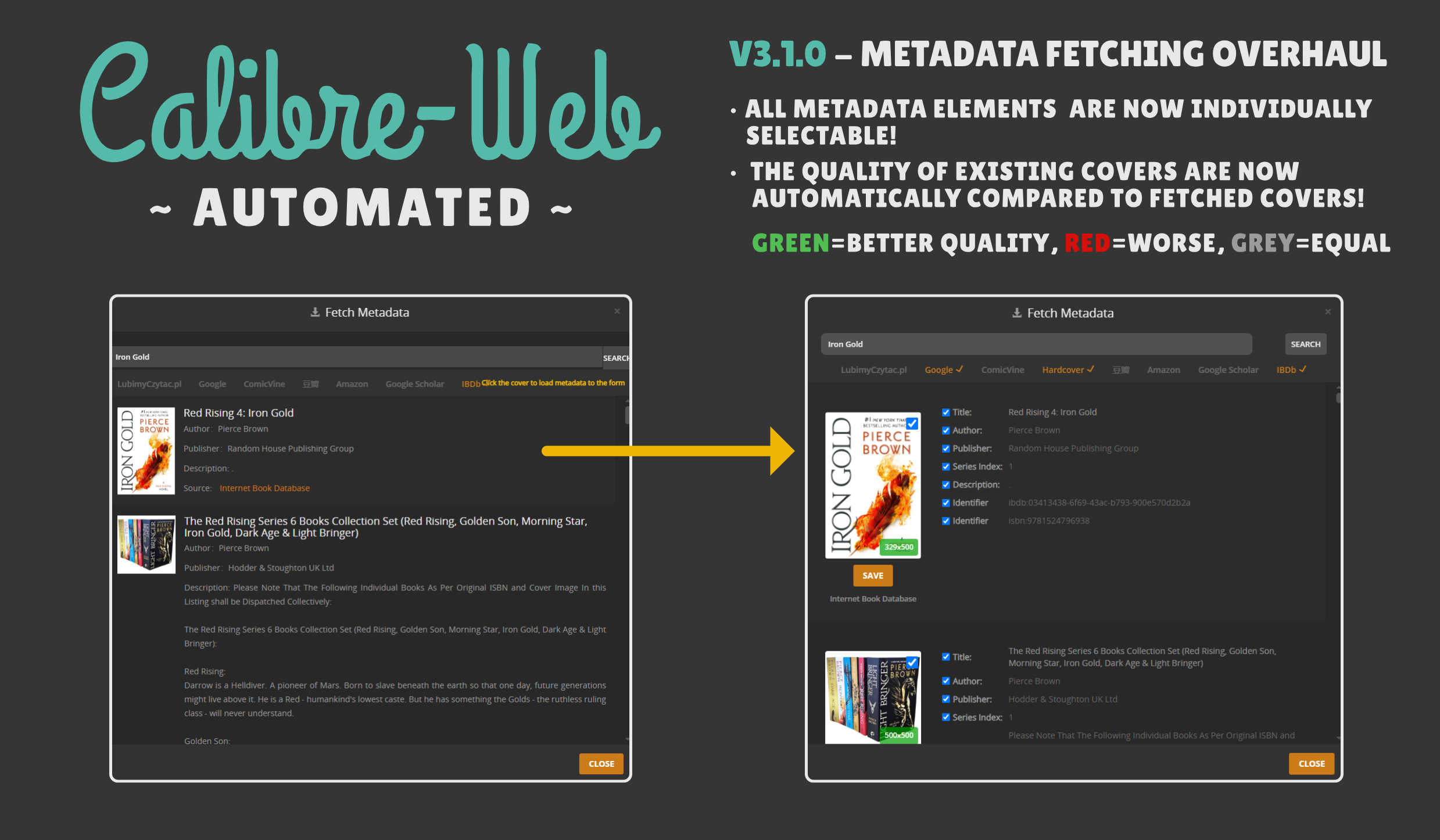
NEW: Greatly Improved Metadata Selection UI 🎨
- Demitrix was really on a roll the last couple of months and also contributed some really cool functionality to the Metadata Selection UI
-
Much more Elegant & Readable UI, both on Mobile & on Desktop
- Improved CSS for the Fetch Metadata interface—making it easier and clearer for you to review and select metadata sources.
-
Individually Selectable Elements
- Say goodbye to having to having all of your book's metadata overwritten simply becuasse you wanted a better looking cover!
- As of V3.1.0, all metadata elements can be individually updated from multiple sources instead of the only option being to take everything for a single source!
-
Visual Quality Comparison Between the Cover Your Book Already Those Available from Metadata Providers
- Looking for a specific cover but not sure if the image file is low quality or not? As of V3.1.0, the resolution of cover images is now displayed on the bottom right corner of the preview, the background of which is colour-coded to indicate whether the available cover is of greater, lower or equal quality to the one already attached to the ebook!
-
Thanks to demitrix for their contributions to this! <3
NEW: KoReader Sync Functionality! 📚🗘
- CWA now includes built-in KOReader syncing functionality, providing a modern alternative to traditional KOReader sync servers!
- Universal KOReader Syncer: Works across all KOReader-compatible devices, storing sync data in a readable format for future CWA features
- Modern Authentication: Uses RFC 7617 compliant header-based authentication instead of legacy MD5 hashing for enhanced security
- CWA Integration: Leverages your existing CWA user accounts and permissions - no additional server setup required
- Easy Installation: Plugin and setup instructions are available directly from your CWA instance at
/kosync - Provided by sirwolfgang! <3
NEW: Support for the Latest Versions of Calibre, even on devices with older Kernels! 🆕🎉
- ABI tag from the extracted libQt6* files removed to allow them to be used with older kernels
- Adds
binutilsto installstripfor calibre-included Dockerfile.
strip libQt6*.so files of the ABI tag so that they can work with older kernels (harmless for newer kernels).
These libraries appear to still contain fallbacks for any missing syscalls that calibre might use.
add .gitattributes to enforce LF checkout on .sh files (useful for those who build on windows) - Thanks to these changes, CWA now has much greater compatibility with a much wider range of devices & is able to keep up to date with the latest Calibre Releases! 🎉
- Provided by FennyFatal <3
NEW: Calibre Plugin Support (WIP) 🔌
- Users can now install Calibre plugins such as DeDRM
- The feature is still a work in progress but users with existing Calibre instances can simply bind their existing Calibre plugins folder to
/config/.config/calibre/pluginsin theirdocker-composefile
NEW: Bulk Add Books to Shelves 📚📚📚
Contributed by netvyper, you can now select multiple books from the book list page and add them to a shelf in one go!
- New "Add to Shelf" button in bulk actions on the book list.
- Modal dialog lets you pick your shelf.
- Backend checks for permissions, duplicates, and provides clear success/error feedback.
NEW: Better Docs Cometh - The Birth of the CWA Wiki 📜
- The documentation for CWA while for many enough, could really be better in helping as many users find the answers and information they need as quickly as possible
- Therefore We have started work on the CWA Wiki to strive towards this goal!
- While still very much a work in progress, submissions for pages, edits ect. are open to the community so if you stumble across something that se...


