Many thanks to the creators of these projects.
Rename config.py-demo to config.py and a replace the placeholders with your credentials and the pin code you want, and before you upload all the files to your ESP32 don't forget to configure the your LCD's dimensions and pins (and your bot's name) in main.py.
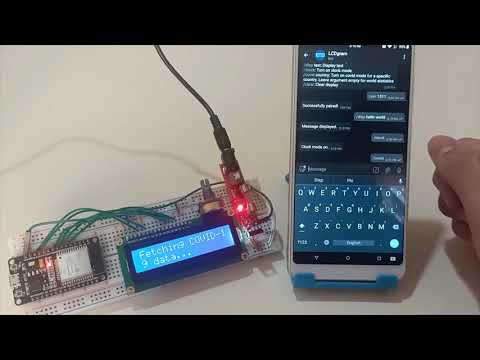
Here is the list of available bot commands with a description of each:
- /help: Sends the list of available commands with a short description of each one.
- /pin pincode: This is used to pair with the display.
- /disp text: Will display whatever the text the user enters after it on the LCD.
- /clock: Turn clock mode on, where it will synchronize the internal RTC using a web API (timeapi.io) and display the current time and date on the LCD and update them continuously.
- /covid country: Turns on COVID-19 mode where it will display the cases and deaths for the chosen country. If country is left empty it will display the global statistics. The data is updated regularly every 15 minutes, and is fetched from a reliable API (disease.sh).
- /clear: Clears the display.
This was made for a college project.