
Who doesn't love Pluto.jl? Who doesn't love a nicely formatted slideshow like Beamer or reveal.js used by Quarto? This package combines the two1! Gets the interactivity of Pluto with a slideshow format.
It is not yet registered in the General registry, but you can install it from my local registry (or directly with the repo url) with
julia> import Pkg;
julia> Pkg.pkg"registry add https://github.com/dmetivie/LocalRegistry"
Then add it to your Pluto notebook with like any other package.
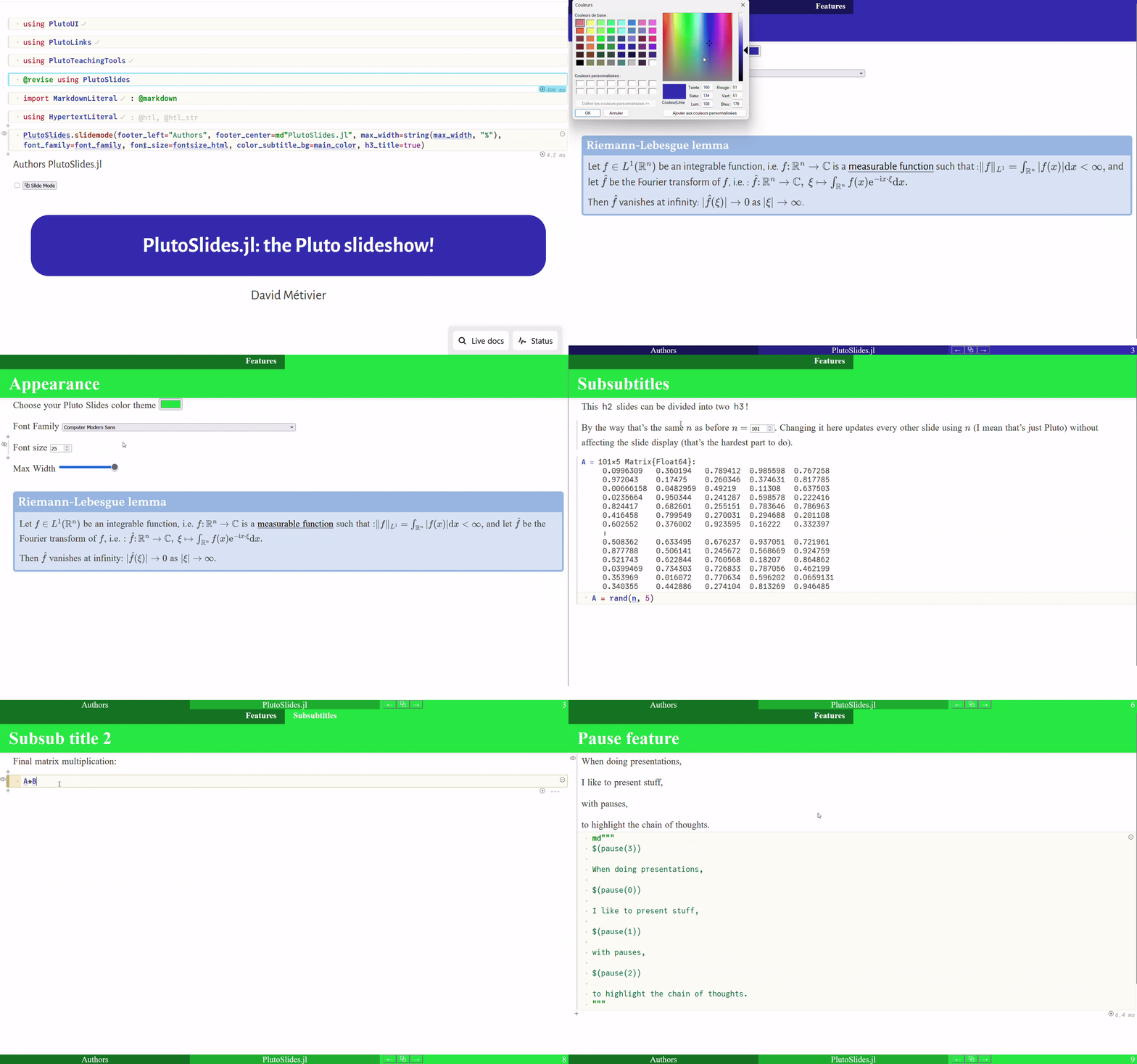
In a Pluto notebook, after installing the package, you can enable slide mode with
using PlutoSlides

# this will make the notebook width/font etc like the slides (check the docstring for options)
# this is if you want to work on your notebook without the slide mode enabled but keeping same style
slide_mode_settings(footer_left="Authors", footer_center=md"PlutoSlides.jl")

# you can add an (h1) title slide with
slide_mode_title(
    title="PlutoSlides.jl: the Pluto slideshow!",
    author="You",
    footnote=md"[^Note]: This is not an official Pluto Project",
    figures=[Resource("https://raw.githubusercontent.com/dmetivie/PlutoSlides.jl/refs/heads/master/assets/logo_pluto_slides.svg", :with => "100%")]
)

# then click it to enable/disable slide mode
slide_mode_button()- Slide mode: it will display
# Section,## Subsection/Slide, and### Subsubsectionas different slides. The convention is similar as in Pluto's presentation mode (so the original presentation mode should also work). - Title slide and section titles bands: The last title appears in a band at the top of the slide.
- Slide counter: it will display the current slide number and the total number of slides. (Making this optional is a planned feature.)
- Appearance (fontsize, font family, colors): you can customize the appearance of the slides with various options.
- Navigation: you can navigate through the slides with the arrow keys, or with a click on the left/right part of the screen and leave slide mode.
- Title slide: it will display the title (
# Title) of the notebook as the title slide. pause(n)command: it will create a pause in the slide, allowing you to reveal content step by step. It is very experimental and seems to work inside markdown cells like
Warning
Display: Keep in mind that the display of the slides (vertical and horizontal) depends on your screen size.
Warning
Experimental: This package is very experimental and not well tested. Sometimes a good old F5 (refresh) might be needed.
Warning
Performance: On some of my larger notebooks, I noticed a huge performance drop. Is it related to the number of slides or something else? I don't know. If you have an idea, please discuss it on the related issue #3.
My typical workflow at work is
- Open a Pluto notebook with
import Pluto;Pluto.run(auto_reload_from_file=true) - Have the
.jlscript open in a larger screen - Using the laptop I'll use for the presentation as a second screen using full screen of your navigator, I open the Pluto notebook. This is the only way to be sure that what will be displayed is exactly what I want.
- Edit either the
.jlscript or the Pluto notebook. The notebook will reload automatically.
If you don't have a second screen e.g. on the road, you can just open the notebook on your presentation laptop.
Tip
You can have very simple Markdown layout, but thanks to @htl macro, you can have much more complex one, with output of code (figures, numbers etc.) entangled with text using interpolation @htl"My text is $(x)".
For that HypertextLiteral.jl and MarkdownLiteral.jl packages are great.
Tip
LLMs: LLM coding assistants are so powerful that they can really help with HTML, Markdown, etc.
Using them inside your IDE with import Pluto;Pluto.run(auto_reload_from_file=true) is really powerful2.
It can easily convert existing LaTeX Beamer slides to a Pluto notebook.
To add a cell, they sometimes can even generate correct Pluto unique cell id # ╟─xxxx that is recognized by Pluto. In case this does not work, you can always add the cell on the notebook and it will appear on the .jl script.
I was not completely satisfied by the look of the presentation mode of Pluto, which did not look like my usual Beamer presentations. Modifying this classic presentation mode is not completely straightforward, because it requires some choice, might depend on the size of your screen and so on (see here). However, I still wanted to try and end up creating this package in case you find it useful. There is probably a lot of room for improvement, and better ways to do things, so feel free to open an issue or a PR.
- Address the performance issue on some notebooks see issue #3
- Better scalability/formatting of notebooks for different screens and font sizes. There is
max_widthoption, but it is not perfect. Maybe amax_heightoption could be useful too? - PDF export of the slides.
- Make the Pluto screen recording work nicely with slide mode.
- Template like Beamer themes, e.g. Madrid, Berlin.
- More testing (I have only tested on my computer, with Firefox).
- h3 title with the h2 top right title in the band (currently it adds a new band bellow h2 title band).
- The fonts of the footer band I think do not match the rest of the slide.
- Option to remove slide counter, add/remove total slide number.
- No title band slide if empty h2 title
##title is provided? Or like an option?