
Extract and visualize Windows path strings from CSRSS raw data - fast, private and browser-based.
Use here: https://dot-sys.github.io/VortexCSRSSTool/
⭐ Star this project if you found it useful.
Vortex CSRSS Tool is a lightweight web app that extracts Win-Path strings from CSRSS raw data in JavaScript.
All data is processed locally in your browser. No information is stored or transmitted.
- Extract Raw String Data from Systeminformer (explained below).
- Paste your raw CSRSS string results into the input field.
- Click Create.
- Review the parsed and filtered output.
Filter Options:
- Filter and Sort (.exe / .dll): Extracted strings are filtered out of raw data (entries that end with .exe or .dll)
- Modified Extensions: Filters out Extensions that do not end in typical extensions found in CSRSS
- Find Associates: Shows executed files in csrss data which are from the same Folder and could be executed by the same Program.
All Data is sorted from A-Z.
To extract raw strings from csrss, best use SystemInformer.
In this specific case we will make use of its canary version, as it usually has a more up-to-date Kernel-Mode-Driver.
- Install and start the Program
- Click the
Button and choose there "Enable-Kernel-Mode" Option. Restart the Program.
- Restart the program and make sure we have Administrator-Mode activated by clicking the
Admin-Icon.
- On the Top Right side search for "CSRSS" and choose the first Process in the List.
- Doubleclick > Go to the Memories-Tab > Options > Strings
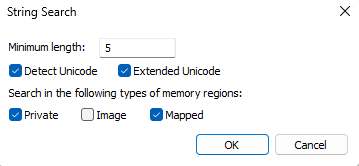
- Choose Minimum Length 5 and Enable "Detect Unicode", "Extended Unicode", "Private" and "Mapped" Options:


- On the Bottom right side click on "Copy"
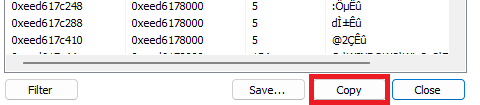
- Copy the Results on the Vortex CSRSS Tool Website in the Input Section
- Re-Do Steps 4-8 with the Second Search-Result.
- Eric Zimmerman’s Bstrings tool - for the original WinPath regex