



When you publish a video on YouTube, you have the option to add a chapters list in the description, which divides the video timeline into chapters for easier navigation.
This RotorHazard plugin will help you to generate a chapters list based on the start time of each heat. Ideal for when you want to publish the VOD of your livestream afterwards and make it easier for viewers to navigate to a specific round / heat of the race.
- Every time a heat starts it will be logged as a chapter entry.
- Based on the start time, the plugin will generate a list of chapters for YouTube.
- Export a txt file where you can copy/paste the chapters into your YouTube video description.
Warning
This plugin is still in development and only works currently with the dev branch of RotorHazard.
This method is the easiest way to install the plugin.
The YouTube Chapters plugin is available as a community plugin for RotorHazard. You can install it directly from the RotorHazard web interface.
- Go to the Settings page in RotorHazard.
- Click on the Plugins tab and click on the Browse Community Plugins (online only) button.
- Search for YouTube Chapters in the list of available plugins.
- Click on the Install button to install the plugin.
- After the installation is complete, restart RotorHazard to load the plugin.
This method is for more advanced users who are comfortable with the command line.
- Install the YouTube Chapters plugin, by running the following command in your terminal at the device where RotorHazard is installed:
bash -c "$(curl -fsSL https://short.dutchdronesquad.nl/install-youtube-chapters)"- You'll be prompted to choose between stable or development:
- stable: Choose this option if you want to install a stable release.
- The script will fetch the last 5 stable releases from GitHub.
- Choose the version you want to install and press enter.
- development: Choose this option if you want to install the latest development version.
- The script will fetch the main branch from GitHub.
- stable: Choose this option if you want to install a stable release.
- If the plugin is already in RotorHazard, you'll be prompted to update it.
- Choose y (yes) to update the plugin.
- Choose n (no) to exit the script.
- When the installation is finished, restart RotorHazard to load the plugin.
- Note when you started live streaming (local time).
- Do the race timing as you are used to, each heat start will be logged automatically.
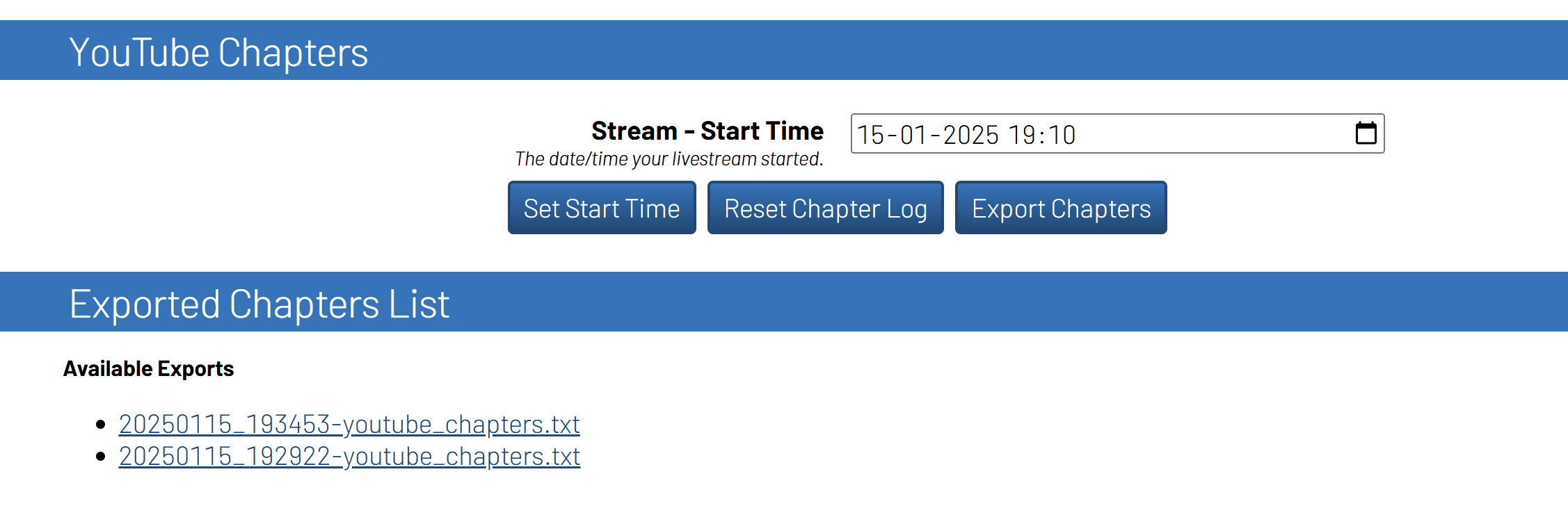
- When you are done, fill in the start time and confirm with the
Set Start Timebutton. - Click on
Export Chaptersto generate a txt file with the chapters.- You will see the download link after page refresh under Exported Chapters List.
- Don't forget to reset the logging every time you have a new event.
This Python project relies on uv as its dependency manager, providing comprehensive management and control over project dependencies.
You need the following tools to get started:
- uv - A python virtual environment/package manager
- Python 3.11 (or higher) - The programming language
- Clone the repository
- Install all dependencies with UV. This will create a virtual environment and install all dependencies
uv sync --all-groupsAs this repository uses the prek framework, all changes are linted and tested with each commit.
To install the prek check, run:
uv run prek installTo run all checks and tests manually, use the following command:
uv run prek run --all-filesTo manual run only on the staged files, use the following command:
uv run prek runThis plugin has been requested by Dutch Drone Racing (DDR) and developed by Dutch Drone Squad (DDS).
Distributed under the MIT License. See LICENSE for more information.