AI-powered extraction of PCB footprint data from component datasheet images with Altium Designer 26 compatible output.

| Component | Status |
|---|---|
| Backend API | ✅ Complete (185 tests passing) |
| Vision Extraction | ✅ Complete (Sonnet/Opus) |
| DelphiScript Generator | ✅ Complete & verified in Altium 26 |
| Frontend | ✅ Complete (React + Tailwind v4) |
Hardware engineers frequently encounter components without existing PCB footprints. Creating footprints manually from datasheets takes 15-60 minutes per component. FootprintAI uses Claude Vision to extract footprint dimensions from datasheet images and generates Altium Designer footprint files automatically.
- AI Vision Extraction: Upload, drag-drop, or paste (Ctrl+V) datasheet images
- Multiple Image Support: Upload multiple images (dimension drawings, pin diagrams, tables) for better accuracy
- Confidence Scoring: Low-confidence values highlighted in yellow/orange
- Standard Package Detection: Detects IPC-7351 packages and redirects to Altium's IPC wizard
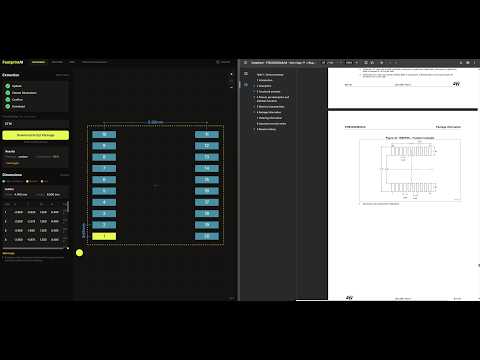
- Pin 1 Selection: Interactive click-to-select when AI is uncertain
- 2D Preview: Visual verification with zoom/pan and pad spacing dimensions
- Part Number Input: Custom filename for downloads
- Altium Export: Script Project package (.zip) with .PrjScr and .pas files
- In-App Documentation: Tabs for README, PRD, and Technical Decisions with Mermaid diagram support
| Layer | Technology |
|---|---|
| Frontend | React + Tailwind CSS |
| Backend | Python FastAPI |
| AI | Anthropic Claude API (Sonnet default, Haiku/Opus available) |
| Hosting | Railway (local dev first) |
pcb_footprint_generator/
├── backend/
│   ├── main.py                    # FastAPI app and routes
│   ├── extraction.py              # Claude Vision API integration
│   ├── generator_delphiscript.py  # DelphiScript (.pas) generation
│   ├── models.py                  # Pydantic data models
│   ├── prompts.py                 # AI extraction prompts
│   ├── requirements.txt
│   ├── pytest.ini                 # Test configuration
│   └── tests/                     # 186 unit tests
├── frontend/
│   ├── src/
│   │   ├── App.jsx                # Main app with two-panel layout
│   │   ├── main.jsx               # Entry point
│   │   ├── index.css              # Tailwind v4 theme
│   │   └── components/            # React components
│   ├── vite.config.js             # Vite config with API proxy
│   └── package.json
├── documents/                     # PRD and ground truth data
├── example_datasheets/            # Test images
└── README.md
flowchart TB
    subgraph Frontend["Frontend (React + Tailwind)"]
        UP[UploadPanel]
        CP[ControlPanel]
        PC[PreviewCanvas]
        DT[DimensionTable]
        MV[MarkdownViewer]
    end

    subgraph Backend["Backend (FastAPI)"]
        MA[main.py<br/>API Routes]
        EX[extraction.py<br/>Claude Vision]
        GEN[generator_delphiscript.py<br/>Script Generator]
        MOD[models.py<br/>Pydantic Models]
        PR[prompts.py<br/>AI Prompts]
    end

    subgraph External["External Services"]
        CLAUDE[Claude Vision API<br/>Sonnet/Haiku/Opus]
        ALTIUM[Altium Designer 26]
    end

    UP -->|POST /api/upload| MA
    CP -->|GET /api/extract| MA
    CP -->|POST /api/confirm| MA
    CP -->|GET /api/generate| MA
    MA --> EX
    EX -->|Vision Request| CLAUDE
    CLAUDE -->|JSON Response| EX
    EX --> MOD
    MA --> GEN
    GEN -->|.zip package| CP
    CP -->|Download| ALTIUM
    MA --> PC
    MA --> DT
sequenceDiagram
    participant U as User
    participant F as Frontend
    participant B as Backend
    participant C as Claude API
    participant A as Altium

    U->>F: Upload datasheet images
    F->>B: POST /api/upload (images[])
    B-->>F: job_id

    U->>F: Click "Extract"
    F->>B: GET /api/extract/{job_id}
    B->>C: Vision API (images + prompt)
    C-->>B: JSON (pads, outline, confidence)
    B-->>F: ExtractionResult

    F->>F: Display preview + dimensions
    Note over F: Highlight low-confidence values

    alt Pin 1 uncertain
        U->>F: Click to select Pin 1
    end

    U->>F: Click "Confirm"
    F->>B: POST /api/confirm/{job_id}
    B-->>F: confirmed

    U->>F: Click "Download"
    F->>B: GET /api/generate/{job_id}
    B->>B: Generate DelphiScript
    B-->>F: Script Project (.zip)

    U->>A: Extract & open .PrjScr
    U->>A: Run script
    A->>A: Create footprint
- Python 3.11+
- Node.js 18+
- Anthropic API key
cd backend
python -m venv venv
source venv/bin/activate  # Windows: venv\Scripts\activate
pip install -r requirements.txt

# Set environment variable
export ANTHROPIC_API_KEY=your_key_here

# Run server
uvicorn main:app --reload --port 8000cd backend
source venv/bin/activate
python -m pytest tests/ -v185 tests passing (1 skipped integration test) covering models, extraction, prompts, API endpoints, and generators.
cd frontend
npm install
npm run dev
The app will be available at http://localhost:5173 (or 5174 if 5173 is in use).
| Method | Endpoint | Description |
|---|---|---|
| GET | /api/health |
Health check |
| POST | /api/upload |
Upload images (PNG/JPEG/GIF/WebP, multiple supported), returns job_id |
| GET | /api/extract/{job_id}?model=sonnet |
Extract dimensions with confidence (model: haiku/sonnet/opus) |
| POST | /api/confirm/{job_id} |
Confirm dimensions + Pin 1 selection |
| GET | /api/generate/{job_id} |
Download Script Project package (.zip) |
| POST | /api/detect-standard |
Check for IPC-7351 standard packages |
| GET | /api/job/{job_id}/status |
Get job status |
| DELETE | /api/job/{job_id} |
Delete job |
| GET | /api/docs/{doc_name} |
Get markdown documentation (readme, prd, technical-decisions) |
- Upload: Drag-drop, paste (Ctrl+V), or click to upload datasheet images
- Upload multiple images (dimension drawing, pin diagram, tables) for better accuracy
- Click "Upload X Images" when ready
- Part Number: Enter the component part number (used for filename)
- Extract: Click "Extract Dimensions" - review results with confidence highlighting
- Pin 1: If prompted, click on the preview canvas to select Pin 1
- Verify: Use zoom/pan controls to check pad spacing dimensions on the 2D preview
- Download: Get the Script Project package (.zip)
- Run in Altium:
- Extract the zip file
- Open the
.PrjScrfile in Altium Designer - Open/create a PCB Library document
- Run the script (DXP → Run Script → select the procedure)
- SMD: Rectangular, Round, Rounded Rectangle, Oval
- Through-Hole: Circular and slotted drill holes
- Thermal Pads: Basic size/position (no paste mask patterns in MVP)
Five validated footprints for testing:
- RJ45 Connector - Through-hole, 22 pads
- USB 3.0 Connector - Through-hole with slotted holes
- M.2 Mini PCIe - SMD edge connector, 79 pads
- Samtec HLE Socket - Mixed SMD + TH, 42 pads
- SO-8EP - SOIC-8 with exposed thermal pad
Approximately $0.002-0.004 per extraction using Claude Sonnet (default). Sonnet chosen over Haiku for accuracy - Haiku confused pad dimensions with pitch/spacing. Opus available for complex through-hole connectors.
| Model | Cost/Extraction | Best For |
|---|---|---|
| Haiku | ~$0.002 | Not recommended (accuracy issues) |
| Sonnet | ~$0.003 | Simple SMD packages (default) |
| Opus | ~$0.004 | Complex TH connectors |
- Railway account
- Anthropic API key
- Connect your repo to Railway
- Set environment variables in Railway dashboard:
ANTHROPIC_API_KEY=sk-ant-api03-... - Deploy - Railway will automatically:
- Install Python and Node.js dependencies
- Build the React frontend
- Copy frontend to backend/static
- Start the FastAPI server
In production, the following rate limits apply:
| Endpoint | Limit |
|---|---|
/api/upload |
30 requests/hour per IP |
/api/extract |
10 requests/hour per IP |
Rate limits only apply when RAILWAY_ENVIRONMENT=production or ENVIRONMENT=production is set. Local development has no rate limits.
railway.toml- Railway deployment configurationDockerfile- Multi-stage build (Node frontend + Python backend).dockerignore- Files excluded from Docker build.env.example- Environment variable template
MIT