Early Access: Auto Formatting
With Flutter's master branch as of August 11th, 2016, we now have an early access auto-formatting solution. We are looking for feedback from users. Please try it out and file issues.
(Thanks to the Dart team for their help with the dartfmt utility.)
Make sure you are using a version of Flutter that is newer than August 11th, 2016. To check the last-commit-date, cd to your local copy of the flutter repo, run git log, and look at the top result.
Also, make sure you are using the dartfmt that is bundled with Flutter, and found in $FLUTTER_ROOT/bin/cache/dart-sdk/bin/dartfmt. Run $FLUTTER_ROOT/bin/cache/dart-sdk/bin/dartfmt --version to ensure you have version 0.2.8 or newer.
If you use Atom, please ensure your Flutter plugin for Atom has the correct flutter_root setting.
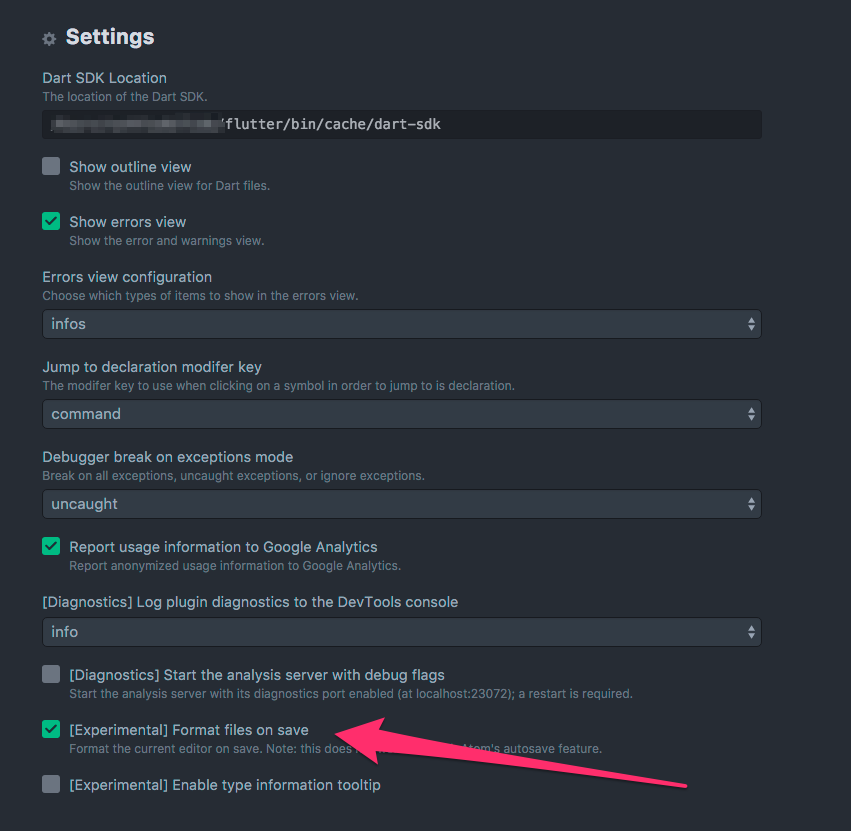
Also, you may want to enable "format on save" option in the Dart plugin settings.
To get a good formatting experience with Flutter, you must first adopt trailing commas. (The reasons are out of the scope of this article.) If you do not add trailing commas, the formatter will potentially significantly rearrange your code.
The rule for adding a trailing comma is simple. Always add a trailing comma at the end of a parameter list in functions, methods, and constructors where you care about keeping the formatting you crafted.
Here is a formatted example with trailing commas:

Here is a formatted example without trailing commas:

To learn more about the dartfmt command, please check out the dart_style pub package.
The Flutter team would like to know how auto-formatting works for you.
Please file issues or chat with us in our Gitter.
