







HGR is a hand-gesture recognition library that provides an inference API for an AI model trained in Python.
- Name: HGR (Hand Gesture Recognition)
- Author / Maintainer: gellston
- Examples:
-
HGR.Native.Cu118(C++ / native)
Native runtime + C++ API for Windows x64. Use this if you want to call HGR directly from C++. -
HGR.Managed.Cuda118(C# / .NET)
A managed wrapper (C++/CLI) around the native runtime for a smoother .NET experience on Windows x64.
Both packages target Windows x64. GPU inference requires a compatible NVIDIA GPU environment (see below).
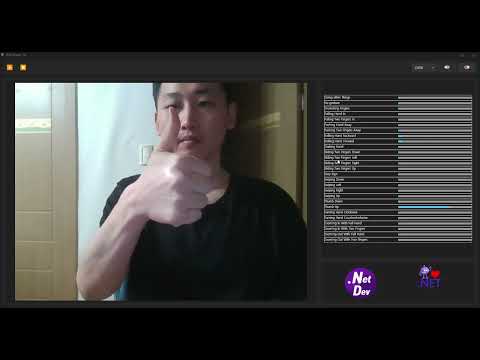

- Training scripts used for model development are available here:
- This project used the Jester-Dataset :
- ✅ Windows x64 only
- Even if you use C# or C++, this library only works on Windows x64.
- CPU inference: no special runtime constraints (beyond standard Windows x64 requirements).
- CUDA inference requires an NVIDIA GPU + driver.
- You must install CUDA 11.8 on the target machine.
- You must install cuDNN 8.5.0.96 (CUDA 11.x build) on the target machine.
- This package does not bundle the NVIDIA CUDA / cuDNN redistributable DLLs.
- Make sure CUDA/cuDNN DLLs are discoverable at runtime (e.g., in
PATHor alongside your app).
- Make sure CUDA/cuDNN DLLs are discoverable at runtime (e.g., in
If CUDA inference fails to load (e.g., DLL not found / entry point not found), the most common causes are:
- NVIDIA driver is outdated/incompatible
- CUDA/cuDNN versions do not match (CUDA 11.8 + cuDNN 8.5.0.96)
- CUDA/cuDNN DLLs are not on
PATH(or not deployed next to the executable)
Note: NVIDIA downloads may require an NVIDIA Developer account login.
-
CUDA Toolkit 11.8 (Windows x86_64)
https://developer.nvidia.com/cuda-11-8-0-download-archive?target_os=Windows&target_arch=x86_64 -
cuDNN v8.5.0.96 (CUDA 11.x, Windows x86_64 zip)
Option A (recommended entry): cuDNN Archive (pick v8.5.0 for CUDA 11.x → Windows x86_64 (Zip))
https://developer.nvidia.com/rdp/cudnn-archiveOption B (direct file; will redirect to NVIDIA login):
https://developer.nvidia.com/compute/cudnn/secure/8.5.0/local_installers/11.7/cudnn-windows-x86_64-8.5.0.96_cuda11-archive.zip
HGR.Native.Cu118andHGR.Managed.Cu118can be used in a mixed mode:- You can run CPU inference regardless of CUDA availability.
- To run CUDA inference, you must have a compatible NVIDIA driver + CUDA 11.8 + cuDNN 8.5.0.96 installed/configured.
- This enables CPU fallback or choosing CPU/CUDA per workload.
- Visual Studio 2026
This library requires a separate redistribution package to run (native runtime DLLs, etc.). Download and install the redistribution package before using HGR.
- Microsoft Visual C++ Redistributable (Latest Supported): https://learn.microsoft.com/ko-kr/cpp/windows/latest-supported-vc-redist?view=msvc-170
HGR is not a “single one-off release”. The NuGet packages can be updated over time (bug fixes, performance improvements, new runtime variants, model upgrades).
Current / planned package list:
HGR.Native.Cu118(Windows x64, native runtime, CPU, requires CUDA 11.8 + cuDNN 8.5.0.96 for GPU)
https://www.nuget.org/packages/HGR.Native.Cu118HGR.Managed.Cuda118(Windows x64, managed wrapper for .NET / C#; uses the native runtime under the hood)
https://www.nuget.org/packages/HGR.Managed.Cuda118
The list may expand (e.g., different CUDA versions) and existing packages may receive updates.
Install-Package HGR.Native.Cu118dotnet add package HGR.Native.Cu118Install-Package HGR.Managed.Cuda118dotnet add package HGR.Managed.Cuda118#include <iostream>
#include <opencv2/opencv.hpp>
#include <hgr/hgr.h>
#include <hgr/clipSampler.h>
int main()
{
try {
auto memoryPool = hgrapi::v1::memoryPool::create();
auto hgr = hgrapi::v1::hgr::create();
hgr->setup(hgrapi::v1::dlType::ghost3d, hgrapi::v1::device::cuda);
hgr->setEmaAlpha(0.2f);
auto sampler = hgrapi::v1::clipSampler::create();
sampler->setMaxFrames(40);
sampler->setSampleFrames(16);
cv::VideoCapture cap;
cap.open(0);
if (!cap.isOpened()) {
std::cerr << "Failed to open VideoCapture.\n";
return 1;
}
cv::Mat frame;
while (true) {
if (!cap.read(frame) || frame.empty()) {
std::cerr << "End of stream or failed to read frame.\n";
break;
}
auto dlImage = hgrapi::v1::image::create(frame.cols, frame.rows, 3, frame.data, memoryPool);
auto resizeImage = hgrapi::v1::image::resize(dlImage, 128, 64);
sampler->append(resizeImage);
auto samples = sampler->requestSampling();
auto result = hgr->predict(samples);
std::cout << "name : " << result.name << " prob : " << result.prob << std::endl;
cv::imshow("capture", frame);
cv::waitKey(1);
}
}
catch (std::exception ex) {
std::cout << ex.what() << std::endl;
}
return 0;
}
using OpenCvSharp;

namespace ManagedTest
{
    internal class Program
    {
        static void Main(string[] args)
        {
            try
            {
                var memoryPool = HGRAPI.V1.MemoryPool.Create();
                var hgr = HGRAPI.V1.HGR.Create();

                hgr.Setup(HGRAPI.V1.DLType.Ghost3D, HGRAPI.V1.Device.Cuda);
                hgr.EmaAlpha = 0.2f;

                var sampler = HGRAPI.V1.ClipSampler.Create();
                sampler.MaxFrames = 40;
                sampler.SampleFrames = 16;

                using var cap = new VideoCapture(0);
                if (!cap.IsOpened())
                {
                    Console.WriteLine("Failed to open VideoCapture (camera 0).");
                    return;
                }

                using var frame = new Mat();

                while (true)
                {
                    if (!cap.Read(frame) || frame.Empty())
                    {
                        Console.WriteLine("Failed to read frame or empty frame.");
                        break;
                    }


                    using var dlImage = HGRAPI.V1.Image.Create((uint)frame.Cols, (uint)frame.Rows, 3, frame.Data, memoryPool);
                    using var resizeImage = HGRAPI.V1.Image.Resize(dlImage, 128, 64);

                    sampler.Append(resizeImage);

                    var samples = sampler.RequestSampling();
                    var result = hgr.Predict(samples);

                    Cv2.ImShow("capture", frame);

                    int key = Cv2.WaitKey(1);
                    if (key == 27)
                        break;

                    System.Console.WriteLine("name : {0} prob : {1}", result.Name, result.Prob);

                    HGRAPI.V1.ClipSampler.DisposeImages(samples);
                }

                cap.Release();
                Cv2.DestroyAllWindows();
            }
            catch (Exception ex)
            {
                Console.WriteLine($"Exception: {ex}");
            }
        }
    }
}- Provide a managed NuGet wrapper for .NET / C# (
HGR.Managed.Cuda118) - Improve .NET API ergonomics (more idiomatic C# surface)
- Add additional runtime variants (e.g., different CUDA versions)
- Improve hand-gesture recognition model quality and provide more model options/variants
This project uses ideas and/or model architectures from academic research. If you use HGR in research, demos, or publications, please consider citing the original papers.
This project was influenced by GhostNet and Resource Efficient 3D CNNs. Based on these ideas, we designed a custom GhostNet3D module and built the model architecture on top of it.
We sincerely thank the authors and contributors of these works for advancing efficient neural network research:
-
GhostNet (CVPR 2020)
Kai Han, Yunhe Wang, Qi Tian, Jianyuan Guo, Chunjing Xu, Chang Xu
GhostNet: More Features from Cheap Operations
arXiv: https://arxiv.org/abs/1911.11907
Paper (CVF Open Access): https://openaccess.thecvf.com/content_CVPR_2020/papers/Han_GhostNet_More_Features_From_Cheap_Operations_CVPR_2020_paper.pdf -
Resource Efficient 3D Convolutional Neural Networks (ICCVW 2019 / arXiv 2019)
Okan Köpüklü, Neslihan Kose, Ahmet Gunduz, Gerhard Rigoll
Resource Efficient 3D Convolutional Neural Networks
arXiv: https://arxiv.org/abs/1904.02422
Note: Please also comply with the licenses/terms of any upstream code, weights, and third-party libraries you use or redistribute.
This project is licensed under the MIT License (for the HGR source code).
This distribution may include third-party components and/or binaries.
Those components are NOT covered by the MIT License and remain subject to their respective licenses/terms.
Included third-party license texts are provided under the licenses/ folder:
CUDA-EULA.txt— NVIDIA CUDA runtime components (redistributables)cudnn-LICENSE.txt— NVIDIA cuDNN runtime componentsonnxruntime-LICENSE.txt— ONNX Runtime licenseonnxruntime-ThirdPartyNotices.txt— ONNX Runtime third-party noticesopencv-LICENSE.txt— OpenCV license
By using this package, you agree to comply with all applicable third-party license terms in addition to the MIT License.
MIT License
Copyright (c) 2025–present gellston
Permission is hereby granted, free of charge, to any person obtaining a copy of this software and associated documentation files (the "Software"), to deal in the Software without restriction, including without limitation the rights to use, copy, modify, merge, publish, distribute, sublicense, and/or sell copies of the Software, and to permit persons to whom the Software is furnished to do so, subject to the following conditions:
The above copyright notice and this permission notice shall be included in all copies or substantial portions of the Software.
THE SOFTWARE IS PROVIDED "AS IS", WITHOUT WARRANTY OF ANY KIND, EXPRESS OR IMPLIED, INCLUDING BUT NOT LIMITED TO THE WARRANTIES OF MERCHANTABILITY, FITNESS FOR A PARTICULAR PURPOSE AND NONINFRINGEMENT. IN NO EVENT SHALL THE AUTHORS OR COPYRIGHT HOLDERS BE LIABLE FOR ANY CLAIM, DAMAGES OR OTHER LIABILITY, WHETHER IN AN ACTION OF CONTRACT, TORT OR OTHERWISE, ARISING FROM, OUT OF OR IN CONNECTION WITH THE SOFTWARE OR THE USE OR OTHER DEALINGS IN THE SOFTWARE.