WPS Manager
In order to use the WPS plugin in MapStore you need to be sure that the files below are included in the buildjs.cfg file:
openlayers-ext/lib/OpenLayers/Format/WCSGetCoverage.jsopenlayers-ext/lib/OpenLayers/Format/OGCExceptionReport.jsopenlayers-ext/lib/OpenLayers/Format/XML/VersionedOGC.jsopenlayers-ext/lib/OpenLayers/Format/OWSCommon.jsopenlayers-ext/lib/OpenLayers/Format/OWSCommon/v1_ext.jsopenlayers-ext/lib/OpenLayers/Format/WFST/v1_1_0_ext.jsopenlayers-ext/lib/OpenLayers/Format/OWSCommon/v1_1_0_ext.jsopenlayers-ext/lib/OpenLayers/Format/GeoStore.jsopenlayers-ext/lib/OpenLayers/RequestExt.jsopenlayers-ext/lib/OpenLayers/EventsExt.jsopenlayers-ext/lib/OpenLayers/RequestExt/XMLHttpRequestExt.jsopenlayers-ext/lib/OpenLayers/GeoStore.jsopenlayers-ext/lib/OpenLayers/WPSClient.jsopenlayers-ext/lib/OpenLayers/WPSProcess.jsopenlayers-ext/lib/OpenLayers/Format/WPSDescribeProcess.jsopenlayers-ext/lib/OpenLayers/Format/WPSExecute.jsopenlayers-ext/lib/OpenLayers/Format/WPSExecuteRequest.jsgxp/src/script/plugins/wpsmanager/lib/WPSManager.jsgxp/src/script/plugins/client/lib/GeoStoreClient.js
NOTE: In the default configuration this is already done.
##Plugin Description
The WPS Manager Plugin provides a high level API for interaction with Web Processing Services (WPS) and manager the Process instances.
An gxp.plugins.WPSManager uses a OpenLayersExt.WPSClient for the WPS intercation and a gxp.plugins.GeoStoreClient to store the Execute instances.
When the WPSManager plugin is instantiated a "Geostore Category" called as plugin id is created. The WPS Manager Plugin supports synchronous and asynchronus Execute requests. For each Execute request a "Geostore Resource" is created.
For the asynchronous request supports the status update, for the synchronous requests supports the "raw" data outputs.
The resource description contains a execute status information and the output type (raw or not raw). The resource store data contains directly the output if the output type is raw or a JSON Object wich contains the Execute response information. For the Execute response parsing is used the OpenLayersExt.Format.WPSExecute object.
##Configuration Exemple
Besides the plugin configuration the following script import must be uncommented from the composer.html file:
<!-- Externatls OpenLayers libraries to manage WPS processes  -->
<script type="text/javascript" src="script/OpenLayersExt.js"></script>
Then you have to specify the a valid plugin configuration, something like that:
{
   "ptype": "gxp_wpsmanager",
   "id": "wpsSPM",
   "url": "http://localhost:8080/geoserver/wps",
   "geostoreUrl": "http://localhost:8080/geostore/rest",
   "geostoreUser": "admin",
   "geostorePassword": "admin",
   "geostoreProxy": "/http_proxy/proxy?url="
 }
-
ptype: ptype of the plugin -
id: plugin identifies -
url: URL of the WPS service -
geostoreUrl: GeoStore REST base URL -
geostoreUser: a valid user name to allow Categorty creation -
geostorePassword: the corresponding user password -
geostoreProxy: The proxy to use for Ajax cross domain requests.
##Send WPS Execute request In order to send a Execute Request with WPSManager plugin you have to use the execute method:
wpsManager.execute(processName,executeRequest,callback);
The processName is the WPS Process name.
The executeRequest can be an Object which contains the request properties or a String which contains directly the WPS Execute request. For the WPS Execute request parsing is used the OpenlayersExt.Format.WPSExecuteRequest which define a object with the request properties.This object properties are:
-
storeExecuteResponse:
BooleanOptional. Indicates if the execute response document shall be stored (if true Asynchronous instance). -
lineage:
BooleanOptional. Indicates if the Execute operation response shall include the DataInputs and OutputDefinitions elements. -
status:
BooleanOptional. Indicates if the stored execute response document shall be updated to provide ongoing reports on the status of execution. -
type:
StringOptional. Type of output ("data" or "raw") -
inputs:
ObjectMandatory. The inputs for the process, keyed by input identifier.The data input types currently supported are: OpenLayers.WPSProcess.LiteralData, OpenLayers.WPSProcess.ComplexData, OpenLayers.WPSProcess.BoundingBoxData, OpenLayers.WPSProcess.ReferenceData. -
outputs:
ArrayMandatory. Array of OpenLayers.WPSProcess.Output Object
The optional callback is a function to call when the execute response is retrieved.
##WPS Execute Synchronous request An example of sending WPS Execute synchronous request is the following:
wpsManager.execute('JTS:isValid',{
   "inputs": {
            geom: new OpenLayers.WPSProcess.ComplexData({
                  value: "POINT(6 40)",
                  mimeType: "application/wkt"
             })
   },
   "outputs": [{
        "identifier": "result",
        "mimeType" : "text/xml"
   }]
 });
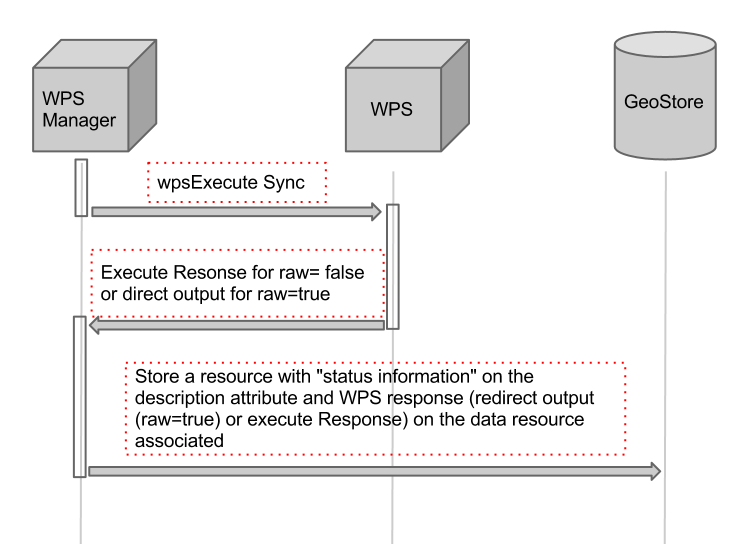
The sequence of interactions is described on the following figure:
##WPS Execute Asynchronous request An example of sending WPS Execute asynchronous request is the following:
wpsManager.execute('JTS:isValid',{
   "storeExecuteResponse": true,
   "lineage": true,
   "status": true,
   "inputs": {
            geom: new OpenLayers.WPSProcess.ComplexData({
                  value: "POINT(6 40)",
                  mimeType: "application/wkt"
             })
   },
   "outputs": [{
        "identifier": "result",
        "mimeType" : "text/xml"
   }]
 });
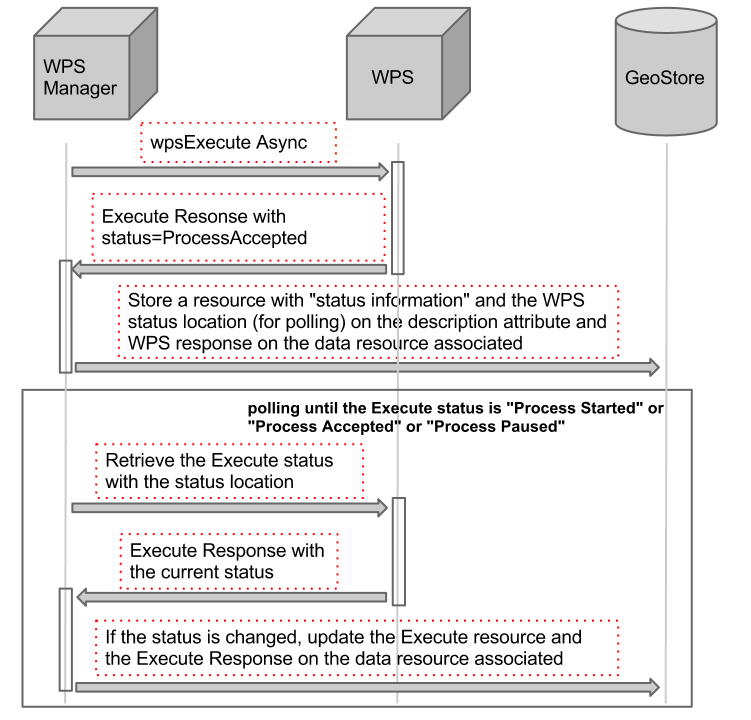
The sequence of interactions is described on the following figure: