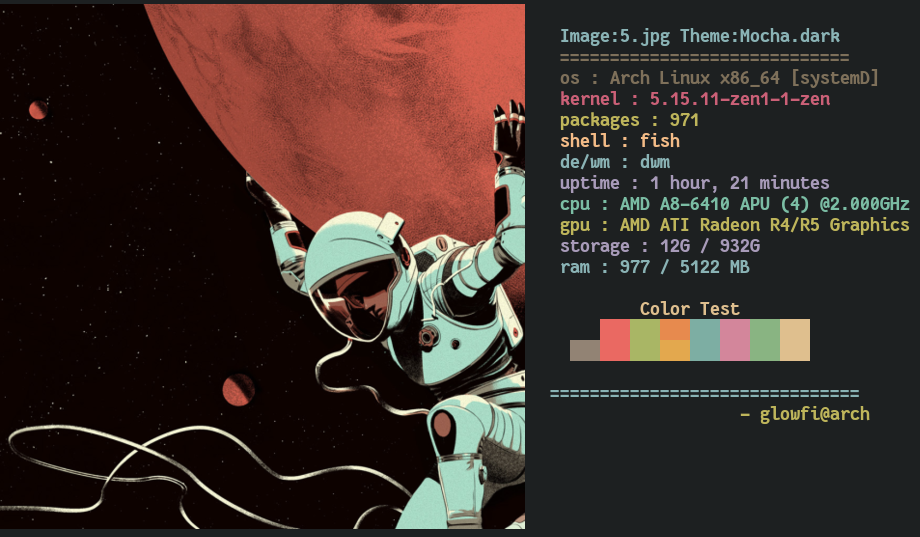


XHIBIT is a customizable terminal showcase tool that displays:
- 🖼 ASCII characters
- 🎨 Colorschemes
- 💻 System specifications
- 🖼 Optional image previews
Designed for terminal enthusiasts who want a visually expressive system display.
Works on any Linux-based distribution.
echo 'export PATH=$HOME/.local/bin:$PATH' >> ~/.bashrcChange
.bashrcto your shell’s rc file if needed.
echo 'set PATH ~/.local/bin $PATH' >> ~/.config/fish/config.fishRestart your shell afterwards.
pip install xhibit- Python ≥ 3.5
- kitty terminal or ueberzug
- xorg-xdpyinfo
- xdotool
- xorg-xprop
- xorg-xwininfo
xhibit [options]| Option | Description |
|---|---|
-v |
Show version |
-cs |
Choose colorscheme |
-rcs |
Random colorscheme |
-ccs |
Custom colors (8 hex values) |
-cn |
Choose ASCII character |
-rcn |
Random character |
-cpu |
Custom CPU name |
-gpu |
Custom GPU name |
-img |
Display image |
-imb |
Image backend (kitty / ueberzug) |
-crop |
Image crop mode (fit / fill) |
Available characters:
- monalisa
- egyptian
- casper
- fairy
- dragon
- 212 built-in colorschemes
List all:
xhibit -lcs allFull list: https://raw.githubusercontent.com/glowfi/xhibit-colorschemes/main/colorscheme.txt
xhibit -cs gruvbox -cn casper
xhibit -cs dracula -cn fairy
xhibit -rcs t -rcn t
xhibit -ccs "#BF616A,#A3BE8C,#EBCB8B,#81A1C1,#B48EAD,#88C0D0,#E5E9F0,#B48EAD"
Supports image previews using:
kittygraphics protocolueberzug
git clone https://github.com/ueber-devel/ueberzug
cd ueberzug
pip install .
cd ..
rm -rf ueberzugxhibit -img "path/to/image" -imb kittyor
xhibit -img "path/to/image" -imb ueberzugxhibit -crop fit
xhibit -crop fill
Contributions and improvements are welcome.
Small focused PRs preferred.
GPL-3.0