



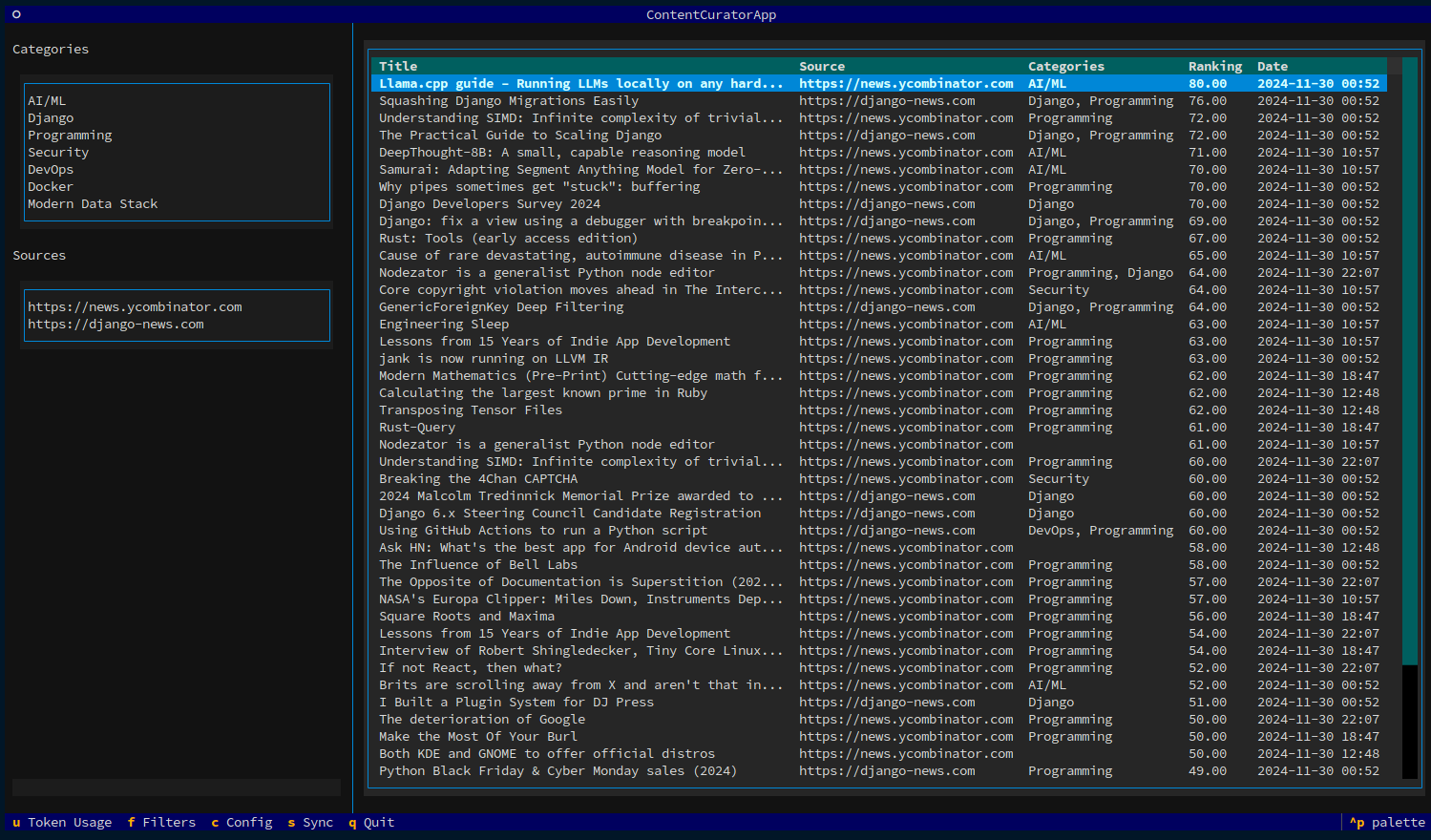
Turn information noise into meaningful signal with AI-powered content curation.
AI Signal helps you regain control over your information diet. While platforms and algorithms decide what content reaches you, AI Signal empowers you to define your own curation strategy. You set the categories, quality thresholds, and filtering criteria—ensuring the content you consume aligns with your interests and goals.
Think of it as your personal content curator, running locally on your machine, surfacing valuable information while filtering out noise.
- AI-Powered Analysis - Smart categorization and ranking using OpenAI
- Custom Filters - Define categories, quality thresholds, and filtering criteria
- Multiple Sources - Support for RSS feeds, YouTube, Medium, Reddit, Hacker News
- Export & Share - Send to Obsidian vault or social media platforms
- Keyboard-Driven - Fully accessible terminal interface powered by Textual
- Cost Tracking - Monitor AI token usage and costs in real-time
Built with a clean, event-driven architecture featuring:
- Interface-based design (ABC) for all core services
- Dependency injection with automated service resolution
- Real-time UI updates via pub/sub event bus
- 94% test coverage across core services
- Thread-safe operations ready for future multi-UI support
See Architecture Documentation for technical details.
# Install with pip
pip install ai-signal

# Or with pipx (recommended for global installation)
pipx install ai-signal

# Or with poetry
poetry add ai-signal# Initialize configuration
aisignal init
# Edit ~/.config/aisignal/config.yaml with your:
# - OpenAI API key
# - Jina AI API key
# - Content sources
# - Categories of interest
# Run the application
aisignal runSee the Configuration Guide for detailed setup instructions.
Global: q Quit • c Config • s Sync • f Filters • u Usage stats
Navigation: ↑↓ Move • Enter Details • o Open browser
Actions: e Export to Obsidian • t Share Twitter • l Share LinkedIn
Current Version: 0.11.0 • Status: Active Development
AI Signal is production-ready with all core features functional. The architecture migration is complete with 94% test coverage.
Currently: Finishing RSS/Atom feed integration (88% complete) to reduce API costs by 50-80%.
See STATUS.md for detailed project status, roadmap, and what's in development.
We welcome contributions! Whether it's bug reports, feature requests, or code contributions, your help makes AI Signal better.
Development Setup:
# Clone the repository
git clone https://github.com/guglielmo/ai-signal.git
cd ai-signal

# Install dependencies
poetry install

# Run tests
poetry run pytest

# Run the application
poetry shell
aisignal run
See CONTRIBUTING.md for detailed contribution guidelines.
This project is licensed under the MIT License - see the LICENSE file for details.
- STATUS.md - Current project status and roadmap
- VISION.md - Product vision and strategic direction
- Configuration Guide - Setup and configuration
- Architecture - Technical architecture and design
- Contributing Guide - How to contribute
Guglielmo Celata
- GitHub: @guglielmo
- Mastodon: @guille@mastodon.uno