- 홈페이지를 크롤링하여 검색가능한 전화번호부를 제작한다.
- core data를 사용하여 디바이스에 값을 저장한다.
- Swift
- Xcode
- SwiftSoup Library
- https://github.com/scinfu/SwiftSoup
- iPhone XR/XS Max/11/11 Pro Max
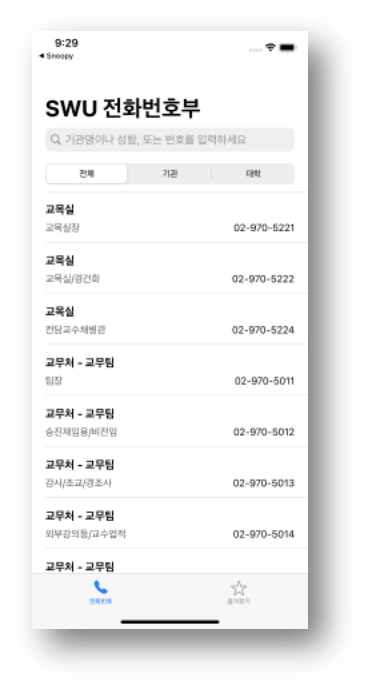
- 홈페이지에서 전화번호 불러오기 - SwiftSoup을 사용하여 크롤링해온다.
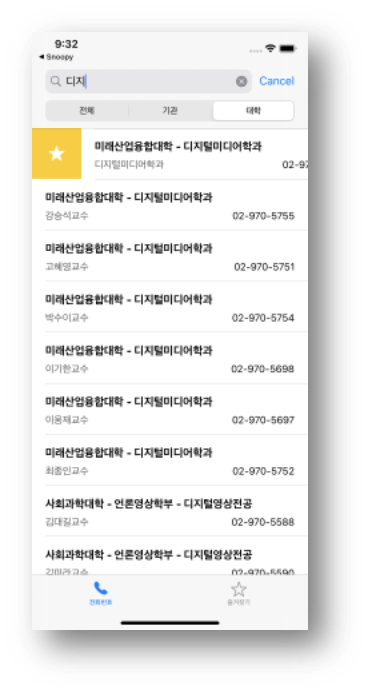
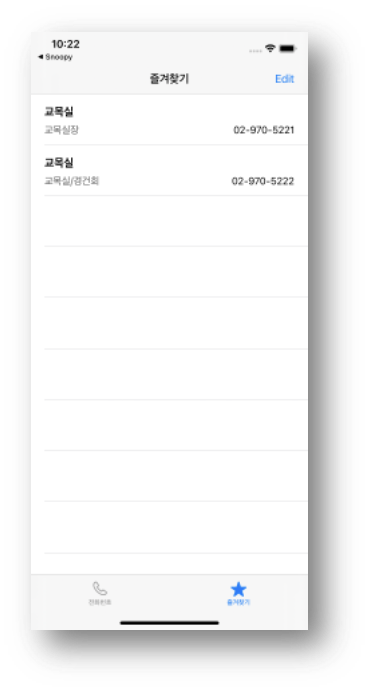
- 즐겨찾기 - core data에 해당 값을 저장한다.
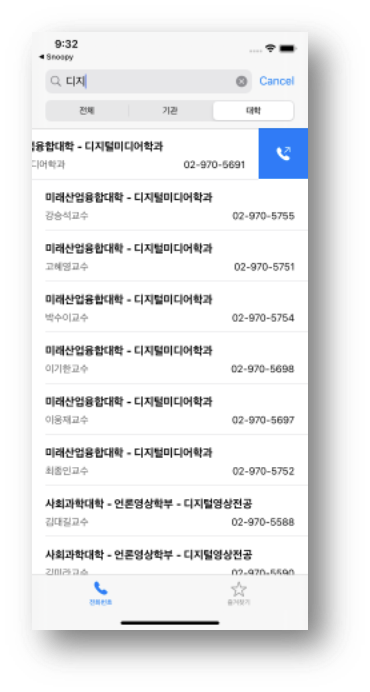
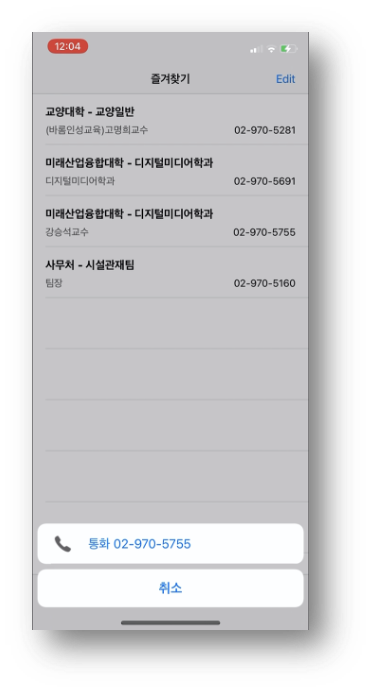
- 통화 - NSURL을 사용하여 해당 번호로 바로 전화할 수 있다.
-
SwiftSoup을 사용하여 크롤링해온다.
- URL의 html을 불러오고
- 파싱해서 Document형식으로 만들어서
- String타입으로 바꾼다
- String타입(줄글)을 정리해주고 분류한다.
 func crawl() {
        guard let myURL = url else {
            return
        }
        do {
            let html = try String(contentsOf: myURL, encoding: .utf8)
            let doc: Document = try SwiftSoup.parse(html)
            let headertitle = try doc.title()
            print(html)

            // doc내 위치 (data가 들어있는 위치로 접근)
            let element = try doc.select("#body > div > div > script")

           // html -> string코드
            var tt = try element[0].outerHtml()

            // Data 정리
            tt = tt.replacingOccurrences(of: "\r\n\t\t\t\t\t", with: "").replacingOccurrences(of: "\t", with: "").replacingOccurrences(of: "<br>", with: "").replacingOccurrences(of: "//", with: "").replacingOccurrences(of: """
                <script type="text/javascript">
                """, with: "").replacingOccurrences(of: "</script>", with: "").replacingOccurrences(of: "{}", with: "").replacingOccurrences(of: "[", with: "").replacingOccurrences(of: "]", with: "").replacingOccurrences(of: "pnl.", with: "").replacingOccurrences(of: "pnl", with: "").replacingOccurrences(of: "{", with: "").replacingOccurrences(of: "}", with: "").replacingOccurrences(of: " ", with: "").replacingOccurrences(of: "\"", with: "").replacingOccurrences(of: ",name", with: "+name").replacingOccurrences(of: "name:", with: "").replacingOccurrences(of: "number:", with: "")

            // 배열 생성
            var ttArr = tt.components(separatedBy: ";")


            // Data 정리 2
            ttArr.removeAll {$0.contains("push()")}
            ttArr.removeAll {!$0.contains("구성원")}

            // 오름차순으로 sort
            ttArr.sort()

            for index in 0..<ttArr.count {
                ttArr2.append(contentsOf: ttArr[index].components(separatedBy: "="))
            }
            ttArr2.removeAll {$0.isEmpty}
            ttArr2.removeAll {$0 == "교무처.교무팀"}
            ttArr2.removeAll {$0 == "평생교육원.평생교육팀"}


            for index in 0..<ttArr2.count {
                if index % 2 == 1 {
                    let array = ttArr2[index].components(separatedBy: "+")
                    team.append(array)
                }
                else {
                    titleArr.append(ttArr2[index])
                }
            }
            team.removeFirst()
            titleArr.removeFirst()


            // print("------------------")

            for index in 0..<team.count {
                for i in 0..<team[index].count {
                    let array = team[index][i].components(separatedBy: ",")
                    let oneMan = Man(teamTitle: titleArr[index].replacingOccurrences(of: ".구성원", with: "").replacingOccurrences(of: ".", with: " - "), name: array[0], number: array[1], category: { () -> String in
                        if titleArr[index].contains("대학") || titleArr[index].contains("전공") {
                            return "대학"
                        }
                        else {
                            return "기관"
                        }


                    }())
                    group.append(oneMan)
                }
            }

            for index in 0..<group.count {
                print(group[index])
            }

        } catch Exception.Error(type: let type, Message: let message) {
            print("message = \(message)")
        } catch {
            print("error")
        }


}-
즐겨찾기 - core data에 해당 값을 저장한다.
- NSManagedObjectContext와 Entity를 가져오고
- NSManagedObject(model)을 만들어서 담고
- context를 저장한다.
  let deleteButton = UIAlertAction(title: "추가", style: .default, handler: {_ in
                let context = self.appDelegate.persistentContainer.viewContext
                let entity = NSEntityDescription.entity(forEntityName: "Bookmark", in: context)

                if let entity = entity {
                    let person = NSManagedObject(entity: entity, insertInto: context)
                    if !self.isFiltering {
                        person.setValue(self.group[indexPath.row].teamTitle, forKey: "teamTitle")
                        person.setValue(self.group[indexPath.row].name, forKey: "name")
                        person.setValue(self.group[indexPath.row].category, forKey: "category")
                        person.setValue(self.group[indexPath.row].number, forKey: "number")
                        print(self.group[indexPath.row])
                    }
                    else {
                        person.setValue(self.filteredList[indexPath.row].teamTitle, forKey: "teamTitle")
                        person.setValue(self.filteredList[indexPath.row].name, forKey: "name")
                        person.setValue(self.filteredList[indexPath.row].category, forKey: "category")
                        person.setValue(self.filteredList[indexPath.row].number, forKey: "number")
                        print(self.filteredList[indexPath.row])
                    }

                    do {
                        try context.save()
                    } catch {
                        print(error.localizedDescription)
                    }
                }
                self.bookmarkVC.tableView.reloadData()
                completionHandler(true)
                self.navigationController!.present(alertController2, animated: true, completion: nil)
})-
통화 - NSURL을 사용하여 해당 번호로 바로 전화할 수 있다.
- 번호를 NSURL타입으로 바꾸고
- openURL
     func tableView(_ tableView: UITableView, trailingSwipeActionsConfigurationForRowAt indexPath: IndexPath) -> UISwipeActionsConfiguration? {

        //if
        let action = UIContextualAction(style: .destructive, title: "통화", handler: {(action, view, completionHandler) in
            // searchController.active == true여야 filleredList가 생성됨.
            // active 전엔 group(filteredList의 filter 이전 배열)
            if self.isFiltering {
                self.callNumber = self.filteredList[indexPath.row].number
            }
            else {
                self.callNumber = self.group[indexPath.row].number
            }

            let numberURL = NSURL(string: "tel://" + "\(self.callNumber)")
            UIApplication.shared.canOpenURL(numberURL as! URL)
            UIApplication.shared.open(numberURL as! URL, options: [:], completionHandler: nil)
            completionHandler(true)
        })
        action.image = UIImage(systemName: "phone.arrow.up.right.fill")
        action.backgroundColor = UIColor.systemBlue
        print(callNumber)

        return UISwipeActionsConfiguration(actions: [action])
    }