An algorithm is a well defined computational process that takes some input and produces and output
A data structure is a way to store and organise data. It can also be seen as a special type of algorithm.
- Strings in C are null terminated char arrays.
- In C++ there is an added implementation of a proper string class (
std::string) that acts as a wrapper forchar[], as well as fixing issues when dealing with null termination
- In C++ a null value is actually just 0 (or something that looks like it)
- Since C++11 an actual null_ptr type exists, which means you're able to have a proper null (similar to C) that isn't just 0.
- Declaring a static variable is usually placed onto the stack (usually*).
- The variable will die at the end of the code block in which it is defined (they will be automatically deallocated).
-
Dynamically allocating a variable will be usually placed onto the heap (usually*).
-
C++ does not contain any garbage collection, which means the variable will no longer be automatically deallocated, and you will have to decide where to deallocate it using the
deletekeyword. -
BIG MUST: The
deleteMUST be used if you dynamically allocate memory.
int* arr = new int[5];
[...]
delete[] arr; // delete[] is used for arrays
[*] NB: C++ Standard does not specify where to allocate dynamic or static memory
Arrays in C++ are very similar to Java arrays:
int a[4] = {1,2,3,4};
int a[] = {1,2,3,4};
int a[4] = {};
int a[4];
Arrays are statically created, which means they will automatically deallocate once out of scope. However, one thing to note is that C++ arrays need a size to be declared. If we don't know the size of the array to use, we can use a pointer:
- Arrays can be treated as pointers e.g.
int[] = int* - Technical jargon: Arrays decay to pointers to the first element of the array.
A pointer is an object that refers to another object

double* px; // initialise a pointer
double x = 5.1234
px = &x;   // setting a pointer to the memory address of an object
*px; // obtains the value pointed to by the pointer (dereferencing)
(*px).bar = px->bar // arrow notation can be used to access a memberA reference variable is used to give a name to an object. It refers to the same object. For Example:
int& rx = x;- the reference variable
rxreferencesx, which means that if you change the value ofrx, it will also change the value ofx.
Using references is extremely useful for when passing a value into a function by reference:
void do_something_cool(int& x) {
	x = x + 1;
}
int y = 1;
do_something_cool(y); // y now equals 2Class myClass : public parentClass {
private:
int private_int;
public:
int getPrivateInt();
void setPrivateInt(int value);
string toString();
}C++ Separates definitions from source code:
- Definitions are placed in a header file (
.h, .hppetc.) - Source Code is in source files (
.cppetc.) - Code can also be placed entirely in the header file
Abstract data types don’t specify implementations, rather they are just specifications of behaviour of Data Types (Same as an interface and abstraction)
Class intList {
public:
	virtual ~intList() {};
	virtual bool isEmpty() = 0;
	virtual void prepend(int c) = 0;
	virtual int head() = 0;
	virtual intList tail() = 0;
}int n;
std::cout << “Enter a number!” << std::endl();
std::cin >> n;To get an entire line:
std::getline(std::cin, [variable to read into]);
std::err can be used to output errors
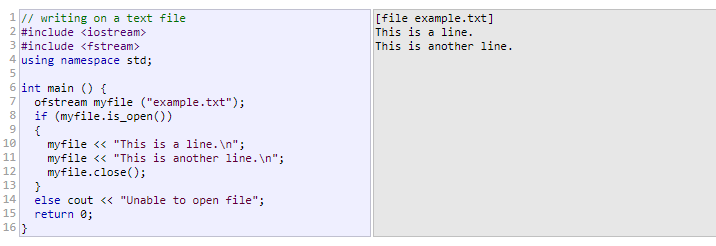
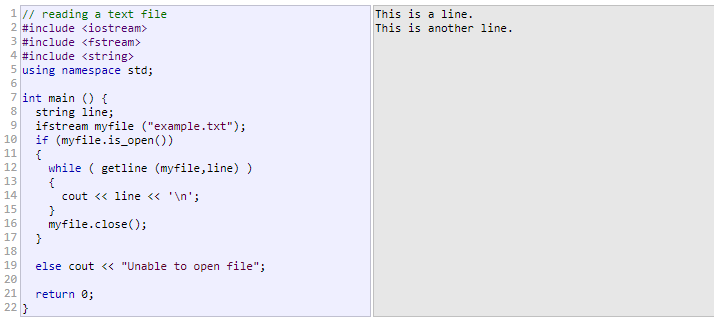
e.g. ~intLinkedList()
Destructors are a special method that is run when an object has the special delete operator called on it
delete [pointer to thing to delete]
delete[] [array variable] // because arrays are a pointer, so this works the same way
The delete is required when we've created something with new. Otherwise heap memory is not deallocated, and we have a memory leak.
C++ has a try/catch implementation
try {
	throw 20;
} catch (int e) {
	// print error here
}- Just list all other cpp files after the main.cpp
g++ main.cpp other.cpp etc.cpp - can also use
g++ *.cpp -o output
- A FIFO (First-in-first-out) data structure
- Can only be added to the back
- Can only be taken off the front
- Unbounded capacity (normally)
class intQueue {
public:
	virtual ~intQueue() {};
	virtual void enqueue(int n) = 0;
	virtual int dequeue() = 0;
	virtual int peek() = 0;
};- A Deque (double-ended queue). Can add and remove at both ends
- Priority Queue is a queue, but elements are inserted with a priority, and come out in priority order.
- A LIFO (Last-in-first-out) data structure
- Add from the top
- Remove from the top
class intStack {
public:
	virtual ~intStack() {};
	virtual void push() = 0;
	virtual int pop() = 0;
	virtual int peek() = 0;
}; std::vector<T>
- Arrays are hard to manage in C/C++. Vectors are a good alternative to this, and can be seen as dynamically size arrays.
- Has element access:
at,operator[],frontbacketc. - Has iterators!
begin -> end,cbegin -> cend,rbegin -> rend,crbegin -> crend - Can be checked for its capacity:
empty,size,max_sizeetc.
- A good way to write certain types of code once, if the code doesn't care about the types it is working with
- We can make a
std::vector<int>, or even astd::vector<char>. Within classes: - Make sure to add a
template <typename T>before using templates within a class
template <typename T>
class node {
  private:
    T data;
    node *next;
}An iterator is any object that, pointing to some element in a range of elements (such as an array or a container), has the ability to iterate through the elements of that range using a set of operators (with at least the increment (++) and dereference (*) operators).
The most obvious form of iterator is a pointer: A pointer can point to elements in an array, and can iterate through them using the increment operator (++). But other kinds of iterators are possible. For example, each container type (such as a list) has a specific iterator type designed to iterate through its elements.
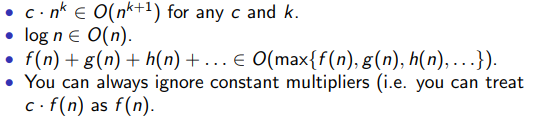
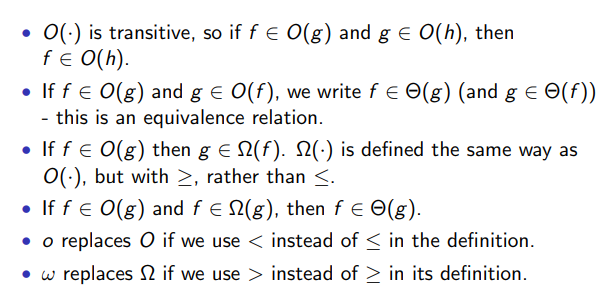
- O (Big-Oh) Notation: The upper bound of an algorithm
- Θ (Theta) Notation: Bounds a function from above and below, defines exact asymptotic behaviou
- Ω (Omega) Notation: Asymptotic lower bound
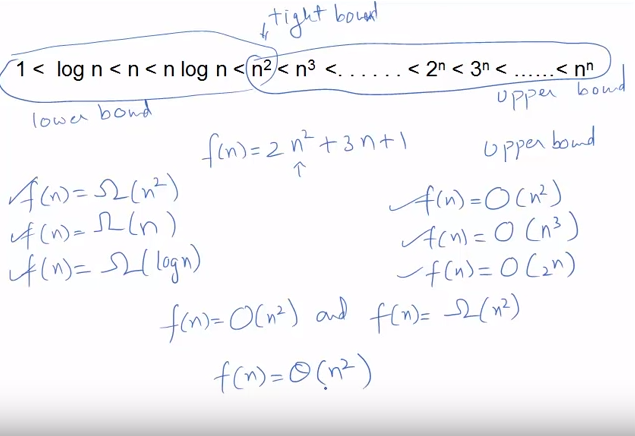
Comparing two functions f and g:
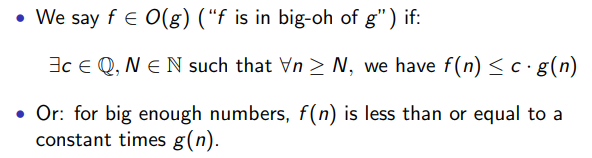
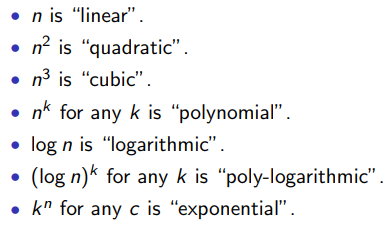
- This helps us as we can now compare and decide which function is the fastest (in its worst case scenario)
- "One of the algorithm's running time will be larger for large enough inputs"
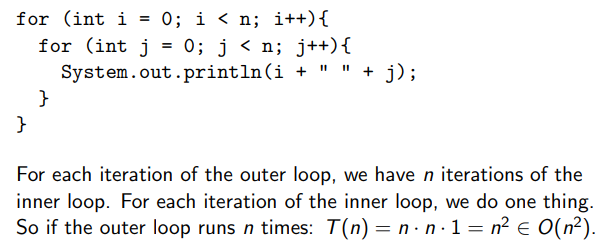
Count the number of steps
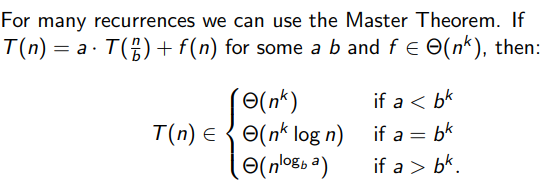
The general framework for a divide-and-conquer algorithm is:
- Divide the instance into a set of sub-problems
- If a subproblem is small enough, solve it, otherwise recursively split the subproblem
- Combine the subproblem solutions into a whole solution.
finds if an element is in a sorted array (probably the simplest d&c algorithm, and is in O(log n) time):
- Check the middle of the array, is the middle greater or smaller than the target element?
- If it’s the same, you’ve found it! If the array is size one and it’s not the same, it’s not there!
- If it’s greater, search the left side of the array. Otherwise search the right.
int exp(x, n) {
	if (n == 0) then
		return 1;
	if (n%2) // if is odd
		return x * exp(x, n-1);
	else {
		int y = exp(x, n/2);
		return y * x;
	}
}
Recursion is conceptually a central component of Divide & Conquer. Recursion can lead to "neat" code, however will also lead to inefficient and broken code.
Carefully specify:
- The Preconditions: what must be true about the input before you start the algorithm.
- The Post-conditions: what must be true about the output when you’re done.
These conditions then apply at every step of the recursion.
Work out how to measure the “size” of an instance.
Consider a general instance of the problem:
- Imagine you have friends who can magically solve any instance of the problem strictly smaller than yours if it meets the preconditions.
- From your instance, construct sub-instances that meet the preconditions.
- Get your friends to solve them.
- Recombine the sub-solutions.
- Recursion often gives nice "simple" algorithms, but making them efficient can be trickier
- Iterative algorithms are often easily made efficient (and easily optimised by compilers), But they result in hard-to-understand code.
There is not always a simple answer to which one to used, both approaches can be used, and you must think about what works best for the problem.
- Is my problem naturally recursive or iterative?
- Do I know how to terminate the algorithm (base cases for recursion, loop conditions for iteration)?
- Will I re-use the same information over and over?
- A candidate for memoization - recursion, but where we remember what we’ve already calculated.
- If memoization isn’t good, then this should probably be iterative.
- Are the limits well defined (not just can I guarantee they will be met, but do I know them in advance)¿
- If not, recursion will probably be easier.
- Can I do it tail-recursively?
- Has only one recursive call, at the end of the function - this is often easy to read, but the compiler can also optimise it into iteration.
Graphs are an incredibly useful modelling tool. Simple graphs consist of:
- A set of elements called vertices.
- A set of unordered pairs of distinct vertices called edges.
- There is only one edge between a pair of vertices.
Other types of graph come from altering these conditions:
- Ordered pairs gives directed graphs.
- More than one edge per pair gives multi-graphs.
- More than two vertices per edge gives hypergraphs.
- Edges (and vertices) can be weighted, labelled, &c.
Vertices within graphs model many things such as:
- Computers
- Processes
- Proteins
- Production facilities
- Websites
Edges model relationships between the things:
- Network links
- Shared resources
- Protein interactions
- Transport links
- Hyper links
Adjacency: If two vertices have an edge between them, they are adjacent Incident: If a vertex is one of the pair that forms an edge, it is incident to that edge. Degree: The number of edges incident to a vertex is the degree of that vertex. Arcs: Directed edges
When denoting graph components:
- Graphs will be denoted with uppercase letters like G, H, &c.
- Vertices will be denoted by lowercase letters like u, v, &c., or natural numbers 1, 2, 3, 4, . . . , n.
- Edges will be denoted by lowercase letters like e, d, &c. or by their incident vertices:
- In undirected graphs uv.
- In directed graphs (u, v) – u is the tail, v is the head.
- Directed edges are also called arcs.
- addVertex(Vertex v)
- removeVertex(Vertex v)
- addEdge(Vertex u, Vertex v)
- removeEdge(Vertex u, Vertex v)
- adjacent(Vertex u, Vertex v)
- degree(Vertex u)
- return the vertices in the graph
- return the edges incident to a vertex
- return the vertices adjacent to a vertex
Quick access – O(1), but with not so great space and set-up – O(n^2) (with n vertices).
The simplest form:
- Edges are stored as a two-dimensional matrix (e.g.
vector<vector<bool> > edgesorbool edges[][] - if
edge[i][j] == true, then vertex i is adjacent to vertex j.
Some enhancements:
- can use a numeric (
int,double) matrix to give weighted edges. - Can use a matrix of Edges if edges are more complex – a null-type value means no edge.
- Easily supports directed graphs and undirected graphs.
- If vertices have associated data, we can store them separately (another array would make matching indices easy).
- Each vertex has associated with it a list of its adjacent vertices.
- Could be a size n array of linked lists, or similar.
- Slower to determine adjacency – O(n), but faster to return all adjacent vertices – O(1).
- Most compact space representation O(m + n) where m is the number of edges in the graph – we have to store something for each vertex and edge anyway, so this is the best we can do.
- Easy to modify for more complex edge and vertex data structures.
- Works best for sparse graphs (few edges per vertex).
- We have classes for Vertex, Edge and Graph.
- Vertex contains a list of its Edges.
- Each Edge knows its endpoints.
- the Graph knows about everything.
- Lots of references to keep track of.
- Tends to be the slow way to do things, but has a nice match to the conceptual version.
- Pick a starting vertex.
- Recursively pick an unvisited neighbour and visit it.
- Can be implemented recursively, or iteratively using a stack.
Recursive:
dft(Vertex v){
	mark v as visited;
	visit(v);
	for each neighbour u of v {
		if (u is unmarked)
			dft(u);
	}
}
Iterative:
dft() {
	pick starting vertex v;
	Stack unprocessed = new Stack();
	unprocessed.push(v);
	while (!unprocessed.isEmpty()) {
		Vertex u = unprocessed.pop();
		if (u is unmarked) {
			visit(u);
			mark u;
			for each neighbour w of u {
				unprocessed.push(w);
			}
		}
	}
}- Pick a starting vertex and put it in a queue.
- Iteratively take a vertex from the queue, visit it and place all its neighbours in the queue.
- It’s inherently iterative, it’s not impossible to implement recursively, just silly.
bft() {
	pick starting vertex v;
	Queue unprocessed = new Queue();
	unprocessed.offer(v);
	while (!unprocessed.isEmpty()) {
		Vertex u = unprocessed.poll();
		if (u is unmarked) {
			visit(u);
			mark u;
			for each neighbour w of u {
				unprocessed.offer(w);
			}
		}
	}
}- Some graphs produce the same traversal order for both.
- Which one to use will depend upon the application.
- Notice the iterative versions of both are actually identical – just swap the stack and the queue.
- Both O(n + m).
Greedy Algorithms are based on picking what looks good now.
- One of the simplest algorithmic paradigms.
- Usually easy to implement.
- Only really works for certain types of problems.
- For some problems, a greedy approach may produce the worst solution!
Greedy Algorithms usually work when the problem satisfies two properties:
- Optimal Substructure: Optimal solutions contain optimal subsolutions to subproblems (you can split solutions up and they’re still good).
- Greedy Choice Property: Any decisions depend only on what you’ve already seen (you don’t have to come back and fix things).
Subgraph: A subset of the vertices and the edges of a graph that form a graph Spanning: A graph is spanning if it includes all the vertices of the original graph Spanning Tree: A spanning subgraph is a spanning tree if it contains no cycles. Minimum Spanning Tree: a minimum spanning tree if it has minimum total (edge) weight over all possible spanning trees of that graph (is it unique?).
-
In unweighted graphs (or a graph where all edge weights are the same), any spanning tree is a minimum spanning tree.
-
We can compute one from a depth-first or breadth-first traversal.
-
If we have different weights on the edges, a simple traversal is not enough.
-
There are two main algorithms: Prim’s Algorithm and Kruskal’s Algorithm
- Keep track of which edges and vertices are in the tree.
- Pick the next smallest edge that extends the tree, add it.
- Keep going until the whole graph is spanned.
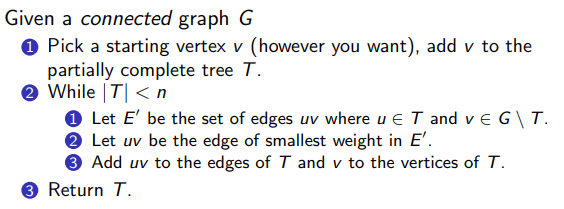
Algorithm Complexity:
- If we use an adjacency matrix O(n^2)
- Putting edges into a binary heap, with the graph sorted as an adjacent list O((n+m)log n) = O(mlog n)
- e.g. Start with a lot of trees (a forest), and pick the best edge to connect two components (trees) together, until the whole thing has been connected
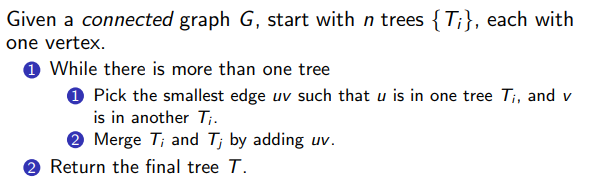
Algorithm Complexity:
- By labelling vertices with which component they’re in, we can get O(n · m) – not great.
- If we sorted the edges, and employ an efficient disjoint set data structure: O(m log m) = O(m log n) – about the same as the normal Prim implementation.
- If the edges can be sorted efficiently by counting sort or radix sort or similar, we can get O(m · α(n)), where α(n) is the inverse of the single valued Ackermann function.
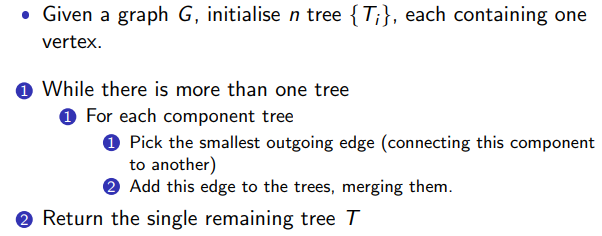
Is kind of like a cross between Prim's and Kruskal's.
Algorithm Complexity:
- The outer loop only needs to execute O(log n) times – we halve the number of components at each step.
- Along with search for the edges at each iteration, we get O(m log n) without too much fiddling.
- A similar approach as used for Kruskal’s can be used to get O(m · α(n)).
- A randomised version exists with O(m) expected running time – remember this is linear in the size of the graph, about as fast as possible.
- If the graph has several disconnected components, we can’t get a spanning tree (trees have to be connected).
- We can get a spanning forest.
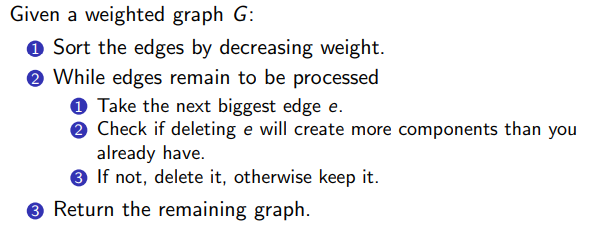
- Appears the same as Kruskal's algorithm, sort of like a backwards Kruskal's
- Removes edges instead of adding them, to determine what we're left with at the end
Algorithm Complexity:
- We can sort the edges in O(m log m).
- We can check the connectivity in O(log n(log log n) 3 ).
- So in total we get O(m log n(log log n)^3 ) time
Tree: is a graph with no cycles e.g. you can't walk through the graph and get back to the starting point without backtracking Binary Tree: A tree where every vertex has at most three neighbours:
- One vertex is the root
- Each vertex has at most two children, and at most one parent
- Vertices with no children are called Leaves
- 3D rendering (binary space partition).
- Networking (Binary Tries, Treaps).
- Cryptology (GGM Trees).
- Coding and Compression (Huffman Trees).
- Hashing (Hash Trees).
- Sorting (Heaps and Heapsort).
- Searching (Binary Search Trees).
- Parsing (Expression Trees)
Either:
- Create a type of linked list, but instead of one
nextpointer, you add a second pointer to accommodate for both left and right children - Embedded within an array, where the children of the vertex at index
iare at indices2iand2i+1
Very amenable to recursive implementation:
- At each node we have 3 things to do:
- Deal with the current node,
- visit the left child,
- visit the right child.
- Gives 3 different traversals.
- Pre-order (deal with the current node first)
- In-order (deal with the current node between visiting the descendents)
- Post-order (deal with the current node last).
Recursive implementations
All 3 are the same, except that you change where the visit(n); code block is placed
recursiveTraversal(Node n) {
	if (n == null) return;
	visit(n); // pre order only
	preorderTraversal(n.leftChild());
	visit(n); // in order only
	preorderTraversal(n.rightChild());
	visit(n); // post order only
}
Pre-order iterative
preorderTraversal(Node n) {
	Stack s = new Stack();
	Node current = n;
	while (current != null) {
		visit(current);
		if (current.rightChild() != null)
			s.push(current.rightChild());
		if (current.leftChild() != null)
			s.push(current.leftChild());

		current = stack.pop();
	}
}
In-order iterative
inorderTraversal(Node n) {
	Stack s = new Stack();
	Node current = n;
	while (current != null || !s.isEmpty()) {
		if (current != null) {
			s.push(current);
			current = current.leftChild();
		} else {
			current = s.pop();
			visit(current);
			current = current.rightChild();
		}
	}
}
Post-order iterative
postorderTraversal(Node n) {
	Stack s = new Stack();
	Node current = n;
	Node last = null;
	while (current != null || !s.isEmpty()) {
		if (current != null) {
			s.push(current);
			current = current.leftChild();
		} else {
			if (s.peek().rightChild() != null &&
				s.peek().rightChild() != last) {
				current = s.peek().rightChild();
			} else {
				current = s.pop();
				visit(current);
				last = current;
			}
		}
	}
}- Visits vertices according to their level in the tree (left to right, top to bottom).
- Use a queue to simply implement iteratively
breadthFirst(Node n) {
	Queue q = new Queue();
	q.add(n);
	while (!q.isEmpty()) {
		Node current = q.remove();
		visit(current);
		if (current.leftChild != null)
			q.add(current.leftChild());
		if (current.rightChild != null)
			q.add(current.rightChild());
	}
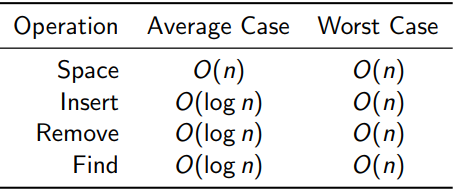
}- A Simple data structure that allows fast insertion, removal and lookup of the elements they store.
- They are an ordered data structure, but because they use a binary tree, you don’t have to reshuffle everything to put something new in (compared to array-like data structures).
- Rule of implementation: If what you’re looking for (or what you have) has a smaller key than the current vertex, go to the left. Otherwise, go to the right. (Special case: duplicate keys)
- Insertion involves traversing the tree to the bottom and adding a new element where you stop
- Grammar trees
- Boolean Expressions
- Very useful for compiling code (and operation precedence)