This web application is a simplified version of the classic board game Clue®. Clue-Less retains the same nine rooms, six weapons, and six characters as the original game. The core rules remain unchanged, with the main simplification being how players navigate the game board.
- The Ngrok access point enables multiple players to log in from different devices and browsers,
allowing them to join the same game from anywhere in the world.


-
Players can communicate via the built-in chat to coordinate and decide when to start the game.
-
Once a player joins, they can send messages that are broadcast to all other players in the game.
-
My messages appear on the right, while messages from other players are displayed on the left alongside their profile images.

-
Tested across multiple devices and browsers:
- MacBook (Safari)
- MacBook (Firefox)

- iPad (Chrome)

- Windows (Edge)

- Windows (Chrome)

- iPhone (Safari)


-
When players enter the lobby, the server generates a Case File (suspect, room, weapon) and distributes cards.
-
A broadcast message is sent to all players when someone joins, updating the player list and count.
-
The game can start once 3 to 6 players have joined.
-
Mrs. Scarlet becomes the host if assigned; otherwise, due to random character assignment, the first player to join is designated as host and can start the game.


-
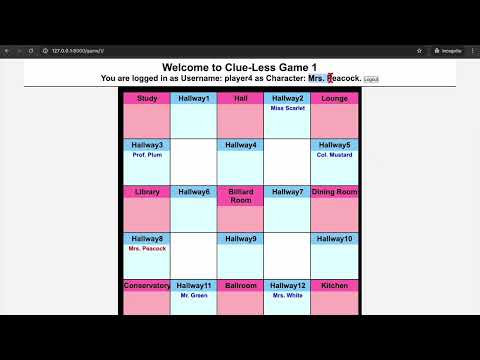
The player's username, character name, and their character name displayed on the board are highlighted in yellow.
-
Players can move between rooms and hallways, including secret diagonal passages, by clicking the target location.
- Movement through secret hallways

- Movement from hallways to rooms

- Movement through secret hallways
-
Errors are displayed if:
- The player is already at the selected location,

- The move is invalid,

- Or the target hallway is occupied.

- The player is already at the selected location,
-
A player's turn ends when they click the End Turn button.

- Players can move only during their turn.

- Players can move only during their turn.


-
Players can only make a suggestion during their turn; attempting to do so on another player's turn triggers an error message.

-
Suggestions can only be made when the player is inside a room (not in a hallway).

-
Players can view their own cards at any time using the Display Hand button.

-
Only the suspect and weapon are specified in a suggestion; the room is implied by the player's current location.
-
When a suggestion is made:
- The suggested character is moved to the room where the suggestion is made.
- The system checks each other player, in order, to find someone who can disprove the suggestion.
- If a player holds multiple matching cards, they can choose which card to reveal.

-
Eliminated characters (due to incorrect accusations):
- Can still disprove suggestions with matching cards.

- Can still be moved if they are part of another player's suggestion.

- Can still disprove suggestions with matching cards.


-
Players can make an accusation at any point during their turn.
- Attempting to accuse outside of their turn triggers an error message.

- Attempting to accuse outside of their turn triggers an error message.
-
Incorrect Accusations:
- The accusing player receives a private message, “Your accusation was incorrect. You are no longer able to move or make accusations, but you remain a suspect.”
- A public message and notification announce the player's elimination.

-
Eliminated players:
- Cannot make suggestions or accusations; corresponding buttons are disabled.
- Can no longer move; their turn is auto-skipped and the End Turn button is disabled.

-
If all other players are eliminated, the last remaining player continues alone until the game ends.

-
Tie Condition:
If all players are eliminated due to incorrect accusations:- All action buttons (Display Hands, Suggestions, Accusations, End Turn) are disabled.
- A distinct game-over notification is shown, indicating a tie.

-
Correct Accusations:
- Broadcasts the correct solution and announces the winner to all players.
- Displays a distict notification style to indicate the game has ended.
- Disables all action buttons except Game History for all players.


- Displays all private and public messages relevant to each player.

- Sign Up

- Log In
- Players authenticate and join the game.
- Upon login, the server randomly assigns each player a unique character.

- If a player enters an incorrect password, an error message is displayed.

- Cookie isolation is implemented to prevent session overwrites,
ensuring each player's data remains intact even after page reloads.

- Supports up to 6 players per game; a 7th player attempting to join receives an error message.

- Logout
- Logging out deactivates the player's game instance.


- Light/Dark Mode for user convenience, ensuring consistent styling throughout the entire game interface.
- All game messages are displayed as 7-second popups for clarity and consistency.
This project is based on Python version 3.10.16. The commands below are based on macOS. Modify these settings to suit your development environment.
-
Move to the root of the project directory
% cd path/to/your/project-directory -
Create virtual environment (both MacOS and Windows)
% python -m venv venv
-
Activate virtual environment
- MacOS:
% source venv/bin/activate - Windows:
file-path> .\venv\Scripts\activate
- MacOS:
-
Install all dependencies for this project
-
% pip install -r requirements.txt
- Custom script to uninstall all dependencies
% python uninstall_packages.py
-
-
Initial Setup for Database Migration
- Generate migration files for your database based on
/game/models.py% python manage.py makemigrations
- Apply all database migrations
% python manage.py migrate
- Generate migration files for your database based on
-
Run Redis Server
% redis-server
-
Initial Setup for Django Server: Run the following commands only once!
- Run the server to handle both HTTP (pages) and WebSocket (live) connections.
-
Use Daphne to enforce ASGI (Asynchronous Server Gateway Interface), ensuring WebSockets live connections function properly for multiplayer support.
% python run_daphne.py
- The customized code
/run_daphne.pyscript enhances developer efficiency by shortening the startup command each time the server is launched. For further explanation.
- The customized code
-
Shut Down the Running Server
% ctrl + c
-
Run Django Server
% python manage.py runserver
- The server log shows “Starting
ASGI/Daphneversion 4.1.2 development server at http://127.0.0.1:8000/"
- The server log shows “Starting
-
Running the server in a Production Setting
- Ngrok Installation and Authentication Setup
- Install Ngrok
- Set Authentication Token at the bottom of this page
- Authenticate Ngrok agent
% ngrok config add-authtoken $YOUR_AUTHTOKEN
- Run Ngrok: Start the tunnel
% ngrok http 8000
- Update
/clueless/settings.pyPRODUCTION = TruePRODUCTION_NGROK_APP = '*.ngrok-free.app'
- Ngrok Installation and Authentication Setup
-
Access the
PRODUCTION_NGROK_URL/loginEndpoint
The backend of Clue-Less Game is built to handle game logic, user authentication, and real-time communication for a seamless multiplayer experience.
- Framework: Django
- A Python web framework used for handling user authentication, game state management, and routing.
- Manages the core game logic, such as player turns, accusations, suggestions, and game state updates.
- Real-Time Communication: Django Channels
- Extends Django to support WebSocket connections, enabling real-time updates for multiplayer interactions.
- Handles events like player movements, turn updates, and notifications (e.g., game end, accusation/suggestion results).
- Database: SQLite (default for Django development)
- Stores user data and game state.
The frontend is designed to provide an interactive and responsive user interface for players to engage with the game board, manage their actions, and view game history.
- HTML: Structures the game interface, including the game board, action buttons, notification bar, and history window.
- CSS: Provides styling for the game board, buttons, and history window, with responsive design using CSS variables and relative units. Includes light/dark mode theming for better user experience.
- JavaScript: Handles client-side logic, including:
- WebSocket communication for real-time updates (e.g., player movements, turn changes).
- DOM manipulation for updating the game board, displaying popups, and managing the history window.
- Event listeners for user interactions (e.g., clicking rooms, submitting accusations/suggestions).
- No frontend frameworks are used; the project relies on vanilla JavaScript for simplicity and lightweight performance.
For development and testing purposes, Clue-Less Game is deployed locally and exposed to the internet using Ngrok, allowing remote access for demos, testing, or collaboration.
- Ngrok for Public Access: Ngrok creates a secure tunnel to the local Django server, providing a public URL that can be shared with others.
- Limitations:
- The free tier has bandwidth limits and a session timeout (typically 2 hours per session as of May 2025).
- Free Ngrok URLs are temporary and change each time the tunnel restarts. For a persistent URL, consider a paid Ngrok plan with custom subdomains.
- For production deployment, consider a more robust hosting solution (e.g., AWS, Heroku) instead of Ngrok.

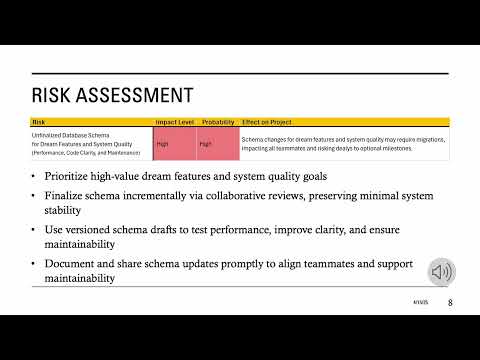
Development Log provides detailed explanations of the system architecture, resolved issues, and their solutions, among other information.
- Branches were intentionally retained to reflect unmerged or externally merged contributions, indicate code ownership, and help teammates better understand the project history.
- Testing code is in
/game/management/commands/, with usage and purpose explained in each command's help section.