
Real-time pet detection and recognition with YOLO
-
Download trained weight file from our release or train it by yourself.
-
Clone YOLO Project
git clone https://github.com/pjreddie/darknet cd darknet -
modify yolo source code
vim examples/yolo.cCreate a new array of labels string.
char *pet_names[] = {"Abyssinian", "Bengal", "Birman", "Bombay", "British_Shorthair", "Egyptian_Mau", "Maine_Coon", "Persian", "Ragdoll", "Russian_Blue", "Siamese", "Sphynx", "american_bulldog", "american_pit_bull_terrier", "basset_hound", "beagle", "boxer", "chihuahua", "english_cocker_spaniel", "english_setter", "german_shorthaired", "great_pyrenees", "havanese", "japanese_chin", "keeshond", "leonberger", "miniature_pinscher", "newfoundland", "pomeranian", "pug", "saint_bernard", "samoyed", "scottish_terrier", "shiba_inu", "staffordshire_bull_terrier", "wheaten_terrier", "yorkshire_terrier"};Go to the
test_yolofunction and modify the input parameter ofdraw_detections.Use
draw_detections(im, dets, l.side*l.side*l.n, thresh, pet_names, alphabet, 37);replace it. -
Compile and test your yolo.
Compile and link this project first.
make clean
make -j8
Test
./darknet detector test cfg/pet.data cfg/yolov3-pet.cfg your-yolo-pet.weights ~/Your-dataset/JPEGImages/havanese_102.jpgThere will be an image named
predictions.pngin your darknet root directory.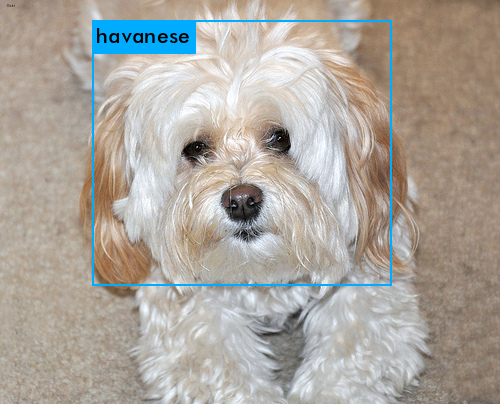
If you want to train yolo by your self or train other dataset, you can refer to this guide.
-
Clone this repo
git clone https://github.com/ideaRunner/yolo-pet.git cd yolo-pet -
Download Pet Dataset
The Oxford-IIIT Pet Dataset
You can download the images and annotations by
wget -c http://www.robots.ox.ac.uk/~vgg/data/pets/data/images.tar.gz
wget -c http://www.robots.ox.ac.uk/~vgg/data/pets/data/annotations.tar.gz
Unzip
tar -xvf images.tar.gz
tar -xvf annotations.tar.gz
Change the directory name to which yolo need.
mv images JPEGImages -
Clone YOLO Project
git clone https://github.com/pjreddie/darknet
cd darknet
make
Download Pretrained Convolutional Weights of Yolo-v3
wget https://pjreddie.com/media/files/darknet53.conv.74
-
Generate label files
cd ..
python pet_label generate
Then there will be a
Train_List.txtfile andVal_List.txtfile in the root directory and labels inlabelsdirectory. You must KeeplabelsandJPEGImagesin same directory. -
Edit configure files
vim darknet/cfg/pet.datacopy, paste and save
classes= 37
train  = Your/Own/Path/Train_List.txt
valid  = Your/Own/Path/Val_List.txt
names = data/pet.names
backup = pet_backup
Don't forget to change the path as you generate before.
vim darknet/data/pet.namescopy, paste and save
Abyssinian
Bengal
Birman
Bombay
British_Shorthair
Egyptian_Mau
Maine_Coon
Persian
Ragdoll
Russian_Blue
Siamese
Sphynx
american_bulldog
american_pit_bull_terrier
basset_hound
beagle
boxer
chihuahua
english_cocker_spaniel
english_setter
german_shorthaired
great_pyrenees
havanese
japanese_chin
keeshond
leonberger
miniature_pinscher
newfoundland
pomeranian
pug
saint_bernard
samoyed
scottish_terrier
shiba_inu
staffordshire_bull_terrier
wheaten_terrier
yorkshire_terrier
Create
yolov3.cfgand Edit the last serveal lines, change fliters to 126 and classes to 37. For yolov3, you need to find and change 3 times. For yolov2, you need to find and change 2 times. You also need to uncomment the train partbatchandsubdivisionsin the first servel lines of this cfg file.You can use our
.cfgfile in this repo if you don't want to change by your self.mv darknet/cfg/yolov3-voc.cfg darknet/cfg/yolov3-pet.cfg vim darknet/cfg/yolov3-pet.cfgMake a directory for training backup. The name should be same as you defined in
pet.data.mkdir darknet/pet_backups -
Train yolo
cd darknet
./darknet detector train cfg/pet.data cfg/yolov3-pet.cfg  darknet53.conv.74
The train result will be at your backup directory. You can fellow the guide above and test wheather it is good or not.