Part 1: Basic Music Streaming with NodeJS
- Go to
localhost:8000in your web browser. Make sure you see the "IEEE Beats" text on the webpage. - Go to
localhost:5000/apiin your web browser. Make sure you see welcome text.
Let's make sure we can make changes to the API and see those changes on localhost:5000/api.
Currently, api/routes/index.js should look like this:
//...

router.get('/', (req, res) => {
  //Send some witty plaintext
  res.send("Welcome to the IEEE Beatz API! If you're seeing this, NodeJS is working. :)");
});

//...
Let's change it to say this:
Welcome to [Insert Your Name Here]'s Beats!
To view your change:
- Press Ctrl+C on the terminal Window that is running the NodeJS API
- Rerun
node app.js(in the same window). (This is like a server restart.) - Refresh the browser at
localhost:5000/api.
Possible Solution
//...

router.get('/', (req, res) => {
  //Send some witty plaintext
  res.send("Welcome to [Insert Your Name Here]'s Beats!");
});

//...
We can send entire HTML pages using res.send(), or simple text just as above. Take a look at res.send()'s documentation (ExpressJS) for more information.
Now, we will create a new request. Create an empty GET request at localhost:5000/api/stream.
Possible Solution
//...

router.get('/', (req, res) => {
  //...
});

router.get('/stream', (req, res) => {
  //it's empty!
});

//...
If we refresh NodeJS and try to go to localhost:5000/api/stream, the browser will hang (assuming our request truly is empty). What's happening?
- Request and response:

- What a request/response look like:
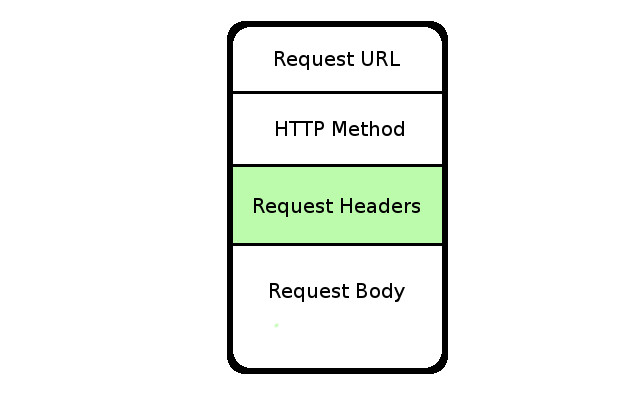
- REST Methods
- GET: Just GETs information. No body is allowed.
- POST: Like a postman gives you mail, POST requests give information and also receive. Body is required.
- Others, like DELETE, PUT, etc. are similar but have varying restrictions
Next, we will send an entire audio file to the web browser. First, we will need to read the file using NodeJS's fs.readFile() (documentation). Then we, can send the data directly to the client.
router.get('/stream', (req, res) => {
 //read file
  const filename = "music/Train - Hey Soul Sister.mp3";
  fs.readFile(filename, (err, data) => {
    //send file
    res.send(data);
  });
});
But wait - why does the browser not recognize this file and begin playing immediately? Headers. Look at the table here for information about the headers allowed on a request. Which header tells the browser what type of data we are sending?
Answer
The `Content-Type` header. To send this header, we can use `res.set()` (in [Express JS Documentation](https://expressjs.com/en/4x/api.html#res)). Try it! (Hint: the most widely-supported media type of an mp3 is `audio/mpeg`, so we should set `Content-Type` to `audio.mpeg` before sent the request.)Possible Solution
router.get('/stream', (req, res) => {
  //read file
  const filename = "music/Train - Hey Soul Sister.mp3";
  fs.readFile(filename, (err, data) => {
    //we need to tell the browser that this is an mp3
    res.set({
      "Content-Type": "audio/mpeg" //MIME Type
    });
    //send file
    res.send(data);
  });
});
If we go to localhost:5000/api/stream, music plays! 👍
We will now optimize sending this media file by using a stream instead. fs.readFile is inefficient because it must read the entire file before sending it. However, streams send the file as it is being read.
Try replacing fs.readFile with fs.createReadStream. Here's what the code should look like:
router.get('/stream', (req, res) => {
  //create stream
  const filename = "music/Train - Hey Soul Sister.mp3";
  var stream = fs.createReadStream(filename);
  //set headers - we also replaced res.set with res.writeHead (more efficient)
  res.writeHead(200, {
    "Content-Type": "audio/mpeg"
  });
  //pipe the stream to the response
  stream.pipe(res);
});
However, there's a downside of using streams. Try the code above. Notice that the web browser can't identify how long the song is. This is because the stream only reads as much of the file as the browser requests. In order to allow scrolling through the song, we will need to tell the browser how long the file is. This is done with the Content-Length header.
First, use fs.stat (result: fs.Stats) to get the length of the file (in bytes).
Possible Solution
router.get('/stream', (req, res) => {
  //read file
  const filename = "music/Train - Hey Soul Sister.mp3";
  fs.stat(filename, (err, stats) => {
    var length = stats.size;
    var stream = fs.createReadStream(filename);
    //set headers
    res.writeHead(200, {
      "Content-Type": "audio/mpeg"
    });
    //pipe the stream to the response
    stream.pipe(res);
  });
});
Finally, set the Content-Length header to the file length.
Possible Solution
router.get('/stream', (req, res) => {
  //read file
  const filename = "music/Train - Hey Soul Sister.mp3";
  fs.stat(filename, (err, stats) => {
    var length = stats.size;
    var stream = fs.createReadStream(filename);
    //set headers
    res.writeHead(200, {
      "Content-Type": "audio/mpeg",
      "Content-Length": stat.size
    })
    //pipe the stream to the response
    stream.pipe(res);
  });
});
Try it! You should be able to scroll through the file now. 😄
All Code So Far
/** This file contains all of the API calls **/

//ExpressJS allows us to create REST APIs easily
const express = require('express');
//Here's the ExpressJS router
const router = express.Router();
//This is required to read the filesystem
const fs = require('fs');

/** A test request!
    GET /api
**/
router.get('/', (req, res) => {
  //Send some witty plaintext
  res.send("Welcome to Arthur Pachachura's Beats!");
});

router.get('/stream', (req, res) => {
  //read file
  const filename = "music/Train - Hey Soul Sister.mp3";
  fs.stat(filename, (err, stats) => {
    var length = stats.size;
    var stream = fs.createReadStream(filename);
    //set headers
    res.writeHead(200, {
      "Content-Type": "audio/mpeg",
      "Content-Length": length
    });
    //pipe the stream to the response
    stream.pipe(res);
  });
});

module.exports = router;Finally, we will become a true streaming service. Currently, the server still sends the entire file (although maybe not all at once). If we're skipping songs, this is highly inefficient. Instead, we will use a method called chunking in which we, if the browser requests it, send small parts of the file at once. The browser can request chunked mode by the Range header. If the header is set, the browser is asking for a range of bytes (like 123520-162516) instead of the whole file.
First, we will need to check if the Range header is present.
router.get('/stream', (req, res) => {
  //read file
  const filename = "music/Train - Hey Soul Sister.mp3";
  fs.stat(filename, (err, stats) => {
    var length = stats.size;
    if (req.headers['range']) {
      //Chunked mode

    } else {
      //Regular mode
      //set headers
      res.writeHead(200, {
        "Content-Type": "audio/mpeg",
        "Content-Length": length
      });
      //create and pipe a stream to the response
      fs.createReadStream(filename).pipe(res);
    }
  });
});
Now that we have that, let's convert the number 123456-849289 (or two numbers separated by a single dash) into a machine-readable begin and end. We copied this part from StackOverflow, but if you want to try to figure it out yourself, we won't stop you. 😄
Possible Solution
//Chunked mode
var range = req.headers.range;
var parts = range.replace(/bytes=/, "").split("-");
var partialstart = parts[0];
var partialend = parts[1];

var start = parseInt(partialstart, 10);
var end = partialend ? parseInt(partialend, 10) : length-1;
var chunksize = (end-start)+1;

var stream = fs.createReadStream(filename, {start: start, end: end});
res.writeHead(206, { //206=Partial Content (chunked!)
  'Content-Range': 'bytes ' + start + '-' + end + '/' + length,
  'Accept-Ranges': 'bytes',
  'Content-Length': chunksize,
  'Content-Type': 'audio/mpeg'
});
stream.pipe(res);
We will test this code in the next Part.
- HTTP: Protocol that specifies how to send data over the Internet
- REST: When we send a request, we use one of GET, POST, DELETE, etc. and send that to a given URL (with headers and, if allowed, a body). The response returned is also formatted by REST specification.
- NodeJS: Our back-end server technology, allowing us to write JavaScript that interacts with the filesystem
- ExpressJS: A nodeJS import that allows making REST APIs quickly and easily.
- Headers: Part of an HTTP request that specifies certain "metadata"
- Streams: Allows NodeJS to send the file as it is being read (instead of reading the entire file then sending it)
- Chunking: A method that allows sending small parts of a large file (as opposed to sending the entire file)
Here's all the code so far:
/** This file contains all of the API calls **/

//ExpressJS allows us to create REST APIs easily
const express = require('express');
//Here's the ExpressJS router
const router = express.Router();
//This is required to read the filesystem
const fs = require('fs');

/** A test request!
    GET /api
**/
router.get('/', (req, res) => {
  //Send some witty plaintext
  res.send("Welcome to Arthur Pachachura's Beats!");
});

router.get('/stream', (req, res) => {
  //read file
  const filename = "music/Train - Hey Soul Sister.mp3";
  fs.stat(filename, (err, stats) => {
    var length = stats.size;
    if (req.headers['range']) {
      //Chunked mode
      var range = req.headers.range;
      var parts = range.replace(/bytes=/, "").split("-");
      var partialstart = parts[0];
      var partialend = parts[1];

      var start = parseInt(partialstart, 10);
      var end = partialend ? parseInt(partialend, 10) : length-1;
      var chunksize = (end-start)+1;

      var stream = fs.createReadStream(filename, {start: start, end: end});
      res.writeHead(206, { //206=Partial Content (chunked!)
         'Content-Range': 'bytes ' + start + '-' + end + '/' + length,
         'Accept-Ranges': 'bytes',
         'Content-Length': chunksize,
         'Content-Type': 'audio/mpeg'
      });
      stream.pipe(res);
    } else {
      //Regular mode
      //set headers
      res.writeHead(200, {
        "Content-Type": "audio/mpeg",
        "Content-Length": length
      });
      //create and pipe a stream to the response
      fs.createReadStream(filename).pipe(res);
    }
  });
});

module.exports = router;